
liquibase使用
1. 创建表
drop database if exists mybatis;

create database mybatis;

use mybatis;

create table mybatis.CUSTOMERS (

  ID bigint not null primary key,

  NAME varchar(15) not null,

  EMAIL varchar(128) not null,

  PASSWORD varchar(8) not null,

  PHONE int ,

  ADDRESS varchar(255),

  SEX char(1) ,

  IS_MARRIED bit,

  DESCRIPTION text,

  IMAGE blob,

  BIRTHDAY date,

  REGISTERED_TIME timestamp

);

select * from mybatis.CUSTOMERS;
2. 配置pom.xml
<project xmlns="http://maven.apache.org/POM/4.0.0" xmlns:xsi="http://www.w3.org/2001/XMLSchema-instance"
xsi:schemaLocation="http://maven.apache.org/POM/4.0.0 http://maven.apache.org/xsd/maven-4.0.0.xsd">
<modelVersion>4.0.0</modelVersion>
<parent>
<groupId>com.example</groupId>
<artifactId>middleware</artifactId>
<version>0.0.1-SNAPSHOT</version>
</parent>
<artifactId>liquibase</artifactId>
<properties>
<jdbc.driver>com.mysql.cj.jdbc.Driver</jdbc.driver>
<jdbc.url>jdbc:mysql://localhost:3306/mybatis?useUnicode=true&characterEncoding=utf8&serverTimezone=GMT&useSSL=false&allowPublicKeyRetrieval=true</jdbc.url>
<jdbc.username>root</jdbc.username>
<jdbc.password>1234</jdbc.password>
</properties>
<build>
<plugins>
<plugin>
<groupId>org.apache.maven.plugins</groupId>
<artifactId>maven-compiler-plugin</artifactId>
<version>2.5.1</version>
<configuration>
<source>1.8</source>
<target>1.8</target>
</configuration>
</plugin>
<plugin>
<groupId>org.liquibase</groupId>
<artifactId>liquibase-maven-plugin</artifactId>
<version>3.5.3</version>
<configuration>
<!--指定执行主文件 -->
<changeLogFile>${basedir}/src/main/resources/conf/liquibase/master_changelog.xml</changeLogFile>
<diffChangeLogFile>${basedir}/src/main/resources/conf/liquibase/changelog/${maven.build.timestamp}_changelog.xml</diffChangeLogFile>
<outputChangeLogFile>${basedir}/src/main/resources/conf/liquibase/changelog/changelog_original.xml</outputChangeLogFile>
<driver>${jdbc.driver}</driver>
<url>${jdbc.url}</url>
<username>${jdbc.username}</username>
<password>${jdbc.password}</password>
<dropFirst>false</dropFirst>
<defaultSchemaName />
<referenceUrl>hibernate:spring:com.jaguar.myapp.domain?dialect=&hibernate.ejb.naming_strategy=org.springframework.boot.orm.jpa.hibernate.SpringNamingStrategy</referenceUrl>
<verbose>true</verbose>
<logging>debug</logging>
<!-- 是否需要弹出确认框 -->
<promptOnNonLocalDatabase>false</promptOnNonLocalDatabase>
<!--输出文件的编码 -->
<outputFileEncoding>UTF-8</outputFileEncoding>
<!--执行的时候是否显示详细的参数信息 -->
<verbose>true</verbose>
<!--是否每次都重新加载properties -->
<propertyFileWillOverride>true</propertyFileWillOverride>
<rollbackTag>${project.version}</rollbackTag>
<tag>${project.version}</tag>
</configuration>
</plugin>
</plugins>
</build>
<dependencies>
<dependency>
<groupId>mysql</groupId>
<artifactId>mysql-connector-java</artifactId>
<version>8.0.11</version>
</dependency>
<dependency>
<groupId>org.liquibase</groupId>
<artifactId>liquibase-core</artifactId>
<version>3.6.1</version>
</dependency>
</dependencies>
</project>3. 根据数据库反向生成changeLog文件 mvn liquibase:generateChangeLog
创建空changelog_original.xml
<?xml version="1.1" encoding="UTF-8" standalone="no"?>

<databaseChangeLog xmlns="http://www.liquibase.org/xml/ns/dbchangelog" xmlns:ext="http://www.liquibase.org/xml/ns/dbchangelog-ext" xmlns:xsi="http://www.w3.org/2001/XMLSchema-instance" xsi:schemaLocation="http://www.liquibase.org/xml/ns/dbchangelog-ext http://www.liquibase.org/xml/ns/dbchangelog/dbchangelog-ext.xsd http://www.liquibase.org/xml/ns/dbchangelog http://www.liquibase.org/xml/ns/dbchangelog/dbchangelog-3.5.xsd">

</databaseChangeLog>
执行 mvn liquibase:generateChangeLog
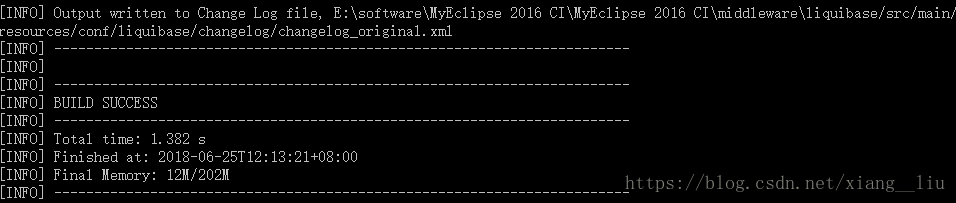
changelog_original.xml
<?xml version="1.1" encoding="UTF-8" standalone="no"?>

<databaseChangeLog xmlns="http://www.liquibase.org/xml/ns/dbchangelog" xmlns:ext="http://www.liquibase.org/xml/ns/dbchangelog-ext" xmlns:xsi="http://www.w3.org/2001/XMLSchema-instance" xsi:schemaLocation="http://www.liquibase.org/xml/ns/dbchangelog-ext http://www.liquibase.org/xml/ns/dbchangelog/dbchangelog-ext.xsd http://www.liquibase.org/xml/ns/dbchangelog http://www.liquibase.org/xml/ns/dbchangelog/dbchangelog-3.5.xsd">

    <changeSet author="kd (generated)" id="1529903520054-1">

        <createTable tableName="customers">

            <column name="ID" type="BIGINT">

                <constraints nullable="false"/>

            </column>

            <column name="NAME" type="VARCHAR(15)">

                <constraints nullable="false"/>

            </column>

            <column name="EMAIL" type="VARCHAR(128)">

                <constraints nullable="false"/>

            </column>

            <column name="PASSWORD" type="VARCHAR(8)">

                <constraints nullable="false"/>

            </column>

            <column name="PHONE" type="INT"/>

            <column name="ADDRESS" type="VARCHAR(255)"/>

            <column name="SEX" type="CHAR(1)"/>

            <column name="IS_MARRIED" type="BIT(1)"/>

            <column name="DESCRIPTION" type="TEXT"/>

            <column name="IMAGE" type="BLOB"/>

            <column name="BIRTHDAY" type="date"/>

            <column name="REGISTERED_TIME" type="TIMESTAMP(26)"/>

        </createTable>

    </changeSet>

    <changeSet author="kd (generated)" id="1529903520054-2">

        <addPrimaryKey columnNames="ID" constraintName="PRIMARY" tableName="customers"/>

    </changeSet>

</databaseChangeLog>
4. 清空当前数据库,包括liquibase的版本信息 mvn liquibase:dropAll
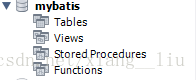
5. 将xml的改变更新到数据库 mvn liquibase:update
(1) 指定执行主文件 master_changelog.xml
<?xml version="1.0" encoding="utf-8"?>

<databaseChangeLog

        xmlns="http://www.liquibase.org/xml/ns/dbchangelog"

        xmlns:xsi="http://www.w3.org/2001/XMLSchema-instance"

        xsi:schemaLocation="http://www.liquibase.org/xml/ns/dbchangelog http://www.liquibase.org/xml/ns/dbchangelog/dbchangelog-3.5.xsd">

    <!-- mvn liquibase:update -->

    <include file="conf/liquibase/changelog/00000000000000_initial_common.xml" relativeToChangelogFile="false"/>

</databaseChangeLog>
(2) 初始化的文件 00000000000000_initial_common.xml
拷贝自changelog_original.xml
两个重要改动
a) 定义了autoIncrement, 关联
b) 将TIMESTAMP(26) 改为TIMESTAMP
<?xml version="1.0" encoding="utf-8"?>

<databaseChangeLog

        xmlns="http://www.liquibase.org/xml/ns/dbchangelog"

        xmlns:xsi="http://www.w3.org/2001/XMLSchema-instance"

        xsi:schemaLocation="http://www.liquibase.org/xml/ns/dbchangelog http://www.liquibase.org/xml/ns/dbchangelog/dbchangelog-3.5.xsd">

    <property name="now" value="now()" dbms="mysql,h2"/>

    <property name="now" value="current_timestamp" dbms="postgresql"/>

    <property name="now" value="sysdate" dbms="oracle"/>

    <property name="autoIncrement" value="true" dbms="mysql,h2,postgresql,oracle"/>

     <changeSet author="kd (generated)" id="1529903520054-1">

        <createTable tableName="customers">

            <column name="ID" type="BIGINT" autoIncrement="${autoIncrement}">

                <constraints primaryKey="true" nullable="false"/>

            </column>

            <column name="NAME" type="VARCHAR(15)">

                <constraints nullable="false"/>

            </column>

            <column name="EMAIL" type="VARCHAR(128)">

                <constraints nullable="false"/>

            </column>

            <column name="PASSWORD" type="VARCHAR(8)">

                <constraints nullable="false"/>

            </column>

            <column name="PHONE" type="INT"/>

            <column name="ADDRESS" type="VARCHAR(255)"/>

            <column name="SEX" type="CHAR(1)"/>

            <column name="IS_MARRIED" type="BIT(1)"/>

            <column name="DESCRIPTION" type="TEXT"/>

            <column name="IMAGE" type="BLOB"/>

            <column name="BIRTHDAY" type="date"/>

            <column name="REGISTERED_TIME" type="TIMESTAMP"/>

        </createTable>

    </changeSet>

    <changeSet id="00000000000000-05" author="shj">

        <sqlFile path="conf/liquibase/preloaddata/dml.sql"/>

    </changeSet>

</databaseChangeLog>
(3) dml.sql
Insert into mybatis.CUSTOMERS (NAME,EMAIL,PASSWORD, PHONE,  ADDRESS,SEX,IS_MARRIED,DESCRIPTION,IMAGE,BIRTHDAY,REGISTERED_TIME)

values ('customer','customer@customer.com','1234',123,'customer address','女',1,'customer description',null,now(),now());
执行结果
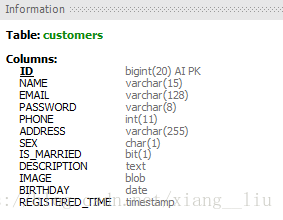

alter table mybatis.CUSTOMERS add test varchar(25);
再次update...
6. 根据数据库反向生成changeLog文件
执行 mvn liquibase:dbDoc
最常用的命令说明:
update(将xml的改变更新到数据库)
rollback(回滚到某一版本或者某一时刻,必须要带上rollbackTag参数)
dbDoc (生成数据库文档)
dropAll(慎用,清空当前数据库,包括liquibase的版本信息)
generateChangeLog(根据数据库反向生成changeLog文件)
tag(为当前数据库打上标签)
liquibase使用的更多相关文章
- liquibase的使用
前言 liquibase是一个数据库持续集成插件.独立于数据库存在,oracle,mysql,db2,h2,sql server,postgresql都能使用.它使用配置文件来更新数据库结构,并加入版 ...
- Spring3+Mybatis3+Mysql+ivy+liquibase
Spring3+Mybatis3+Mysql+ivy+liquibase 集成 近一周时间所学技术:整合Spring+MyBatis+MySql+ivy+liquibase Mybatis:是一个基于 ...
- liquibase之快速入门
第一步: 创建一个Changelog File: 这个database Changelog file列举了数据库中所有的改变情况,该文件是以xml为基础的,下面是一个空的xml文件: <?xm ...
- Liquibase的简单使用
LiquiBase是一个用于数据库重构和迁移的开源工具,通过日志文件的形式记录数据库的变更,然后执行日志文件中的修改,将数据库更新或回滚到一致的状态.它的目标是提供一种数据库类型无关的解决方案,通过执 ...
- [心得] 如何利用liquibase進行資料庫版本控制 - 實際練習
透過上一篇的基本觀念介紹,希望大家應該有一點點感覺了! 這篇我們就來做個簡單的版本演練,加深印象吧! 我使用的環境如下 System : Windows 7 Database : SQL Server ...
- flyway和liquibase的使用样例
在代码上我们有svn和git等诸多的版本控制方法. 但是在数据库上却没有相应的工具.一度导致多环境见的数据库同步难以维持. flyway和liquibase都是常见的数据库版本控制工具. flyway ...
- [心得] 如何利用liquibase進行資料庫版本控制 - 基礎觀念
前言 - 會寫這篇除了是要記錄一下使用的過程之外,也是發現到網路上找來的教學幾乎都是跟其它環境做結合 比較沒有單純利用command進行的流程.也沒有整體觀念的介紹,所以將我所理解的整理分享給大家. ...
- LiquiBase 学习
preconditions mysql database is installed maven has been setted up properly add depedenceies apply p ...
- Liquibase使用入门
1.LiquiBase简介 LiquiBase是一个用于数据库重构和迁移的开源工具,通过日志文件的形式记录数据库的变更,然后执行日志文件中的修改,将数据库更新或回滚到一致的状态.LiquiBase的主 ...
- eclipse liquibase 插件
http://marketplace.eclipse.org/category/free-tagging/liquibase http://marketplace.eclipse.org/market ...
随机推荐
- 在请求的参数中设置可选值列表为当前职责可访问的所有OU
方法一: 实现此需求的前提之一是为该请求开启多业务实体访问,开启方法 系统管理员->系统管理->并发->程序,进入OAF页面,查询你的并发,然后点更新,选择请求,在业务实体模式下选择 ...
- [转载]Huffman编码压缩算法
转自http://coolshell.cn/articles/7459.html 前两天发布那个rsync算法后,想看看数据压缩的算法,知道一个经典的压缩算法Huffman算法.相信大家应该听说过 D ...
- vscode golang插件下载
此处是windows,linux操作类似 进行如下命令进行目录切换:cd %GOPATH%\src\github.com\golang我这里的GOPATH是在D:\go_project如果src目录下 ...
- 使用百度地图SDK出现的问题及解决方法
1. 第一个错误信息如下: java.lang.RuntimeException: Unable to start activity ComponentInfo{com.example.baiduma ...
- New Concept English Two 13 31
$课文29 出租汽车 294. Captain Ben Fawcett has bought an unusual taxi and has begun a new service. 本.弗西特机长买 ...
- 转:HTTP Get请求URL最大长度
转自:http://blog.csdn.net/M_ChangGong/article/details/5764711 各浏览器HTTP Get请求URL最大长度并不相同,几类常用浏览器最大长度及超过 ...
- vue music-抓取歌单列表数据(渲染轮播图)
下载安装新依赖 babel-runtime:对es6语法进行转译 fastclick:对移动端进行点击300毫秒延迟 ,,取消掉 babel-polyfill:API 先添加,在npm install ...
- 最佳C/C++编辑器 source insight3
C/C++嵌入式代码编辑器source insight3下载地址 http://www.sourceinsight.com/eval.html 注册码:SI3US-361500-17409
- GIST特征描述符使用(转)
GIST特征描述符使用 一种场景特征描述 场景特征描述? 通常的特征描述符都是对图片的局部特征进行描述的,以这种思路进行场景描述是不可行的. 比如:对于“大街上有一些行人”这个场景,我们必须通过局部特 ...
- ballerina 学习十九 安全编程
ballerina 内部提供了几种常用的安全开发模型,token 认证(jwt) basic auth jwt 安全 参考代码 import ballerina/http; http:AuthPr ...