
LNMP简要配置
部署LNMP环境
nginx[web服务,接收用户的请求]

php     [解释器]

yum -y localinstall php-fpm-5.4.<tab> [服务]

mariadb                [数据库客户端]

mariadb-server [数据库服务器]

mariadb-devel  [依赖包]

php-mysql        [php连接mysql的扩展包]
所有服务
[root@proxy lnmp_soft]# netstat -nutlp |grep

tcp               0.0.0.0:              0.0.0.0:*               LISTEN      /nginx: master

[root@proxy lnmp_soft]# netstat -nutlp |grep

tcp               0.0.0.0:            0.0.0.0:*               LISTEN      /mysqld

[root@proxy lnmp_soft]# systemctl restart php-fpm

[root@proxy lnmp_soft]# netstat -nutlp |grep

tcp               127.0.0.1:          0.0.0.0:*               LISTEN      /php-fpm: mast
nginx+FastCGI

工作原理图:
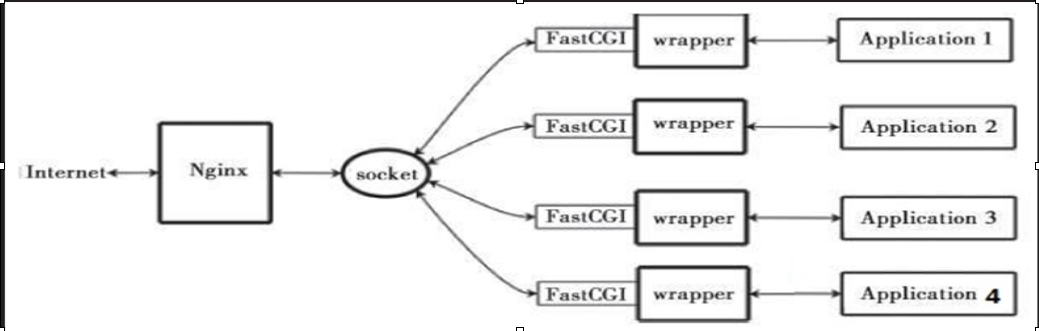
工作流程:

1、web server 启动时载入fastCGI进程管理器

2、FastCGI进程管理器初始化,启动多个解释器进程

3、当客户端请求到达web server时,FastCGI进程管理器选择并连接一个解释器(php 9000)

4、FastCGI子进程完成处理后返回结果,将标准输出和错误信息从同一连返回web server

FastCGI简介

FastCGI是一种常住型的CGI

将CGI解释器进程保持在内存中,进行委会与调度

	FastCGI技术目前支持语言有PHP、C/C++、jave、Perl、Python、Ruby等

FastCGI缺点:内存消耗大

配置FastCGI
[root@proxy ~]# grep -v "^;" /etc/php-fpm.d/www.conf

[www]

listen = 127.0.0.1:                监听9000(php-fpm服务)

listen.allowed_clients = 127.0.0.1        允许的客户地址

user = apache                    用户

group = apache                    用户组

pm = dynamic                    模式

pm.max_children =

pm.start_servers =

pm.min_spare_servers =

pm.max_spare_servers =

slowlog = /var/log/php-fpm/www-slow.log

php_admin_value[error_log] = /var/log/php-fpm/www-error.log

php_admin_flag[log_errors] = on

php_value[session.save_handler] = files

php_value[session.save_path] = /var/lib/php/session
编辑nginx.conf
location ~ \.php$ {

           proxy_pass   http://127.0.0.1;

        }

         pass the PHP scripts to FastCGI server listening on 127.0.0.1:

        location ~ \.php$ {

            root           html;

            fastcgi_pass   127.0.0.1:;

            fastcgi_index  index.php;
地址重写

rewrite 旧 新 【选项】

redirect 地址栏变,临时重定向

permanent 地址栏变,永久重定向

last		停止执行其他rewrite

break		停止执行其他语句,结束访问

rewrite /a.html /b.html last;

rewrite /b.html /c.html last;

rewrite /c.html /a.html last;	防止死循环

1:访问a.html跳转到b.html
vim /usr/local/nginx/conf/nginx.conf

... ...

    server {

            listen

            server_name localhost;

    location / {

            rewrite a.html /b.html  redirect;

    }

#echo "BB" > /usr/local/nginx/html/b.html

#nginx -s reload
2:访问192.168.4.5跳转到www.tmooc.cn
vim /usr/local/nginx/conf/nginx.conf

... ...

    server {

            listen

            server_name localhost;

    location / {

            rewrite ^/  http://www.tmooc.cn;

    }

附加:

访问旧的网站页面,跳转到新的网站相同页面

  rewrite ^/(.*)     http://www.jd.com/$1;

 保留和粘贴
3:不同浏览器访问相同页面返回结果不同
ie  http://192.168.4.5/test.html

firefox http://192.168.4.5/test.html

uc  http://192.168.4.5/test.html

nginx【内置变量】

vim /usr/local/nginx/conf/nginx.conf

  server {

        ... ...

    if ($http_user_agent ~* curl){

        rewrite ^/(.*)  /curl/$;

    }

#cd  /usr/local/nginx/html

#echo "" >test.html

#mkdir curl

#echo "" >curl/test.html

#nginx -s reload

firefox http://192.168.4.5/test.html

curl http://192.168.4.5/test.html
4:如果用户访问的页面不存则转到首页
vim /usr/local/nginx/conf/nginx.conf

 server {

        ... ...

    if (!-e  $request_filename){

        rewrite ^/  http://192.168.4.5;

    }

#nginx -s reload
易错
1、php服务没有启动
2、nginx配置文件[动静分离] 出现下载页面
3、404 not found 没有此网页或网页位置放错
4、空白页面 脚本写错了
LNMP简要配置的更多相关文章
- PXE简要配置过程
目录 1.所需服务 2.简要配置过程 1.dhcp服务 2.tftp服务 3.提供pxelinux.0配置文件 4.提供系统所需文件 1.所需服务: dhcp服 ...
- lnmp+phpmyadmin配置与出现问题
本博客归moka同学(新浪微博:moka同学)本人亲自整理,如有使用,请加链接注明出处. lnmp 安装完全后,配置phpmyadmin .其访问方式为 http://202.18.400.379/p ...
- CentOS 7 lnmp环境配置laravel项目的问题总结!
一.最常见的几个问题 1.部署好站点后,访问站点的时候始终是“File Not Found”!(nginx中的路由配置问题) 2.除了根目录可以访问其它的访问全是403问题!(权限问题) 3.除了根目 ...
- LNMP的配置与优化
一.LNMP的下载 LNMP一键安装包是一个用Linux Shell编写的可以为CentOS/RadHat/Fedora.Debian/Ubuntu/Raspbian/Deepin VPS或独立主机安 ...
- VM虚拟机 Centos7 lnmp环境 配置域名问题 windows浏览器访问的问题
CentOS7 ip地址为 192.168.0.155 搭有 LNMP集成环境 执行 lnmp vhost add 配置服务器 指定目录的域名 mark.com 这时windows 机器的 浏览器想 ...
- [LNMP]——LNMP环境配置
LNMP=Linux+Nginx+Mysql+PHP Install Nginx //安装依赖包 # yum install openssl openssl-devel zlib-devel //安装 ...
- CentOS 下 LNMP 环境配置
安装配置 Nginx 安装配置 MySQL 安装配置 PHP Nginx 与 PHP-FPM 集成 环境配置验证 LNMP 环境代表 Linux 系统下 Nginx + MySQL + PHP 网 ...
- WIN10 vagrant和virtualbox虚拟机和一键搭建lnmp环境配置thinkphp虚拟主机
版本:win10系统 virtualbox:5.1.26 vagrant :1.9.7 centos 7.0 xshell/git 首先下载好对应版本的软件 配置vagrant和virtualbox ...
- laravel 的lnmp 的配置
装了lnmp后,一般用 lnmp vhost add 添加网站 一般 只用重写和ssl功能 再发laravel官方的配置 server { listen 80; server_name example ...
随机推荐
- JAVA程序员应该看的15本书的电子版
转载▼ 转载自:http://blog.sina.com.cn/s/blog_8297f0d00100v5ew.html 作为Java程序员来说,最痛苦的事情莫过于可以选择的范围太广,可以读的书太多, ...
- day24<多线程>
多线程(多线程的引入) 多线程(多线程并行和并发的区别) 多线程(Java程序运行原理和JVM的启动是多线程的吗) 多线程(多线程程序实现的方式1) 多线程(多线程程序实现的方式2) 多线程(实现Ru ...
- 关于直播学习笔记-003-nginx-rtmp、srs、vlc、obs
服务器 1.nginx-rtmp:https://github.com/illuspas/nginx-rtmp-win32 2.srs:https://github.com/illuspas/srs- ...
- python2.0_s12_day19_前端结合后端展示客户咨询纪录
接下来就是将后台视图与前端页面结合起来了完成后台系统了.实现前端展示用户列表1.先在base.html代码中把模版中Dashboard下面的内容清空,如下: 具体删除哪些html代码,自己找吧.2.我 ...
- 什么是LTE?
LTE是英文Long Term Evolution的缩写.LTE也被通俗的称为3.9G,具有100Mbps的数据下载能力,被视作从3G向4G演进的主流技术.它改进并增强了3G的空中接入技术,采用OFD ...
- 定义了一个UIImageView如何使加载的图片不会失真 UIImageView的Frame值是固定的
定义了一个UIImageView如何使加载的图片不会失真 UIImageView的Frame值是固定的 UIViewContentModeScaleToFill, 缩放内容到合适比例大小 UIVie ...
- Python初学总结
下边的总结都是在python3上 一.基础 1.输出与输入: 输出:print(变量/字符串) 输入:input() 返回的是字符串 price=input() print(price) 2.pyth ...
- Android ImageResizer:inSampleSize
import android.annotation.TargetApi; import android.content.Context; import android.content.res.Reso ...
- SSH电力项目三 - Dao层、service层查询实现(HQL)
底层方法封装:模糊查询,姓张的人 查询思路:select * from elec_text o #Dao层 where o.textName like '%张%' ...
- mysql日期处在某两个时间段之间的between比较
where SYSDATE() between '2018-08-28 09:21:48' and '2018-08-28 09:25:48' sysdate()等于2018-08-28 09:23: ...