
LNMP简要配置
部署LNMP环境
nginx[web服务,接收用户的请求]

php     [解释器]

yum -y localinstall php-fpm-5.4.<tab> [服务]

mariadb                [数据库客户端]

mariadb-server [数据库服务器]

mariadb-devel  [依赖包]

php-mysql        [php连接mysql的扩展包]
所有服务
[root@proxy lnmp_soft]# netstat -nutlp |grep

tcp               0.0.0.0:              0.0.0.0:*               LISTEN      /nginx: master

[root@proxy lnmp_soft]# netstat -nutlp |grep

tcp               0.0.0.0:            0.0.0.0:*               LISTEN      /mysqld

[root@proxy lnmp_soft]# systemctl restart php-fpm

[root@proxy lnmp_soft]# netstat -nutlp |grep

tcp               127.0.0.1:          0.0.0.0:*               LISTEN      /php-fpm: mast
nginx+FastCGI

工作原理图:
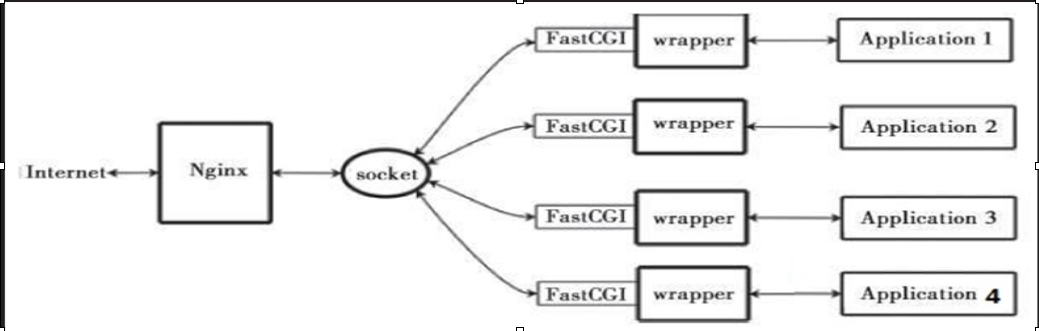
工作流程:

1、web server 启动时载入fastCGI进程管理器

2、FastCGI进程管理器初始化,启动多个解释器进程

3、当客户端请求到达web server时,FastCGI进程管理器选择并连接一个解释器(php 9000)

4、FastCGI子进程完成处理后返回结果,将标准输出和错误信息从同一连返回web server

FastCGI简介

FastCGI是一种常住型的CGI

将CGI解释器进程保持在内存中,进行委会与调度

	FastCGI技术目前支持语言有PHP、C/C++、jave、Perl、Python、Ruby等

FastCGI缺点:内存消耗大

配置FastCGI
[root@proxy ~]# grep -v "^;" /etc/php-fpm.d/www.conf

[www]

listen = 127.0.0.1:                监听9000(php-fpm服务)

listen.allowed_clients = 127.0.0.1        允许的客户地址

user = apache                    用户

group = apache                    用户组

pm = dynamic                    模式

pm.max_children =

pm.start_servers =

pm.min_spare_servers =

pm.max_spare_servers =

slowlog = /var/log/php-fpm/www-slow.log

php_admin_value[error_log] = /var/log/php-fpm/www-error.log

php_admin_flag[log_errors] = on

php_value[session.save_handler] = files

php_value[session.save_path] = /var/lib/php/session
编辑nginx.conf
location ~ \.php$ {

           proxy_pass   http://127.0.0.1;

        }

         pass the PHP scripts to FastCGI server listening on 127.0.0.1:

        location ~ \.php$ {

            root           html;

            fastcgi_pass   127.0.0.1:;

            fastcgi_index  index.php;
地址重写

rewrite 旧 新 【选项】

redirect 地址栏变,临时重定向

permanent 地址栏变,永久重定向

last		停止执行其他rewrite

break		停止执行其他语句,结束访问

rewrite /a.html /b.html last;

rewrite /b.html /c.html last;

rewrite /c.html /a.html last;	防止死循环

1:访问a.html跳转到b.html
vim /usr/local/nginx/conf/nginx.conf

... ...

    server {

            listen

            server_name localhost;

    location / {

            rewrite a.html /b.html  redirect;

    }

#echo "BB" > /usr/local/nginx/html/b.html

#nginx -s reload
2:访问192.168.4.5跳转到www.tmooc.cn
vim /usr/local/nginx/conf/nginx.conf

... ...

    server {

            listen

            server_name localhost;

    location / {

            rewrite ^/  http://www.tmooc.cn;

    }

附加:

访问旧的网站页面,跳转到新的网站相同页面

  rewrite ^/(.*)     http://www.jd.com/$1;

 保留和粘贴
3:不同浏览器访问相同页面返回结果不同
ie  http://192.168.4.5/test.html

firefox http://192.168.4.5/test.html

uc  http://192.168.4.5/test.html

nginx【内置变量】

vim /usr/local/nginx/conf/nginx.conf

  server {

        ... ...

    if ($http_user_agent ~* curl){

        rewrite ^/(.*)  /curl/$;

    }

#cd  /usr/local/nginx/html

#echo "" >test.html

#mkdir curl

#echo "" >curl/test.html

#nginx -s reload

firefox http://192.168.4.5/test.html

curl http://192.168.4.5/test.html
4:如果用户访问的页面不存则转到首页
vim /usr/local/nginx/conf/nginx.conf

 server {

        ... ...

    if (!-e  $request_filename){

        rewrite ^/  http://192.168.4.5;

    }

#nginx -s reload
易错
1、php服务没有启动
2、nginx配置文件[动静分离] 出现下载页面
3、404 not found 没有此网页或网页位置放错
4、空白页面 脚本写错了
LNMP简要配置的更多相关文章
- PXE简要配置过程
目录 1.所需服务 2.简要配置过程 1.dhcp服务 2.tftp服务 3.提供pxelinux.0配置文件 4.提供系统所需文件 1.所需服务: dhcp服 ...
- lnmp+phpmyadmin配置与出现问题
本博客归moka同学(新浪微博:moka同学)本人亲自整理,如有使用,请加链接注明出处. lnmp 安装完全后,配置phpmyadmin .其访问方式为 http://202.18.400.379/p ...
- CentOS 7 lnmp环境配置laravel项目的问题总结!
一.最常见的几个问题 1.部署好站点后,访问站点的时候始终是“File Not Found”!(nginx中的路由配置问题) 2.除了根目录可以访问其它的访问全是403问题!(权限问题) 3.除了根目 ...
- LNMP的配置与优化
一.LNMP的下载 LNMP一键安装包是一个用Linux Shell编写的可以为CentOS/RadHat/Fedora.Debian/Ubuntu/Raspbian/Deepin VPS或独立主机安 ...
- VM虚拟机 Centos7 lnmp环境 配置域名问题 windows浏览器访问的问题
CentOS7 ip地址为 192.168.0.155 搭有 LNMP集成环境 执行 lnmp vhost add 配置服务器 指定目录的域名 mark.com 这时windows 机器的 浏览器想 ...
- [LNMP]——LNMP环境配置
LNMP=Linux+Nginx+Mysql+PHP Install Nginx //安装依赖包 # yum install openssl openssl-devel zlib-devel //安装 ...
- CentOS 下 LNMP 环境配置
安装配置 Nginx 安装配置 MySQL 安装配置 PHP Nginx 与 PHP-FPM 集成 环境配置验证 LNMP 环境代表 Linux 系统下 Nginx + MySQL + PHP 网 ...
- WIN10 vagrant和virtualbox虚拟机和一键搭建lnmp环境配置thinkphp虚拟主机
版本:win10系统 virtualbox:5.1.26 vagrant :1.9.7 centos 7.0 xshell/git 首先下载好对应版本的软件 配置vagrant和virtualbox ...
- laravel 的lnmp 的配置
装了lnmp后,一般用 lnmp vhost add 添加网站 一般 只用重写和ssl功能 再发laravel官方的配置 server { listen 80; server_name example ...
随机推荐
- “浪潮杯”山东省第五届ACM大学生程序设计竞赛(总结贴)
第一次參加省赛有点小激动,尽管是作为打星队參赛,但心情却是上下起伏. 5月9号晚上11点多到威海,有点略冷.可是空气比淄博好多了,大家到了旅馆的时候都非常晚了,抱怨了一下三星级的酒店的待遇,喝杯咖啡早 ...
- JavaScript------去掉Array中重复值
转载: http://blog.csdn.net/teresa502/article/details/7926796 代码: // 删除数组中重复数据 function removeDuplElem( ...
- laravel 控制器构造方法注入request对象
IndexController: <?php namespace App\Http\Controllers; use Illuminate\Http\Request; use App\Http\ ...
- php执行外部命令
php执行外部命令的不少,例如:exec.shell_exec.system.popen等.我特意的讲一下popen,它跟其他函数不太一样,其他函数执行一个命令后,会等待其返回后,再向下执行,而pop ...
- 深入浅出MFC——Win32程序基本概念(一)
1. Windows程序分为“程序代码”和“UI资源”,下图所示: 2. Windows支持动态链接(应用程序所调用的Windows API函数是在“执行时期”才链接上的).Windows程序调用的函 ...
- 集群应用Session一致性实现的三种方案
转自:http://blog.csdn.net/zwx521515/article/details/78679679 https://www.cnblogs.com/study-everyday/p/ ...
- 重构(Refactoring)技巧读书笔记(General Refactoring Tips)
重构(Refactoring)技巧读书笔记 之一 General Refactoring Tips, Part 1 本文简要整理重构方法的读书笔记及个人在做Code Review过程中,对程序代码常用 ...
- navicat 激活流程
Navicat Premium 12激活 我自己测试了一下可以激活,很好用 原作链接:https://blog.csdn.net/loveer0/article/details/82016644 Na ...
- SWT/JFace开发遇到org.eclipse.core.runtime.IProgressMonitor问题的解决办法(转载)
今日正在使用SWT和JFace开发一个系统,在搭建JFace平台时遇到了一个问题,运行HelloWorld程序抛出org.eclipse.core.runtime.IProgressMonitor的n ...
- 安装Hadoop系列 — 安装SSH免密码登录
配置ssh免密码登录 1) 验证是否安装ssh:ssh -version显示如下的话则成功安装了OpenSSH_6.2p2 Ubuntu-6ubuntu0.1, OpenSSL 1.0.1e 11 ...