
升级mac xcode打包证书报错 git 报错
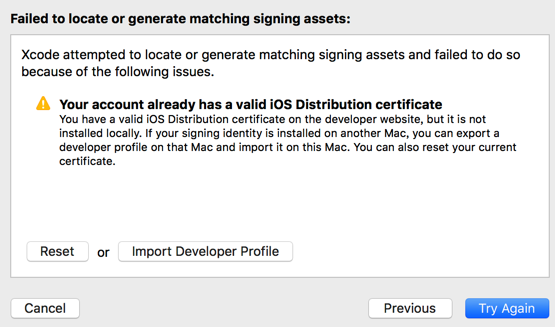
reset tryAgain
git 在钥匙串中找不到指定的项 重新配置公钥撕咬
SSH keys
An SSH key allows you to establish a secure connection between your computer and GitLab. Before generating an SSH key in your shell, check if your system already has one by running the following command:
cat ~/.ssh/id_rsa.pubIf you see a long string starting with ssh-rsa or ssh-dsa, you can skip the ssh-keygen step.
Note: It is a best practice to use a password for an SSH key, but it is not required and you can skip creating a password by pressing enter. Note that the password you choose here can't be altered or retrieved.
To generate a new SSH key, use the following command:
ssh-keygen -t rsa -C "songximing@wtoip.com"This command will prompt you for a location and filename to store the key pair and for a password. When prompted for the location and filename, you can press enter to use the default.
Use the command below to show your public key:
cat ~/.ssh/id_rsa.pubCopy-paste the key to the 'My SSH Keys' section under the 'SSH' tab in your user profile. Please copy the complete key starting with ssh- and ending with your username and host.
To copy your public key to the clipboard, use code below. Depending on your OS you'll need to use a different command:
Windows:
clip < ~/.ssh/id_rsa.pubMac:
pbcopy < ~/.ssh/id_rsa.pubhttp://www.jianshu.com/p/1232f048f98a
localhost:.ssh songximing$ cat ~/.ssh/id_rsa.pub
ssh-rsa AAAAB3NzaC1yc2EAAAADAQABAAABAQDbNYo5xDoMyEqLd+7QR7i0/h5BEMtaqSrqPgIMihRcj9qn31iMKdJWGVdieWZwMmX+PR8APYd4kxs9isbW9sAmhGWxCl2sdR3sQIg6NihJBjmXa0QayDaXIoTeaP6+YuLekRgBDfLXiVlIXBBgE3BvhN1EXMqpHNWTUMDOb/Gp94WFxiA1gWx1ehNC5xclO3j/EyyEUqVbTN6ijFHdaveBhVR7j1ypHW2JpuhQp1bQyW+A6MqeUTd4Gqhy/80juKndMAFM3P0krpwTQd9V6ChWwM0g7mtErh6BgErL9BIqt4DBsN/ou/DxnjygbXp2RS4xvc8exBfyktB1y4uyRx4P songximing@wtoip.com
localhost:.ssh songximing$ git config --global user.email "songximing@wtoip.com"
localhost:.ssh songximing$ git config --global user.name "songximing"
localhost:.ssh songximing$
只要把ssh-rsa粘贴到网站上添加保存,就可以拉代码啦
升级mac xcode打包证书报错 git 报错的更多相关文章
- Mac Angular打包报错xcode-select: error: tool 'xcodebuild' requires Xcode
Mac Angular打包报错: Error: xcode-select: error: tool 'xcodebuild' requires Xcode, but active developer ...
- 升级mac Mojave系统,git无法使用
升级mac Mojave系统后 无法使用git,出现如下问题 xcrun: error: invalid active developer path (/Library/Developer/Comma ...
- 解决升级到Xcode10,react native项目运行报错问题
今天刚升级到Xcode10,就遇到两个报错问题 错误一:Xcode 10: Build input file double-conversion cannot be found error: Buil ...
- 解决git报错
解决git报错:fatal: unable to access "https://github.com/.../.git/" 1.在git中执行(记得分开执行) git confi ...
- Updates were rejected because the remote contains work that you do(git报错解决方案)
Updates were rejected because the remote contains work that you do(git报错解决方案) 今天向GitHub远程仓库提交本地项目文件时 ...
- git报错:'fatal:remote origin already exists
git报错:'fatal:remote origin already exists'怎么处理?附上git常用操作以及说明. git添加远程库的时候有可能出现如下的错误, 怎么解决? 只要两步: 1 ...
- Git报错 bad numeric config value '100000' for 'pack.windowmemory': out of range
Git报错 bad numeric config value '10240M' for 'pack.windowmemory': out of range $ git config --edit -- ...
- 【问题与解决】Mac OS通过 npm 安装 React Native 报错(checkPermissions Missing write access to /usr/local/lib/node_modules)
报错情况: 当Mac OS通过 npm 安装 React Native 报错,警告文字为:checkPermissions Missing write access to /usr/local/lib ...
- 记Git报错-refusing to merge unrelated histories
记Git报错-refusing to merge unrelated histories 系统:win7 git版本: 2.16.2.windows.1 问题 1.本地初始化了git仓库,放了一些 ...
随机推荐
- 基于google Zxing实现二维码、条形码扫描,仿微信二维码扫描效果(转)
转载:http://blog.csdn.net/xiaanming/article/details/10163203 了解二维码这个东西还是从微信 中,当时微信推出二维码扫描功能,自己感觉挺新颖的,从 ...
- Ubuntu 14.04 安装R 环境
Introduction R is a popular open source programming language that specializes in statistical computi ...
- 对phpexcel的若干补充
导出excel属性设置 //Include class require_once('Classes/PHPExcel.php'); require_once('Classes/PHPExcel/Wri ...
- VC++ : VS2008 使用ATL开发COM组件
新建ATL Project,工程名命名为MyAtlCom: 出现工程 向导,一路“Next”: Add class,点击添加 ATL Simple Object , 类名CStatistic, 接口I ...
- RedisTemplate实现事物问题剖析和解决
一.问题描述 Redis为单进程单线程模式,采用队列模式将并发访问变成串行访问,Redis对事物支持不会很复杂,当一个客服端连接Redis服务时,发出了MULTI命令时,这个连接会进入事物,在执行MU ...
- Java精选笔记_面向对象(多态、异常)
多态 概述 可以理解为事物存在的多种体现形态.同样的引用调用同样的方法却做了不同的事情 多态的本质是:一个程序中同名的不同方法. 多态的体现 父类的引用指向子类的对象,父类的引用接收子类的对象. 多态 ...
- 高级类特性----抽象类(abstract class)
抽象类(abstract class) 随着继承层次中一个个新子类的定义,类变得越来越具体,而父类则更一般,更通用.类的设计应该保证父类和子类能够共享特征.有时将一个父类设计得非常抽象,以至于它没有具 ...
- ios开发之--简单动画效果的添加
记录一个简单的动画效果,自己写的,很简单,仅做记录. 附一个demo的下载地址: https://github.com/hgl753951/hglTest.git 代码如下: 1,准备 BOOL _i ...
- 【渗透测试学习平台】 web for pentester -7.文件包含
Example 1 输入单引号,报错,得到物理路径 可通过../../../../etc/paaswd 读取敏感信息 可包含本地文件或远程文件 https://assets.pentesterlab. ...
- 基于51的串行通讯原理及协议详解(uart)
串行与并行通讯方式并行:控制简单,传输速度快.线多,长距离成本较高且同时接受困难.串行:将数据字节分成一位一位的行驶在一条传输线上进行传输.如图: 同步与异步串行通讯方式同步串行通讯方式:同步通讯 ...