
nginx代理学习
一、windows下nginx代理ftp服务器
我所在的开发环境里,nginx和ftp在同一台服务器。
ftp根目录:
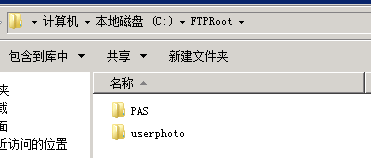
nginx的配置:
在nginx.conf中加入:
    server {
        listen ;
        server_name localhost;
        location / {
            root C:/FTPRoot;
            index *.*;
            add_header Access-Control-Allow-Origin *;
            add_header Access-Control-Allow-Headers X-Requested-With;
            add_header Access-Control-Allow-Methods GET,POST,OPTIONS;
        }
    }
然后重新加载配置文件即可,参考:https://www.cnblogs.com/qianzf/p/6809427.html。
二、nginx配置:通过端口进行负载均衡
#user  nobody;
worker_processes  1;

#error_log  logs/error.log;
#error_log  logs/error.log  notice;
#error_log  logs/error.log  info;

#pid        logs/nginx.pid;

events {
    worker_connections  1024;
}

http {
    include       mime.types;
    default_type  application/octet-stream;

    #log_format  main  '$remote_addr - $remote_user [$time_local] "$request" '
    #                  '$status $body_bytes_sent "$http_referer" '
    #                  '"$http_user_agent" "$http_x_forwarded_for"';

    #access_log  logs/access.log  main;

    sendfile        on;
    #tcp_nopush     on;

    #keepalive_timeout  0;
    keepalive_timeout  65;

    #gzip  on;

    server {
        listen 9004;

        location /igt {
            root /usr/local/nginx/webapps;
            index index.html;
        }
    }
    upstream 8080tomcat {
         server 10.11.12.61:8080 weight=1;
         server 10.11.12.62:8080 weight=1;
    }
    server {
        listen       8080;
        server_name  localhost;

        location / {
            root   html;
            index  index.html index.htm;
            proxy_pass http://8080tomcat;
        }

        error_page   500 502 503 504  /50x.html;
        location = /50x.html {
            root   html;
        }

    }

    upstream 9080tomcat {
         server 10.11.12.105:9080 weight=1;
         server 10.11.12.106:9080 weight=1;
    }
    server {
        listen       9080;
        server_name  localhost;

        location / {
            root   html;
            index  index.html index.htm;
            proxy_pass http://9080tomcat;
        }

        error_page   500 502 503 504  /50x.html;
        location = /50x.html {
            root   html;
        }

    }

}
这其中,根据端口会分发到不同的后端集群中。
三、nginx配置前后端分离项目
一般的项目中,前后端分离。前端是纯粹的html,直接放nginx。前端项目中,会指定后端的地址。
我们可以将后端的地址,指定为nginx的ip+后端服务的端口。
然后,在nginx中,再像上述第二节那样配置端口转发。
本例中,nginx的ip为:10.11.12.107
1、配置前端
    server {
        listen 9004;

        location /igt {
            root /usr/local/nginx/webapps;
            index index.html;
        }
    }
前端项目的位置如下:

2、在前端项目中配置后端服务的url

3、配置后端服务
    upstream 9080tomcat {
         server 10.11.12.105:9080 weight=1;
         server 10.11.12.106:9080 weight=1;
    }
    server {
        listen       9080;
        server_name  localhost;

        location / {
            root   html;
            index  index.html index.htm;
            proxy_pass http://9080tomcat;
        }

        error_page   500 502 503 504  /50x.html;
        location = /50x.html {
            root   html;
        }

    }
nginx代理学习的更多相关文章
- nginx 反向代理学习
目录 nginx 反向代理学习 一.正向代理和反向代理的区别 1.1正向代理 1.2 反向代理 二.nginx反向代理的使用 nginx 反向代理学习 一.正向代理和反向代理的区别 正向代理代理客户端 ...
- Nginx支持WebSocket反向代理-学习小结
WebSocket是目前比较成熟的技术了,WebSocket协议为创建客户端和服务器端需要实时双向通讯的webapp提供了一个选择.其为HTML5的一部分,WebSocket相较于原来开发这类app的 ...
- nginx代理https站点(亲测)
nginx代理https站点(亲测) 首先,我相信大家已经搞定了nginx正常代理http站点的方法,下面重点介绍代理https站点的配置方法,以及注意事项,因为目前大部分站点有转换https的需要所 ...
- Nginx 入门学习教程
昨天听一个前同事说他们公司老大让他去研究下关于Nginx 方面的知识,我想了下Nginx 在如今的开发技术栈中应该会很大可能会用到,所以写篇博文记录总结下官网学习教程吧. 1. 什么是Nginx? 我 ...
- nginx简单学习(tomcat)
一.负载均衡的简单配置 1.下载nginx 2.tomcat*2 配置不同的端口用于正常启动,在jsp中<%= session.getId()%>可以查看jSessionId,tomcat ...
- Nginx基础学习
参考博客: http://www.2cto.com/os/201212/176520.html http://os.51cto.com/art/201111/304611.htm http://www ...
- go 通过nginx代理后获取用户ip
go 如果使用自己的服务器,可以直接使用 net/http 来获取 func ip(w http.ResponseWriter, r *http.Request) { fmt.Println(r.Re ...
- 二、netcore跨平台之 Linux部署nginx代理webapi
上一章,我们讲了在linux上安装netcore环境,以及让netcore在linux上运行. 这一章我们开始讲在linux上配置nginx,以及让nginx反向代理我们的webapi. 什么ngin ...
- 10分钟学会windows中iis搭建服务器集群实现负载均衡和nginx代理转发
前言 我们之前聊过 10分钟搭建服务器集群--Windows7系统中nginx与IIS服务器搭建集群实现负载均衡:https://www.cnblogs.com/xiongze520/p/103087 ...
随机推荐
- 说说$POST 、$HTTP_RAW_POST_DATA、php://input三者之间的区别
$POST $_POST是我们最常用的获取POST数据的方式,它是以关联数组方式组织提交的数据,并对此进行编码处理,如urldecode,甚至编码转换,识别的数据类型是PHP默认识别的数据类型 app ...
- npm常用命令汇总
npm是一个node包管理和分发工具,已经成为了非官方的发布node模块(包)的标准. 有了npm,可以很快的找到特定服务要使用的包,进行下载.安装以及管理已经安装的包. 1.npm install ...
- l2正则化
在机器学习中,无论是分类还是回归,都可能存在由于特征过多而导致的过拟合问题.当然解决的办法有 (1)减少特征,留取最重要的特征. (2)惩罚不重要的特征的权重. 但是通常情况下,我们不知道应该惩罚哪些 ...
- 关于Unity中使用刚体制作简单跑酷案例
一.步骤 1.创建一个Canvas 2.对Canvas进行初始化,记得把Game视图的分辨率调成和Canvas里面设置的一样的分辨率960X640 3.创建一个Image的UI节点作为Canvas的子 ...
- 中国餐馆过程(Chinese restaurant process)
也就是说假设空桌子有a0个人,然后顾客选择桌子的概率和桌子上人数成正比. 性质: 改变用户的排列方式,桌子的排列方式,概率不变换.
- gpio irq
/***************************************************************** * gpio irq * * 一直以来都没了解过gpio的irq, ...
- 第二百八十三节,MySQL数据库-MySQL存储过程
MySQL数据库-MySQL存储过程 MySQL存储过程,也就是有点像MySQL函数,但是他与MySQL函数是有区别的,后面会讲到函数,所以注意区分 注意:函数与存储过程的区别 存储过程是:CREAT ...
- 转载:30多条mysql数据库优化方法,千万级数据库记录查询轻松解决
1.对查询进行优化,应尽量避免全表扫描,首先应考虑在 where 及 order by 涉及的列上建立索引. 2.应尽量避免在 where 子句中对字段进行 null 值判断,否则将导致引擎放弃使用索 ...
- 【转载】PADS Layout将导入DXF,并转换成板框步骤
1.在PADS Layout中选择 Import... 2.选择DXF文件(一般由结构工程师给出),直接点OK即可. 3.导入后,板框图一角视图如下.右键选择 Select Shapes,然后双击外框 ...
- 【Java集合的详细研究9】Java堆栈(stack)的使用方法
栈是一种常用的数据结构,栈只允许访问栈顶的元素,栈就像一个杯子,每次都只能取杯子顶上的东西,而对于栈就只能每次访问它的栈顶元素,从而可以达到保护栈顶元素以下的其他元素.”先进后出”或”后进先出”就是栈 ...