
iOS 模仿一个小项目,总结一下里边的模块
ManoBoo: 参考链接:http://www.jianshu.com/p/fd4c46c31508
这个小的项目是参考ManoBoo的简书的,链接在上方,自己在仿做的过程中,也离不开ManoBoo的帮助
一 配置项目的基本环境
1 Pod AVFoundation框架,ReactiveCocoa框架
-->从终端打开项目 cd+文件路径

-->创建Podfile文件 vim Podfile


-->安装第三方框架 pod install


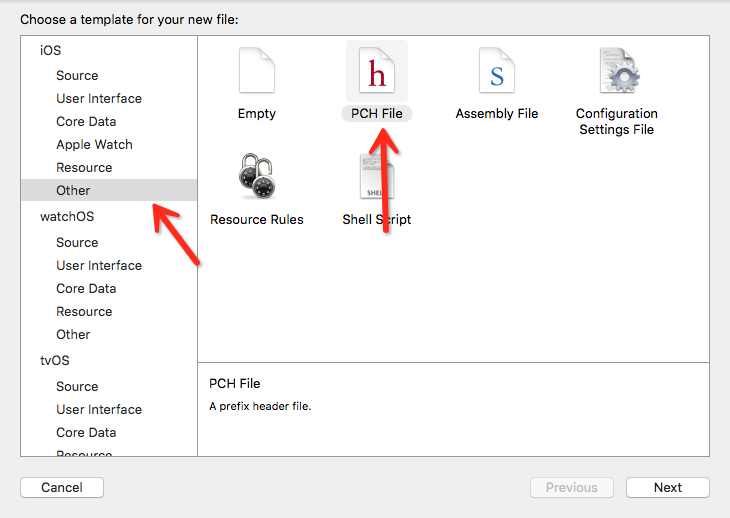
2 使用pch文件
-->新建pch文件
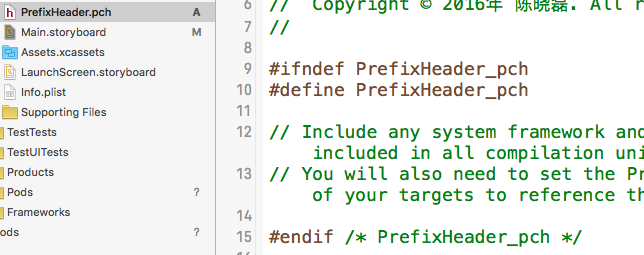
-->将需要用到的全局的头文件和宏添加进去
3 导入ttf字体文件并使用
-->获取字体文件ttf
-->将ttf文件copy到项目中
-->在Info.plist中添加项

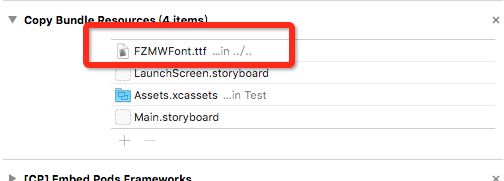
-->在Project--Build Phases--Copy Bundle Resoueces中添加资源
-->使用(要使用字体的真实名称,而不是文件名)
二 基础页面的搭建
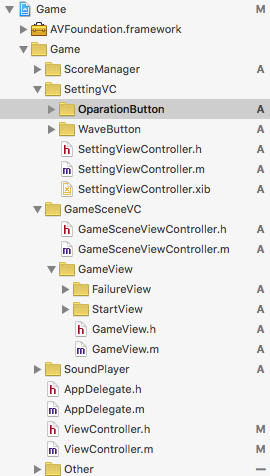
根据需要将项目分成相应的模块,在这里按照页面以及功能划分
1 开始页面

1-1 添加按钮
- (void)setMainView

{

    _startBtn = [[UIButton alloc] initWithFrame:CGRectMake(, , SCREEN_WIDTH / , SCREEN_HEIGHT)];

    _startBtn.backgroundColor = [UIColor blackColor];

    _startBtn.titleLabel.font = [UIFont fontWithName:@"FZMiaoWuS-GB" size:];

    [_startBtn setTitle:@"开始游戏 " forState:UIControlStateNormal];

    WeakSelf;

    [[_startBtn rac_signalForControlEvents:UIControlEventTouchUpInside] subscribeNext:^(id x) {

        [weakSelf buttonHideAnimation];

        [weakSelf presentViewController:[[GameSceneViewController alloc] init] animated:false completion:^{

            [SoundPlayer pauseBGMMusic];

        }];

    }];

    [self.view addSubview:_startBtn];
1-2 给按钮添加点击事件
[_startButton rac_signalForControlEvents:UIControlEventTouchUpInside]返回一个 RACSignal,可以理解为 一个信号,用于监听事件,后面 subscribeNext:^(id x) {} 用于订阅信号

1-3 给按钮添加动画
# pragma mark : 按钮消失/ 出现动画

- (void)buttonHideAnimation

{

    [UIView animateWithDuration:0.4 animations:^{

        _startBtn.center = CGPointMake(- _startBtn.center.x, _startBtn.center.y);

        _settingBtn.center = CGPointMake(_settingBtn.center.x + SCREEN_WIDTH, _settingBtn.center.y);

    }];

}

- (void)buttonShowAnimation

{

    [UIView animateWithDuration:0.4 animations:^{

        _startBtn.center = CGPointMake(SCREEN_WIDTH / , _startBtn.center.y);

        _settingBtn.center = CGPointMake(SCREEN_WIDTH /  * , _settingBtn.center.y);

    }];

}
使用的是UIView的block动画
2 倒计时动画页面
- (CAAnimationGroup *)setAnimationGroup

{

    //缩放动画

    CABasicAnimation *animation1 = [CABasicAnimation animation];

    [animation1 setKeyPath:@"transform.scale"];

    [animation1 setFromValue:@1.0];

    [animation1 setToValue:@4.0];

    [animation1 setDuration:1.0];

    //透明度改变动画

    CABasicAnimation *animation2 = [CABasicAnimation animation];

    [animation2 setKeyPath:@"alpha"];

    [animation2 setFromValue:@1.0];

    [animation2 setToValue:@0.3];

    [animation2 setDuration:1.0];

    CAAnimationGroup *animationGroup = [[CAAnimationGroup alloc] init];

    animationGroup.animations = [NSArray arrayWithObjects:animation1, animation2, nil];

    [animationGroup setDuration:1.0];

    [animationGroup setDelegate:self];

    return animationGroup;

}
使用的是CABasicAnimation基础动画
这个ManoBoo在简书中已经讲的很详细了,此处略去
3 游戏界面以及点击按钮之后的闪烁动画效果
如何搭建游戏界面,在简书中也有非常详细的介绍
4 点击错误后弹出的失败页面

4-1 此处重点在于如何在xib中使用位置的绑定
4-2 点击结束按钮后会跳转回开始页面
用 presentViewController 方法进入游戏页面,对应的,用 dismissViewControllerAnimated 方法可以返回
用 pushViewController 方法进入的话,则需要调用 popViewControllerAnimated 方法返回
5 设置页面的搭建
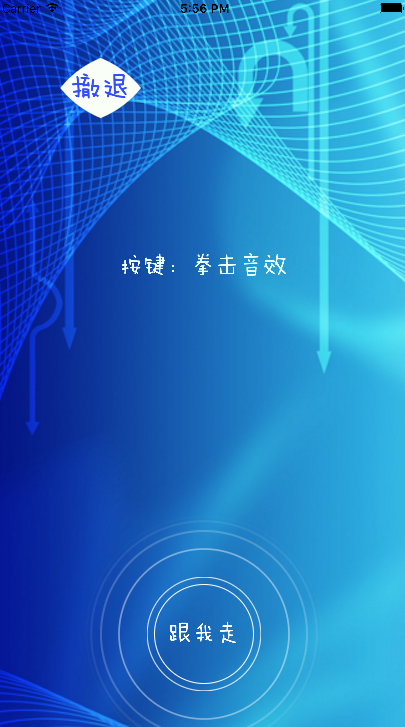

5-1 与错误页面的搭建类似,区别在于其中加入了按钮动画
5-1 水波纹动画按钮
将CABasicAnimation基础动画和CAKeyframeAnimation帧动画结合使用
- (void)drawRect:(CGRect)rect{

    NSInteger pulsingCount = ;//波纹的环数

    double animationDuration = ;

    CALayer * animationLayer = [CALayer layer];//动画layer

    for (int i = ; i < pulsingCount; i++) {

        //保证波纹是个圆形

        CALayer * pulsingLayer = [CALayer layer];

        pulsingLayer.frame = CGRectMake(, , rect.size.width, rect.size.height);

        pulsingLayer.borderColor = [UIColor colorWithRed: green: blue: alpha:].CGColor;

        pulsingLayer.borderWidth = ;

        pulsingLayer.cornerRadius = rect.size.height / ;

        //缩放动画

        CABasicAnimation * scaleAnimation = [CABasicAnimation animationWithKeyPath:@"transform.scale"];

        scaleAnimation.fromValue = @0.8;

        scaleAnimation.toValue = @2.4;

        //关键帧动画  透明度

        CAKeyframeAnimation * opacityAnimation = [CAKeyframeAnimation animationWithKeyPath:@"opacity"];

        opacityAnimation.values = @[@, @0.9, @0.8, @0.7, @0.6, @0.5, @0.4, @0.3, @0.2, @0.1, @];

        opacityAnimation.keyTimes = @[@, @0.1, @0.2, @0.3, @0.4, @0.5, @0.6, @0.7, @0.8, @0.9, @];

        //动画执行的速度 默认

        CAMediaTimingFunction * defaultCurve = [CAMediaTimingFunction functionWithName:kCAMediaTimingFunctionDefault];

        CAAnimationGroup * animationGroup = [CAAnimationGroup animation];

        animationGroup.beginTime = CACurrentMediaTime() + (double)i * animationDuration / (double)pulsingCount;

        animationGroup.duration = animationDuration;

        animationGroup.repeatCount = HUGE;

        animationGroup.timingFunction = defaultCurve;//动画运行的节奏

        animationGroup.animations = @[scaleAnimation, opacityAnimation];

        [pulsingLayer addAnimation:animationGroup forKey:nil];

        [animationLayer addSublayer:pulsingLayer];

    }

    [self.layer addSublayer:animationLayer];

}
5-2 圆形按钮
重绘drawRect方法
- (void)drawRect:(CGRect)rect {

    self.backgroundColor = [UIColor clearColor];

    self.layer.borderWidth = ;

    self.layer.borderColor = [UIColor whiteColor].CGColor;

    self.layer.cornerRadius = rect.size.width / ;

}
5-3 点击去简书按钮之后会跳转到其他页面
[[UIApplication sharedApplication] openURL:[NSURL URLWithString:@"http://www.jianshu.com/users/28aed6e79eac/timeline"]];
三 相应的功能模块
1 分数管理器
1-1 使用 NSUserDefaults 本地存储,对全局变量bestScore进行更新,若currentScore小于bestScore,则bestScore不变,否则,将currentScore的值赋给bestScore
+ (float)getBestScore{

    NSNumber *bestScore = [[NSUserDefaults standardUserDefaults]  objectForKey:BestScoreKey];

    if(bestScore == nil){

        [[NSUserDefaults standardUserDefaults] setObject:[NSNumber numberWithFloat:0.0] forKey:BestScoreKey];

        bestScore = [NSNumber numberWithFloat:0.0];

    }

    return bestScore.floatValue;

}

+ (void)updateWithCurrentScore:(float)currentScore{

    float bestScore = [self getBestScore];

    bestScore = bestScore < currentScore ? currentScore : bestScore;

    [[NSUserDefaults standardUserDefaults] setObject:[NSNumber numberWithFloat:bestScore] forKey:BestScoreKey];

}
1-2 在失败页面中显示出来以及在控制台中输出
    _failureView.currentScoreLab.text = [NSString stringWithFormat:@"%.1f",_currentScore];

    _failureView.historyScoreLab.text = [NSString stringWithFormat:@"最佳成绩:%.f",[ScoreManager getBestScore]];

    _failureView.tipLab.text = @"再接再励哦";

    NSLog(@"历史最佳:%.1f",[ScoreManager getBestScore]);

    NSLog(@"当前成绩:%.1f",_currentScore);
1-3 使用_currentScore来计算当前点击正确的按钮数,即分数,若按钮的状态为胜利,则加一
    if (type == CompleteTypeVictory) {

        _currentScore += 1.0;

        [[SoundPlayer shareInstance] changeSound];

        [self updateClickOnTrue];

        [self updateGameSpeed];

    }
2 速度控制器
- (void)updateGameSpeed{

    if (_currentScore < ) {

        _gameSpeed = 2.5 * ( + _currentScore / );

    }else{

        _gameSpeed = 5.0;

    }

    [[NSUserDefaults standardUserDefaults] setObject:[NSNumber numberWithFloat:_gameSpeed] forKey:GameSpeedKey];

}
3 音乐播放器
使用AVAudioPlayer控制播放音乐
dispatch_queue_t dispatchQueue = dispatch_get_global_queue(DISPATCH_QUEUE_PRIORITY_DEFAULT, );

    dispatch_async(dispatchQueue, ^{

            //获取音乐文件路径

        NSURL *soundUrl = [NSURL fileURLWithPath:[[NSBundle mainBundle] pathForResource:[NSString stringWithFormat:@"C-%d",i]  ofType:@"wav"]];

        if (!_audioPlayer) {

            _asset = [[AVURLAsset alloc] initWithURL:soundUrl options:nil];

            //实例化音乐播放控件

            _audioPlayer = [[AVAudioPlayer alloc] initWithContentsOfURL:_asset.URL error:nil];

        }

        if (_audioPlayer != nil) {

            _audioPlayer = [[AVAudioPlayer alloc] initWithContentsOfURL:[NSURL fileURLWithPath:[[NSBundle mainBundle] pathForResource:[NSString stringWithFormat:@"C-%d",i] ofType:@"wav"]] error:nil];

            _audioPlayer.delegate = self;

            [_audioPlayer play];

            if (i < ) {

                ++i;

            }else{

                i = ;

            }

        }else{

            NSLog(@"初始化失败");

        }

    });
四 项目整体都使用的重点
1 单例模式
若希望一个类只有一个实例存在,同时可得到这个特定实例提供的服务入口,那么可以使用单例设计模式
在整个项目中,这个累的对象只能被初始化一次,这种特性可以用在某些需要全局共享的资源中,比如管理类,引擎类
UIApplication,NSUserDefaults等都是iOS的系统单例
static SoundPlayer *instance;

//单例模式,保证只有一个soundPlayer对象

+ (SoundPlayer *)shareInstance{

    @synchronized(instance) {

        if (!instance) {

            instance = [[SoundPlayer alloc] init];

        }

        return instance;

    }

}
2 多线程
iOS中,只有主线程,才能立即刷新UI,如果是通过侦听异步消息,触发回调函数,或者调用异步方法,请求刷新UI,都会产生线程阻塞和延迟的问题
多线程:让CPU在同一时间内运行两行以上代码
iOS是一个支持多任务的操作系统,因此在编写iOS的多线程程序时,可分为两个部分:传统的多线程处理方式(NSThread)或者使用GCD派遣队列(Dispatch Queue)与block块来分派程序
GCD提供了3中类型的队列:main,concurrent,serial
main队列:程序代码默认运行的队列,iOS会将所有跟可视化组件有关的运行程序放在这个队列,main队列一定要使用异步模式,若使用同步模式,会造成app运行程序产生死结
concurr队列:有4 种(优先权),高优先权,中优先权,低优先权,背景取得concurrent队列的进入点后,可以选择异步或同步运行
serial队列:用户自己创建的队列,队列创建时徐给出唯一识别的名字(字符串型),serial队列一定是dispatch_sync()
每个区块中程序代码在各种队列中运行有两种方式:同步,异步
同步:(sync)同一队列,被设置为同步模式的线程一定要先运行晚才回轮到下一个线程运行:dispatch_sync()
异步:(async)同一队列所有线程一起执行:dispatch_async()
    dispatch_queue_t dispatchQueue = dispatch_get_global_queue(DISPATCH_QUEUE_PRIORITY_BACKGROUND, );

    dispatch_async(dispatchQueue, ^{

    });
3 weakSelf
防止block的循环引用
#define WeakSelf __weak typeof(self) weakSelf = self
iOS 模仿一个小项目,总结一下里边的模块的更多相关文章
- 用struts2标签如何从数据库获取数据并在查询页面显示。最近做一个小项目,需要用到struts2标签从数据库查询数据,并且用迭代器iterator标签在查询页面显示,可是一开始,怎么也获取不到数据,想了许久,最后发现,是自己少定义了一个变量,也就是var变量。
最近做一个小项目,需要用到struts2标签从数据库查询数据,并且用迭代器iterator标签在查询页面显示,可是一开始,怎么也获取不到数据,想了许久,最后发现,是自己少定义了一个变量,也就是var变 ...
- 跟我一起用node-express搭建一个小项目(mongodb)[二]
我的小项目主要是会用到MongoDB. 呵呵,我也是现学现卖. 都说小公司十八般武艺样样稀疏,没有办法啊! 兵来兵挡,将来将挡!自己是个兵呢?还是一个将呢! 没有公司培养,就自己培养自己呗.差的远一点 ...
- 【源码项目+解析】C语言/C++开发,打造一个小项目扫雷小游戏!
一直说写个几百行的小项目,于是我写了一个控制台的扫雷,没有想到精简完了代码才200行左右,不过考虑到这是我精简过后的,浓缩才是精华嘛,我就发出来大家一起学习啦,看到程序跑起来能玩,感觉还是蛮有成就感的 ...
- Winform窗体用对象数组做一个小项目
首先我我们看一下需求:我们要做的是显示员工信息,实现项目经理给员工评分的功能! 首先项目经理是评分的人所以没有用,因为我们自己写,评分的就是我们自己.所以我们要做的是先在vs也就是我们的环境里建一个项 ...
- IOS 从一个小地方想到……
//(一个比较好的地方是 : cancel代表取消的意思,suspended,表示已经挂起,这些英文记住了用来命名挺好的,看看别人的过去时都是加ed的,就是这么强,所以语法不好的话,多关注ios的命名 ...
- 基于Asp.net core + EF + Sqlite 5分钟快速上手一个小项目
虽然该方法不会用在实际开发中,但该过程对于初学者还是非常友好的,真应了麻雀虽小,五脏俱全这句话了.好了不多废话了,直接开始!! 1.建立一个名为test的Asp.net core web应用程序 这一 ...
- 麻雀虽小,五脏俱全。基于Asp.net core + Sqlite 5分钟快速上手一个小项目
虽然该方法不会用在实际开发中,但该过程对于初学者还是非常友好的,真应了麻雀虽小,五脏俱全这句话了.好了不多废话了,直接开始!! 1.建立一个名为test的Asp.net core web应用程序 这一 ...
- 从一个小项目看return 引用 重载运算符
#ifndef _ARRAY_H_ #define _ARRAY_H_ class Array { private: int mLength; int* mSpace; public: Array(i ...
- 跟我一起用node-express搭建一个小项目[一]
我一直以为你要学nodejs你就要掌握很多东西啊!比如js最少得看10本书吧,nodejs书籍得看吧!其实呢,到最后,你会发现,因为工作,或者找工作的需要,什么不学,那些js不懂 也没有很大的关系.所 ...
随机推荐
- PHP正则表达式详解(三)
1.preg_match() :preg_match() 函数用于进行正则表达式匹配,成功返回 1 ,否则返回 0 . 语法:int preg_match( string pattern, strin ...
- JBOSS 5 session时间配置
C:\jboss-5.1.0.GA\server\default\deployers\jbossweb.deployer web.xml <session-config> < ...
- Uva 2319
理解:区域覆盖.假设该点在勘测半圆的边缘,求出与该点可在一个半圆的坐标范围l,r,然后,for 一次判断 #include<cstdio> #include<algorithm> ...
- Form 详细属性--2016年12月4日
属性 名称 说明 AcceptButton 获取或设置当用户按 Enter 键时所单击的窗体上的按钮. AccessibilityObject 获取分配给该控件的 Accessib ...
- Python自动化之django的ORM
django ORM操作 1.什么是ORM? ORM,即Object-Relational Mapping(对象关系映射),它的作用是在关系型数据库和业务实体对象之间作一个映射,这样,我们在具体的操作 ...
- HTML5和HTML4的主要区别 [转]
原文:http://www.cnblogs.com/jiangyehu1110/archive/2013/07/10/3182277.html 1. HTML5标准还在制定中 这头一个不同之处显而易见 ...
- [转]关于Android系统的”点九”
李华明Himi原创,转载务必在明显处注明:转载自[黑米GameDev街区] 原文链接: http://www.himigame.com/android-game/321.html 前几天群成员讨论过关 ...
- 关于kali2.0rolling中metasploit升级后无法启动问题的解决总结
最近在学习metasploit的使用,文中提到可以使用msfupdate命令来对metasploit的payload.exploit等进行升级,我就试了一下,没想到升级过程并不麻烦,但升级后却出现了无 ...
- JAVA SSM 示例代码
SSM 即spring+spring mvc+mybatis,开发工具IDEA 1.先看下项目结构如图: 2.主要配置文件 spring-mvc.xml <?xml version=" ...
- 不会JavaScript能混前端么?能拿到高薪么?
不会JavaScript能混前端么?能拿到高薪么? 答案是:很难! 为什么这么说呢,理由很简单 1)有很多企业不注重前端开发,当然也就不会给你高薪了,这样的企业以小企业居多. 他们一般对前端开发的认识 ...