
Working with Data » Getting started with ASP.NET Core and Entity Framework Core using Visual Studio » 增、查、改、删操作
Create, Read, Update, and Delete operations
By Tom Dykstra
The Contoso University sample web application demonstrates how to create ASP.NET Core 1.0 MVC web applications using Entity Framework Core 1.0 and Visual Studio 2015. For information about the tutorial series, see the first tutorial in the series.
In the previous tutorial you created an MVC application that stores and displays data using the Entity Framework and SQL Server LocalDB. In this tutorial you’ll review and customize the CRUD (create, read, update, delete) code that the MVC scaffolding automatically creates for you in controllers and views.
在前面的教程中,您创建了 MVC 应用程序,使用实体框架和 SQL 服务器 LocalDB来存储和显示数据。在本教程中,您会回顾和自定义 CRUD 代码 (创建、 读取、 更新、 删除),这些代码由 MVC 基架为您自动创建于控制器和视图中。
Note
It’s a common practice to implement the repository pattern in order to create an abstraction layer between your controller and the data access layer. To keep these tutorials simple and focused on teaching how to use the Entity Framework itself, they don’t use repositories. For information about repositories with EF, see the last tutorial in this series.
Sections:
In this tutorial, you’ll work with the following web pages:


Customize the Details page¶ 自定义Details页面
The scaffolded code for the Students Index page left out the Enrollments property, because that property holds a collection. In the Details page you’ll display the contents of the collection in an HTML table.
基架搭建的Students Index页面的代码忽略的Enrollments属性,因为该属性包含一个集合。在Details页面中,你将把该集合的内容显示到HTML表中。
In Controllers/StudentsController.cs, the action method for the Details view uses the SingleOrDefaultAsync method to retrieve a single Student entity. Add code that calls Include. ThenInclude, and AsNoTracking methods, as shown in the following highlighted code.
在Controllers/StudentsController.cs中,关于Details视图的方法使用SingleOrDefaultAsync方法来取回单个Student实体。增加如下高亮的Include. ThenInclude和AsNoTracking方法代码。
public async Task<IActionResult> Details(int? id)

{

    if (id == null)

    {

        return NotFound();

    }

    var student = await _context.Students

        .Include(s => s.Enrollments)

            .ThenInclude(e => e.Course)

        .AsNoTracking()

        .SingleOrDefaultAsync(m => m.ID == id);

    if (student == null)

    {

        return NotFound();

    }

    return View(student);

}
The Include and ThenInclude methods cause the context to load the Student.Enrollments navigation property, and within each enrollment the Enrollment.Course navigation property. You’ll learn more about these methods in the reading related data tutorial.
Include和ThenInclude方法使上下文加载Student.Enrollments导航属性,以及在每个enrollment中的Enrollment.Course导航属性。
The AsNoTracking method improves performance in scenarios where the entities returned will not be updated in the current context’s lifetime. You’ll learn more about AsNoTracking at the end of this tutorial.
AsNoTracking 方法提高了在该场景下的性能,即在当前上下文生命周期中不再更新返回的实体。你将在该教程的末尾学习更多关于AsNoTracking 的内容。
Note
The key value that is passed to the Details method comes from route data.
Route data is data that the model binder found in a segment of the URL. For example, the default route specifies controller, action, and id segments:
    app.UseMvc(routes =>

    {

        routes.MapRoute(

            name: "default",

            template: "{controller=Home}/{action=Index}/{id?}");

    });

    DbInitializer.Initialize(context);

}
In the following URL, the default route maps Instructor as the controller, Index as the action, and 1 as the id; these are route data values.
http://localhost:1230/Instructor/Index/1?courseID=2021
The last part of the URL (”?courseID=2021”) is a query string value. The model binder will also pass the ID value to the Details method id parameter if you pass it as a query string value:
http://localhost:1230/Instructor/Index?id=1&CourseID=2021
In the Index page, hyperlink URLs are created by tag helper statements in the Razor view. In the following Razor code, the id parameter matches the default route, so id is added to the route data.
<a asp-action="Edit" asp-route-id="@item.ID">Edit</a>
In the following Razor code, studentID doesn’t match a parameter in the default route, so it’s added as a query string.
<a asp-action="Edit" asp-route-studentID="@item.ID">Edit</a>
Add enrollments to the Details view¶ 向Details视图添加enrollments
Open Views/Students/Details.cshtml. Each field is displayed using DisplayNameFor and DisplayFor helper, as shown in the following example:
<dt>

    @Html.DisplayNameFor(model => model.EnrollmentDate)

</dt>

<dd>

    @Html.DisplayFor(model => model.EnrollmentDate)

</dd>
After the last field and immediately before the closing </dl> tag, add the following code to display a list of enrollments:
在表示关闭的</dl>标签前的最后一个字段后,添加以下代码来显示enrollments列表:
<dt>

    @Html.DisplayNameFor(model => model.Enrollments)

</dt>

<dd>

    <table class="table">

        <tr>

            <th>Course Title</th>

            <th>Grade</th>

        </tr>

        @foreach (var item in Model.Enrollments)

        {

            <tr>

                <td>

                    @Html.DisplayFor(modelItem => item.Course.Title)

                </td>

                <td>

                    @Html.DisplayFor(modelItem => item.Grade)

                </td>

            </tr>

        }

    </table>

</dd>
If code indentation is wrong after you paste the code, press CTRL-K-D to correct it. 如果粘贴后代码的缩进出现问题,按CTRL-K-D进行修正。
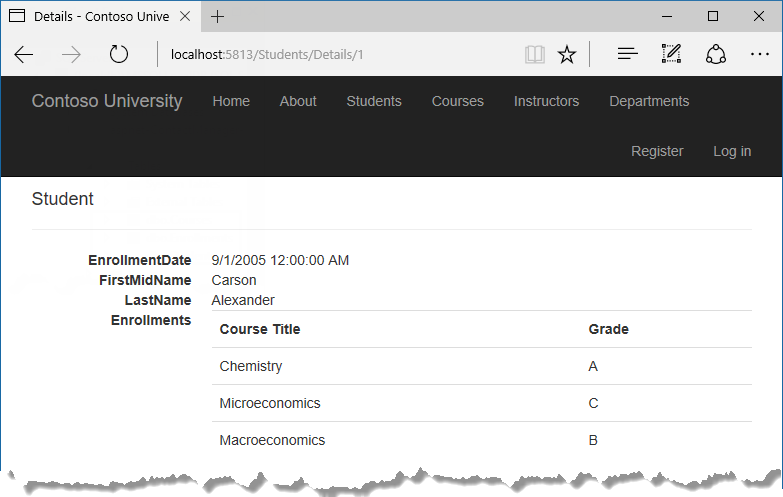
This code loops through the entities in the Enrollments navigation property. For each enrollment, it displays the course title and the grade. The course title is retrieved from the Course entity that’s stored in the Course navigation property of the Enrollments entity.
Run the application, select the Students tab, and click the Details link for a student. You see the list of courses and grades for the selected student:

Update the Create page¶ 更新Creat页面
In StudentsController.cs, modify the HttpPost Create method by adding a try-catch block and removing ID from the Bind attribute.
[HttpPost]

[ValidateAntiForgeryToken]

public async Task<IActionResult> Create(

    [Bind("EnrollmentDate,FirstMidName,LastName")] Student student)

{

    try

    {

        if (ModelState.IsValid)

        {

            _context.Add(student);

            await _context.SaveChangesAsync();

            return RedirectToAction("Index");

        }

    }

    catch (DbUpdateException /* ex */)

    {

        //Log the error (uncomment ex variable name and write a log.

        ModelState.AddModelError("", "Unable to save changes. " +

            "Try again, and if the problem persists " +

            "see your system administrator.");

    }

    return View(student);

}
This code adds the Student entity created by the ASP.NET MVC model binder to the Students entity set and then saves the changes to the database. (Model binder refers to the ASP.NET MVC functionality that makes it easier for you to work with data submitted by a form; a model binder converts posted form values to CLR types and passes them to the action method in parameters. In this case, the model binder instantiates a Student entity for you using property values from the Form collection.)
You removed ID from the Bind attribute because ID is the primary key value which SQL Server will set automatically when the row is inserted. Input from the user does not set the ID value.
将ID从Bind属性删除,因为ID是主键值,当插入一行使将由SQL Server自动设置。用户输入不设置该ID值。
Other than the Bind attribute, the try-catch block is the only change you’ve made to the scaffolded code. If an exception that derives from DbUpdateException is caught while the changes are being saved, a generic error message is displayed. DbUpdateException exceptions are sometimes caused by something external to the application rather than a programming error, so the user is advised to try again. Although not implemented in this sample, a production quality application would log the exception. For more information, see the Log for insight section in Monitoring and Telemetry (Building Real-World Cloud Apps with Azure).
The 原文:ASP.NET Core 配置 Entity Framework Core - ASP.NET Core 基础教程 - 简单教程,简单编程 ASP.NET Core 配置 Entity Fram ... Updating related data¶ 7 of 7 people found this helpful The Contoso University sample web applicatio ... Reading related data¶ 9 of 9 people found this helpful The Contoso University sample web application ... Migrations¶ 4 of 4 people found this helpful The Contoso University sample web application demonstra ... Creating a complex data model 创建复杂数据模型 8 of 9 people found this helpful The Contoso University sampl ... Sorting, filtering, paging, and grouping 7 of 8 people found this helpful By Tom Dykstra The Contoso ... 最近在学dotNetCore 所以尝试了一下api 这个功能 不多说了大致实现如下 1.用vs2017建立一个Asp.net Core Web 应用程序 在弹出的对话框中选择 Web API 项目名 ... http://www.oracle.com/technetwork/topics/dotnet/tech-info/odpnet-dotnet-ef-core-sod-4395108.pdf Orac ... 使用ASP.NET Core MVC 和 Entity Framework Core 开发一个CRUD(增删改查)的应用程序 不定时更新翻译系列,此系列更新毫无时间规律,文笔菜翻译菜求各位看官老爷们轻 ... typedef struct _browseinfoW { HWND hwndOwner; PCIDLIST_ABSOLUTE pidlRoot; LPWSTR pszDisplayName; // ... Struts2的处理结果(一) --处理结果的配置 1.处理结果 在Action处理完用户请求之后,并不会直接生成响应,而是把一个字符串返回给Struts2框架,再由框架选择此字符串结果对应的物理视图 ... Problem Description 部队中共有N个士兵,每个士兵有各自的能力指数Xi,在一次演练中,指挥部确定了M个需要防守的地点,按重要程度从低到高排序,依次以数字1到M标注每个地点的重要程度, ... package com.hanqi.test; import java.sql.*; import java.util.*; public class LianXi { public static v ... 1.控制只返回JSON一种数据 public class JsonContentNegotiator : IContentNegotiator { private readonly JsonMedia ... 1. 在安装的时候,不要用默认的最小安装.选择GNOME Desktop 2.自动分区的时候,选择自己进行分区 2个分区,1个大小为1024M的swap分区,剩下的分配一个ext3的分区.设备类型都选 ... 出自:http://blog.chinaunix.net/uid-20639775-id-3323098.html Mysql事件学习 在系统管理或者数据库管理中,经常要周期性的执行某一个命令或者SQ ... 如何制作vb安装程序,是在学习Vb6.0过程中比较常见的一个入门问题. 在此笔者介绍一个最简单的安装方法,就是用VB自带的打包程序进行打包,虽然比较普通,不过内部却有不少窍门,相信这一点知道的人可能不 ... 记得我当时也犯过这个错误 rm -rf /* 傻傻的盯着屏幕看... 还好当时是在自己的虚拟机里,没什么数据,打镜像恢复回来就好了.今天看到这篇文章,备用!嗯 是的 万一哪天脑抽了 --------- ... p { margin-bottom: 0.1in; direction: ltr; line-height: 120%; text-align: left; widows: 2; orphans: 2 ...ValidateAntiForgeryToken attribute helps prevent cross-site request forgery (CSRF) attacks. The token is automatically injected into the view by the FormTagHelper and is included when the form is submitted by the user. The token is validated by the ValidateAntiForgeryToken attribute. For more information about CSRF, see
Working with Data » Getting started with ASP.NET Core and Entity Framework Core using Visual Studio » 增、查、改、删操作的更多相关文章
随机推荐