
ListView 搭配SimpleAdapter
这是SimplerAdapter的构造函数
public SimpleAdapter(Context context, List<? extends Map<String, ?>> data,

            @LayoutRes int resource, String[] from, @IdRes int[] to) {

        mData = data;

        mResource = mDropDownResource = resource;

        mFrom = from;

        mTo = to;

        mInflater = (LayoutInflater) context.getSystemService(Context.LAYOUT_INFLATER_SERVICE);

    }
from A list of column names that will be added to the Map associated with each


*        item.
to The views that should display column in the "from" parameter. These should all be
*        TextViews. The first N views in this list are given the values of the first N columns
*        in the from parameter.
context:是上下文;
List<?extends Map<String,?>> data:这里是listview的数据来源,最外层是一个list数据结构list泛型指定的是继承了Map的对象。这里准备使用ArrayList<HashMap<String,String>>;
resource:这是listview的布局文件注意着是@LayoutRes那么就应该是R.layout里的xml文件
from:看注释这里是指定数据源中Map的column的名字,也就是说是指定Map<key,value>中key;是我们添加数据的索引。
to:这是需要显示的TextView(这里必须是TextView)的id,对应的是Map<key,value>中value,将是我们可见的内容。
那么ListView的布局如下:hashmap_item.xml
<?xml version="1.0" encoding="utf-8"?>

<LinearLayout xmlns:android="http://schemas.android.com/apk/res/android"

    android:orientation="vertical" android:layout_width="match_parent"

    android:layout_height="match_parent">

    <TextView

        android:layout_width="match_parent"

        android:layout_height="wrap_content"

        android:id="@+id/hash_title"/>

    <TextView

        android:layout_width="match_parent"

        android:layout_height="wrap_content"

        android:id="@+id/hash_aticle"/>

</LinearLayout>
主要代码如下
 private ArrayList<HashMap<String,String>> item;

    private ListView listView;

    @Override

    protected void onCreate(Bundle savedInstanceState) {

        super.onCreate(savedInstanceState);

        setContentView(R.layout.activity_main);

        listView = (ListView)findViewById(R.id.my_listview);

        DataInit();

        SimpleAdapter sa = new SimpleAdapter(this,item,R.layout.hashmap_item,new String[]{"title","article"},new int[]{R.id.hash_title,R.id.hash_aticle});

        listView.setAdapter(sa);

    }

    private void DataInit(){

        item = new ArrayList<>(20);

        for(int i=0;i<30;i++){

            HashMap<String,String> hashmap = new HashMap<>();

            hashmap.put("title","title:"+i);

            hashmap.put("article","article:"+i);

            item.add(hashmap);

        }

    }
activity_main.xml定义如下
<?xml version="1.0" encoding="utf-8"?>

<RelativeLayout xmlns:android="http://schemas.android.com/apk/res/android"

    xmlns:tools="http://schemas.android.com/tools"

    android:layout_width="match_parent"

    android:layout_height="match_parent"

    android:paddingBottom="@dimen/activity_vertical_margin"

    android:paddingLeft="@dimen/activity_horizontal_margin"

    android:paddingRight="@dimen/activity_horizontal_margin"

    android:paddingTop="@dimen/activity_vertical_margin"

    tools:context="com.skymaster.hs.arrayadapter.MainActivity">

    <ListView

        android:layout_width="wrap_content"

        android:layout_height="wrap_content"

        android:id="@+id/my_listview" />

</RelativeLayout>
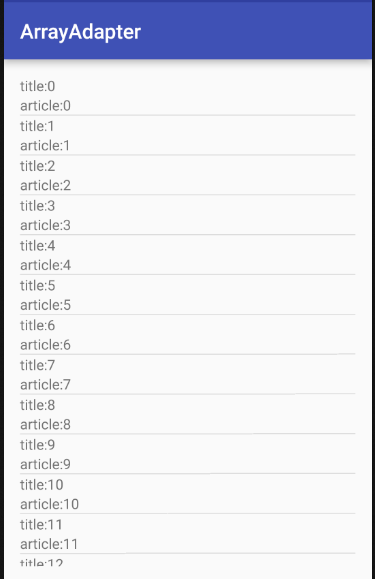
程序效果图
ListView 搭配SimpleAdapter的更多相关文章
- ListView与SimpleAdapter
Adapter可以视作控件与数据之间的桥梁 对ListView做自由布局和填充需要使用到Adapter,这里我们采用SimpleAdapter. 简单来说: 1.定义一个ListItem,其数据结构是 ...
- 滚动视图、列表视图[ListView、SimpleAdapter类]
滚动视图 <ScrollView android: layout_width="fill_parent" android: layout_height="fill_ ...
- 安卓开发_浅谈ListView(SimpleAdapter数组适配器)
安卓开发_浅谈ListView(ArrayAdapter数组适配器) 学习使用ListView组件和SimapleAdapter适配器实现一个带图标的ListView列表 总共3部分 一.MainAc ...
- ListView之SimpleAdapter
SimpleAdapter是安卓内置的适配器,本文展示的是listview的子项为{图片,文件}组合 如下图所示: 具体代码: SimpleAdapter_test.java /* ListView ...
- AdapterView及其子类之四:基于ListView及SimpleAdapter实现列表
代码请见SimpleAdapterDemo.zip. 步骤如下: 1.创建主布局文件 <RelativeLayout xmlns:android="http://schemas.and ...
- Android ListView 之 SimpleAdapter 二 (包含 item 中按钮监听)
1 MainActivity.java package com.myadapter; import java.util.ArrayList; import java.util.HashMap; ...
- ListView与SimpleAdapter(三)
一般用于只有两个控件的列表. 使用SimpleAdapter 的数据是以List<Map<String,?>>形式封装数据, List的每一节对应ListView的每一行. H ...
- 关于SimpleAdapter和ListView结合使用,实现列表视图的笔记
使用ListView需要为其添加适配器: 适配器有两种:1.ArrayAdapter --用于单独文字显示 2.SimpleAdapter --用于文字和图片显示 这里主要记录SimpleAdapt ...
- Android中ListView同过自定义布局并使用SimpleAdapter的方式实现数据的绑定
1.listview的数据填充可以通过ArrayAdapter,SimpleAdapter,也可以是一个xml文件,但是ArrayAdapter与SimpleAdapter的区别是: 2 ArrayA ...
随机推荐
- error: command 'x86_64-linux-gnu-gcc' failed with exit status 1
转载自:http://blog.csdn.net/wang1144/article/details/42277179 在ubuntu14.04版本上安装lxml,老是出错,在一番艰辛的搜索之后 ,终于 ...
- 本地计算机上的MSSQLSERVER服务启动后又停止了。一些服务自动停止,如果它们没有什么可做的
本地计算机上的MSSQLSERVER服务启动后又停止了.一些服务自动停止,如果它们没有什么可做的 笔者ASP运行环境:操作系统为Windows XP SP2,IIS的版本为默认的5.1,数据库为SQL ...
- 如何查看tensorflow版本与存储位置
import tensorflow as tf tf.__version__ __看着是一个下划线,实际上是两个下划线,中间有空格 tf.__path_
- js的Prototype属性 解释及常用方法
函数:原型 每一个构造函数都有一个属性叫做原型(prototype,下面都不再翻译,使用其原文).这个属性非常有用:为一个特定类声明通用的变量或者函数. prototype的定义 你不需要显式地声明一 ...
- 在主类E的main方法中,创建类B 的对象并赋给父类A的对象a,使用上转型对象a来测试上转型对象的一些特性。
public class A { private int a=1; public int getA() { return a; } public void setA(int a) { this.a = ...
- 事务mysql
一.事务的概念 事务指逻辑上的一组操作,组成这组操作的各个单元,要不全部成功,要不全部不成功. 例如:A——B转帐,对应于如下两条sql语句 update from account set mone ...
- ubuntu vi/vim编辑器必知必会
转载出处:http://blog.csdn.net/xiajun07061225/article/details/7039413 一.我们为什么要学习vim编辑器? Linux的命令行界面下面有非常多 ...
- 蒙特卡洛法计算定积分—Importance Sampling
如上图所示,计算区间[a b]上f(x)的积分即求曲线与X轴围成红色区域的面积.下面使用蒙特卡洛法计算区间[2 3]上的定积分:∫(x2+4*x*sin(x))dx # -*- coding: u ...
- SOME USEFUL MACHINE LEARNING LIBRARIES.
from: http://www.erogol.com/broad-view-machine-learning-libraries/ http://www.slideshare.net/Vincenz ...
- hdu 5673 Robot 卡特兰数+逆元
Robot Time Limit: 12000/6000 MS (Java/Others) Memory Limit: 65536/65536 K (Java/Others) Problem D ...