
ListView之SimpleAdapter
SimpleAdapter是安卓内置的适配器,本文展示的是listview的子项为{图片,文件}组合
如下图所示:
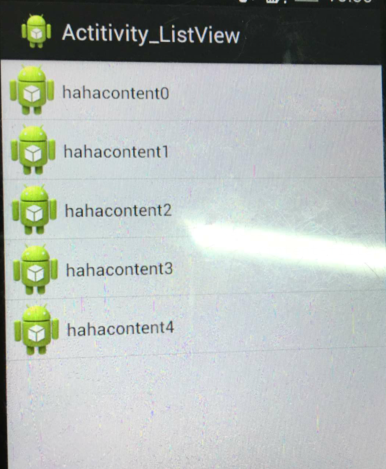
具体代码:
SimpleAdapter_test.java
 /*

 ListView :列表

 通常有两个职责:

 a.将数据填充到布局

 b.处理点击事件

 一个ListView创建需要几个元素:

 a.ListView中第一列的    View

 b.填入View的图片或数据

 c.连接数据 与ListView的适配器

 有哪些适配器?

 ArrayAdapter<T>  用来绑定一个数组,支持泛型设计

 SimpleAdapter 用来绑定在xml中定义的控件和对应的数据

 SimpleCursorAdapter:用来绑定游标得到的数据

 BaseAdapter 通用的基础适配器

  *

  * */

 public class SimpleAdapter_test extends Activity {

     private ListView listview;

     private int[] ids=new int[]{

             R.drawable.s1,

             R.drawable.s2,

             R.drawable.s3,

             R.drawable.s4,

             R.drawable.s5};

     private SimpleAdapter adapter;

     private Context context;

     private List<Map<String,Object>> datas;

     @Override

     protected void onCreate(Bundle savedInstanceState) {

         super.onCreate(savedInstanceState);

         setContentView(R.layout.baseadapate);

         context = this;

         listview = (ListView) findViewById(R.id.listview);

         initData();

         //map中所有的key的

         String[] from=new String[]{"map_image","map_content"};

         int[] to=new int[]{R.id.image,R.id.content};

         adapter=new SimpleAdapter(context, datas, R.layout.items2, from, to);

         listview.setAdapter(adapter);

         listview.setOnItemClickListener(new OnItemClickListener() {

             @Override

             public void onItemClick(AdapterView<?> parent, View view,

                     int position, long id) {

                 Toast.makeText(context,"你选中的是:"+ datas.get(position).get("map_content"), ).show();

             }

         });

     }

     private void initData() {

         datas = new ArrayList<Map<String,Object>>();

         for(int i=;i<;i++)

         {

             Map<String,Object> map = new HashMap<String, Object>();

             map.put("map_image",BitmapFactory.decodeResource(getResources(), ids[i]));

             map.put("map_content", "hahacontent"+i);

             datas.add(map);

         }

     }

 }
baseadapate.xml
 <?xml version="1.0" encoding="utf-8"?>

 <LinearLayout xmlns:android="http://schemas.android.com/apk/res/android"

     android:layout_width="match_parent"

     android:layout_height="match_parent"

     android:orientation="vertical" >

     <ListView

         android:layout_width="match_parent"

         android:layout_height="match_parent"

         android:id="@+id/listview"

         >

     </ListView>

 </LinearLayout>
items2.xml
 <?xml version="1.0" encoding="utf-8"?>

 <LinearLayout xmlns:android="http://schemas.android.com/apk/res/android"

     android:layout_width="match_parent"

     android:layout_height="match_parent"

     android:orientation="horizontal"

     android:layout_gravity="center"

     >

     <ImageView

         android:id="@+id/image"

         android:layout_width="wrap_content"

         android:layout_height="wrap_content"

         android:background="@drawable/ic_launcher"

         />

     <TextView

         android:layout_marginTop="15dp"

         android:id="@+id/content"

         android:layout_width="0px"

         android:layout_height="wrap_content"

         android:layout_weight=""

         android:text="haa"

         />

 </LinearLayout>
不要忘了在清单里注册activity,并且设置为app入口
 <activity android:name=".BaseAdapter_test">

             <intent-filter>

                 <action android:name="android.intent.action.MAIN" />

                 <category android:name="android.intent.category.LAUNCHER" />

             </intent-filter>

 </activity>
ListView之SimpleAdapter的更多相关文章
- ListView与SimpleAdapter
Adapter可以视作控件与数据之间的桥梁 对ListView做自由布局和填充需要使用到Adapter,这里我们采用SimpleAdapter. 简单来说: 1.定义一个ListItem,其数据结构是 ...
- 滚动视图、列表视图[ListView、SimpleAdapter类]
滚动视图 <ScrollView android: layout_width="fill_parent" android: layout_height="fill_ ...
- 安卓开发_浅谈ListView(SimpleAdapter数组适配器)
安卓开发_浅谈ListView(ArrayAdapter数组适配器) 学习使用ListView组件和SimapleAdapter适配器实现一个带图标的ListView列表 总共3部分 一.MainAc ...
- ListView 搭配SimpleAdapter
这是SimplerAdapter的构造函数 public SimpleAdapter(Context context, List<? extends Map<String, ?>&g ...
- AdapterView及其子类之四:基于ListView及SimpleAdapter实现列表
代码请见SimpleAdapterDemo.zip. 步骤如下: 1.创建主布局文件 <RelativeLayout xmlns:android="http://schemas.and ...
- Android ListView 之 SimpleAdapter 二 (包含 item 中按钮监听)
1 MainActivity.java package com.myadapter; import java.util.ArrayList; import java.util.HashMap; ...
- ListView与SimpleAdapter(三)
一般用于只有两个控件的列表. 使用SimpleAdapter 的数据是以List<Map<String,?>>形式封装数据, List的每一节对应ListView的每一行. H ...
- 关于SimpleAdapter和ListView结合使用,实现列表视图的笔记
使用ListView需要为其添加适配器: 适配器有两种:1.ArrayAdapter --用于单独文字显示 2.SimpleAdapter --用于文字和图片显示 这里主要记录SimpleAdapt ...
- Android中ListView同过自定义布局并使用SimpleAdapter的方式实现数据的绑定
1.listview的数据填充可以通过ArrayAdapter,SimpleAdapter,也可以是一个xml文件,但是ArrayAdapter与SimpleAdapter的区别是: 2 ArrayA ...
随机推荐
- animation之translate、scale、alpha、rotate动画效果呈现
动画类型 Android的animation由四种类型组成 XML中 alpha 渐变透明度动画效果 scale 渐变尺寸伸缩动画效果 translate 画面转换位置移动动画效果 rotate 画面 ...
- IIS 问题解决
一.网站发布后 报500错误 解决办法:重新向iis注册framwork: 二.试图加载格式不正确的程序.(Exception from HRESULT: 0x8007000B) 解决办法:对应应用程 ...
- HDU 2025 查找最大元素
查找最大元素 Time Limit: 2000/1000 MS (Java/Others) Memory Limit: 65536/32768 K (Java/Others) Total Submis ...
- [Unit Testing] Based on input value, spyOn function
describe( 'Forgot Password: with username', ()=> { let dirElementInput; beforeEach( ()=> { // ...
- C++11 多线程 基础
C++11开始支持多线程编程,之前多线程编程都需要系统的支持,在不同的系统下创建线程需要不同的API如pthread_create(),Createthread(),beginthread()等,使用 ...
- docke 网络配置
一,docker 的bridge模式是和vmware中的nat模式类似的,但是如果想要弄成和vmwae中的bridge怎么办呢? 说明,bridge模式获取的Ip是与宿主机的ip是出于同一个网段的. ...
- easyUI的doCellTip 就是鼠标放到单元格上有个提示的功能
1:这个东西是我抄的(抄的哪儿的我就想不起来了- -)弹出的窗没有样式 不是很好看 //扩展 $.extend($.fn.datagrid.methods, { /** * 开打提示功能 * @pa ...
- excel 下载
public string CreateExcel(string SelectedBizType, string strReportDate, DropDownList ddlYQ, DropDown ...
- 实现Web虚拟现实的最轻松方案—A-Frame框架
问题 随着vr的热度那么web虚拟现实是否可行 1. 实现Web虚拟现实的最轻松方案 A-Frame A-Frame是一款开源的可通过定制HTML元素构建WebVR方案的框架.有了这个框架,Web程序 ...
- 对Spring.Net+NHibenate+Asp.Net Mvc+Easyui框架的个人认识
对Spring.Net+NHibenate+Asp.Net Mvc+Easyui框架的个人认识 初次接触Spring.Net+NHibenate+Asp.Net Mvc+Easyui框架,查阅了相 ...