
Installshield build all installer in development computer
Step:
- Copy all "SetupPrerequisites" from build server. please make sure below items:
- Installshield version, current is 2014
- SetupPrerequisites is in path: "C:\Program Files (x86)\InstallShield\2014\SetupPrerequisites"
- the build server info: 10.222.**.***; build\administrator@******
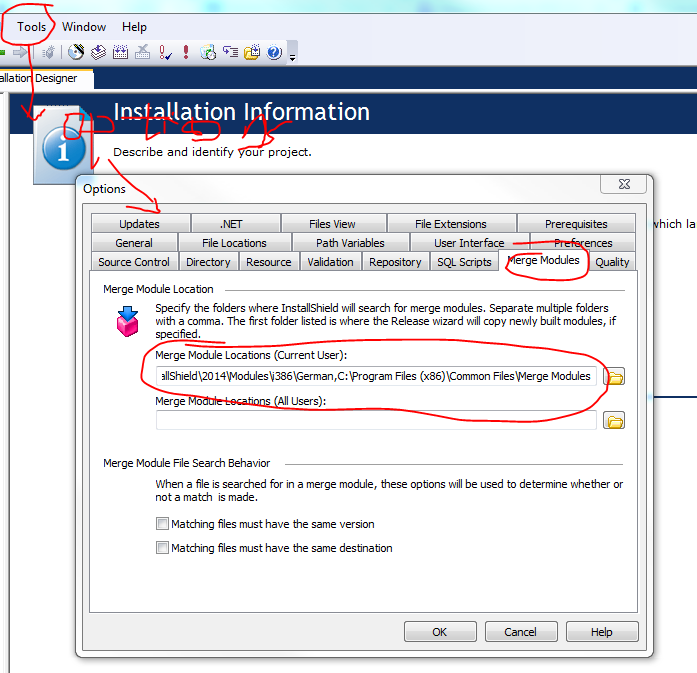
- Copy the needs “merging module” from build server. If installshield cannot find the merging module or the right version, it will popup the error "
Error -4075: File not found. An error occurred merging module <MODULENAME> for feature <FEATURENAME>." please make sure the below items:
search build server merging moule from these folder
Copy the build server module replace to local computer. detail see this link: https://flexeracommunity.force.com/customer/articles/en_US/ERRDOC/Build-Error-4075-Pro-Premier
- Create bat file and run the bat command, please replace the build number if need.
C:\Windows\system32\cmd.exe /s /c ""C:\Windows\Microsoft.NET\Framework\v4.0.30319\MSBuild.exe" Service\***\sp**erf\***.sln /p:Configuration=Release&&"C:\Program Files (x86)\InstallShield\2014\System\IsCmdBld.exe" -r "SINGLE_EXE_IMAGE" -p Service\***\install\***.ism -y "5.0.000.427"&&"C:\Program Files (x86)\InstallShield\2014\System\IsCmdBld.exe" -r "SINGLE_EXE_IMAGE" -p Service\***\install\Walkie-Talkie.ism -y "5.0.000.427"&&"C:\Program Files (x86)\InstallShield\2014\System\IsCmdBld.exe" -r "SINGLE_EXE_IMAGE" -p Service\***\install\Sp***erf.ism -y "5.0.000.427"&&del ***\config.js 2>nul&&"C:\Program Files (x86)\InstallShield\2014\System\IsCmdBld.exe" -r "SINGLE_EXE_IMAGE" -p Service\***\install\FileSe***rver.ism -y "5.0.000.427""

pause
Installshield build all installer in development computer的更多相关文章
- InstallShield Build错误:Internal build error 6041
点击左侧菜单: Media-Release-选择release版本(例如Release1)-Build标签- keey unused directories 改为no(默认为yes)
- InstallShield Build Error -1014: Cannot rename directory <PATH> to <PATH>\folder.Bak.
InstallSheild执行Build结果错误: 错误详细信息: Cannot rename directory <PATH> to <PATH>\folder.Bak. W ...
- Creating Hyperv Agent Installer
Creating Hyperv Agent Installer Skip to end of metadata Created by Anshul Gangwar, last modified ...
- 学习NAnt Build .CS+Solution+MSBuild+SVN+NUnit+NUnitReport
NAnt help:http://nant.sourceforge.net/release/latest/help/tasks/NAntContrib help:http://nantcontrib. ...
- installshield 32位打包和64位打包的注意事项
原文:installshield 32位打包和64位打包的注意事项 32/64位问题要把握几点:1. 明确你的产品是否需要区分32/64位2. 明确你的产品中是否有32/64位的服务注册3. 了解In ...
- web-based installer and executable installer in python 3 ,what is the difference between them?
Welcome to Python! This applies to all programs, not just python: An executable installer has every ...
- 乘风破浪,Java遇见OpenJDK GA(Build By Microsoft),即将晋升为Azure云管理服务默认JVM
什么是Microsoft Build of OpenJDK Java Development Kit (JDK) 是Sun公司(已被Oracle收购)针对Java开发员的软件开发工具包.自从Java推 ...
- How to create Web Deployment Package and install the package
Create Web Deployment Package To configure settings on the Connection tab In the Publish method drop ...
- Android模拟器使用教程
Using the Emulator In this document Overview Android Virtual Devices and the Emulator Starting and S ...
随机推荐
- BOM之history
history是JavaScript中BOM上的一个对象,其中存储了浏览器的历史记录 history存储简单过程 浏览器会将一个窗口中访问的网页进行记录,不管我们通过以下哪种方式改变页面,浏览器都会把 ...
- 常用阻止ajax缓存方法集锦
HTML 通过添加meta标签 <meta http-equiv= "pragma" content= "no-cache"/> (pragma: ...
- Java -- 内部类, 成员内部类,局部内部类,匿名内部类,闭包和回调, 枚举类
1. 成员内部类分为 静态内部类 和 非静态内部类. 非静态内部类 和 外部类的其他成员一样处理, 非静态内部类可以访问外部类的private的属性,而外部类不能访问非静态内部类的属性,需要实例非静 ...
- Codeforces 429B Working out:dp【枚举交点】
题目链接:http://codeforces.com/problemset/problem/429/B 题意: 给你一个n*m的网格,每个格子上有一个数字a[i][j]. 一个人从左上角走到右下角,一 ...
- 详细的.Net并行编程高级教程--Parallel
一直觉得自己对并发了解不够深入,特别是看了<代码整洁之道>觉得自己有必要好好学学并发编程,因为性能也是衡量代码整洁的一大标准.而且在<失控>这本书中也多次提到并发,不管是计算机 ...
- Java_数据交换_dom4j_01_解析xml
1.说明 详细原理以后再研究,先将例子存着 2.代码 2.1 xml内容 <?xml version="1.0" encoding="UTF-8"?> ...
- leetcode 226. Invert Binary Tree(递归)
Invert a binary tree. 4 / \ 2 7 / \ / \ 1 3 6 9 to 4 / \ 7 2 / \ / \ 9 6 3 1 Trivia:This problem was ...
- 在Windows下搭建Android开发环境
随着移动互联网的迅速发展,前端的概念已发生很大的变化,已不仅仅局限在网页端.而Android系统作为智能机市场的老大,作为前端开发工程师, 非常有必要了解和学习.但面对众多学习资料,站在前端开发工程师 ...
- 动作基类 CCAction
CCAction动作基类关系 class CC_DLL CCAction : public CCObject { public: CCAction(void); virtual ~CCAction(v ...
- FFmpeg 基本用法
FFmpeg FFmpeg 基本用法 本课要解决的问题 1.FFmpeg的转码流程是什么? 2.常见的视频格式包含哪些内容吗? 3.如何把这些内容从视频文件中抽取出来? 4.如何从一种格式转换为另一种 ...