
Installshield build all installer in development computer
Step:
- Copy all "SetupPrerequisites" from build server. please make sure below items:
- Installshield version, current is 2014
- SetupPrerequisites is in path: "C:\Program Files (x86)\InstallShield\2014\SetupPrerequisites"
- the build server info: 10.222.**.***; build\administrator@******
- Copy the needs “merging module” from build server. If installshield cannot find the merging module or the right version, it will popup the error "
Error -4075: File not found. An error occurred merging module <MODULENAME> for feature <FEATURENAME>." please make sure the below items:
search build server merging moule from these folder
Copy the build server module replace to local computer. detail see this link: https://flexeracommunity.force.com/customer/articles/en_US/ERRDOC/Build-Error-4075-Pro-Premier
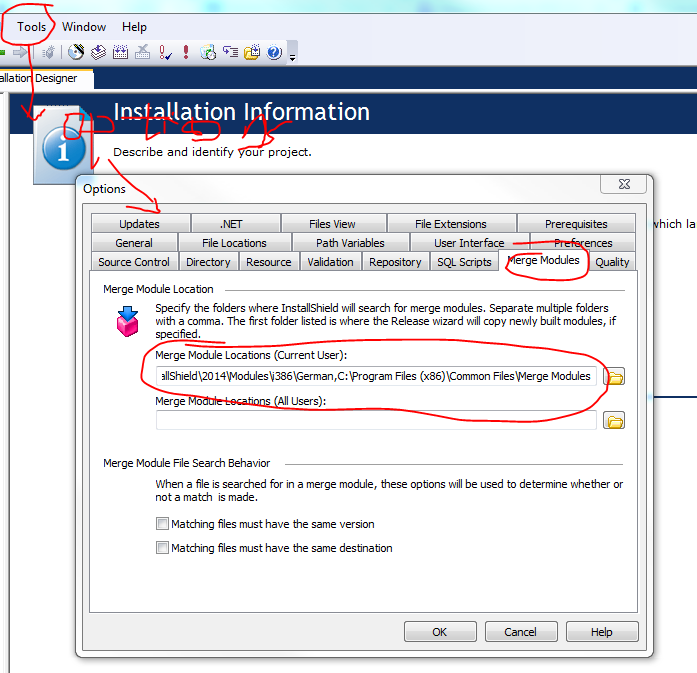
- Create bat file and run the bat command, please replace the build number if need.
C:\Windows\system32\cmd.exe /s /c ""C:\Windows\Microsoft.NET\Framework\v4.0.30319\MSBuild.exe" Service\***\sp**erf\***.sln /p:Configuration=Release&&"C:\Program Files (x86)\InstallShield\2014\System\IsCmdBld.exe" -r "SINGLE_EXE_IMAGE" -p Service\***\install\***.ism -y "5.0.000.427"&&"C:\Program Files (x86)\InstallShield\2014\System\IsCmdBld.exe" -r "SINGLE_EXE_IMAGE" -p Service\***\install\Walkie-Talkie.ism -y "5.0.000.427"&&"C:\Program Files (x86)\InstallShield\2014\System\IsCmdBld.exe" -r "SINGLE_EXE_IMAGE" -p Service\***\install\Sp***erf.ism -y "5.0.000.427"&&del ***\config.js 2>nul&&"C:\Program Files (x86)\InstallShield\2014\System\IsCmdBld.exe" -r "SINGLE_EXE_IMAGE" -p Service\***\install\FileSe***rver.ism -y "5.0.000.427""

pause
Installshield build all installer in development computer的更多相关文章
- InstallShield Build错误:Internal build error 6041
点击左侧菜单: Media-Release-选择release版本(例如Release1)-Build标签- keey unused directories 改为no(默认为yes)
- InstallShield Build Error -1014: Cannot rename directory <PATH> to <PATH>\folder.Bak.
InstallSheild执行Build结果错误: 错误详细信息: Cannot rename directory <PATH> to <PATH>\folder.Bak. W ...
- Creating Hyperv Agent Installer
Creating Hyperv Agent Installer Skip to end of metadata Created by Anshul Gangwar, last modified ...
- 学习NAnt Build .CS+Solution+MSBuild+SVN+NUnit+NUnitReport
NAnt help:http://nant.sourceforge.net/release/latest/help/tasks/NAntContrib help:http://nantcontrib. ...
- installshield 32位打包和64位打包的注意事项
原文:installshield 32位打包和64位打包的注意事项 32/64位问题要把握几点:1. 明确你的产品是否需要区分32/64位2. 明确你的产品中是否有32/64位的服务注册3. 了解In ...
- web-based installer and executable installer in python 3 ,what is the difference between them?
Welcome to Python! This applies to all programs, not just python: An executable installer has every ...
- 乘风破浪,Java遇见OpenJDK GA(Build By Microsoft),即将晋升为Azure云管理服务默认JVM
什么是Microsoft Build of OpenJDK Java Development Kit (JDK) 是Sun公司(已被Oracle收购)针对Java开发员的软件开发工具包.自从Java推 ...
- How to create Web Deployment Package and install the package
Create Web Deployment Package To configure settings on the Connection tab In the Publish method drop ...
- Android模拟器使用教程
Using the Emulator In this document Overview Android Virtual Devices and the Emulator Starting and S ...
随机推荐
- mutation与action
mutation 作用: 更改state的状态 说明: 每个mutation对象都有字符串类型(type)与回调函数,在回调函数内进行状态修改,回调函数的第一个参数为state eg: mutatio ...
- Android进程间通信(IPC)机制Binder简要介绍和学习计划【转】
本文转载自:http://blog.csdn.net/luoshengyang/article/details/6618363 在Android系统中,每一个应用程序都是由一些Activity和Ser ...
- 算法(Algorithms)第4版 练习 1.5.9
不可能.如果是weighted quick-union的话,6的父节点应该是5,而不是5的父节点是6.
- HDU 3954 Level up(多颗线段树+lazy操作)
又是一开始觉得的水题,结果GG了好久的东西... 题意是给你n个英雄,每个英雄开始为1级经验为0,最多可以升到k级并且经验一直叠加,每一级都有一个经验值上限,达到就升级.接着给你两种操作:W li r ...
- AJAX+json+jquery实现预加载瀑布流布局
宽度是一定的高度不定的瀑布流布局 也可以说是无缝拼图 当浏览器滚动到底部时候自动加载图片 加载的图片地址用json 在img.js里 ,还有正在加载动画是用 css3制作的 在ff等支持css3可以显 ...
- BZOJ 1010 [HNOI2008]玩具装箱toy:斜率优化dp
题目链接:http://www.lydsy.com/JudgeOnline/problem.php?id=1010 题意: 有n条线段,长度分别为C[i]. 你需要将所有的线段分成若干组,每组中线段的 ...
- 英语发音规则---Y字母
英语发音规则---Y字母 一.总结 一句话总结: 1.Y字母在单词最前面读发[j]? yes /jes/ [jɛs] n. 是 yard /jɑːd/ [jɑd] n. 院子 yellow /'jel ...
- Android 基础-1.0 按钮4种点击事件
第一种 测试使用 直接xml添加,平时在自己的测试demo中使用比较多. 1.直接在xml里给按钮添加点击事件 android:onClick="btn_click" 2.按住op ...
- svn_学习_01_TortoiseSVN使用教程
二.参考资料 1.TortoiseSVN新人使用指南 2.
- [原]NYOJ-216-A problem is easy
大学生程序代写 /*A problem is easy 时间限制:1000 ms | 内存限制:65535 KB 难度:3 描述 When Teddy was a child , he was a ...