
Mybatis的应用1 Mybatis和logback的应用配置
首先新建一个module, 然后,在pom文件里面添加一些引用的项。
pom.xml
<?xml version="1.0" encoding="UTF-8"?>

<project xmlns="http://maven.apache.org/POM/4.0.0"

         xmlns:xsi="http://www.w3.org/2001/XMLSchema-instance"

         xsi:schemaLocation="http://maven.apache.org/POM/4.0.0 http://maven.apache.org/xsd/maven-4.0.0.xsd">

<parent>

    <artifactId>JavaInterfaceTest</artifactId>

    <groupId>com.peixm.code</groupId>

    <version>1.0-SNAPSHOT</version>

</parent>

<modelVersion>4.0.0</modelVersion>

<artifactId>Chapter11</artifactId>

<dependencies>

    <dependency>

        <groupId>org.springframework.boot</groupId>

        <artifactId>spring-boot-starter-web</artifactId>

    </dependency>

    <dependency>

        <groupId>io.springfox</groupId>

        <artifactId>springfox-swagger-ui</artifactId>

        <version>2.6.1</version>

    </dependency>

    <dependency>

        <groupId>io.springfox</groupId>

        <artifactId>springfox-swagger2</artifactId>

        <version>2.6.1</version>

    </dependency>

    <dependency>

        <groupId>org.projectlombok</groupId>

        <artifactId>lombok</artifactId>

        <version>1.16.14</version>

    </dependency>

    <dependency>

        <groupId>com.alibaba</groupId>

        <artifactId>fastjson</artifactId>

        <version>1.2.38</version>

    </dependency>

    <dependency>

        <groupId>mysql</groupId>

        <artifactId>mysql-connector-java</artifactId>

    </dependency>

    <dependency>

        <groupId>org.mybatis.spring.boot</groupId>

        <artifactId>mybatis-spring-boot-starter</artifactId>

        <version>1.3.0</version>

    </dependency>

</dependencies>

</project>
在resourses下面新建一个application.yml文件
application.yml
server:

  port: 8888   # 配置端口号

logging:

  path: logs   #在同级目录下生成logs文件夹

  file: mylog.log  # 生成文件

spring:   #spring里面配置mysql地址之类的

  application:

    name: myTest   #仅仅是application名字

  datasource:  #mysql的配置

    driver-class-name: com.mysql.jdbc.Driver

    url: jdbc:mysql://127.0.0.1:3306/course    #本地的地址➕端口号➕数据库名称

    username: root   #数据库用户名和密码

    password: 123456Aa

mybatis:

  type-alises-package: com.course.model  #javabean,做映射的

  mapper-locations:

    - mapper/*    #文件夹mapper  加载下面的所有xml文件
logback.xml文件
<?xml version="1.0" encoding="UTF-8"?>

<configuration>

    <include resource="org/springframework/boot/logging/logback/defaults.xml"/>

    <property name="FILE_LOG_PATTERN" value="%d{yyyy-MM-dd HH:mm:ss.SSS} [%thread] %-5level %logger{80} - %msg%n"/>

    <property name="LOG_PATH" value="${LOG_PATH:-${LOG_TEMP:-${java.io.tmpdir:-/tmp}}}"/>

    <appender name="FILE" class="ch.qos.logback.core.rolling.RollingFileAppender">

        <file>${LOG_PATH}/${LOG_FILE}</file>

        <rollingPolicy class="ch.qos.logback.core.rolling.TimeBasedRollingPolicy">

            <fileNamePattern>${LOG_PATH}/${LOG_FILE}.%d{yyyy-MM-dd}</fileNamePattern>

        </rollingPolicy>

        <encoder charset="UTF-8">

            <pattern>${FILE_LOG_PATTERN}</pattern>

        </encoder>

    </appender>

    <appender name="STDOUT" class="ch.qos.logback.core.ConsoleAppender">

        <encoder>

            <pattern>${FILE_LOG_PATTERN}</pattern>

        </encoder>

    </appender>

    <appender name="CRAWLER_LOG" class="ch.qos.logback.core.rolling.RollingFileAppender">

        <file>${LOG_PATH}/event.log</file>

        <rollingPolicy class="ch.qos.logback.core.rolling.TimeBasedRollingPolicy">

            <fileNamePattern>${LOG_PATH}/event.%d{yyyy-MM-dd}.log</fileNamePattern>

            <maxHistory>30</maxHistory>

        </rollingPolicy>

        <encoder class="ch.qos.logback.classic.encoder.PatternLayoutEncoder">

            <pattern>%msg%n</pattern>

        </encoder>

    </appender>

    <logger name="com.business.intelligence.util.CrawlerLogger" level="INFO" additivity="false">

        <appender-ref ref="CRAWLER_LOG"/>

    </logger>

    <root level="INFO">   <!--记录日志的级别-->

        <appender-ref ref="STDOUT"/>

        <appender-ref ref="FILE"/>

    </root>

</configuration>
mybatis-config.xml
<?xml version="1.0" encoding="UTF-8" ?>

<!--

       Copyright 2015-2016 the original author or authors.

       Licensed under the Apache License, Version 2.0 (the "License");

       you may not use this file except in compliance with the License.

       You may obtain a copy of the License at

          http://www.apache.org/licenses/LICENSE-2.0

       Unless required by applicable law or agreed to in writing, software

       distributed under the License is distributed on an "AS IS" BASIS,

       WITHOUT WARRANTIES OR CONDITIONS OF ANY KIND, either express or implied.

       See the License for the specific language governing permissions and

       limitations under the License.

-->

<!DOCTYPE configuration

        PUBLIC "-//mybatis.org//DTD Config 3.0//EN"

        "http://mybatis.org/dtd/mybatis-3-config.dtd">  <!--遵照那个模版-->

<configuration>

    <typeAliases>

        <package name="com.course.model"/>   <!--映射到那个包里面-->

    </typeAliases>

    <mappers>

        <mapper resource="mapper/mysql.xml"/>   <!--mapper可以是多个   一般都是mapper/***.xml-->

    </mappers>

</configuration>
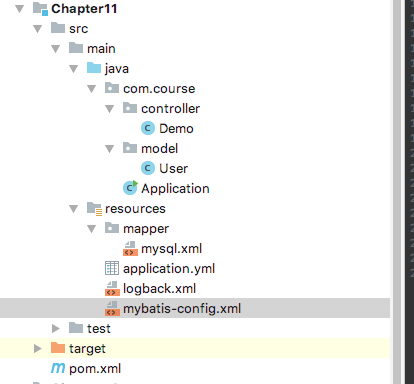
以下是目录结构
Mybatis的应用1 Mybatis和logback的应用配置的更多相关文章
- 使用IDEA配置Maven + SpringMVC + Mybatis 【一步一步踩坑详细配置完成】
PS:初学,想使用Maven配置一个SpringMVC的开发环境,照着网上的各种图文解说,配置了好久都没成功,有些写的不够详细,有些只有写一半,走了不少弯弯绕绕,踩了不少的坑,此文将正确配置成功的步骤 ...
- MyBatis学习总结(七)——Mybatis缓存(转载)
孤傲苍狼 只为成功找方法,不为失败找借口! MyBatis学习总结(七)--Mybatis缓存 一.MyBatis缓存介绍 正如大多数持久层框架一样,MyBatis 同样提供了一级缓存和二级缓存的 ...
- 【转】MyBatis学习总结(七)——Mybatis缓存
[转]MyBatis学习总结(七)——Mybatis缓存 一.MyBatis缓存介绍 正如大多数持久层框架一样,MyBatis 同样提供了一级缓存和二级缓存的支持 一级缓存: 基于PerpetualC ...
- 【转】MyBatis学习总结(一)——MyBatis快速入门
[转]MyBatis学习总结(一)——MyBatis快速入门 一.Mybatis介绍 MyBatis是一个支持普通SQL查询,存储过程和高级映射的优秀持久层框架.MyBatis消除了几乎所有的JDBC ...
- 使用Mybatis Generator自动生成Mybatis相关代码
本文将简要介绍怎样利用Mybatis Generator自动生成Mybatis的相关代码: 一.构建一个环境: 1. 首先创建一个表: CREATE TABLE pet (name VARCHAR(2 ...
- Mybatis特殊字符处理,Mybatis中xml文件特殊字符的处理
Mybatis特殊字符处理,Mybatis中xml文件特殊字符的处理 >>>>>>>>>>>>>>>>& ...
- MyBatis Generator自动生成MyBatis的映射代码
MyBatis Generator大大简化了MyBatis的数据库的代码编写,有了一个配置文件,就可以直接根据表映射成实体类.Dao类和xml映射.资源地址:MyBatis项目地址:http://my ...
- mybatis系列笔记(1)---mybatis入门
mybatis入门 MyBatis是什么? MyBatis 本是apache的一个开源项目iBatis, 2010年这个项目由apache software foundation 迁移到了goog ...
- springmvc 项目完整示例04 整合mybatis mybatis所需要的jar包 mybatis配置文件 sql语句 mybatis应用
百度百科: MyBatis 本是apache的一个开源项目iBatis, 2010年这个项目由apache software foundation 迁移到了google code,并且改名为MyBat ...
- Mybatis(六) Spring整合mybatis
心莫浮躁~踏踏实实走,一步一个脚印,就算不学习,玩,能干嘛呢?人生就是那样,要找点有意思,打发时间的事情来做,而钻研技术,动脑动手的过程,还是比其他工作更有意思些~ so,努力啥的都是强迫自己做自以为 ...
随机推荐
- JHipster技术栈定制 - JHipster Registry消息总线配置
本文说明了如何定制化JHipster-Registry,增加消息总线功能. 实现的效果就是修改配置中心的文件后,通过消息队列主动推送给微服务而无需重启微服务,实现配置内容热加载. 1 整体规划 1.1 ...
- JHipster技术栈定制 - 基于UAA的微服务之间安全调用
本文通过代码实例演示如何通过UAA实现微服务之间的安全调用. uaa: 身份认证服务,同时也作为被调用的资源服务.服务端口9999. microservice1: 调用uaa的消费者服务,服务端口80 ...
- EF ORM
//新增 UserInfo userInfo = new UserInfo(); userInfo.UserName = "YANG"; userInfo.UserPass = & ...
- c/c++ linux 进程 fork wait函数
linux 进程 fork wait函数 fork:创建子进程 wait:父进程等待子进程结束,并销毁子进程,如果父进程不调用wait函数,子进程就会一直留在linux内核中,变成了僵尸进程. for ...
- Github上html页面(包括CSS样式和JS效果)如何显示出来
在看Github上项目时,发现有的html页面效果能很好的展现出来,而有的则不能.对这个问题很好奇,因此研究了一下,最终做到了将页面展示出来的目的.下面以我的Github的开源项目bootstrap- ...
- 5.5Python数据处理篇之Sympy系列(五)---解方程
目录 目录 前言 (一)求解多元一次方程-solve() 1.说明: 2.源代码: 3.输出: (二)解线性方程组-linsolve() 1.说明: 2.源代码: 3.输出: (三)解非线性方程组-n ...
- 本机不安装Oracle客户端,使用PL/SQL Developer和 Instant Client 工具包连接oracle 11g远程数据库
一.先到Oracle网站下载Instant Client 下载地址:http://www.oracle.com/technetwork/cn/database/features/instant-cli ...
- 阿里巴巴JAVA开发手册
Java编程规约 (一)命名风格 1. [强制] 代码中的命名均不能以下划线或美元符号开始,也不能以下划线或美元符号结束. 反例: _name / __name / $O ...
- 云数据库PolarDB(一)
一.出现的背景及PolarDB简介 阿里云,中国第一家拥有完整云计算能力的企业. 2015年,在计算界的奥运会Sort Benchmark中,阿里云计算100TB数据排序只用了不到7分钟,把Apach ...
- 【Linux基础】mount报错:mount.nfs: Remote I/O error
问题描述:mount 报错:mount.nfs: Remote I/O error 挂载时需要指明版本,由于NFS服务器有多个版本,V2.V3.V4.而且各版本同时运行,因此挂载时需要说明版本号. 由 ...