
Mybatis(六) Spring整合mybatis
心莫浮躁~踏踏实实走,一步一个脚印,就算不学习,玩,能干嘛呢?人生就是那样,要找点有意思,打发时间的事情来做,而钻研技术,动脑动手的过程,还是比其他工作更有意思些~ so,努力啥的都是强迫自己做自以为努力正确的事情,想干嘛就干嘛把!
--WZY
一、Spring整合mybatis思路
非常简单,这里先回顾一下mybatis最基础的根基,
mybatis,有两个配置文件
全局配置文件SqlMapConfig.xml(配置数据源,全局变量,加载映射文件等东西)
映射文件xxxMapper.xml,用来对输入参数输出参数,数据库语句做配置的。
mybatis配置好之后的使用步骤
1、获取sqlMapConfig.xml的位置然后进行加载
2、通过sqlMapConfig.xml中的内容创建出sqlsessionFactory对象
3、然后通过sqlsessionFactory对象创建出sqlsession对象
4、有了sqlsession对象就可以进行相应的操作了。
集成思路
有了上面的一些知识回顾,那么就有思路让spring继承mabatis了。
1、让spring来管理数据源信息,sqlMapConfig.xml中就不需要加载数据源了。交给spring管理
2、让spring通过单例方式管理SqlSessionFactory,只需要一个SqlSessionFactory帮我们生成sqlsession即可。也就是需要sqlsession对象就让sqlsessionfactory生成。所以是单例方式。
3、让spring创建sqlsession bean。也就是通过SqlSessionFactory创建SqlSession,
4、如果是使用mapper代理开发的方式,那么持久层的mapper都需要由spring进行管理,spring和mybatis整合生成mapper代理对象。
二、工程搭建
2.1、创建java工程
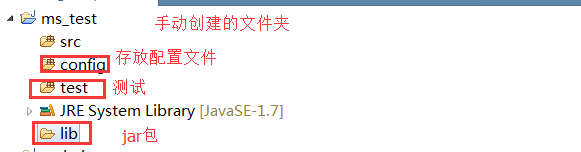
2.2、添加jar包
Mybatis的核心和依赖包
数据库驱动包
spring的包
junit包
spring和mybatis整合包
dbcp连接池
2.3、
2.4、添加SqlMapConfig.xml
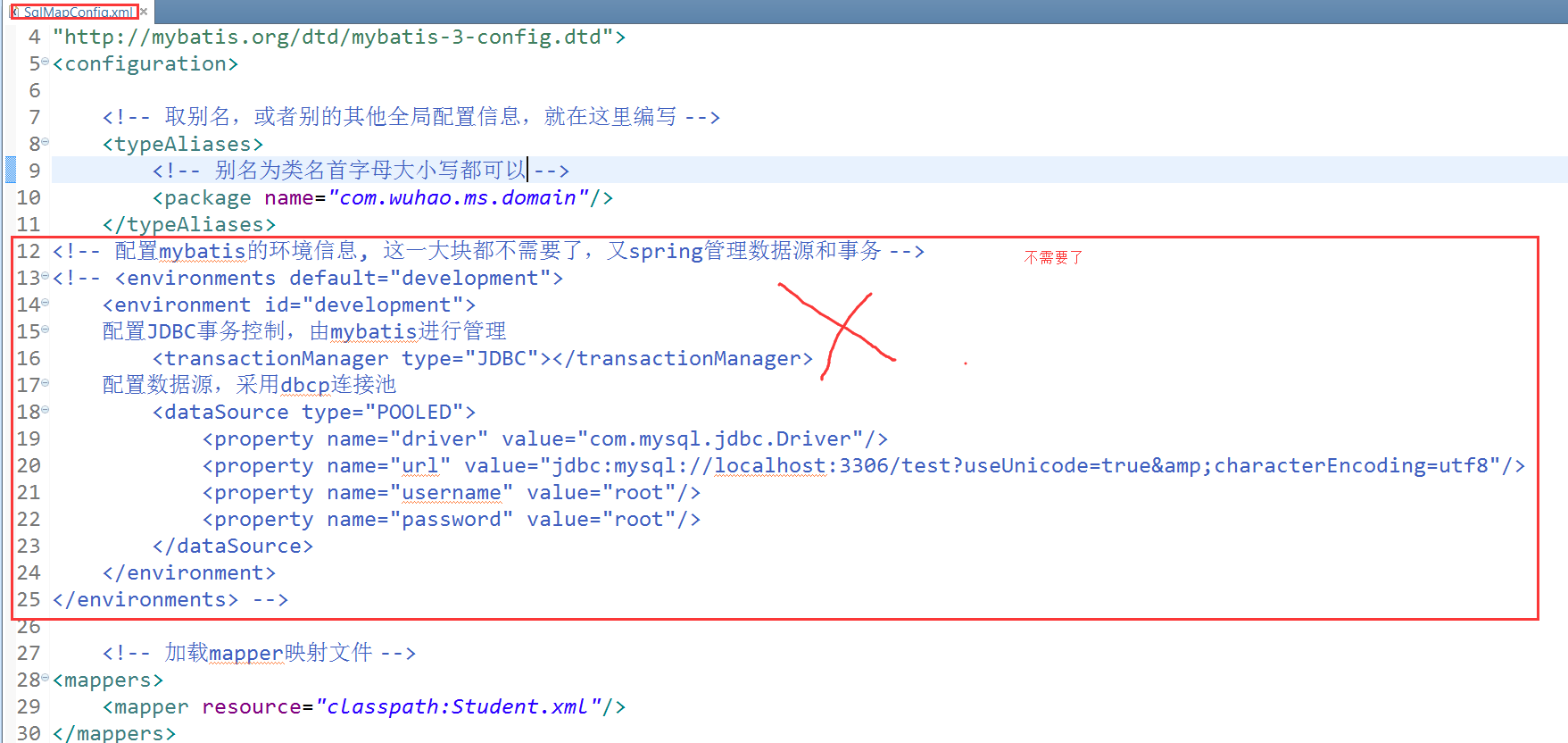
<?xml version="1.0" encoding="UTF-8" ?>

<!DOCTYPE configuration

PUBLIC "-//mybatis.org//DTD Config 3.0//EN"

"http://mybatis.org/dtd/mybatis-3-config.dtd">

<configuration>

    <!-- 取别名,或者别的其他全局配置信息,就在这里编写 -->

    <typeAliases>

        <!-- 别名为类名首字母大小写都可以 -->

        <package name="com.wuhao.ms.domain"/>

    </typeAliases>

    <!-- 加载mapper映射文件 -->

<mappers>

    <mapper resource="classpath:Student.xml"/>

</mappers>

</configuration>
sqlMapConfig.xml
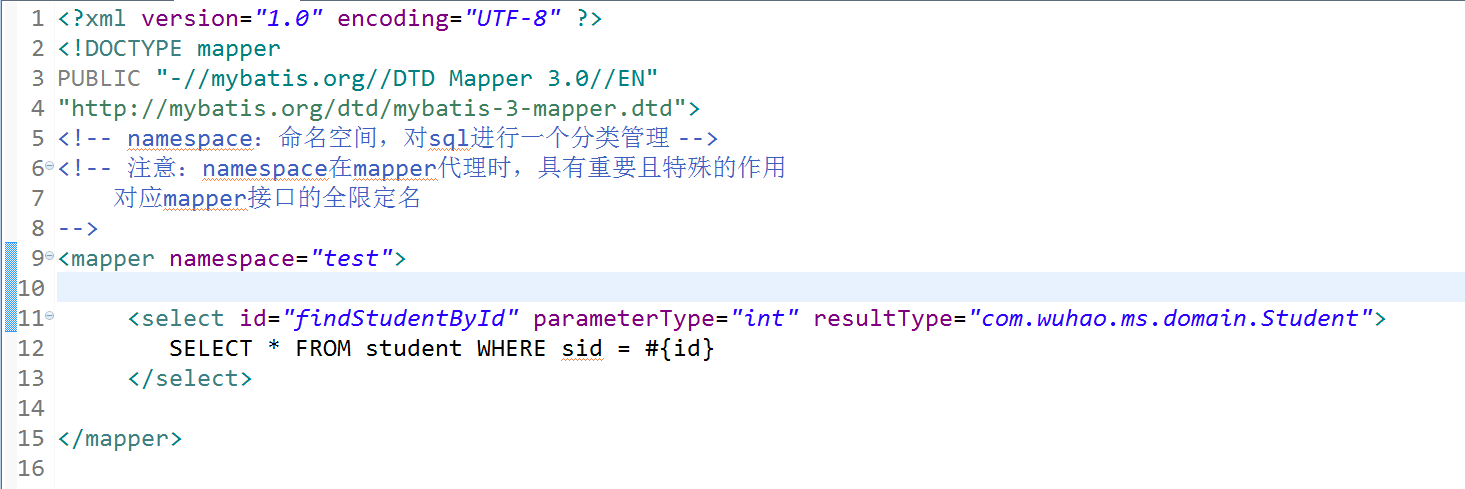
2.5、映射配置文件Student.xml
<?xml version="1.0" encoding="UTF-8" ?>

<!DOCTYPE mapper

PUBLIC "-//mybatis.org//DTD Mapper 3.0//EN"

"http://mybatis.org/dtd/mybatis-3-mapper.dtd">

<!-- namespace:命名空间,对sql进行一个分类管理 -->

<!-- 注意:namespace在mapper代理时,具有重要且特殊的作用

    对应mapper接口的全限定名

-->

<mapper namespace="test">

     <select id="findStudentById" parameterType="int" resultType="com.wuhao.ms.domain.Student">

         SELECT * FROM student WHERE sid = #{id}

     </select>

</mapper>
Student.xml
2.6、整合spring的配置文件applicationContext.xml

<beans xmlns="http://www.springframework.org/schema/beans"

    xmlns:xsi="http://www.w3.org/2001/XMLSchema-instance" xmlns:mvc="http://www.springframework.org/schema/mvc"

    xmlns:context="http://www.springframework.org/schema/context"

    xmlns:aop="http://www.springframework.org/schema/aop" xmlns:tx="http://www.springframework.org/schema/tx"

    xsi:schemaLocation="http://www.springframework.org/schema/beans

        http://www.springframework.org/schema/beans/spring-beans-3.2.xsd

        http://www.springframework.org/schema/mvc

        http://www.springframework.org/schema/mvc/spring-mvc-3.2.xsd

        http://www.springframework.org/schema/context

        http://www.springframework.org/schema/context/spring-context-3.2.xsd

        http://www.springframework.org/schema/aop

        http://www.springframework.org/schema/aop/spring-aop-3.2.xsd

        http://www.springframework.org/schema/tx

        http://www.springframework.org/schema/tx/spring-tx-3.2.xsd ">

    <!-- 引用java配置文件 -->

    <context:property-placeholder location="db.properties" />

    <!-- 配置数据源 -->

    <bean id="dataSource" class="org.apache.commons.dbcp.BasicDataSource">

        <property name="driverClassName" value="${db.driver}" />

        <property name="url" value="${db.url}" />

        <property name="username" value="${db.username}" />

        <property name="password" value="${db.password}" />

        <property name="maxActive" value="10" />

        <property name="maxIdle" value="5" />

    </bean>

    <!-- 配置SqlSessionFactory -->

    <bean id="sqlSessionFactory" class="org.mybatis.spring.SqlSessionFactoryBean">

        <!-- 指定mybatis的全局配置文件的路径 -->

        <property name="configLocation" value="SqlMapConfig.xml"></property>

        <!-- 数据源 -->

        <property name="dataSource" ref="dataSource"></property>

    </bean>

</beans>
applicationContext.xml
2.7、db.properties

db.driver=com.mysql.jdbc.Driver

db.url=jdbc:mysql://localhost:3306/test?useUnicode=true&characterEncoding=utf8

db.username=root

db.password=root
db.properties
2.8、总观,就编写了四个配置文件,和一个javabean

三、开发原始dao
上面是一个通用的配置,我们在使用mybatis时,有两个模式,一种就是原始dao的方式,一种就是使用mapper代理的方式,这里就介绍原始dao是如何集成spring的
StudengDao:接口

StudentDaoImpl:实现类

使用原始dao开发的缺点就是只能通过selectOne或者selectList等操作,而不是直接调用映射配置文件中的方法,不能一目了然。
spring中配置StudentDao

很多人这里会有疑问,觉得在spring中配置了StudengDao这个bean,但是我们根本没用在StudengDaoImpl中用set方法让其自动注入呀?原因就在StudengDaoImpl中继承了sqlSessionDaoSupport这个类,这个类帮我们做了,所以,我们直接通过this.getSqlSession()获取对象即可。
测试:

四、mapper方式开发
编写mapper接口,StudentMapper.java

编写mapper映射文件 StudengMapper.xml,注意两个要放在一起。名称要相同
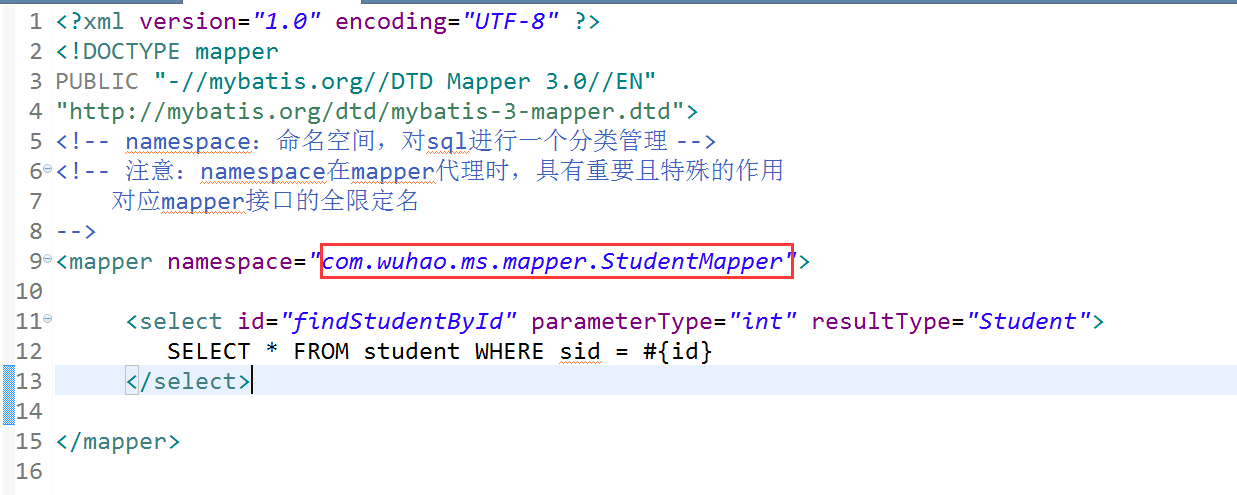
spring中生成mapper代理对象
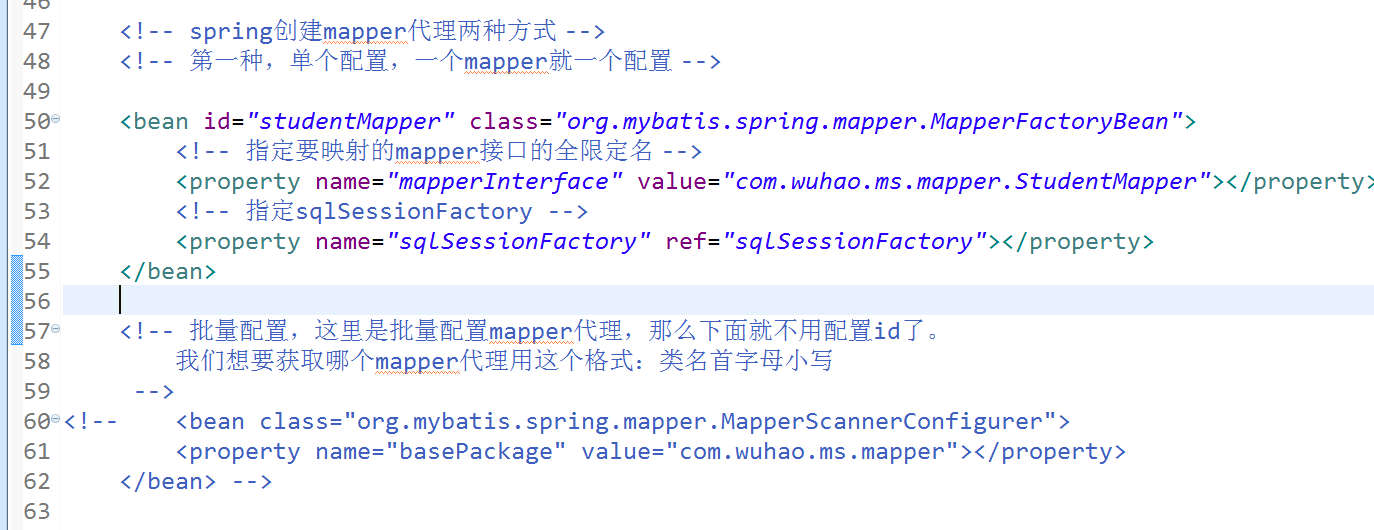
    <!-- spring创建mapper代理两种方式 -->

    <!-- 第一种,单个配置,一个mapper就一个配置 -->

    <bean id="studentMapper" class="org.mybatis.spring.mapper.MapperFactoryBean">

        <!-- 指定要映射的mapper接口的全限定名 -->

        <property name="mapperInterface" value="com.wuhao.ms.mapper.StudentMapper"></property>

        <!-- 指定sqlSessionFactory -->

        <property name="sqlSessionFactory" ref="sqlSessionFactory"></property>

    </bean>

    <!-- 批量配置,这里是批量配置mapper代理,那么下面就不用配置id了。

        我们想要获取哪个mapper代理用这个格式:类名首字母小写

     -->

<!--     <bean class="org.mybatis.spring.mapper.MapperScannerConfigurer">

        <property name="basePackage" value="com.wuhao.ms.mapper"></property>

    </bean> -->
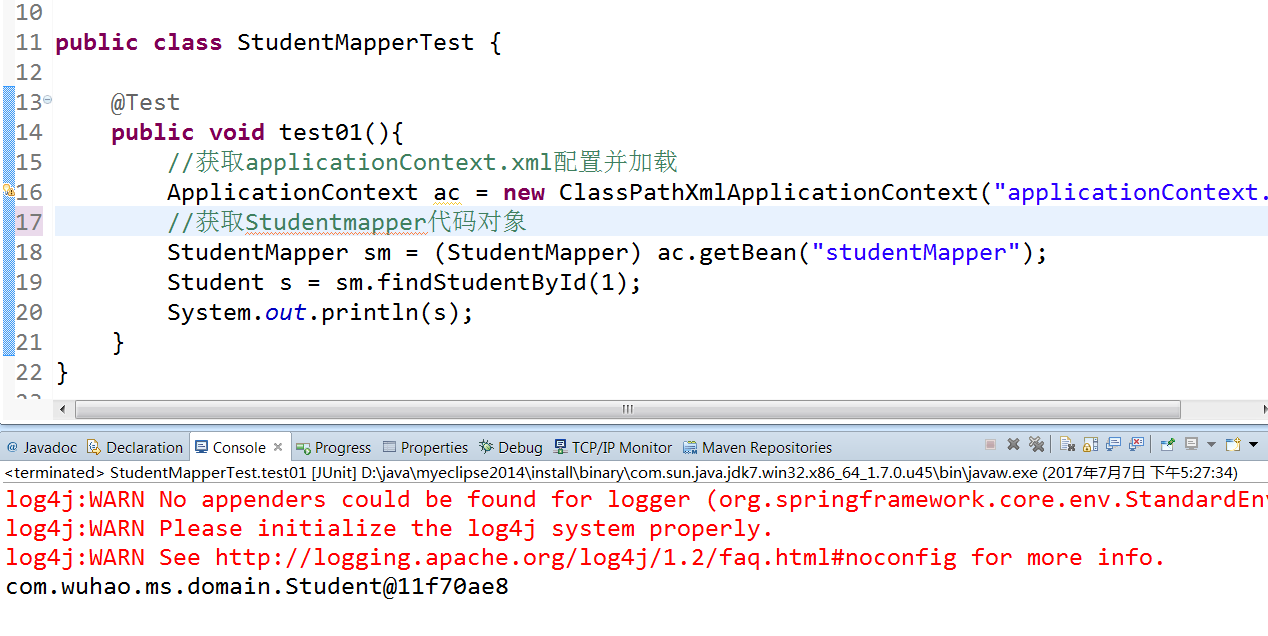
测试:
五、总结
就这样结束了,spring集成Mybatis,很简单,有什么对象都由spring来创建即可。注意原始dao和mapper这两种开发方式的不同。结果都市一样的,方式不同而已。这个在第一节讲Mybatis就已经讲解过了,这里不在陈述,下一章节讲解一下Mybatis的逆向工程
Mybatis(六) Spring整合mybatis的更多相关文章
- MyBatis - 6.Spring整合MyBatis
1.查看不同MyBatis版本整合Spring时使用的适配包: http://www.mybatis.org/spring/ 2.下载整合适配包 https://github.com/mybatis/ ...
- Mybatis和Spring整合&逆向工程
Mybatis和Spring整合&逆向工程Mybatis和Spring整合mybatis整合Spring的思路目的就是将在SqlMapConfig.xml中的配置移植到Spring的appli ...
- spring基础:什么是框架,框架优势,spring优势,耦合内聚,什么是Ioc,IOC配置,set注入,第三方资源配置,综合案例spring整合mybatis实现
知识点梳理 课堂讲义 1)Spring简介 1.1)什么是框架 源自于建筑学,隶属土木工程,后发展到软件工程领域 软件工程中框架的特点: 经过验证 具有一定功能 半成品 1.2)框架的优势 提高开发效 ...
- Spring学习总结(六)——Spring整合MyBatis完整示例
为了梳理前面学习的内容<Spring整合MyBatis(Maven+MySQL)一>与<Spring整合MyBatis(Maven+MySQL)二>,做一个完整的示例完成一个简 ...
- Mybatis学习(六)————— Spring整合mybatis
一.Spring整合mybatis思路 非常简单,这里先回顾一下mybatis最基础的根基, mybatis,有两个配置文件 全局配置文件SqlMapConfig.xml(配置数据源,全局变量,加载映 ...
- spring学习 六 spring与mybatis整合
在mybatis学习中有两种配置文件 :全局配置文件,映射配置文件.mybatis和spring整合,其实就是把mybatis中的全局配置文件的配置内容都变成一个spring容器的一个bean,让sp ...
- MyBatis 与 Spring 整合
MyBatis-Spring 项目 目前大部分的 Java 互联网项目,都是用 Spring MVC + Spring + MyBatis 搭建平台的. 使用 Spring IoC 可以有效的管理各类 ...
- 从0开始整合SSM框架--2.spring整合mybatis
依赖:<properties> <!-- spring版本号 --> <spring.version>4.1.3.RELEASE</spring.versio ...
- MyBatis学习(四)MyBatis和Spring整合
MyBatis和Spring整合 思路 1.让spring管理SqlSessionFactory 2.让spring管理mapper对象和dao. 使用spring和mybatis整合开发mapper ...
随机推荐
- 【js jQuery】map集合 循环迭代取值---以及 map、json对象、list、array循环迭代的方法和区别
后台给前台传来一个map @ResponseBody @RequestMapping(value = "getSys") public Map<Long,String> ...
- iBtais 多重嵌套循环
iBatis支持集合循环, 但是如何做到双重循环, 请见下例子 例子描述: 需要去三张结构相同的表中获取信息, 需要将信息拼合去重后返回 入参数据类型: Map<String,Object> ...
- 使用 vs code 搭建vue项目(一)
1. 配置环境 1.1. 安装nodejs,下载地址:https://nodejs.org/en/download/. 步骤-..安装完成后,输入node-v,提示如下,则安装完成. 1.2. 安装v ...
- spring aop 的代理工厂
参考 https://docs.spring.io/spring/docs/4.3.11.RELEASE/spring-framework-reference/htmlsingle/#aop-unde ...
- Springfox与swagger的整合使用
一.前言 让我们先理一下springfox与swagger的关系. swagger是一个流行的API开发框架,这个框架以“开放API声明”(OpenAPI Specification,OAS)为基础, ...
- 03 of learning python
01 input输入的是str类型 如果输入的是数字的话,要记得强制转换一下! 02 isdigit() 这个方法是用来检测字符串是否全部由数字组成 str.isdigit() 如果字符串只包含数字则 ...
- Java中基本数据和包装类的比较
public class AutoBoxTest { public static void main(String[] args) { Integer a1 = 127; Integer a2 = 1 ...
- 架构(二)Maven安装以及Nexus配置
一 Maven安装配置 1.1 下载 http://mirrors.tuna.tsinghua.edu.cn/apache/maven/maven-3/3.5.4/binaries/apache-ma ...
- [转] Snapshotting with libvirt for qcow2 images
http://kashyapc.com/2011/10/04/snapshotting-with-libvirt-for-qcow2-images/ Libvirt 0.9.6 was recentl ...
- python jieba库的基本使用
第一步:先安装jieba库 输入命令:pip install jieba jieba库常用函数: jieba库分词的三种模式: 1.精准模式:把文本精准地分开,不存在冗余 2.全模式:把文中所有可能的 ...