
使用ML.NET实现情感分析[新手篇]后补
在《使用ML.NET实现情感分析[新手篇]》完成后,有热心的朋友建议说,为何例子不用中文的呢,其实大家是需要知道怎么预处理中文的数据集的。想想确实有道理,于是略微调整一些代码,权作示范。
首先,我们需要一个好用的分词库,所以使用NuGet添加对JiebaNet.Analyser包的引用,这是一个支持.NET Core的版本。

然后,训练和验证用的数据集找一些使用中文的内容,并且确认有正确的标注,当然是要越多越好。内容类似如下:
最差的是三文鱼生鱼片。 0

我在这里吃了一顿非常可口的早餐。 1

这是拉斯维加斯最好的食物之一。 1

但即使是天才也无法挽救这一点。 0

我认为汤姆汉克斯是一位出色的演员。 1

...
增加一个切词的函数:
public static void Segment(string source, string result)

{

    var segmenter = new JiebaSegmenter();

    using (var reader = new StreamReader(source))

    {

        using (var writer = new StreamWriter(result))

        {

            while (true)

            {

                var line = reader.ReadLine();

                if (string.IsNullOrWhiteSpace(line))

                    break;

                var parts = line.Split(' ', StringSplitOptions.RemoveEmptyEntries);

                if (parts.Length != ) continue;

                var segments = segmenter.Cut(parts[]);

                writer.WriteLine("{0}\t{1}", string.Join(" ", segments), parts[]);

            }

        }

    }

}
原有的文件路径要的调整为:
const string _dataPath = @".\data\sentiment labelled sentences\imdb_labelled.txt";

const string _testDataPath = @".\data\sentiment labelled sentences\yelp_labelled.txt";

const string _dataTrainPath = @".\data\sentiment labelled sentences\imdb_labelled_result.txt";

const string _testTargetPath = @".\data\sentiment labelled sentences\yelp_labelled_result.txt";
在Main函数的地方增加调用:
Segment(_dataPath, _dataTrainPath);

Segment(_testDataPath, _testTargetPath);
预测用的数据修改为:
IEnumerable<SentimentData> sentiments = new[]

{

    new SentimentData

    {

        SentimentText = "今天的任务并不轻松",

        Sentiment =

    },

    new SentimentData

    {

        SentimentText = "我非常想见到你",

        Sentiment =

    },

    new SentimentData

    {

        SentimentText = "实在是我没有看清楚",

        Sentiment =

    }

};
一切就绪,运行结果如下:
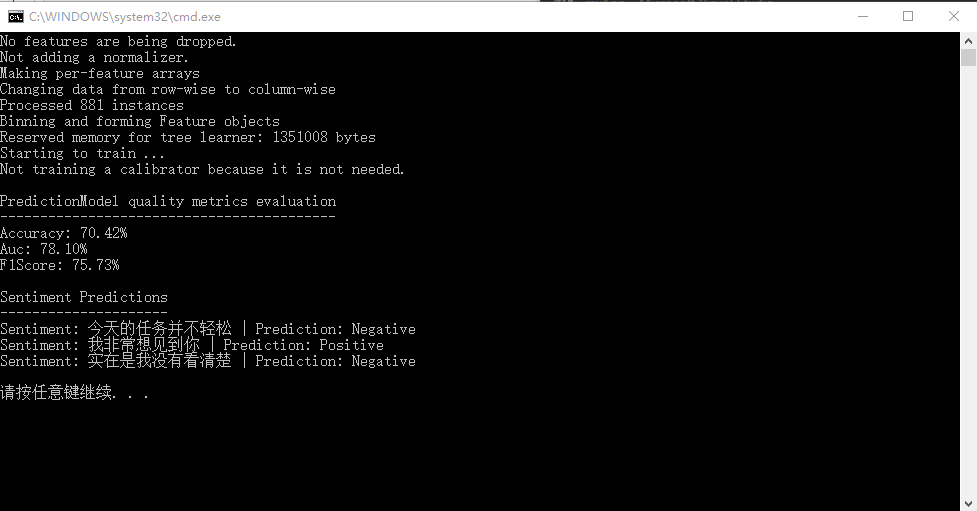
看上去也不坏对么? :)
不久前也看到.NET Blog发了一篇关于ML.NET的文章《Introducing ML.NET: Cross-platform, Proven and Open Source Machine Learning Framework》,我重点摘一下关于路线图方向的内容。
The Road Ahead
There are many capabilities we aspire to add to ML.NET, but we would love to understand what will best fit your needs. The current areas we are exploring are:
- Additional ML Tasks and Scenarios
- Deep Learning with TensorFlow & CNTK
- ONNX support
- Scale-out on Azure
- Better GUI to simplify ML tasks
- Integration with VS Tools for AI
- Language Innovation for .NET
可以看到,随着ONNX的支持,更多的机器学习框架如:TensorFlow、CNTK,甚至PyTorch都能共享模型了,加上不断新增的场景支持,ML.NET将越来越实用,对已有其他语言开发的机器学习服务也能平滑地过渡到.NET Core来集成,值得期待!
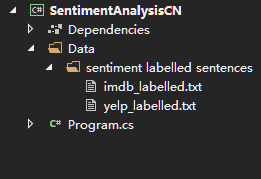
按惯例最后放出项目结构和完整的代码。
using System;

using Microsoft.ML.Models;

using Microsoft.ML.Runtime;

using Microsoft.ML.Runtime.Api;

using Microsoft.ML.Trainers;

using Microsoft.ML.Transforms;

using System.Collections.Generic;

using System.Linq;

using Microsoft.ML;

using JiebaNet.Segmenter;

using System.IO;

namespace SentimentAnalysis

{

    class Program

    {

        const string _dataPath = @".\data\sentiment labelled sentences\imdb_labelled.txt";

        const string _testDataPath = @".\data\sentiment labelled sentences\yelp_labelled.txt";

        const string _dataTrainPath = @".\data\sentiment labelled sentences\imdb_labelled_result.txt";

        const string _testTargetPath = @".\data\sentiment labelled sentences\yelp_labelled_result.txt";

        public class SentimentData

        {

            [Column(ordinal: "")]

            public string SentimentText;

            [Column(ordinal: "", name: "Label")]

            public float Sentiment;

        }

        public class SentimentPrediction

        {

            [ColumnName("PredictedLabel")]

            public bool Sentiment;

        }

        public static PredictionModel<SentimentData, SentimentPrediction> Train()

        {

            var pipeline = new LearningPipeline();

            pipeline.Add(new TextLoader<SentimentData>(_dataTrainPath, useHeader: false, separator: "tab"));

            pipeline.Add(new TextFeaturizer("Features", "SentimentText"));

            var featureSelector = new FeatureSelectorByCount() { Column = new[] { "Features" } };

            pipeline.Add(featureSelector);

            pipeline.Add(new FastTreeBinaryClassifier() { NumLeaves = , NumTrees = , MinDocumentsInLeafs =  });

            PredictionModel<SentimentData, SentimentPrediction> model = pipeline.Train<SentimentData, SentimentPrediction>();

            return model;

        }

        public static void Evaluate(PredictionModel<SentimentData, SentimentPrediction> model)

        {

            var testData = new TextLoader<SentimentData>(_testTargetPath, useHeader: false, separator: "tab");

            var evaluator = new BinaryClassificationEvaluator();

            BinaryClassificationMetrics metrics = evaluator.Evaluate(model, testData);

            Console.WriteLine();

            Console.WriteLine("PredictionModel quality metrics evaluation");

            Console.WriteLine("------------------------------------------");

            Console.WriteLine($"Accuracy: {metrics.Accuracy:P2}");

            Console.WriteLine($"Auc: {metrics.Auc:P2}");

            Console.WriteLine($"F1Score: {metrics.F1Score:P2}");

        }

        public static void Predict(PredictionModel<SentimentData, SentimentPrediction> model)

        {

            IEnumerable<SentimentData> sentiments = new[]

            {

                new SentimentData

                {

                    SentimentText = "今天的任务并不轻松",

                    Sentiment =

                },

                new SentimentData

                {

                    SentimentText = "我非常想见到你",

                    Sentiment =

                },

                new SentimentData

                {

                    SentimentText = "实在是我没有看清楚",

                    Sentiment =

                }

            };

            var segmenter = new JiebaSegmenter();

            foreach (var item in sentiments)

            {

                item.SentimentText = string.Join(" ", segmenter.Cut(item.SentimentText));

            }

            IEnumerable<SentimentPrediction> predictions = model.Predict(sentiments);

            Console.WriteLine();

            Console.WriteLine("Sentiment Predictions");

            Console.WriteLine("---------------------");

            var sentimentsAndPredictions = sentiments.Zip(predictions, (sentiment, prediction) => (sentiment, prediction));

            foreach (var item in sentimentsAndPredictions)

            {

                Console.WriteLine($"Sentiment: {item.sentiment.SentimentText.Replace(" ", string.Empty)} | Prediction: {(item.prediction.Sentiment ? "Positive" : "Negative")}");

            }

            Console.WriteLine();

        }

        public static void Segment(string source, string result)

        {

            var segmenter = new JiebaSegmenter();

            using (var reader = new StreamReader(source))

            {

                using (var writer = new StreamWriter(result))

                {

                    while (true)

                    {

                        var line = reader.ReadLine();

                        if (string.IsNullOrWhiteSpace(line))

                            break;

                        var parts = line.Split(' ', StringSplitOptions.RemoveEmptyEntries);

                        if (parts.Length != ) continue;

                        var segments = segmenter.Cut(parts[]);

                        writer.WriteLine("{0}\t{1}", string.Join(" ", segments), parts[]);

                    }

                }

            }

        }

        static void Main(string[] args)

        {

            Segment(_dataPath, _dataTrainPath);

            Segment(_testDataPath, _testTargetPath);

            var model = Train();

            Evaluate(model);

            Predict(model);

        }

    }

}
使用ML.NET实现情感分析[新手篇]后补的更多相关文章
- 使用ML.NET实现情感分析[新手篇]
在发出<.NET Core玩转机器学习>和<使用ML.NET预测纽约出租车费>两文后,相信读者朋友们即使在不明就里的情况下,也能按照内容顺利跑完代码运行出结果,对使用.NET ...
- INTERSPEECH2020 语音情感分析论文之我见
摘要:本文为大家带来InterSpeech2020 语音情感分析25篇论文中的其中8篇的总结. 本文分享自华为云社区<INTERSPEECH2020 语音情感分析论文总结一>,原文作者:T ...
- Python爬虫和情感分析简介
摘要 这篇短文的目的是分享我这几天里从头开始学习Python爬虫技术的经验,并展示对爬取的文本进行情感分析(文本分类)的一些挖掘结果. 不同于其他专注爬虫技术的介绍,这里首先阐述爬取网络数据动机,接着 ...
- 在Keras中用Bert进行情感分析
之前在BERT实战——基于Keras一文中介绍了两个库 keras_bert 和 bert4keras 但是由于 bert4keras 处于开发阶段,有些函数名称和位置等等发生了变化,那篇文章只用了 ...
- 如何用KNIME进行情感分析
Customer Intelligence Social Media Finance Credit Scoring Manufacturing Pharma / Health Care Retail ...
- 朴素贝叶斯算法下的情感分析——C#编程实现
这篇文章做了什么 朴素贝叶斯算法是机器学习中非常重要的分类算法,用途十分广泛,如垃圾邮件处理等.而情感分析(Sentiment Analysis)是自然语言处理(Natural Language Pr ...
- Stanford NLP学习笔记:7. 情感分析(Sentiment)
1. 什么是情感分析(别名:观点提取,主题分析,情感挖掘...) 应用: 1)正面VS负面的影评(影片分类问题) 2)产品/品牌评价: Google产品搜索 3)twitter情感预测股票市场行情/消 ...
- SA: 情感分析资源(Corpus、Dictionary)
先主要摘自一篇中文Survey,http://wenku.baidu.com/view/0c33af946bec0975f465e277.html 4.2 情感分析的资源建设 4.2.1 情感分析 ...
- C#编程实现朴素贝叶斯算法下的情感分析
C#编程实现 这篇文章做了什么 朴素贝叶斯算法是机器学习中非常重要的分类算法,用途十分广泛,如垃圾邮件处理等.而情感分析(Sentiment Analysis)是自然语言处理(Natural Lang ...
随机推荐
- mysql 分库分表转
分表是分散数据库压力的好方法. 分表,最直白的意思,就是将一个表结构分为多个表,然后,可以再同一个库里,也可以放到不同的库. 当然,首先要知道什么情况下,才需要分表.个人觉得单表记录条数达到百万到千万 ...
- 远程服务器数据交互技术:rsync,scp,mysqldump
远程服务器间数据文件交互,可用技术:rsync,scp 速度:rsync是非加密传输,比scp快 安全:scp为加密传输 备份体量:rsync只更新差异部分,可以做增量和全量备份.scp为全量 传输方 ...
- vs2013下配置x64版c++
最近在ddctf的比赛遇到了x64版的逆向,一大堆寄存器调试的头昏,然后比赛结束后在自己电脑上配置下x64版的c++环境记录下: 首先我们需要新建项目不再废话,然后选择:debug->配置管理器 ...
- SI9000常用共面阻抗模型的解释
所谓的“共面”,即阻抗线和参考层在同一平面,即阻抗线被VCC/GND所包围, 周围的VCC/GND即为参考层. 相较于单端和差分阻抗模型,共面阻抗模型多了一个参数D1,即阻抗线和参 考层VCC/GND ...
- APIO2018 被屠记
占坑 day0 10:40才起床 感觉一点也不好 下午去了趟80中拿牌子然而没有到,白浪费我颓废时间. day0.5 早上第一课讲二分凸优化,有点瞌睡 第二课讲匹配相关,感觉这篇文章涵盖了大部分内容 ...
- 两种方法上传本地文件到github(转)
自从使用github以来,一直都是在github网站在线上传文件到仓库中,但是有时因为网络或者电脑的原因上传失败.最重要的原因是我习惯本地编辑,完成以后再一起上传github.看过了几个教程,总结出最 ...
- Egret获取和显示时间,年,月,日,时分秒
let now = new Date(); this.nowYear = now.getFullYear(); this.nowMonth = now.getMonth() + 1; let noww ...
- Php中文件下载功能实现超详细流程分析
浏览器发送一个请求,请求访问服务器中的某个网页(如:down.php),该网页的代码如下 客户端从服务端下载文件的流程分析: 浏览器发送一个请求,请求访问服务器中的某个网页(如:down.php) ...
- Reveal : Xcode辅助界面调试工具
Reveal简介: Reveal是一款iOS界面调试工具,辅助Xcode进行界面调试,使用它可以在iOS开发的时候动态的查看和修改应用程序的界面. 软件下载 首先去官网下载Reveal,下载地址:ht ...
- Jvm 内存模型 —— GC
一.Jvm 原理 二.Jvm 运行时数据区( Run-Time Data Areas ) (主要是关于 non-stack 区域的详细划分) 从上图可以清楚地看到:程序计数器.Jvm 栈.本地方法栈 ...