
ubuntu16.04 HyperLedger Fabric 1.2.0 开发环境搭建
安装准备
1. 安装git、cRUL、gcc/g++和make
$ sudo apt-get update

$ sudo apt-get install build-essential git curl make

$ $ which gcc

/usr/bin/gcc
2. 安装Docker和Docker Compose
安装Docker-CE
参考: ubuntu16.04下docker安装和简单使用
! 注意安装的docker版本是否满足要求
查看docker版本
$ docker --version

Docker version 18.06.1-ce, build e68fc7a
安装docker-compose
! 注意版本
参考:
docker-compose安装
# 下载

$ sudo curl -L "https://github.com/docker/compose/releases/download/1.22.0/docker-compose-$(uname -s)-$(uname -m)" -o /usr/local/bin/docker-compose

# 添加写权限

$ sudo chmod +x /usr/local/bin/docker-compose

# 查看docker-compose版本

$ docker-compose --version

docker-compose version 1.22.0, build f46880fe
3. 安装go
go下载地址
! 注意go版本是否满足要求
1) 安装
$ wget https://dl.google.com/go/go1.10.1.linux-amd64.tar.gz

$ tar zxvf go1.10.1.linux-amd64.tar.gz

$ sudo mv go /usr/local/

$ mkdir -p ~/go/{src,bin}

$ vi ~/.bashrc
2) 设置环境变量
需要在~/.bashrc中设置环境变量GOPATH,GOROOT,PATH,例如:
export GOROOT=/usr/local/go

export GOPATH=~/go

export PATH=$PATH:$GOROOT/bin:$GOPATH/bin:.
保存退出,使得配置立即生效
source ~/.bashrc
3) 验证配置是否正常
$ echo $GOROOT

/usr/local/go

$ echo $GOPATH

/home/bob/go

$ which go

/usr/local/go/bin/go
4. 安装Nodejs和NPM
! 注意版本
参考: nodejs ubuntu安装
# 查看版本

$ node -v

v8.11.4

$ npm -v

5.6.0
5. 安装python
# 安装python

$ sudo apt-get install python

$ python -V

Python 2.7.12

# 安装pip

$ curl https://bootstrap.pypa.io/get-pip.py -o get-pip.py

# 切换到root用户

$ su

# python get-pip.py
!!!!!! 友情提示: 如果使用了VMware Workstation,做到这里的时候,最好先使用快照(snapshot)进行快速备份,防止之后出现莫名其妙的问题实在解决不了,可以从备份点恢复再来,以免完全重新开始,创建虚拟机。
使用脚本安装fabric
1. 下载启动脚本并安装
$ cd ~

$ mkdir hyperledger-fabric

$ cd hyperledger-fabric

$ curl -sSL https://raw.githubusercontent.com/hyperledger/fabric/release-1.2/scripts/bootstrap.sh -o bootstrap.sh

$ ls

bootstrap.sh

$ chmod +x bootstrap.sh

$ ./bootstrap.sh 1.2.0 1.2.0 0.4.10
注意:
hyperledger-fabric
和
hyperledger-fabric-ca下载速度较慢
可以考虑使用代理加速下载
安装过程记录:
===> List out hyperledger docker images

hyperledger/fabric-ca          1.2.0               66cc132bd09c

hyperledger/fabric-ca          latest              66cc132bd09c

hyperledger/fabric-tools       1.2.0               379602873003

hyperledger/fabric-tools       latest              379602873003

hyperledger/fabric-ccenv       1.2.0               6acf31e2d9a4

hyperledger/fabric-ccenv       latest              6acf31e2d9a4

hyperledger/fabric-orderer     1.2.0               4baf7789a8ec

hyperledger/fabric-orderer     latest              4baf7789a8ec

hyperledger/fabric-peer        1.2.0               82c262e65984

hyperledger/fabric-peer        latest              82c262e65984

hyperledger/fabric-zookeeper   0.4.10              2b51158f3898

hyperledger/fabric-zookeeper   latest              2b51158f3898

hyperledger/fabric-kafka       0.4.10              936aef6db0e6

hyperledger/fabric-kafka       latest              936aef6db0e6

hyperledger/fabric-couchdb     0.4.10              3092eca241fc

hyperledger/fabric-couchdb     latest              3092eca241fc
2. 设置环境变量
在PATH中加入//hyperledger-fabric/fabric-samples/bin,形如:
$ vi ~/.bashrc

# 修改PATH

export PATH=$PATH:$GOROOT/bin:$GOPATH/bin:~/hyperledger-fabric/fabric-samples/bin:.
使得环境变量立即生效
$ source ~/.bashrc
测试修改是否生效
$ fabric-ca-client version

fabric-ca-client:

 Version: 1.2.0

 Go version: go1.10

 OS/Arch: linux/amd64
3. 创建和管理网络
1> 生成数字证书和创世区块
$ cd ~/hyperledger-fabric/fabric-samples/first-network/

$ ./byfn.sh generate

Generating certs and genesis block for channel 'mychannel' with CLI timeout of '10' seconds and CLI delay of '3' seconds

Continue? [Y/n] y

proceeding ...

/home/bob/hyperledger-fabric/fabric-samples/first-network/../bin/cryptogen

...
其中byfn.sh为启动这个网络的启动脚本,启动脚本中除建立一个包含4个节点和1个Order service的网络外,还会启动一个容器用来执行脚本在channel中加入节点,部署和初始化chaincode,以及在部署的chaincode上执行交易。默认channel名称为mychannel,脚本程序会给网络实例生成数字证书和密钥;生成genesis block用来启动ordering service;一些用来配置channel的配置交易
2> 使用docker-compose启动网络
$ ./byfn.sh up

Starting for channel 'mychannel' with CLI timeout of '10' seconds and CLI delay of '3' seconds

Continue? [Y/n] y

proceeding ...

LOCAL_VERSION=1.2.0

...
安装过程记录:

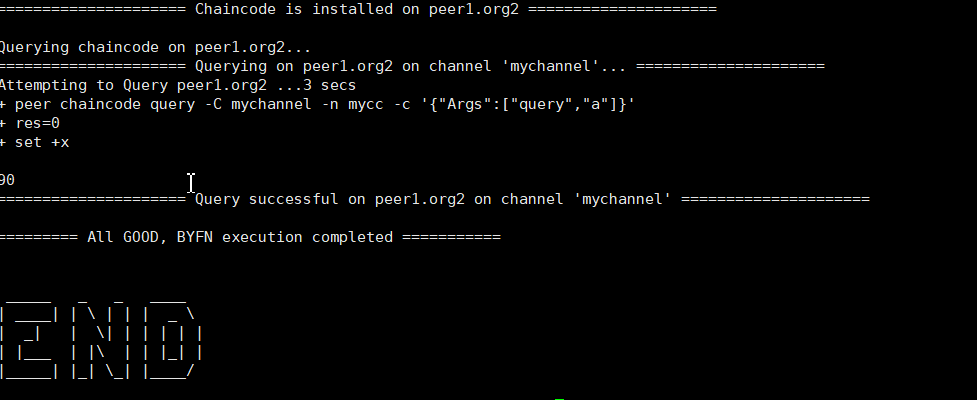
使用docker ps来查看节点启动情况
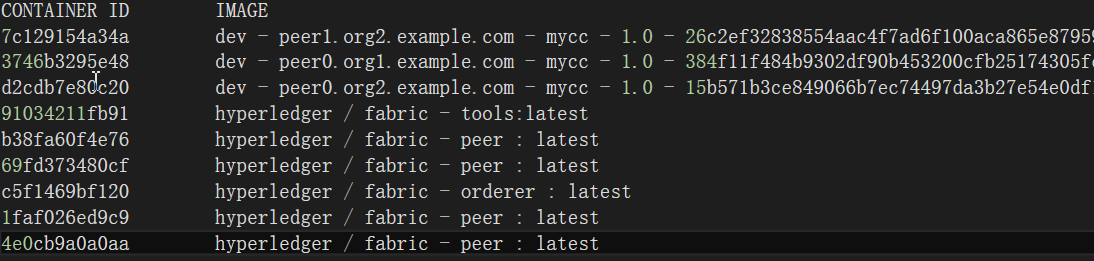
使用docker images查看安装镜像

关闭网络
使用./byfn.sh down
$ ./byfn.sh down

Stopping for channel 'mychannel' with CLI timeout of '10' seconds and CLI delay of '3' seconds

Continue? [Y/n] y

proceeding ...

Stopping cli                    ... done

Stopping peer0.org1.example.com ... done

Stopping peer1.org1.example.com ... done

Stopping orderer.example.com    ... done

Stopping peer0.org2.example.com ... done

Stopping peer1.org2.example.com ... done

Removing cli                    ... done

Removing peer0.org1.example.com ... done

Removing peer1.org1.example.com ... done

Removing orderer.example.com    ... done

Removing peer0.org2.example.com ... done

Removing peer1.org2.example.com ... done

Removing network net_byfn

Removing volume net_orderer.example.com

Removing volume net_peer0.org1.example.com

Removing volume net_peer1.org1.example.com

Removing volume net_peer0.org2.example.com

Removing volume net_peer1.org2.example.com

Removing volume net_peer0.org3.example.com

WARNING: Volume net_peer0.org3.example.com not found.

Removing volume net_peer1.org3.example.com

WARNING: Volume net_peer1.org3.example.com not found.

...
参考:
- https://hyperledger-fabric.readthedocs.io/en/release-1.2/getting_started.html
- https://hyperledger-fabric.readthedocs.io/en/release-1.2/prereqs.html
- https://hyperledger-fabric.readthedocs.io/en/release-1.2/install.html
ubuntu16.04 HyperLedger Fabric 1.2.0 开发环境搭建的更多相关文章
- android 5.0开发环境搭建
Android 5.0 是 Google 于 2014 年 10 月 15 日发布的全新 Android 操作系统.本文将就最新的Android 5.0 开发环境搭建做详细介绍. 工具/原料 jdk- ...
- Hyperledger Fabric (1.0)环境部署 chaincode【转】
三.测试Fabric 其实我们在前面运行./network_setup.sh up的时候系统已经运行了一个Example02的ChainCode测试,部署上去的ChainCodeName是mycc,所 ...
- CC++初学者编程教程(2) Microsoft Visual C++ 6.0开发环境搭建
上一篇演示的是如何安装VS2010,本文演示的是如何安装Microsoft Visual C++ 6.0 简称VC6. 有同学经常VC6都是很古董的版本了,为啥他还存在,不得不说VC6是微软一个很经典 ...
- Hadoop-2.8.0 开发环境搭建(Mac)
Hadoop是一个由Apache基金会开发的分布式系统架构,简称HDFS,具有高容错性.可伸缩性等特点,并且可以部署在低配置的硬件上:同时,提供了高吞吐量的数据访问性能,适用于超大数据集的应用程序,以 ...
- IMX6开发板Qtopia2.2.0开发环境搭建以及编译镜像
搭建 Qtopia2.2.0 开发环境,需要先搭建 Android 的编译环境,然后在 Android 编译环境的基础上,再搭建 Qtopia2.2.0 编译环境.以下内容基于迅为-iMX6开发板.Q ...
- 配置ubuntu 16.04.1 LTS odoo 10.0开发环境
使用VMware Fusion 8.5.0创建ubuntu 64bit虚拟机:使用ubuntu-16.04.1-desktop-amd64.iso镜像缺省安装ubuntu,用户名odoo,密码1234 ...
- 转:Ubuntu16.04下配置php+vscode+xdebug开发环境
转:https://blog.csdn.net/its_my_dream/article/details/78549619 操作系统是Ubuntu16.04,首先要安装和配置php运行环境,我这里用的 ...
- Cocos2d-x.3.0开发环境搭建
配置:win7 + VS2012 + Cocos2d-x.3.0 + Cocos Studio v1.4.0.1 前言:本文介绍在上述配置下进行游戏开发的环境搭建.开发语言为C++.如果读者不需要查看 ...
- 配置ubuntu 14.04.3 LTS odoo 9.0开发环境
使用VMware Fusion 8.0.1创建ubuntu 64bit虚拟机:使用ubuntu-14.04.3-desktop-amd64.iso镜像缺省安装ubuntu,用户名odoo,密码1234 ...
随机推荐
- 微信小程序:首页设置方法(开发模式,使用模式)与其他相关设置
小程序开发并不愉快,许多必建的文件不会自动生成,页面之间的跳转没有快捷键,开发者工具显示区域受限……如果谁有对应的解决办法求告知…… 开始的时候每次保存代码,页面都会刷洗重新渲染一次,而且自动跳回首页 ...
- Arm11-mini6410入坑
Mini6410 学习Stm32的时候原子哥的资料真全啊,而且原子哥在他论坛也解答问题.然而现在学习ARM买了一套友善之臂的开发板,官方的资料只能刚好入门而已,其实入门都算不上.看了一下,网上的资料很 ...
- B-食物链-经典并查集
动物王国中有三类动物A,B,C,这三类动物的食物链构成了有趣的环形.A吃B, B吃C,C吃A. 现有N个动物,以1-N编号.每个动物都是A,B,C中的一种,但是我们并不知道它到底是哪一种. 有人用两种 ...
- MHA(下)
一.配置VIP漂移 主机名 IP地址(NAT) 漂移VIP 描述 mysql-db01 eth0:192.168.0.51 VIP:192.168.0.60 系统:CentOS6.5(6.x都可以) ...
- vue 线上不支持put方法
在app.js中加上 // Vue.http.options.emulateHTTP = true Vue.http.options.timeout = 15000
- 微信小程序页面跳转,带参数跳转
1. wx.navigateTo (保留当前页面,跳转到应用内的某个页面,使用wx.navigateBack可以返回到原页面.) 路径:只能跳转非tabbar路径 参数: 'path?key=v ...
- String与StringBuilder 区别
string 是不可变字符串.一旦创建不可修改,使用Insert.Remove.PadLeft.Replace.Splict等,返回都是新的字符串对象. StringBuilder 是可变字符串,大多 ...
- C#/对线程的认识
1.线程的优点和缺点,以及什么时候来考虑使用线程.多线程可以使得程序响应更快,程序在进行其他任务的同时,线程也处于活动状态.当前没有处理任务的时候,可以把处理器的时间让给其他任务可以随时停止任务可以设 ...
- Altium Designer 10 使用技巧
一.封装文件.PCB文件编辑时的吸附(Snap)的灵敏度. 像焊盘中心.过孔中心.线段的端点.走线的端点.铺铜的顶点,这样的点有吸附光标的特性,鼠标移动到这些点的附近会被吸附到上面.Snap的灵敏度可 ...
- Python3.7和数据库MySQL 8.0.12 数据库数据驱动mysql-connector安装(四)
安装mysql-connector驱动 在系统CMD输入命令: pip install mysql-connector 示例: 创建数据库 # 导入驱动 import mysql.connector ...