
使用CAReplicatorLayer [2]
使用CAReplicatorLayer [2]

工具类
//

//  Math.h

//  MathEquation

//

//  Created by YouXianMing on 15/11/20.

//  Copyright © 2015年 YouXianMing. All rights reserved.

//

#import <Foundation/Foundation.h>

#import <UIKit/UIKit.h>

struct MATHPoint {

    CGFloat x;

    CGFloat y;

}; typedef struct MATHPoint MATHPoint;

static inline MATHPoint MATHPointMake(CGFloat x, CGFloat y) {

    MATHPoint p; p.x = x; p.y = y; return p;

}

@interface Math : NSObject

#pragma mark - Radian & degree.

/**

 *  Convert radian to degree.

 *

 *  @param radian Radian.

 *

 *  @return Degree.

 */

+ (CGFloat)degreeFromRadian:(CGFloat)radian;

/**

 *  Convert degree to radian.

 *

 *  @param degree Degree.

 *

 *  @return radian.

 */

+ (CGFloat)radianFromDegree:(CGFloat)degree;

#pragma mark - Calculate radian.

/**

 *  Radian value from math 'tan' function.

 *

 *  @param sideA Side A

 *  @param sideB Side B

 *

 *  @return Radian value.

 */

+ (CGFloat)radianValueFromTanSideA:(CGFloat)sideA sideB:(CGFloat)sideB;

#pragma mark - Calculate once linear equation (Y = kX + b).

@property (nonatomic) CGFloat  k;

@property (nonatomic) CGFloat  b;

/**

 *  Calculate constant & slope by two math point for once linear equation.

 *

 *  @param pointA Point A.

 *  @param pointB Point B.

 *

 *  @return Math object.

 */

+ (instancetype)mathOnceLinearEquationWithPointA:(MATHPoint)pointA PointB:(MATHPoint)pointB;

/**

 *  Get X value when Y equal some number.

 *

 *  @param yValue Some number.

 *

 *  @return X number.

 */

- (CGFloat)xValueWhenYEqual:(CGFloat)yValue;

/**

 *  Get Y value when X equal some number.

 *

 *  @param xValue Some number.

 *

 *  @return Y number.

 */

- (CGFloat)yValueWhenXEqual:(CGFloat)xValue;

#pragma mark - Reset size.

/**

 *  Get the new size with the fixed width.

 *

 *  @param size  Old size.

 *  @param width The fixed width.

 *

 *  @return New size.

 */

+ (CGSize)resetFromSize:(CGSize)size withFixedWidth:(CGFloat)width;

/**

 *  Get the new size with the fixed height.

 *

 *  @param size   Old size.

 *  @param height The fixed width.

 *

 *  @return New size.

 */

+ (CGSize)resetFromSize:(CGSize)size withFixedHeight:(CGFloat)height;

@end
//

//  Math.m

//  MathEquation

//

//  Created by YouXianMing on 15/11/20.

//  Copyright © 2015年 YouXianMing. All rights reserved.

//

#import "Math.h"

@implementation Math

+ (CGFloat)degreeFromRadian:(CGFloat)radian {

    return ((radian) * (180.0 / M_PI));

}

+ (CGFloat)radianFromDegree:(CGFloat)degree {

    return ((degree) * M_PI / .f);

}

+ (CGFloat)radianValueFromTanSideA:(CGFloat)sideA sideB:(CGFloat)sideB {

    return atan2f(sideA, sideB);

}

CGFloat calculateSlope(CGFloat x1, CGFloat y1, CGFloat x2, CGFloat y2) {

    if (x2 == x1) {

        return ;

    }

    return (y2 - y1) / (x2 - x1);

}

CGFloat calculateConstant(CGFloat x1, CGFloat y1, CGFloat x2, CGFloat y2) {

    if (x2 == x1) {

        return ;

    }

    return (y1*(x2 - x1) - x1*(y2 - y1)) / (x2 - x1);

}

+ (instancetype)mathOnceLinearEquationWithPointA:(MATHPoint)pointA PointB:(MATHPoint)pointB {

    Math *equation = [[[self class] alloc] init];

    CGFloat x1 = pointA.x; CGFloat y1 = pointA.y;

    CGFloat x2 = pointB.x; CGFloat y2 = pointB.y;

    equation.k = calculateSlope(x1, y1, x2, y2);

    equation.b = calculateConstant(x1, y1, x2, y2);

    return equation;

}

- (CGFloat)xValueWhenYEqual:(CGFloat)yValue {

    if (_k == ) {

        return ;

    }

    return (yValue - _b) / _k;

}

- (CGFloat)yValueWhenXEqual:(CGFloat)xValue {

    return _k * xValue + _b;

}

+ (CGSize)resetFromSize:(CGSize)size withFixedWidth:(CGFloat)width {

    CGFloat newHeight = size.height * (width / size.width);

    CGSize  newSize   = CGSizeMake(width, newHeight);

    return newSize;

}

+ (CGSize)resetFromSize:(CGSize)size withFixedHeight:(CGFloat)height {

    float  newWidth = size.width * (height / size.height);

    CGSize newSize  = CGSizeMake(newWidth, height);

    return newSize;

}

@end
进行角度旋转

//

//  ViewController.m

//  CAReplicatorLayer

//

//  Created by YouXianMing on 16/1/13.

//  Copyright © 2016年 YouXianMing. All rights reserved.

//

#import "ViewController.h"

#import "Math.h"

@interface ViewController ()

@end

@implementation ViewController

- (void)viewDidLoad {

    [super viewDidLoad];

    // Create CAReplicatorLayer.

    CAReplicatorLayer *replicatorLayer = [CAReplicatorLayer layer];

    replicatorLayer.frame              = CGRectMake(, , , );

    replicatorLayer.borderWidth        = 0.5f;

    replicatorLayer.borderColor        = [UIColor blackColor].CGColor;

    replicatorLayer.position           = self.view.center;

    [self.view.layer addSublayer:replicatorLayer];

    // Create Layer.

    CALayer *layer        = [CALayer layer];

    layer.frame           = CGRectMake(, , , );

    layer.backgroundColor = [UIColor redColor].CGColor;

    [replicatorLayer addSublayer:layer];

    replicatorLayer.instanceCount     = ;

    CATransform3D transform           = CATransform3DIdentity;

    transform                         = CATransform3DRotate(transform, [Math radianFromDegree:.f], , , );

    replicatorLayer.instanceTransform = transform;

}

@end
进行颜色设置

//

//  ViewController.m

//  CAReplicatorLayer

//

//  Created by YouXianMing on 16/1/13.

//  Copyright © 2016年 YouXianMing. All rights reserved.

//

#import "ViewController.h"

#import "Math.h"

@interface ViewController ()

@end

@implementation ViewController

- (void)viewDidLoad {

    [super viewDidLoad];

    // Create CAReplicatorLayer.

    CAReplicatorLayer *replicatorLayer = [CAReplicatorLayer layer];

    replicatorLayer.frame              = CGRectMake(, , , );

    replicatorLayer.borderWidth        = 0.5f;

    replicatorLayer.borderColor        = [UIColor blackColor].CGColor;

    replicatorLayer.position           = self.view.center;

    [self.view.layer addSublayer:replicatorLayer];

    // Create Layer.

    CALayer *layer        = [CALayer layer];

    layer.frame           = CGRectMake(, , , );

    layer.backgroundColor = [UIColor whiteColor].CGColor;

    [replicatorLayer addSublayer:layer];

    replicatorLayer.instanceCount       = ;

    CATransform3D transform             = CATransform3DIdentity;

    transform                           = CATransform3DRotate(transform, [Math radianFromDegree:.f], , , );

    replicatorLayer.instanceTransform   = transform;

    replicatorLayer.instanceBlueOffset  = -0.2;

    replicatorLayer.instanceGreenOffset = -0.1;

    replicatorLayer.instanceRedOffset   = 0.1;

}

@end
设置第一个对象的颜色
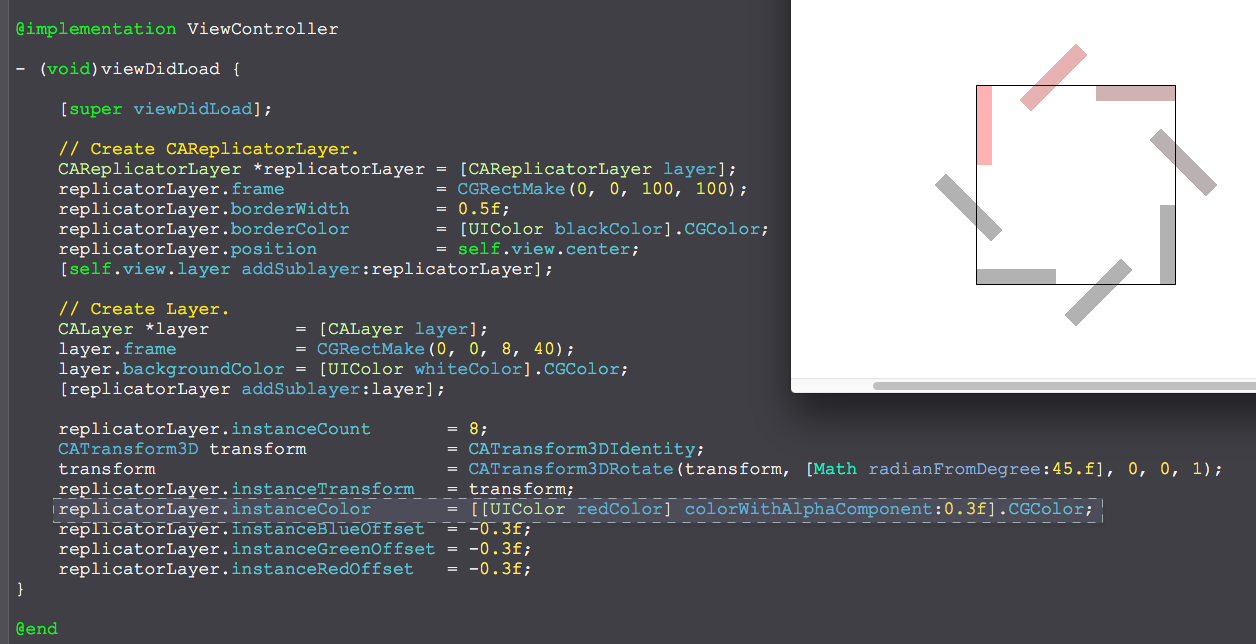
//

//  ViewController.m

//  CAReplicatorLayer

//

//  Created by YouXianMing on 16/1/13.

//  Copyright © 2016年 YouXianMing. All rights reserved.

//

#import "ViewController.h"

#import "Math.h"

@interface ViewController ()

@end

@implementation ViewController

- (void)viewDidLoad {

    [super viewDidLoad];

    // Create CAReplicatorLayer.

    CAReplicatorLayer *replicatorLayer = [CAReplicatorLayer layer];

    replicatorLayer.frame              = CGRectMake(, , , );

    replicatorLayer.borderWidth        = 0.5f;

    replicatorLayer.borderColor        = [UIColor blackColor].CGColor;

    replicatorLayer.position           = self.view.center;

    [self.view.layer addSublayer:replicatorLayer];

    // Create Layer.

    CALayer *layer        = [CALayer layer];

    layer.frame           = CGRectMake(, , , );

    layer.backgroundColor = [UIColor whiteColor].CGColor;

    [replicatorLayer addSublayer:layer];

    replicatorLayer.instanceCount       = ;

    CATransform3D transform             = CATransform3DIdentity;

    transform                           = CATransform3DRotate(transform, [Math radianFromDegree:.f], , , );

    replicatorLayer.instanceTransform   = transform;

    replicatorLayer.instanceColor       = [[UIColor redColor] colorWithAlphaComponent:0.3f].CGColor;

    replicatorLayer.instanceBlueOffset  = -0.3f;

    replicatorLayer.instanceGreenOffset = -0.3f;

    replicatorLayer.instanceRedOffset   = -0.3f;

}

@end
综合使用
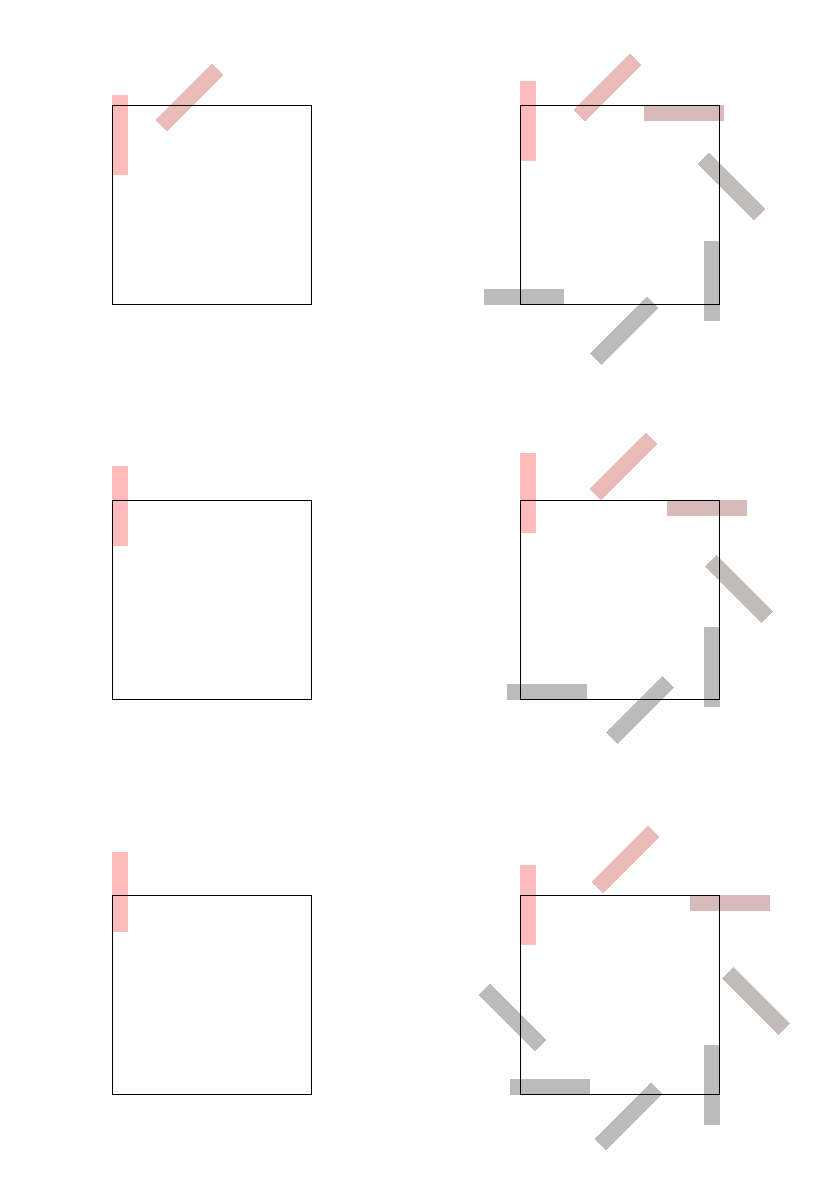
//

//  ViewController.m

//  CAReplicatorLayer

//

//  Created by YouXianMing on 16/1/13.

//  Copyright © 2016年 YouXianMing. All rights reserved.

//

#import "ViewController.h"

#import "Math.h"

@interface ViewController ()

@end

@implementation ViewController

- (void)viewDidLoad {

    [super viewDidLoad];

    // Create CAReplicatorLayer.

    CAReplicatorLayer *replicatorLayer = [CAReplicatorLayer layer];

    replicatorLayer.frame              = CGRectMake(, , , );

    replicatorLayer.borderWidth        = 0.5f;

    replicatorLayer.borderColor        = [UIColor blackColor].CGColor;

    replicatorLayer.position           = self.view.center;

    [self.view.layer addSublayer:replicatorLayer];

    // Create Layer.

    CALayer *layer        = [CALayer layer];

    layer.frame           = CGRectMake(, , , );

    layer.backgroundColor = [UIColor whiteColor].CGColor;

    [replicatorLayer addSublayer:layer];

    {

        CABasicAnimation *animation = [CABasicAnimation animationWithKeyPath:@"position.y"];

        animation.toValue           = @(layer.position.y - .f);

        animation.duration          = 0.5f;

        animation.autoreverses      = true;

        animation.repeatCount       = CGFLOAT_MAX;

        [layer addAnimation:animation forKey:nil];

    }

    replicatorLayer.instanceCount       = ;

    CATransform3D transform             = CATransform3DIdentity;

    transform                           = CATransform3DRotate(transform, [Math radianFromDegree:.f], , , );

    replicatorLayer.instanceTransform   = transform;

    replicatorLayer.instanceColor       = [[UIColor redColor] colorWithAlphaComponent:0.3f].CGColor;

    replicatorLayer.instanceBlueOffset  = -0.3f;

    replicatorLayer.instanceGreenOffset = -0.3f;

    replicatorLayer.instanceRedOffset   = -0.3f;

    replicatorLayer.instanceDelay       = 0.1f;

    {

        CABasicAnimation *animation = [CABasicAnimation animationWithKeyPath:@"instanceCount"];

        animation.fromValue         = @(replicatorLayer.instanceCount);

        animation.toValue           = @();

        animation.duration          = 0.3f;

        animation.autoreverses      = true;

        animation.repeatCount       = CGFLOAT_MAX;

        [replicatorLayer addAnimation:animation forKey:nil];

    }

}

@end
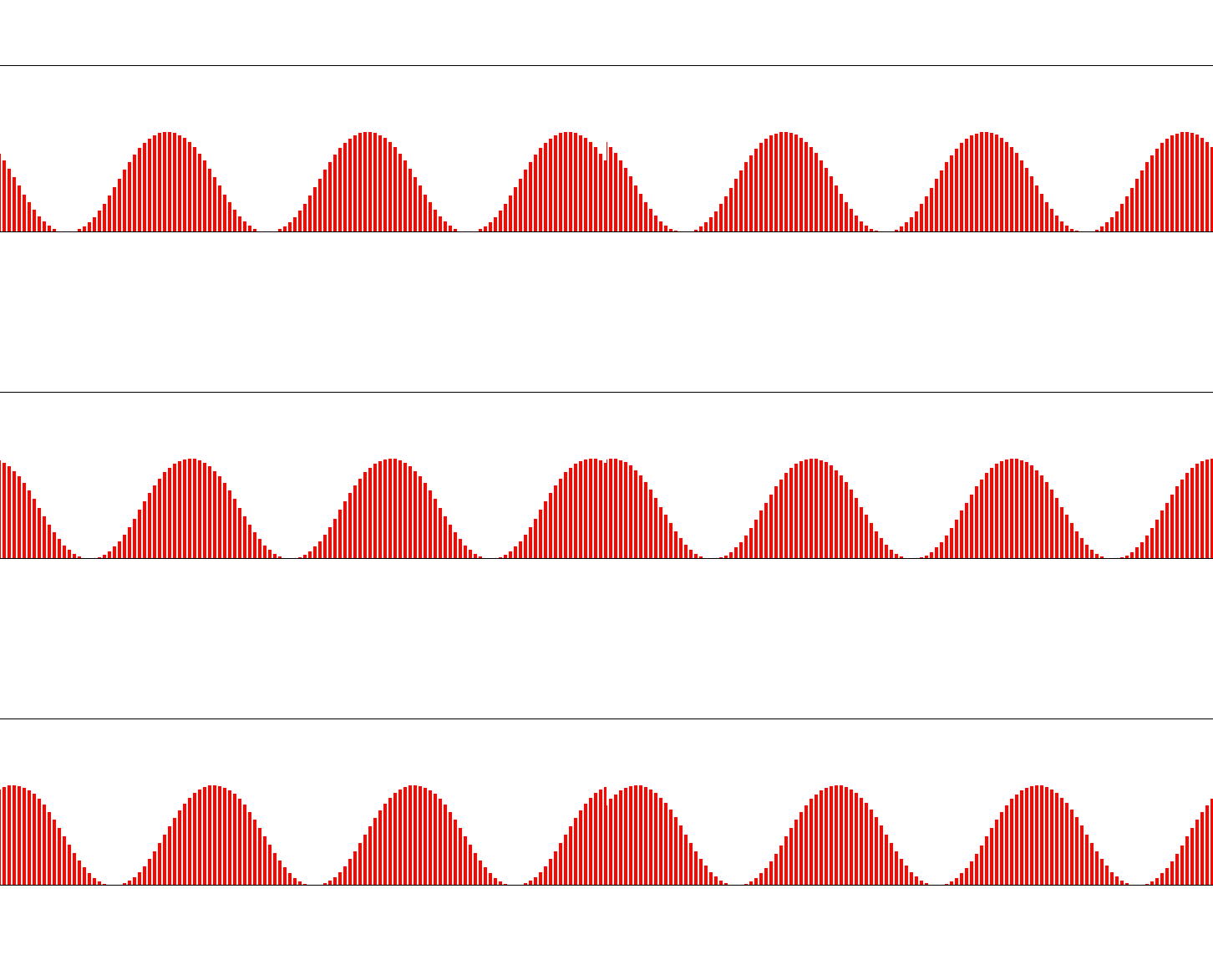
//

//  ViewController.m

//  CAReplicatorLayer

//

//  Created by YouXianMing on 16/1/13.

//  Copyright © 2016年 YouXianMing. All rights reserved.

//

#import "ViewController.h"

@interface ViewController ()

@end

@implementation ViewController

- (void)viewDidLoad {

    [super viewDidLoad];

    CGFloat width  = self.view.frame.size.width;

    CGFloat height = ;

    CAReplicatorLayer *replicatorLayer = [CAReplicatorLayer layer];

    [self.view.layer addSublayer:replicatorLayer];

    replicatorLayer.frame              = CGRectMake(, , width, height);

    replicatorLayer.position           = self.view.center;

    replicatorLayer.borderWidth        = 0.5f;

    replicatorLayer.instanceCount      = width / ;

    replicatorLayer.masksToBounds      = YES;

    replicatorLayer.instanceTransform  = CATransform3DMakeTranslation(-3.0, 0.0, 0.0);

    replicatorLayer.instanceDelay      = 0.025f;

    CALayer *layer        = [CALayer layer];

    layer.frame           = CGRectMake(width - , height, , );

    layer.backgroundColor = [UIColor redColor].CGColor;

    [replicatorLayer addSublayer:layer];

    CABasicAnimation *animation = [CABasicAnimation animationWithKeyPath:@"position.y"];

    animation.toValue           = @(layer.position.y - .f);

    animation.duration          = 0.5f;

    animation.timingFunction    = [CAMediaTimingFunction functionWithName:kCAMediaTimingFunctionEaseInEaseOut];

    animation.autoreverses      = true;

    animation.repeatCount       = CGFLOAT_MAX;

    [layer addAnimation:animation forKey:nil];

}

@end
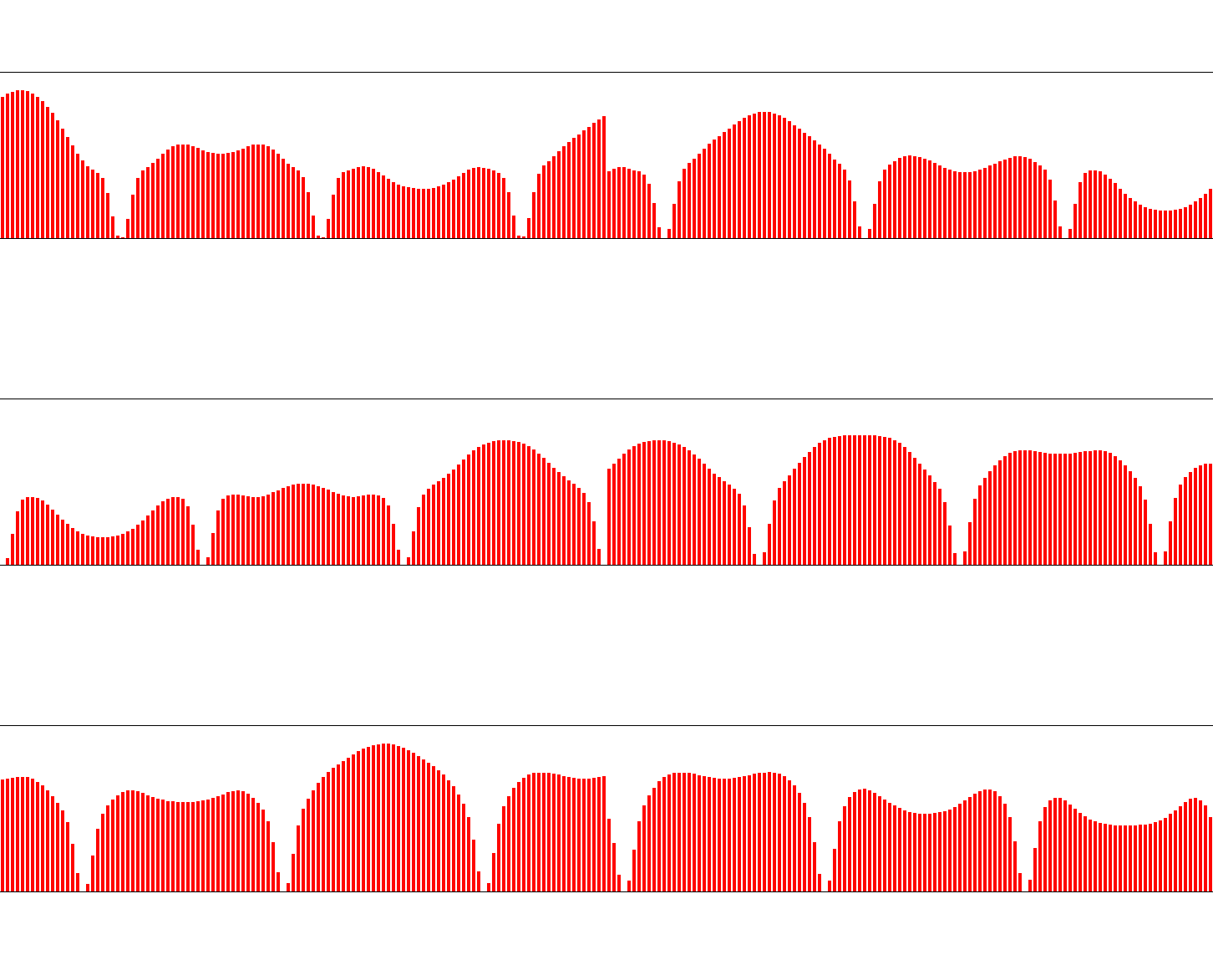
https://github.com/YouXianMing/GCD-Program
//

//  ViewController.m

//  CAReplicatorLayer

//

//  Created by YouXianMing on 16/1/13.

//  Copyright © 2016年 YouXianMing. All rights reserved.

//

#import "ViewController.h"

#import "GCD.h"

@interface ViewController ()

@property (nonatomic, strong) GCDTimer  *timer;

@end

@implementation ViewController

- (void)viewDidLoad {

    [super viewDidLoad];

    CGFloat width  = self.view.frame.size.width;

    CGFloat height = ;

    CAReplicatorLayer *replicatorLayer = [CAReplicatorLayer layer];

    [self.view.layer addSublayer:replicatorLayer];

    replicatorLayer.frame              = CGRectMake(, , width, height);

    replicatorLayer.position           = self.view.center;

    replicatorLayer.borderWidth        = 0.5f;

    replicatorLayer.instanceCount      = width / ;

    replicatorLayer.masksToBounds      = YES;

    replicatorLayer.instanceTransform  = CATransform3DMakeTranslation(-3.0, 0.0, 0.0);

    replicatorLayer.instanceDelay      = 0.025f;

    CALayer *layer        = [CALayer layer];

    layer.frame           = CGRectMake(width - , height, , );

    layer.backgroundColor = [UIColor redColor].CGColor;

    [replicatorLayer addSublayer:layer];

    self.timer = [[GCDTimer alloc] initInQueue:[GCDQueue mainQueue]];

    [self.timer event:^{

        CABasicAnimation *animation = [CABasicAnimation animationWithKeyPath:@"position.y"];

        animation.toValue           = @(layer.position.y - arc4random() % );

        animation.duration          = 0.5f;

        animation.timingFunction    = [CAMediaTimingFunction functionWithName:kCAMediaTimingFunctionEaseInEaseOut];

        animation.autoreverses      = true;

        animation.repeatCount       = CGFLOAT_MAX;

        [layer addAnimation:animation forKey:nil];

    } timeIntervalWithSecs:.f delaySecs:.f];

    [self.timer start];

}

@end
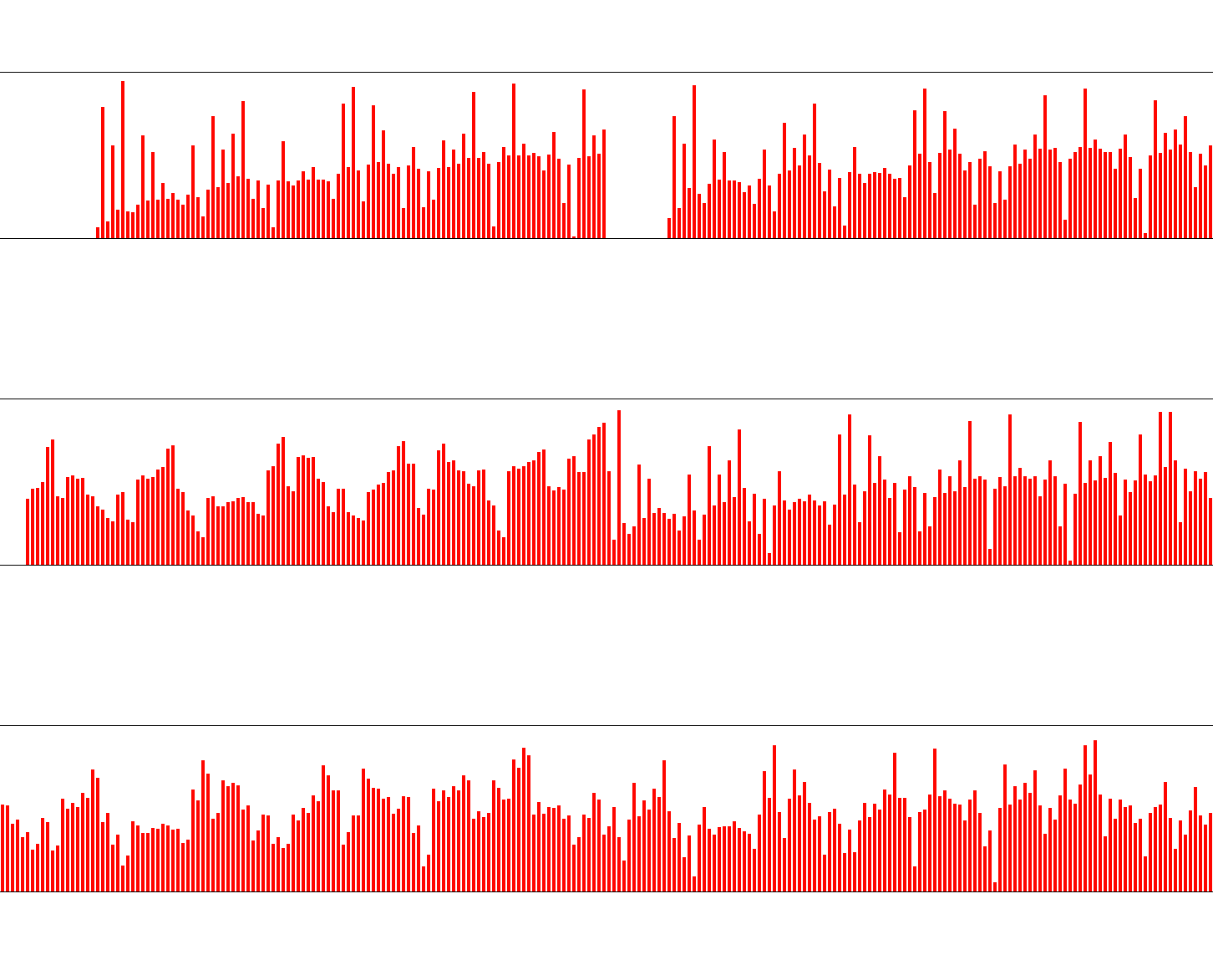
//

//  ViewController.m

//  CAReplicatorLayer

//

//  Created by YouXianMing on 16/1/13.

//  Copyright © 2016年 YouXianMing. All rights reserved.

//

#import "ViewController.h"

#import "Math.h"

#import "GCD.h"

@interface ViewController ()

@property (nonatomic, strong) GCDTimer  *timer;

@end

@implementation ViewController

- (void)viewDidLoad {

    [super viewDidLoad];

    CGFloat width  = self.view.frame.size.width;

    CGFloat height = ;

    CAReplicatorLayer *replicatorLayer = [CAReplicatorLayer layer];

    [self.view.layer addSublayer:replicatorLayer];

    replicatorLayer.frame              = CGRectMake(, , width, height);

    replicatorLayer.position           = self.view.center;

    replicatorLayer.borderWidth        = 0.5f;

    replicatorLayer.instanceCount      = width / ;

    replicatorLayer.masksToBounds      = YES;

    replicatorLayer.instanceTransform  = CATransform3DMakeTranslation(-3.0, 0.0, 0.0);

    replicatorLayer.instanceDelay      = 0.5f;

    CALayer *layer        = [CALayer layer];

    layer.frame           = CGRectMake(width - , height, , );

    layer.backgroundColor = [UIColor redColor].CGColor;

    [replicatorLayer addSublayer:layer];

    self.timer = [[GCDTimer alloc] initInQueue:[GCDQueue mainQueue]];

    [self.timer event:^{

        CABasicAnimation *animation = [CABasicAnimation animationWithKeyPath:@"position.y"];

        animation.toValue           = @(layer.position.y - arc4random() % );

        animation.duration          = 0.5f;

        animation.timingFunction    = [CAMediaTimingFunction functionWithName:kCAMediaTimingFunctionEaseInEaseOut];

        animation.autoreverses      = true;

        animation.repeatCount       = CGFLOAT_MAX;

        [layer addAnimation:animation forKey:nil];

    } timeIntervalWithSecs:.f delaySecs:.f];

    [self.timer start];

}

@end
使用CAReplicatorLayer [2]的更多相关文章
- 利用CAReplicatorLayer实现的加载动画
在上一篇中,笔者简要介绍了CAReplicatorLayer,在本篇中,将介绍具体的实用价值. 实用CAReplicatorLayer作为核心技术实现加载动画. 首先,创建一个UIView的子类 @i ...
- CoreAnimation 之CAReplicatorLayer
CAReplicatorLayer: 主要作用有以下两个: CAReplicatorLayer的目的是为了高效生成许多相似的图层,它会绘制一个或多个图层的子图层 并在每个复制体上应用不同的变换 使用C ...
- CA*Layer(CAReplicatorLayer--)
CAReplicatorLayer (反射应用) 指定一个继承于UIView的ReflectionView,它会自动产生内容的反射效果: + (Class)layerClass//我们也可以通过重写V ...
- CAReplicatorLayer复制Layer和动画, 实现神奇的效果
今天我们看下CAReplicatorLayer, 官方的解释是一个高效处理复制图层的中间层.他能复制图层的所有属性,包括动画. 一样我们先看下头文件 @interface CAReplicatorLa ...
- iOS CAReplicatorLayer 实现脉冲动画效果
iOS CAReplicatorLayer 实现脉冲动画效果 效果图 脉冲数量.速度.半径.透明度.渐变颜色.方向等都可以设置.可以用于地图标注(Annotation).按钮长按动画效果(例如录音按钮 ...
- 用drawRect以及CAReplicatorLayer绘制动态水波纹
用drawRect以及CAReplicatorLayer绘制动态水波纹 大大简化了写水波纹效果的难度,你可以根据示例自己组装水波纹效果,本设计是几个工具组合在一起完成的效果, DrawRectObje ...
- CAReplicatorLayer
CAReplicatorLayer CAReplicatorLayer的目的是为了高效生成许多相似的图层.它会绘制一个或多个图层的子图层,并在每个复制体上应用不同的变换.看上去演示能够更加解释这些,我 ...
- 使用CAReplicatorLayer [1]
使用CAReplicatorLayer [1] 说明 https://developer.apple.com/library/ios/documentation/GraphicsImaging/Ref ...
- iOS CAReplicatorLayer 简单动画
代码地址如下:http://www.demodashi.com/demo/11601.html 写在最前面,最近在看学习的时候,偶然间发现一个没有用过的Layer,于是抽空研究了下,本来应该能提前记录 ...
随机推荐
- tomcat启动(三)Catalina分析-load方法分析
load()方法按从上到下顺序分析(主要分析本人所没学过的知识点,其它略过...). Digester类作用 使用sax技术对xml进行解析 未开始解析时Digester.push(this)这个用来 ...
- 异常空格,ASCII (194,160)问题
今天运营的同学反映有一些店铺的名称后面带空格,我下意识的说不可能啊,我已经处理过了啊.然后就找出来看. 其中有个店铺的名称是“安踏 ”,第一眼看上去好像是带了个空格.然后我就仔细的看了下. pry(m ...
- 修改 /etc/pam.d/login, linux 本地账号密码无法登陆,一直返回 登陆的login界面
今天我在我虚拟机测试的时候遇到了一个问题.登陆centos一直是返回login,账号和密码没错,我也换了两个用户. 1.问题描述 我正常的输入用户名和密码 错误提示截图:返回登陆界面,我重新试了另外的 ...
- CentOS7.2配置Hadoop2.6.5
Hadoop配置文件 /etc/profile 配置Java和Hadoop环境 export JAVA_HOME=/usr/lib/jvm/java-1.8.0-openjdk export CLAS ...
- JAVA-6NIO之FileChannel
Java NIO中的FileChannel是一个连接到文件的通道.可以通过文件通道读写文件. FileChannel无法设置为非阻塞模式,它总是运行在阻塞模式下. 打开FileChannel 在使用F ...
- 任务四十一:UI组件之日历组件(二)
任务四十一:UI组件之日历组件(二) 面向人群: 有一定基础的同学 难度: 中 重要说明 百度前端技术学院的课程任务是由百度前端工程师专为对前端不同掌握程度的同学设计.我们尽力保证课程内容的质量以及学 ...
- 常用算法2 - 广度优先搜索 & 深度优先搜索 (python实现)
1. 图 定义:图(Graph)是由顶点的有穷非空集合和顶点之间边的集合组成,通常表示为:G(V,E),其中,G表示一个图,V是图G中顶点的集合,E是图G中边的集合. 简单点的说:图由节点和边组成.一 ...
- sql中同一个表一个字段的值赋值给另一个字段
UPDATE SG_User SET DefaultOrganizationID = OrganizationID
- windows主机网络信息获取程序设计
掌握windows系统获取网络信息的各种API函数的功能与调用方法,掌握设计程序显示获取到相关网络信息的方法,掌握网络字节数据与主机字节数据之间的转换.掌握这些API函数调用的错误处理方法. 利用本地 ...
- python中类的约束和限制对象添加属性
通过__slots__限制对象可添加的属性 class A: __slots__ = ['a', 'b'] pass a1 = A() a1.a = 10 print(a1.a) a1.c = 0 # ...