
使用CAReplicatorLayer [2]
使用CAReplicatorLayer [2]

工具类
//

//  Math.h

//  MathEquation

//

//  Created by YouXianMing on 15/11/20.

//  Copyright © 2015年 YouXianMing. All rights reserved.

//

#import <Foundation/Foundation.h>

#import <UIKit/UIKit.h>

struct MATHPoint {

    CGFloat x;

    CGFloat y;

}; typedef struct MATHPoint MATHPoint;

static inline MATHPoint MATHPointMake(CGFloat x, CGFloat y) {

    MATHPoint p; p.x = x; p.y = y; return p;

}

@interface Math : NSObject

#pragma mark - Radian & degree.

/**

 *  Convert radian to degree.

 *

 *  @param radian Radian.

 *

 *  @return Degree.

 */

+ (CGFloat)degreeFromRadian:(CGFloat)radian;

/**

 *  Convert degree to radian.

 *

 *  @param degree Degree.

 *

 *  @return radian.

 */

+ (CGFloat)radianFromDegree:(CGFloat)degree;

#pragma mark - Calculate radian.

/**

 *  Radian value from math 'tan' function.

 *

 *  @param sideA Side A

 *  @param sideB Side B

 *

 *  @return Radian value.

 */

+ (CGFloat)radianValueFromTanSideA:(CGFloat)sideA sideB:(CGFloat)sideB;

#pragma mark - Calculate once linear equation (Y = kX + b).

@property (nonatomic) CGFloat  k;

@property (nonatomic) CGFloat  b;

/**

 *  Calculate constant & slope by two math point for once linear equation.

 *

 *  @param pointA Point A.

 *  @param pointB Point B.

 *

 *  @return Math object.

 */

+ (instancetype)mathOnceLinearEquationWithPointA:(MATHPoint)pointA PointB:(MATHPoint)pointB;

/**

 *  Get X value when Y equal some number.

 *

 *  @param yValue Some number.

 *

 *  @return X number.

 */

- (CGFloat)xValueWhenYEqual:(CGFloat)yValue;

/**

 *  Get Y value when X equal some number.

 *

 *  @param xValue Some number.

 *

 *  @return Y number.

 */

- (CGFloat)yValueWhenXEqual:(CGFloat)xValue;

#pragma mark - Reset size.

/**

 *  Get the new size with the fixed width.

 *

 *  @param size  Old size.

 *  @param width The fixed width.

 *

 *  @return New size.

 */

+ (CGSize)resetFromSize:(CGSize)size withFixedWidth:(CGFloat)width;

/**

 *  Get the new size with the fixed height.

 *

 *  @param size   Old size.

 *  @param height The fixed width.

 *

 *  @return New size.

 */

+ (CGSize)resetFromSize:(CGSize)size withFixedHeight:(CGFloat)height;

@end
//

//  Math.m

//  MathEquation

//

//  Created by YouXianMing on 15/11/20.

//  Copyright © 2015年 YouXianMing. All rights reserved.

//

#import "Math.h"

@implementation Math

+ (CGFloat)degreeFromRadian:(CGFloat)radian {

    return ((radian) * (180.0 / M_PI));

}

+ (CGFloat)radianFromDegree:(CGFloat)degree {

    return ((degree) * M_PI / .f);

}

+ (CGFloat)radianValueFromTanSideA:(CGFloat)sideA sideB:(CGFloat)sideB {

    return atan2f(sideA, sideB);

}

CGFloat calculateSlope(CGFloat x1, CGFloat y1, CGFloat x2, CGFloat y2) {

    if (x2 == x1) {

        return ;

    }

    return (y2 - y1) / (x2 - x1);

}

CGFloat calculateConstant(CGFloat x1, CGFloat y1, CGFloat x2, CGFloat y2) {

    if (x2 == x1) {

        return ;

    }

    return (y1*(x2 - x1) - x1*(y2 - y1)) / (x2 - x1);

}

+ (instancetype)mathOnceLinearEquationWithPointA:(MATHPoint)pointA PointB:(MATHPoint)pointB {

    Math *equation = [[[self class] alloc] init];

    CGFloat x1 = pointA.x; CGFloat y1 = pointA.y;

    CGFloat x2 = pointB.x; CGFloat y2 = pointB.y;

    equation.k = calculateSlope(x1, y1, x2, y2);

    equation.b = calculateConstant(x1, y1, x2, y2);

    return equation;

}

- (CGFloat)xValueWhenYEqual:(CGFloat)yValue {

    if (_k == ) {

        return ;

    }

    return (yValue - _b) / _k;

}

- (CGFloat)yValueWhenXEqual:(CGFloat)xValue {

    return _k * xValue + _b;

}

+ (CGSize)resetFromSize:(CGSize)size withFixedWidth:(CGFloat)width {

    CGFloat newHeight = size.height * (width / size.width);

    CGSize  newSize   = CGSizeMake(width, newHeight);

    return newSize;

}

+ (CGSize)resetFromSize:(CGSize)size withFixedHeight:(CGFloat)height {

    float  newWidth = size.width * (height / size.height);

    CGSize newSize  = CGSizeMake(newWidth, height);

    return newSize;

}

@end
进行角度旋转

//

//  ViewController.m

//  CAReplicatorLayer

//

//  Created by YouXianMing on 16/1/13.

//  Copyright © 2016年 YouXianMing. All rights reserved.

//

#import "ViewController.h"

#import "Math.h"

@interface ViewController ()

@end

@implementation ViewController

- (void)viewDidLoad {

    [super viewDidLoad];

    // Create CAReplicatorLayer.

    CAReplicatorLayer *replicatorLayer = [CAReplicatorLayer layer];

    replicatorLayer.frame              = CGRectMake(, , , );

    replicatorLayer.borderWidth        = 0.5f;

    replicatorLayer.borderColor        = [UIColor blackColor].CGColor;

    replicatorLayer.position           = self.view.center;

    [self.view.layer addSublayer:replicatorLayer];

    // Create Layer.

    CALayer *layer        = [CALayer layer];

    layer.frame           = CGRectMake(, , , );

    layer.backgroundColor = [UIColor redColor].CGColor;

    [replicatorLayer addSublayer:layer];

    replicatorLayer.instanceCount     = ;

    CATransform3D transform           = CATransform3DIdentity;

    transform                         = CATransform3DRotate(transform, [Math radianFromDegree:.f], , , );

    replicatorLayer.instanceTransform = transform;

}

@end
进行颜色设置

//

//  ViewController.m

//  CAReplicatorLayer

//

//  Created by YouXianMing on 16/1/13.

//  Copyright © 2016年 YouXianMing. All rights reserved.

//

#import "ViewController.h"

#import "Math.h"

@interface ViewController ()

@end

@implementation ViewController

- (void)viewDidLoad {

    [super viewDidLoad];

    // Create CAReplicatorLayer.

    CAReplicatorLayer *replicatorLayer = [CAReplicatorLayer layer];

    replicatorLayer.frame              = CGRectMake(, , , );

    replicatorLayer.borderWidth        = 0.5f;

    replicatorLayer.borderColor        = [UIColor blackColor].CGColor;

    replicatorLayer.position           = self.view.center;

    [self.view.layer addSublayer:replicatorLayer];

    // Create Layer.

    CALayer *layer        = [CALayer layer];

    layer.frame           = CGRectMake(, , , );

    layer.backgroundColor = [UIColor whiteColor].CGColor;

    [replicatorLayer addSublayer:layer];

    replicatorLayer.instanceCount       = ;

    CATransform3D transform             = CATransform3DIdentity;

    transform                           = CATransform3DRotate(transform, [Math radianFromDegree:.f], , , );

    replicatorLayer.instanceTransform   = transform;

    replicatorLayer.instanceBlueOffset  = -0.2;

    replicatorLayer.instanceGreenOffset = -0.1;

    replicatorLayer.instanceRedOffset   = 0.1;

}

@end
设置第一个对象的颜色
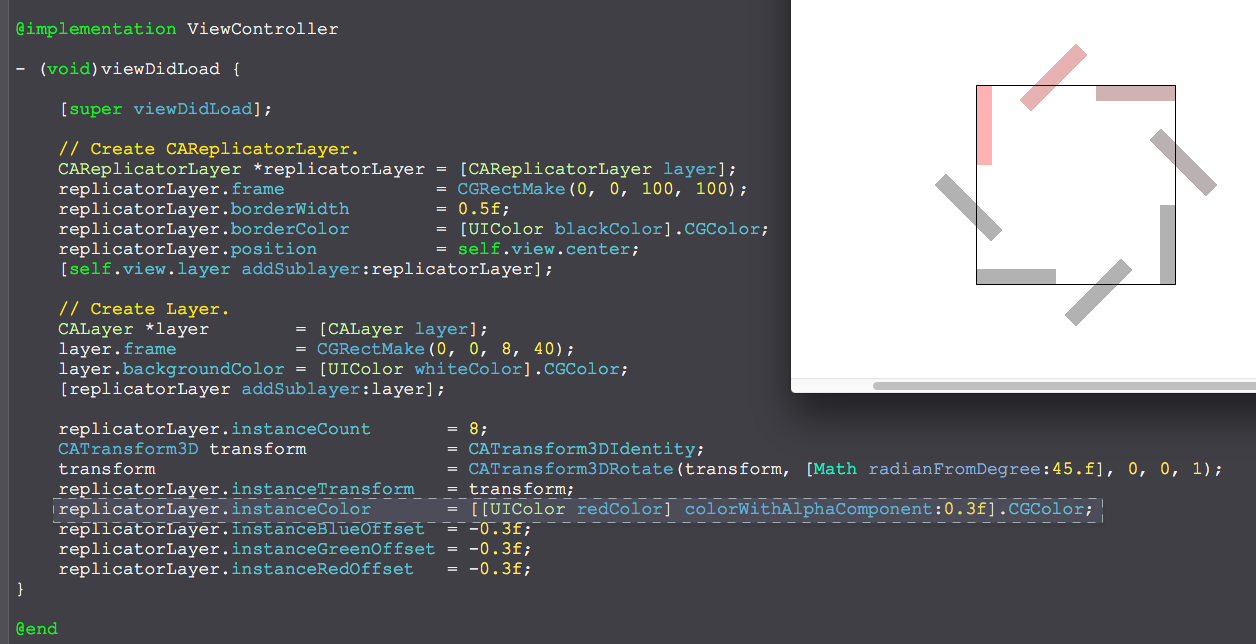
//

//  ViewController.m

//  CAReplicatorLayer

//

//  Created by YouXianMing on 16/1/13.

//  Copyright © 2016年 YouXianMing. All rights reserved.

//

#import "ViewController.h"

#import "Math.h"

@interface ViewController ()

@end

@implementation ViewController

- (void)viewDidLoad {

    [super viewDidLoad];

    // Create CAReplicatorLayer.

    CAReplicatorLayer *replicatorLayer = [CAReplicatorLayer layer];

    replicatorLayer.frame              = CGRectMake(, , , );

    replicatorLayer.borderWidth        = 0.5f;

    replicatorLayer.borderColor        = [UIColor blackColor].CGColor;

    replicatorLayer.position           = self.view.center;

    [self.view.layer addSublayer:replicatorLayer];

    // Create Layer.

    CALayer *layer        = [CALayer layer];

    layer.frame           = CGRectMake(, , , );

    layer.backgroundColor = [UIColor whiteColor].CGColor;

    [replicatorLayer addSublayer:layer];

    replicatorLayer.instanceCount       = ;

    CATransform3D transform             = CATransform3DIdentity;

    transform                           = CATransform3DRotate(transform, [Math radianFromDegree:.f], , , );

    replicatorLayer.instanceTransform   = transform;

    replicatorLayer.instanceColor       = [[UIColor redColor] colorWithAlphaComponent:0.3f].CGColor;

    replicatorLayer.instanceBlueOffset  = -0.3f;

    replicatorLayer.instanceGreenOffset = -0.3f;

    replicatorLayer.instanceRedOffset   = -0.3f;

}

@end
综合使用
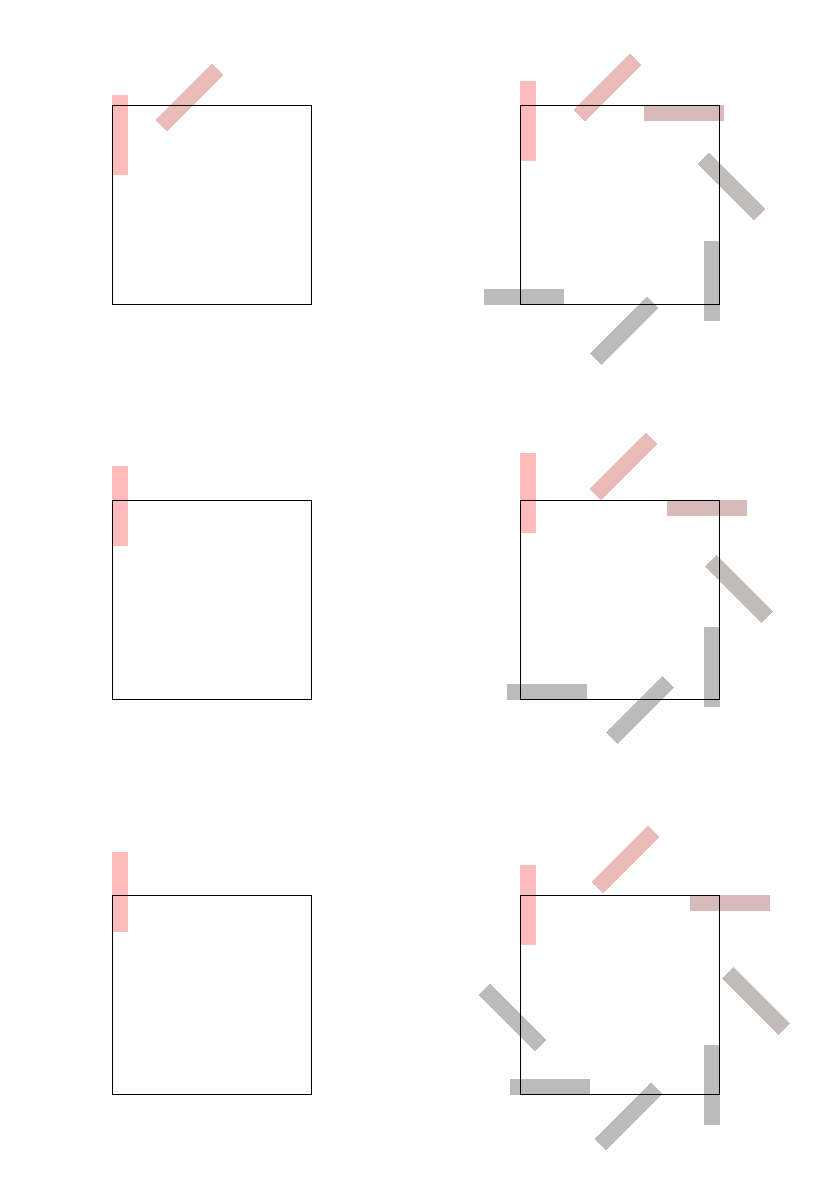
//

//  ViewController.m

//  CAReplicatorLayer

//

//  Created by YouXianMing on 16/1/13.

//  Copyright © 2016年 YouXianMing. All rights reserved.

//

#import "ViewController.h"

#import "Math.h"

@interface ViewController ()

@end

@implementation ViewController

- (void)viewDidLoad {

    [super viewDidLoad];

    // Create CAReplicatorLayer.

    CAReplicatorLayer *replicatorLayer = [CAReplicatorLayer layer];

    replicatorLayer.frame              = CGRectMake(, , , );

    replicatorLayer.borderWidth        = 0.5f;

    replicatorLayer.borderColor        = [UIColor blackColor].CGColor;

    replicatorLayer.position           = self.view.center;

    [self.view.layer addSublayer:replicatorLayer];

    // Create Layer.

    CALayer *layer        = [CALayer layer];

    layer.frame           = CGRectMake(, , , );

    layer.backgroundColor = [UIColor whiteColor].CGColor;

    [replicatorLayer addSublayer:layer];

    {

        CABasicAnimation *animation = [CABasicAnimation animationWithKeyPath:@"position.y"];

        animation.toValue           = @(layer.position.y - .f);

        animation.duration          = 0.5f;

        animation.autoreverses      = true;

        animation.repeatCount       = CGFLOAT_MAX;

        [layer addAnimation:animation forKey:nil];

    }

    replicatorLayer.instanceCount       = ;

    CATransform3D transform             = CATransform3DIdentity;

    transform                           = CATransform3DRotate(transform, [Math radianFromDegree:.f], , , );

    replicatorLayer.instanceTransform   = transform;

    replicatorLayer.instanceColor       = [[UIColor redColor] colorWithAlphaComponent:0.3f].CGColor;

    replicatorLayer.instanceBlueOffset  = -0.3f;

    replicatorLayer.instanceGreenOffset = -0.3f;

    replicatorLayer.instanceRedOffset   = -0.3f;

    replicatorLayer.instanceDelay       = 0.1f;

    {

        CABasicAnimation *animation = [CABasicAnimation animationWithKeyPath:@"instanceCount"];

        animation.fromValue         = @(replicatorLayer.instanceCount);

        animation.toValue           = @();

        animation.duration          = 0.3f;

        animation.autoreverses      = true;

        animation.repeatCount       = CGFLOAT_MAX;

        [replicatorLayer addAnimation:animation forKey:nil];

    }

}

@end
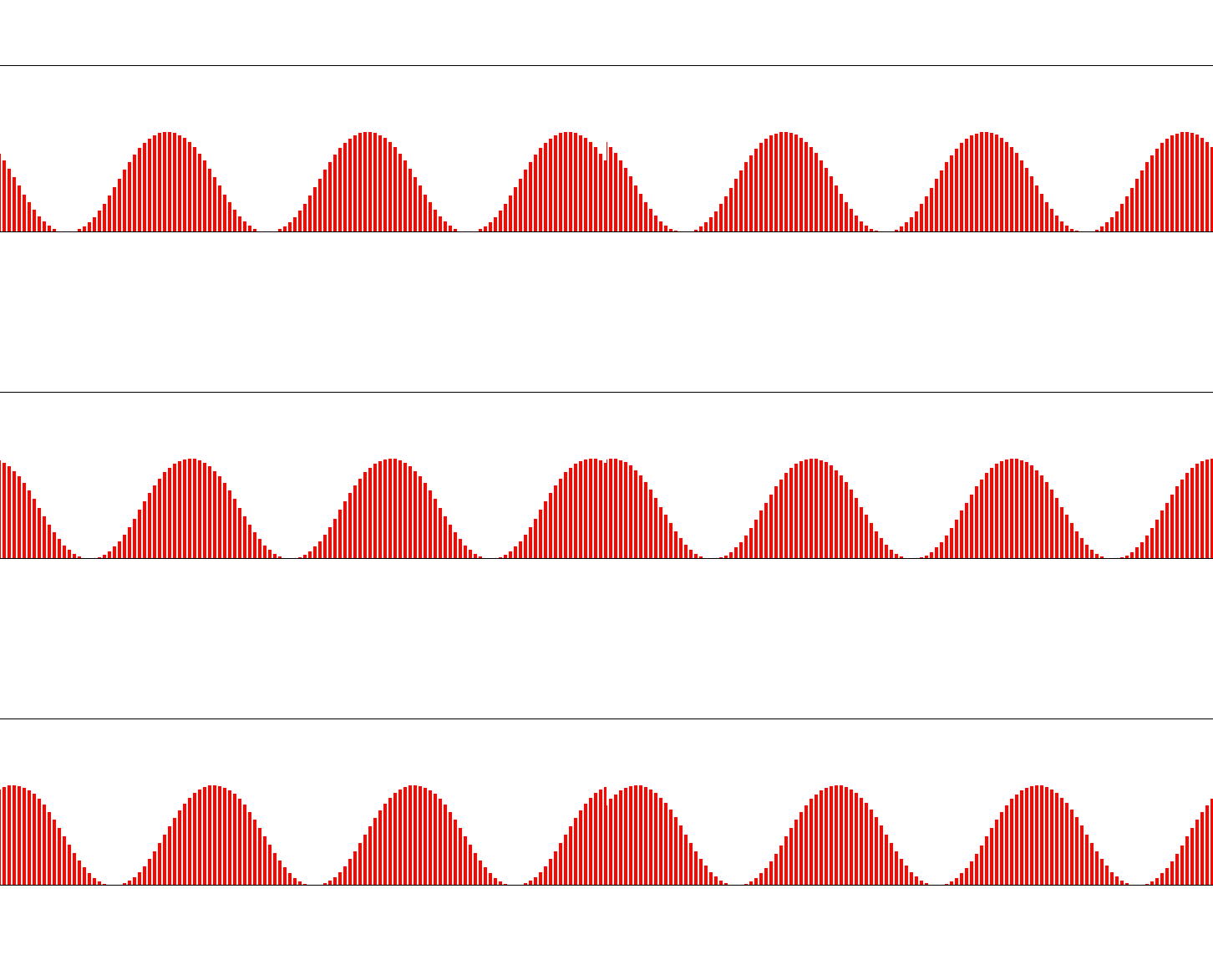
//

//  ViewController.m

//  CAReplicatorLayer

//

//  Created by YouXianMing on 16/1/13.

//  Copyright © 2016年 YouXianMing. All rights reserved.

//

#import "ViewController.h"

@interface ViewController ()

@end

@implementation ViewController

- (void)viewDidLoad {

    [super viewDidLoad];

    CGFloat width  = self.view.frame.size.width;

    CGFloat height = ;

    CAReplicatorLayer *replicatorLayer = [CAReplicatorLayer layer];

    [self.view.layer addSublayer:replicatorLayer];

    replicatorLayer.frame              = CGRectMake(, , width, height);

    replicatorLayer.position           = self.view.center;

    replicatorLayer.borderWidth        = 0.5f;

    replicatorLayer.instanceCount      = width / ;

    replicatorLayer.masksToBounds      = YES;

    replicatorLayer.instanceTransform  = CATransform3DMakeTranslation(-3.0, 0.0, 0.0);

    replicatorLayer.instanceDelay      = 0.025f;

    CALayer *layer        = [CALayer layer];

    layer.frame           = CGRectMake(width - , height, , );

    layer.backgroundColor = [UIColor redColor].CGColor;

    [replicatorLayer addSublayer:layer];

    CABasicAnimation *animation = [CABasicAnimation animationWithKeyPath:@"position.y"];

    animation.toValue           = @(layer.position.y - .f);

    animation.duration          = 0.5f;

    animation.timingFunction    = [CAMediaTimingFunction functionWithName:kCAMediaTimingFunctionEaseInEaseOut];

    animation.autoreverses      = true;

    animation.repeatCount       = CGFLOAT_MAX;

    [layer addAnimation:animation forKey:nil];

}

@end
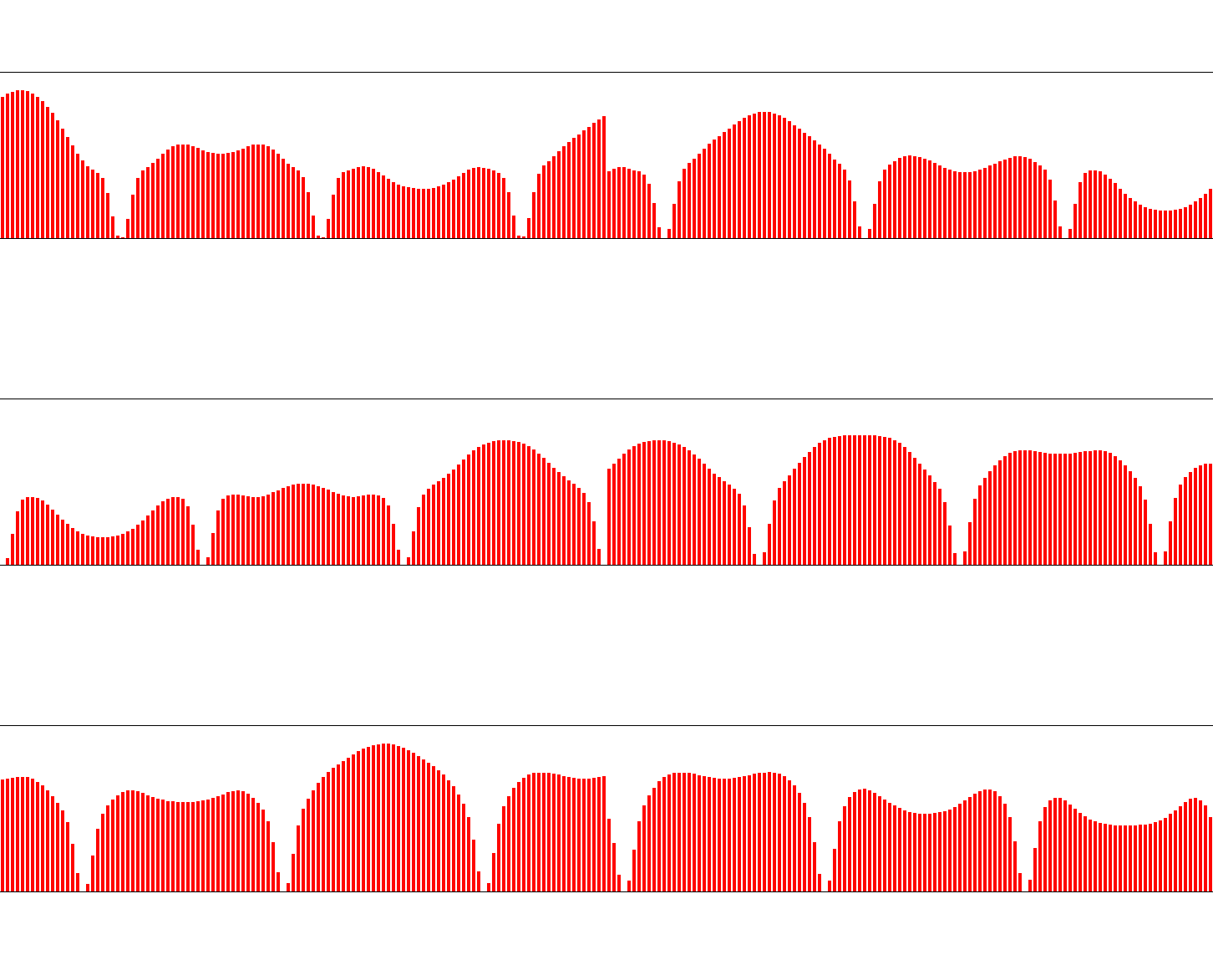
https://github.com/YouXianMing/GCD-Program
//

//  ViewController.m

//  CAReplicatorLayer

//

//  Created by YouXianMing on 16/1/13.

//  Copyright © 2016年 YouXianMing. All rights reserved.

//

#import "ViewController.h"

#import "GCD.h"

@interface ViewController ()

@property (nonatomic, strong) GCDTimer  *timer;

@end

@implementation ViewController

- (void)viewDidLoad {

    [super viewDidLoad];

    CGFloat width  = self.view.frame.size.width;

    CGFloat height = ;

    CAReplicatorLayer *replicatorLayer = [CAReplicatorLayer layer];

    [self.view.layer addSublayer:replicatorLayer];

    replicatorLayer.frame              = CGRectMake(, , width, height);

    replicatorLayer.position           = self.view.center;

    replicatorLayer.borderWidth        = 0.5f;

    replicatorLayer.instanceCount      = width / ;

    replicatorLayer.masksToBounds      = YES;

    replicatorLayer.instanceTransform  = CATransform3DMakeTranslation(-3.0, 0.0, 0.0);

    replicatorLayer.instanceDelay      = 0.025f;

    CALayer *layer        = [CALayer layer];

    layer.frame           = CGRectMake(width - , height, , );

    layer.backgroundColor = [UIColor redColor].CGColor;

    [replicatorLayer addSublayer:layer];

    self.timer = [[GCDTimer alloc] initInQueue:[GCDQueue mainQueue]];

    [self.timer event:^{

        CABasicAnimation *animation = [CABasicAnimation animationWithKeyPath:@"position.y"];

        animation.toValue           = @(layer.position.y - arc4random() % );

        animation.duration          = 0.5f;

        animation.timingFunction    = [CAMediaTimingFunction functionWithName:kCAMediaTimingFunctionEaseInEaseOut];

        animation.autoreverses      = true;

        animation.repeatCount       = CGFLOAT_MAX;

        [layer addAnimation:animation forKey:nil];

    } timeIntervalWithSecs:.f delaySecs:.f];

    [self.timer start];

}

@end
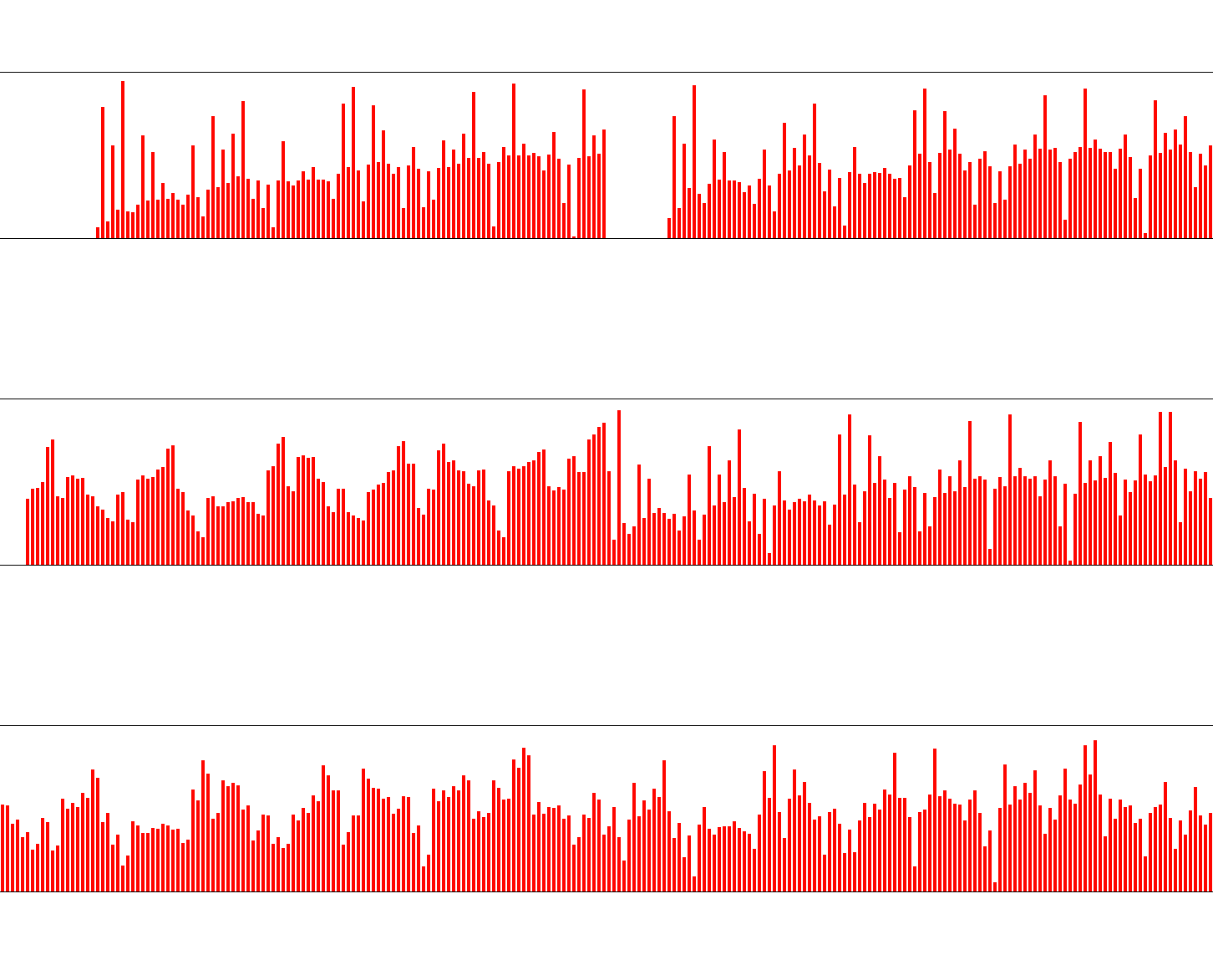
//

//  ViewController.m

//  CAReplicatorLayer

//

//  Created by YouXianMing on 16/1/13.

//  Copyright © 2016年 YouXianMing. All rights reserved.

//

#import "ViewController.h"

#import "Math.h"

#import "GCD.h"

@interface ViewController ()

@property (nonatomic, strong) GCDTimer  *timer;

@end

@implementation ViewController

- (void)viewDidLoad {

    [super viewDidLoad];

    CGFloat width  = self.view.frame.size.width;

    CGFloat height = ;

    CAReplicatorLayer *replicatorLayer = [CAReplicatorLayer layer];

    [self.view.layer addSublayer:replicatorLayer];

    replicatorLayer.frame              = CGRectMake(, , width, height);

    replicatorLayer.position           = self.view.center;

    replicatorLayer.borderWidth        = 0.5f;

    replicatorLayer.instanceCount      = width / ;

    replicatorLayer.masksToBounds      = YES;

    replicatorLayer.instanceTransform  = CATransform3DMakeTranslation(-3.0, 0.0, 0.0);

    replicatorLayer.instanceDelay      = 0.5f;

    CALayer *layer        = [CALayer layer];

    layer.frame           = CGRectMake(width - , height, , );

    layer.backgroundColor = [UIColor redColor].CGColor;

    [replicatorLayer addSublayer:layer];

    self.timer = [[GCDTimer alloc] initInQueue:[GCDQueue mainQueue]];

    [self.timer event:^{

        CABasicAnimation *animation = [CABasicAnimation animationWithKeyPath:@"position.y"];

        animation.toValue           = @(layer.position.y - arc4random() % );

        animation.duration          = 0.5f;

        animation.timingFunction    = [CAMediaTimingFunction functionWithName:kCAMediaTimingFunctionEaseInEaseOut];

        animation.autoreverses      = true;

        animation.repeatCount       = CGFLOAT_MAX;

        [layer addAnimation:animation forKey:nil];

    } timeIntervalWithSecs:.f delaySecs:.f];

    [self.timer start];

}

@end
使用CAReplicatorLayer [2]的更多相关文章
- 利用CAReplicatorLayer实现的加载动画
在上一篇中,笔者简要介绍了CAReplicatorLayer,在本篇中,将介绍具体的实用价值. 实用CAReplicatorLayer作为核心技术实现加载动画. 首先,创建一个UIView的子类 @i ...
- CoreAnimation 之CAReplicatorLayer
CAReplicatorLayer: 主要作用有以下两个: CAReplicatorLayer的目的是为了高效生成许多相似的图层,它会绘制一个或多个图层的子图层 并在每个复制体上应用不同的变换 使用C ...
- CA*Layer(CAReplicatorLayer--)
CAReplicatorLayer (反射应用) 指定一个继承于UIView的ReflectionView,它会自动产生内容的反射效果: + (Class)layerClass//我们也可以通过重写V ...
- CAReplicatorLayer复制Layer和动画, 实现神奇的效果
今天我们看下CAReplicatorLayer, 官方的解释是一个高效处理复制图层的中间层.他能复制图层的所有属性,包括动画. 一样我们先看下头文件 @interface CAReplicatorLa ...
- iOS CAReplicatorLayer 实现脉冲动画效果
iOS CAReplicatorLayer 实现脉冲动画效果 效果图 脉冲数量.速度.半径.透明度.渐变颜色.方向等都可以设置.可以用于地图标注(Annotation).按钮长按动画效果(例如录音按钮 ...
- 用drawRect以及CAReplicatorLayer绘制动态水波纹
用drawRect以及CAReplicatorLayer绘制动态水波纹 大大简化了写水波纹效果的难度,你可以根据示例自己组装水波纹效果,本设计是几个工具组合在一起完成的效果, DrawRectObje ...
- CAReplicatorLayer
CAReplicatorLayer CAReplicatorLayer的目的是为了高效生成许多相似的图层.它会绘制一个或多个图层的子图层,并在每个复制体上应用不同的变换.看上去演示能够更加解释这些,我 ...
- 使用CAReplicatorLayer [1]
使用CAReplicatorLayer [1] 说明 https://developer.apple.com/library/ios/documentation/GraphicsImaging/Ref ...
- iOS CAReplicatorLayer 简单动画
代码地址如下:http://www.demodashi.com/demo/11601.html 写在最前面,最近在看学习的时候,偶然间发现一个没有用过的Layer,于是抽空研究了下,本来应该能提前记录 ...
随机推荐
- Linux-(ls,mv,mkdir,rm,cp)
ls命令 ls命令是linux下最常用的命令.ls命令就是list的缩写,缺省下ls用来打印出当前目录的清单.如果ls指定其他目录,那么就会显示指定目录里的文件及文件夹清单. 通过ls命令不仅可以查看 ...
- Linux的用户(组),权限,文件精妙的三角关系,和强大的帮助系统
在linux中一切都是文件(文件夹和硬件外设是特殊的文件),如果有可能尽量使用文本文件.文本文件是人和机器能理解的文件,也成为人和机器进行 交流的最好途径.由于所有的配置文件都是文本,所以你只需要一个 ...
- Druid连接池(四)
十七.Druid加密 运维和DBA都不希望把密码明文直接写在配置文件中,Druid提供了数据库密码加密的功能. ConfigFilter的作用包括: 从配置文件中读取配置 从远程http文件中读取配置 ...
- Message小结(二)
当客户端调用一个WCF接口时,客户端将请求消息发送到服务端,服务端再返回回复消息.WCF内部实现了消息处理的所有细节,但是并不意味着一切不可更改.WCF也提供了一些方法让开发人员在消息发送前对消息进行 ...
- Deep Q-Network 学习笔记(五)—— 改进③:Prioritized Replay 算法
也就是优先采样,这里的推导部分完全没看懂 Orz,这里也只是记录实现代码. 也就是看了以下两篇文章对应做了实现. 莫烦老师的教程: https://morvanzhou.github.io/tutor ...
- drawRect:和layoutSubview的区别
关于这两个方法的区别 还是有点意思的. UIView的setNeedsDisplay和setNeedsLayout方法.首先两个方法都是异步执行的.setNeedsDisplay会调用自动调用draw ...
- Java - Float与Double类型比较
https://blog.csdn.net/wcxiaoych/article/details/42806313
- 在 CentOS7 上安装 zookeeper-3.5.2 服务
[root@centos-linux src]# pwd /usr/local/src # 1.创建 /usr/local/src/zookeeper 文件夹 [root@centos-linux s ...
- CSS 的介绍
第一章 的介绍 1.CSS:“层叠样式表”,它是cascading style sheets的缩写,作用就是给HTML标签加表现形式(样式-显示),如:字体,图片,列表,位置等. 在浏览器中可以看到部 ...
- Cannot perform conversion to XML from legacy HTML:
错误信息:Cannot perform conversion to XML from legacy HTML: The nekoHTML library is not in classpath. ne ...