
idea中使用tomcat 方式启动spring boot项目
Spring boot 的main 入口启动方式相信都会用,直接运行main直接就启动了,但是往往这种方式并不是最佳的启动方式,比如运维的层面更希望调整tomcat的调优参数,而只使用嵌入启动方式很难做到这些。所以使用tomcat方式启动spring boot就比较重要。
1、去tomcat 官网下载 tomcat 8 tar.gz 文件,然后解压.
https://tomcat.apache.org/download-80.cgi
2、idea中,配置启动
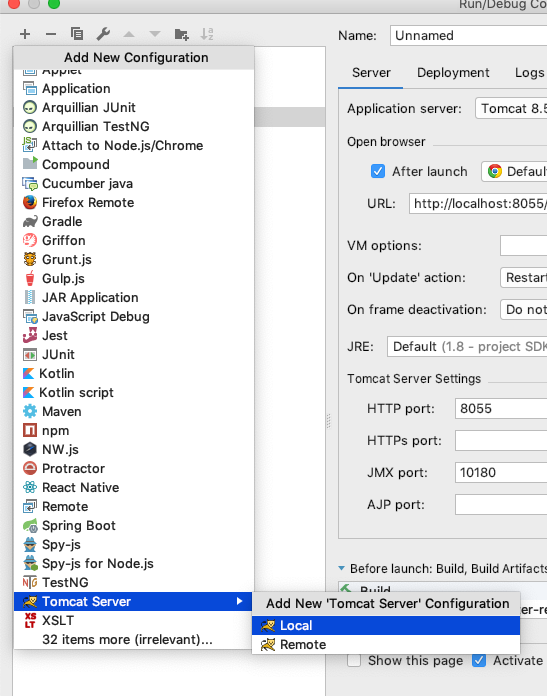
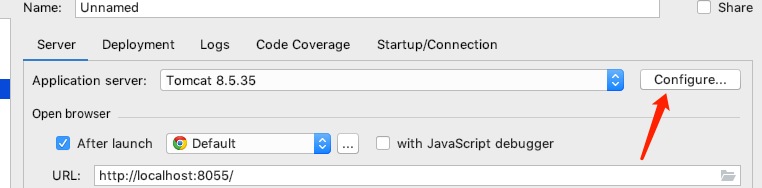
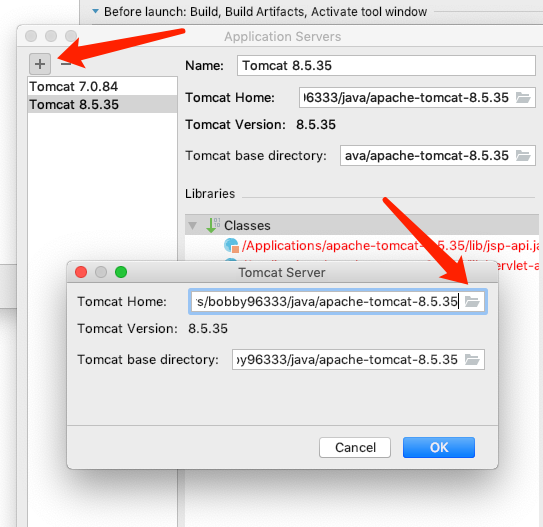
3、gradle or maven 配置
<packaging>war</packaging>
or
apply plugin: "war"
4、增加tomcat启动调用spring boot初始化入口:
public class ServletInitializer extends SpringBootServletInitializer {

    private Logger logger = LoggerFactory.getLogger(ServletInitializer.class);

    @Override

    protected SpringApplicationBuilder configure(SpringApplicationBuilder application) {

        logger.info("starting spring boot initializer ......");

        return application.sources(MainApplication.class);

    }

}
or
package com.example.demo;

import org.springframework.boot.SpringApplication;

import org.springframework.boot.autoconfigure.SpringBootApplication;

import org.springframework.boot.builder.SpringApplicationBuilder;

import org.springframework.boot.web.servlet.support.SpringBootServletInitializer;

@SpringBootApplication

public class Application extends SpringBootServletInitializer {

  @Override

  protected SpringApplicationBuilder configure(SpringApplicationBuilder application) {

    return application.sources(Application.class);

  }

  public static void main(String[] args) {

    SpringApplication.run(Application.class, args);

  }

}
5、start runing
搞定!
idea中使用tomcat 方式启动spring boot项目的更多相关文章
- IntelliJ IDEA启动spring boot项目出现Failed to start component [StandardEngine[Tomcat].StandardHost[localhost].TomcatEmbeddedContext[]]
IntelliJ IDEA启动spring boot项目出现Failed to start component [StandardEngine[Tomcat].StandardHost[localho ...
- 右击main 方法运行正常,启动tomcat 后,spring boot 项目 出现参数字符串是乱码的情况
PrintWriter out = new PrintWriter(new OutputStreamWriter(conn.getOutputStream(), "utf-8")) ...
- 启动spring boot项目
启动spring boot项目 pom.xml如下: <?xml version="1.0" encoding="UTF-8"?> <proj ...
- 启动spring boot项目时报错:java.lang.ClassNotFoundException: javax.servlet.Filter
<dependency> <groupId>org.springframework.boot</groupId> <artifactId>spring- ...
- 使用Spring boot整合Hive,在启动Spring boot项目时,报错
使用Spring boot整合Hive,在启动Spring boot项目时,报出异常: java.lang.NoSuchMethodError: org.eclipse.jetty.servlet.S ...
- 错误: 找不到或无法加载主类(IDEA中启动spring boot项目)
版权声明:本文为博主原创文章,如果转载请给出原文链接:http://www.jufanshare.com/content/142.html 提示:需要对IDEA编辑工具使用熟悉 出现一个问题,就是sp ...
- Windows系统配置.bat启动spring boot项目jar
背景:项目用spring boot构建,maven管理,本地测试好之后打成jar包,在dos窗口可以通过:java -jar demo.jar来启动demo项目,一旦关闭该dos窗口demo项目也被停 ...
- 启动Spring boot项目报错:java.lang.IllegalArgumentException: LoggerFactory is not a Logback
java.lang.IllegalArgumentException: LoggerFactory is not a Logback LoggerContext but Logback is on t ...
- tomcat 启动Spring boot 项目
SpringBoot 项目如何在tomcat容器中运行 1.相关连接: https://blog.csdn.net/u010598360/article/details/78789197/ 2.修改打 ...
随机推荐
- 解决 'findstr' 不是内部或外部命令,也不是可运行的程序或批处理文件 提示问题
如果出现提示“出现'findstr' 不是内部或外部命令,也不是可运行的程序或批处理文件” 这是PATH环境变量的问题,将windows命令的目录添加到PATH中就over了.即:在path中追加:% ...
- MT【118】利用线面角最小解题
解:如图将正四面体放到立方体中,让AB通过$\alpha$面,让$\alpha$面绕着AB动起来.问题就转化成为EF与面$\alpha$线面角$\theta$了.EF的投影为$|EF|cos\thet ...
- BZOJ 3527 力 | FFT
BZOJ 3527 力 | 分治 题意 给出数组q,$E_i = \sum_{i < j} \frac{q_i}{(i - j) ^ 2} - \sum_{i > j} \frac{q_i ...
- 单点登录(三)-----实战-----cas server 源码下载和部署
我们在上一篇文章中使用的是4.0版本的cas,4.0版本的有发布好的war包可以直接使用,那如果我们要使用更新的版本怎么办呢? 就需要下载源码自己编辑打包了. 步骤如下: 版本选择 我们在cas的gi ...
- Java之Junit和反射
Junit,反射 Junit 1.测试的分类: 黑盒测试 : 不需要写代码,给输入值,看程序是否能够输出期望的值. 白盒测试 : 需要进行代码的编写,关注的是程序的具体流程. 2.使用步骤(方法类的命 ...
- View 的setTag() 和 getTag()
View 的setTag() 和 getTag()ImageView.setTag(""); 就是当多个ImageView用到一个监听器时,能触发不同的情况,是View的方法 Ad ...
- url参数中有+、空格、=、%、&、#等特殊符号的问题解决
url出现了有+,空格,/,?,%,#,&,=等特殊符号的时候,可能在服务器端无法获得正确的参数值,如何是好?解决办法将这些字符转化成服务器可以识别的字符,对应关系如下:URL字符转义 用其它 ...
- 音视频处理之FFmpeg+SDL+MFC视频播放器20180411
一.FFmpeg+SDL+MFC视频播放器 1.MFC知识 1).创建MFC工程的方法 打开VC++ 文件->新建->项目->MFC应用程序 应用程序类型->基于对话框 取消勾 ...
- UDP ------ UDP IPPROTO_UDPLITE 参数
介绍 传统的 UDP 通信对整个报文进行校验 UDP-LITE 通信则可以设置校验的长度,适用于可以接受轻微的报文内容出错,比如视频数据:传统的 UDP 由于对整个报文校验,一旦出现报文数据出错就会被 ...
- Centos6.6下安装nginx1.6.3
安装环境: [root@nginx ~]# cat /etc/redhat-release CentOS release 6.6 (Final) [root@nginx ~]# uname -r 2. ...