
分别使用docx4j,jacob将文字与图片插入word中书签位置
项目中需要将一段文字,与人员的签名(图片)插入到上传的word中,上网查询了一下,有许多种方式可以向word中插入文字,发现docx4j与jacob都为比较常见的解决方案,于是就先使用的docx4j进行了文字与图片的插入,在自己开发的机器上docx4j插入文字与图片均成功了,但是在部署到服务器上的时候,使用docx4j插入图片的时候,一直出现一个图片无法插入的bug,没有解决掉,于是就又使用的jacob进行尝试,然后成功了。将两种对word进行操作的工具进行一下总结。
安装: docx4j要简单于jacob。docx4j只需要pom文件中添加即可,jacob需要pom添加后在本机jre的bin目录下安装一个dll文件。
代码量:两者使用同一功能的代码量差不多。
资料:百度下jacob的资料要比docx4j多一些,docx4j英文的资料多一些,在github下也可以找到docx4j。
一、docx4j的插入操作
docx4j安装时候,只需要向pom中添加依赖即可。
pom文件:
<groupId>org.docx4j</groupId>

    <artifactId>docx4j</artifactId>

    <version>3.3.1</version>

</dependency>
插入图片:
/**

     * Method Description:使用docx4j插入图片

     *

     * @param templatePath

     *            // 模板文件路径

     * @param targetPath

     *            // 生成的文件路径

     * @param bookmarkName

     *            // 书签名

     * @param imagePath

     *            void // 图片路径

     * @throws Exception

     * @Author: 张昊亮

     * @Date: 2018年5月17日 下午4:17:20

     */

    public void insertPicture(String templatePath, String targetPath, String bookmarkName, String imagePath) throws Exception {

        // 载入模板文件

        WordprocessingMLPackage wPackage = WordprocessingMLPackage.load(new FileInputStream(templatePath));

        // 提取正文

        MainDocumentPart mainDocumentPart = wPackage.getMainDocumentPart();

        Document wmlDoc = (Document) mainDocumentPart.getJaxbElement();

        Body body = wmlDoc.getBody();

        // 提取正文中所有段落

        List<Object> paragraphs = body.getContent();

        // 提取书签并创建书签的游标

        RangeFinder rt = new RangeFinder("CTBookmark", "CTMarkupRange");

        new TraversalUtil(paragraphs, rt);

        // 遍历书签

        for (CTBookmark bm : rt.getStarts()) {

            // 这儿可以对单个书签进行操作,也可以用一个map对所有的书签进行处理

            if (bm.getName().equals(bookmarkName)) {

                // 读入图片并转化为字节数组,因为docx4j只能字节数组的方式插入图片

                InputStream is = new FileInputStream(imagePath);

                byte[] bytes = IOUtils.toByteArray(is);

                // 创建一个行内图片

                BinaryPartAbstractImage imagePart = BinaryPartAbstractImage.createImagePart(wPackage, bytes);

                // createImageInline函数的前四个参数我都没有找到具体啥意思

                // 最有一个是限制图片的宽度,缩放的依据

                Inline inline = imagePart.createImageInline(null, null, 0, 1, false, 800);

                // 获取该书签的父级段落

                P p = (P) (bm.getParent());

                ObjectFactory factory = new ObjectFactory();

                // R对象是匿名的复杂类型,然而我并不知道具体啥意思,估计这个要好好去看看ooxml才知道

                R run = factory.createR();

                // drawing理解为画布

                Drawing drawing = factory.createDrawing();

                drawing.getAnchorOrInline().add(inline);

                run.getContent().add(drawing);

                p.getContent().add(run);

            }

        }

        wPackage.save(new FileOutputStream(targetPath));

    }
插入文字:
/**

     * Method Description:使用docx4j插入文字

     *

     * @param templatePath

     *            //模板文件位置

     * @param targetPath

     *            //生成文件位置

     * @param words

     *            //添加的文字内容

     * @param bookmarkName

     *            //书签名称

     * @throws Docx4JException

     * @throws FileNotFoundException

     *

     * @Author: 张昊亮

     * @Date: 2018年5月21日 上午10:02:51

     */

    public void insertWords(String templatePath, String targetPath, String words, String bookmarkName) throws FileNotFoundException,

            Docx4JException {

        // 载入模板文件

        WordprocessingMLPackage wPackage = WordprocessingMLPackage.load(new FileInputStream(templatePath));

        // 提取正文

        MainDocumentPart mainDocumentPart = wPackage.getMainDocumentPart();

        Document wmlDoc = (Document) mainDocumentPart.getJaxbElement();

        Body body = wmlDoc.getBody();

        // 提取正文中所有段落

        List<Object> paragraphs = body.getContent();

        // 提取书签并创建书签的游标

        RangeFinder rt = new RangeFinder("CTBookmark", "CTMarkupRange");

        new TraversalUtil(paragraphs, rt);

        // 遍历书签

        for (CTBookmark bm : rt.getStarts()) {

            // 这儿可以对单个书签进行操作,也可以用一个map对所有的书签进行处理

            if (bm.getName().equals(bookmarkName)) {

                ObjectFactory factory = new ObjectFactory();

                P p = (P) (bm.getParent()); // 添加到了标签处

                R r = factory.createR();

                Text t = new Text();

                t.setValue(words);

                r.getContent().add(t);

                p.getContent().add(r);

                wPackage.getMainDocumentPart().getContent().add(p);

            }

        }

        wPackage.save(new FileOutputStream(targetPath));

    }
二、使用jacob进行插入操作
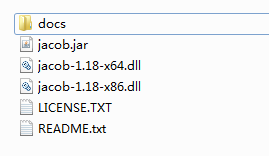
jacob在安装的时候需要,有jar包还有dll文件。
jacob包文件下载:链接:https://pan.baidu.com/s/1v0ZYsVYSu_BO5rB252ufvA 密码:mlfs
<dependency>

     <groupId>com.jacob</groupId>

     <artifactId>jacob</artifactId>

     <version>1.18</version>

 </dependency>
maven项目,添加pom依赖后,需要将jacob-1.18-x64.dll 文件放入项目所在电脑的jre的bin目录下,方可运行。
插入图片:
注:图片在资料中没有查询到的在书签位置插入,而是使用的用图片去替换文字。
/**

     * Method Description:使用jacob插入图片

     *

     * @param templatePath

     *            //模板文件位置

     * @param targetPath

     *            //生成文件位置

     * @param word

     *            // 查询文字的地方

     * @param imagePath

     *            void // 图片路径

     *

     * @Author: 张昊亮

     * @Date: 2018年5月23日 下午4:18:27

     */

    public void insertPicByjacob(String templatePath, String targetPath, String word, String imagePath) {

        System.out.println("启动word...");

        ActiveXComponent app = null;

        Dispatch doc = null;

        // 模板的路径

        String openPath = templatePath;

        // 要保存的文件的路径

        String toFileName = targetPath;

        Dispatch docs = null;

        if (app == null || app.m_pDispatch == 0) {

            app = new ActiveXComponent("Word.Application");

            app.setProperty("Visible", new Variant(false));

            app.setProperty("DisplayAlerts", new Variant(false));

        }

        if (docs == null) {

            // 获得documents对象

            docs = app.getProperty("Documents").toDispatch();

        }

        doc = Dispatch.invoke(docs, "Open", Dispatch.Method, new Object[] { openPath, new Variant(false), new Variant(true) }, new int[1])

                .toDispatch();

        System.out.println("打开文档..." + openPath);

        Dispatch selection = app.getProperty("Selection").toDispatch();

        Dispatch find = Dispatch.call(selection, "Find").toDispatch();// 获得Find组件

        Dispatch.put(find, "Text", word); // 查找字符串

        Dispatch.put(find, "MatchWholeWord", "True"); // 全字匹配

        boolean bl = Dispatch.call(find, "Execute").getBoolean(); // 执行查询

        if (bl) {

            Dispatch inLineShapes = Dispatch.get(selection, "InLineShapes").toDispatch();

            Dispatch picture = Dispatch.call(inLineShapes, "AddPicture", imagePath).toDispatch();

        }

        // 保存文件//new variant() 参数 0Doc 12、16Docx 17pdf

        Dispatch.invoke(doc, "SaveAs", Dispatch.Method, new Object[] { targetPath, new Variant(12) }, new int[1]);

        Dispatch.call((Dispatch) doc, "Close", new Variant(false));

        System.out.println("关闭文档");

        if (app != null)

            app.invoke("Quit", new Variant[] {});

    }
插入文字:
/**

     * Method Description:使用jacob插入文字

     *

     * @param templatePath

     *            //模板文件位置

     * @param targetPath

     *            //生成文件位置

     * @param words

     *            //要插入的内容

     * @param bookmarkName

     *            void // 书签名

     *

     * @Author: 张昊亮

     * @Date: 2018年5月24日 下午5:15:25

     */

    public void insertWordByjacob(String templatePath, String targetPath, String words, String bookmarkName) {

        System.out.println("启动word...");

        ActiveXComponent app = null;

        Dispatch doc = null;

        // 模板的路径

        String openPath = templatePath;

        // 要保存的文件的路径

        String toFileName = targetPath;

        Dispatch docs = null;

        if (app == null || app.m_pDispatch == 0) {

            app = new ActiveXComponent("Word.Application");

            app.setProperty("Visible", new Variant(false));

            app.setProperty("DisplayAlerts", new Variant(false));

        }

        if (docs == null) {

            // 获得documents对象

            docs = app.getProperty("Documents").toDispatch();

        }

        doc = Dispatch.invoke(docs, "Open", Dispatch.Method, new Object[] { openPath, new Variant(false), new Variant(true) }, new int[1])

                .toDispatch();

        System.out.println("打开文档..." + openPath);

        Dispatch activeDocument = app.getProperty("ActiveDocument").toDispatch();

        Dispatch bookMarks = app.call(activeDocument, "Bookmarks").toDispatch();

        Dispatch rangeItem = Dispatch.call(bookMarks, "Item", bookmarkName).toDispatch();

        Dispatch range = Dispatch.call(rangeItem, "Range").toDispatch();

        Dispatch.put(range, "Text", new Variant(words));

        // 保存文件//new variant() 参数 0Doc 12、16Docx 17pdf

        Dispatch.invoke(doc, "SaveAs", Dispatch.Method, new Object[] { targetPath, new Variant(12) }, new int[1]);

        Dispatch.call((Dispatch) doc, "Close", new Variant(false));

        System.out.println("关闭文档");

        if (app != null)

            app.invoke("Quit", new Variant[] {});

    }
分别使用docx4j,jacob将文字与图片插入word中书签位置的更多相关文章
- 控制图片在latex中的位置
如何做到自己控制图片在latex中的位置? 方法:在 \begin{figure} 后面加参数 [h!] 即 \begin{figure}[h!] % Requires \usepackage{gra ...
- 解决图片插入word文档后清晰度降低的问题
解决图片插入word文档后清晰度降低的问题 在默认情况下,word程序会自动压缩插入word文档中的图片以减小整个word文档的.当我们需要插入word文档中的图片保持原始清晰度时,可以通过设置wor ...
- ppt图片在word中不能正常显示,只显示为矩形框的解决方法
word中插入的其他图片是好的,但是从ppt复制粘贴过来的图片只显示个框. 解决方法:以下红框中内容去选中.
- 把图片在word中显示
如下: //放入word中 #region word ThreadPool.QueueUserWorkItem(//使用线程池 (P_temp) =>//使用lambda表达式 { G_wa = ...
- 开发笔记:PDF生成文字和图片水印
背景 团队手里在做的一个项目,其中一个小功能是用户需要上传PDF文件到文件服务器上,都是一些合同或者技术评估文档,鉴于知识版权和防伪的目的,需要在上传的PDF文件打上水印, 这时候我们需要提供能力给客 ...
- C# 操作Word书签(二)——插入图片、表格到书签;读取、替换书签
概要 书签的设置可以帮助我们快速的定位某段文字,使用起来很方便,也很节省时间.在前一篇文章“C# 如何添加/删除Word书签”中介绍了插入.删除书签的方法,本篇文章将对C# 操作Word书签的功能做进 ...
- Java 在Word中添加多行图片水印
Word中设置水印效果时,不论是文本水印或者是图片水印都只能添加单个文字或者图片到Word页面,效果比较单一,本文通过Java代码示例介绍如何在页面中添加多行图片水印效果,即水印效果以多个图片平铺到页 ...
- 使用Emacs中的org-mode写cnblogs之图片插入
.title { text-align: center; margin-bottom: .2em } .subtitle { text-align: center; font-size: medium ...
- C#中按模板操作Word —— 如何向Word中插入图片
一.Word对象模型的重叠性分析 本文主要介绍通过书签Bookmark向Word文档中插入图片的方法.在此之前我们先简单讨论下Word对象模型的重叠性.如果你对Word对象模型还不熟悉,请参考本专栏第 ...
随机推荐
- C++接口继承与实现继承的区别和选择
1.接口继承与实现继承的区别 <Effective C++>条款三十四:区分接口继承和实现继承中介绍的比较啰嗦,概括地说需要理解三点: (1)纯虚函数只提供接口继承,但可以被实现: (2) ...
- Web项目开发中用到的缓存技术
在WEB开发中用来应付高流量最有效的办法就是用缓存技术,能有效的提高服务器负载性能,用空间换取时间.缓存一般用来 存储频繁访问的数据 临时存储耗时的计算结果 内存缓存减少磁盘IO 使用缓存的2个主要原 ...
- 观V8源码中的array.js,解析 Array.prototype.slice为什么能将类数组对象转为真正的数组?
在官方的解释中,如[mdn] The slice() method returns a shallow copy of a portion of an array into a new array o ...
- 洛谷大宁的邀请赛~元旦祭F: U17264 photo(线段树)
标程的写法稍微有点麻烦,其实不需要平衡树也是可以做的. 线段树上维护从左端点开始最远的有拍照的长度,以及区间的最大值. 考虑两段区间合并的时候,显然左区间必须取,右区间的第一个比左区间最大值大的数开始 ...
- 转:动态计算UITableViewCell高度详解
转自:http://www.cocoachina.com/industry/20140604/8668.html 不知道大家有没有发现,在iOS APP开发过程中,UITableView是我们显示 ...
- 完美解决github访问速度慢
1. 解决方法 2.解决方法 1. 修改本地hosts文件 windows系统的hosts文件的位置如下:C:\Windows\System32\drivers\etc\hosts mac/linux ...
- jquery如何获取input(file)控件上传的图片名称,即"11111.jpg"
html代码:<input name=file" type="file" id="file"/> Jquery代码:var file;$( ...
- .NET 定时器类及使用方法
Timer类实现定时任务 //2秒后开启该线程,然后每隔4s调用一次 System.Threading.Timer timer = new System.Threading.Timer((n) =&g ...
- Python3中urllib使用与源代码
Py2.x: Urllib库 Urllin2库 Py3.x: Urllib库 变化: 在Pytho2.x中使用import urllib2---对应的,在Python3.x中会使用import url ...
- 《设计模式》-原则二:里氏代换原则(LSP)
回顾一下上一节说的“开闭原则” 说的是 一个软件要遵循对修改关闭 对新功能扩展的原则. 这一次来说说 “里氏代换原则” 意思是说:子类型必须能代替他们的基类. 看了半天的例子 好像 是懂非懂啊...相 ...