
Content Negotiation using Spring MVC
There are two ways to generate output using Spring MVC:
- You can use the RESTful
@ResponseBodyapproach and HTTP message converters, typically to return data-formats like JSON or XML. Programmatic clients, mobile apps and AJAX enabled browsers are the usual clients. - Alternatively you may use view resolution. Although views are perfectly capable of generating JSON and XML if you wish (more on that in my next post), views are normally used to generate presentation formats like HTML for a traditional web-application.
- Actually there is a third possibility - some applications require both, and Spring MVC supports such combinations easily. We will come back to that right at the end.
In either case you’ll need to deal with multiple representations (or views) of the same data returned by the controller. Working out which data format to return is called Content Negotiation.
There are three situations where we need to know what type of data-format to send in the HTTP response:
- HttpMessageConverters: Determine the right converter to use.
- Request Mappings: Map an incoming HTTP request to different methods that return different formats.
- View Resolution: Pick the right view to use.
Determining what format the user has requested relies on a ContentNegotationStrategy. There are default implementations available out of the box, but you can also implement your own if you wish.
In this post I want to discuss how to configure and use content negotiation with Spring, mostly in terms of RESTful Controllers using HTTP message converters. In a later post I will show how to setup content negotiation specifically for use with views using Spring’s ContentNegotiatingViewResolver.
How does Content Negotiation Work?
[caption id=“attachment_13288” align=“alignleft” width=“200” caption=“Getting the Right Content”] [/caption]
When making a request via HTTP it is possible to specify what type of response you would like by setting the Accept header property. Web browsers have this preset to request HTML (among other things). In fact, if you look, you will see that browsers actually send very confusing Accept headers, which makes relying on them impractical. See http://www.gethifi.com/blog/browser-rest-http-accept-headers for a nice discussion of this problem. Bottom-line: Accept headers are messed up and you can’t normally change them either (unless you use JavaScript and AJAX).
So, for those situations where the Accept header property is not desirable, Spring offers some conventions to use instead. (This was one of the nice changes in Spring 3.2 making a flexible content selection strategy available across all of Spring MVC not just when using views). You can configure a content negotiation strategy centrally once and it will apply wherever different formats (media types) need to be determined.
Enabling Content Negotiation in Spring MVC
Spring supports a couple of conventions for selecting the format required: URL suffixes and/or a URL parameter. These work alongside the use of Accept headers. As a result, the content-type can be requested in any of three ways. By default they are checked in this order:
- Add a path extension (suffix) in the URL. So, if the incoming URL is something like
http://myserver/myapp/accounts/list.htmlthen HTML is required. For a spreadsheet the URL should behttp://myserver/myapp/accounts/list.xls. The suffix to media-type mapping is automatically defined via the JavaBeans Activation Framework or JAF (soactivation.jarmust be on the class path). - A URL parameter like this:
http://myserver/myapp/accounts/list?format=xls. The name of the parameter isformatby default, but this may be changed. Using a parameter is disabled by default, but when enabled, it is checked second. - Finally the
AcceptHTTP header property is checked. This is how HTTP is actually defined to work, but, as previously mentioned, it can be problematic to use.
The Java Configuration to set this up, looks like this. Simply customize the predefined content negotiation manager via its configurer. Note the MediaType helper class has predefined constants for most well-known media-types.
@Configuration

@EnableWebMvc

public class WebConfig extends WebMvcConfigurerAdapter {

  /**

    * Setup a simple strategy: use all the defaults and return XML by default when not sure.

    */

  @Override

  public void configureContentNegotiation(ContentNegotiationConfigurer configurer) {

    configurer.defaultContentType(MediaType.APPLICATION_XML);

  }

}
When using XML configuration, the content negotiation strategy is most easily setup via the ContentNegotiationManagerFactoryBean:
   <!--

        Setup a simple strategy:

           1. Take all the defaults.

           2. Return XML by default when not sure.

       -->

  <bean id="contentNegotiationManager"

             class="org.springframework.web.accept.ContentNegotiationManagerFactoryBean">

       <property name="defaultContentType" value="application/xml" />

  </bean>

 <!-- Make this available across all of Spring MVC -->

 <mvc:annotation-driven content-negotiation-manager="contentNegotiationManager" />
The ContentNegotiationManager created by either setup is an implementation of ContentNegotationStrategy that implements the PPA Strategy (path extension, then parameter, then Accept header) described above.
Additional Configuration Options
In Java configuration, the strategy can be fully customized using methods on the configurer:
@Configuration

@EnableWebMvc

public class WebConfig extends WebMvcConfigurerAdapter {

  /**

    *  Total customization - see below for explanation.

    */

  @Override

  public void configureContentNegotiation(ContentNegotiationConfigurer configurer) {

    configurer.favorPathExtension(false).

            favorParameter(true).

            parameterName("mediaType").

            ignoreAcceptHeader(true).

            useJaf(false).

            defaultContentType(MediaType.APPLICATION_JSON).

            mediaType("xml", MediaType.APPLICATION_XML).

            mediaType("json", MediaType.APPLICATION_JSON);

  }

}
In XML, the strategy can be configured using methods on the factory bean:
  <!-- Total customization - see below for explanation. -->

  <bean id="contentNegotiationManager"

             class="org.springframework.web.accept.ContentNegotiationManagerFactoryBean">

    <property name="favorPathExtension" value="false" />

    <property name="favorParameter" value="true" />

    <property name="parameterName" value="mediaType" />

    <property name="ignoreAcceptHeader" value="true"/>

    <property name="useJaf" value="false"/>

    <property name="defaultContentType" value="application/json" />

    <property name="mediaTypes">

        <map>

            <entry key="json" value="application/json" />

            <entry key="xml" value="application/xml" />

       </map>

    </property>

</bean>
What we did, in both cases:
- Disabled path extension. Note that favor does not mean use one approach in preference to another, it just enables or disables it. The order of checking is always path extension, parameter, Accept header.
- Enable the use of the URL parameter but instead of using the default parameter,
format, we will usemediaTypeinstead. - Ignore the
Acceptheader completely. This is often the best approach if most of your clients are actually web-browsers (typically making REST calls via AJAX). - Don't use the JAF, instead specify the media type mappings manually - we only wish to support JSON and XML.
Listing User Accounts Example

To demonstrate, I have put together a simple account listing application as our worked example - the screenshot shows a typical list of accounts in HTML. The complete code can be found at Github: https://github.com/paulc4/mvc-content-neg.
To return a list of accounts in JSON or XML, I need a Controller like this. We will ignore the HTML generating methods for now.
@Controller

class AccountController {

    @RequestMapping(value="/accounts", method=RequestMethod.GET)

    @ResponseStatus(HttpStatus.OK)

    public @ResponseBody List<Account> list(Model model, Principal principal) {

        return accountManager.getAccounts(principal) );

    }

    // Other methods ...

}
Here is the content-negotiation strategy setup:
	<!-- Simple strategy: only path extension is taken into account -->

	<bean id="cnManager"

		class="org.springframework.web.accept.ContentNegotiationManagerFactoryBean">

		<property name="favorPathExtension" value="true"/>

		<property name="ignoreAcceptHeader" value="true" />

		<property name="defaultContentType" value="text/html" />

		<property name="useJaf" value="false"/>

		<property name="mediaTypes">

			<map>

				<entry key="html" value="text/html" />

				<entry key="json" value="application/json" />

				<entry key="xml" value="application/xml" />

			</map>

		</property>

	</bean>
Or, using Java Configuration, the code looks like this:
	@Override

	public void configureContentNegotiation(

			ContentNegotiationConfigurer configurer) {

		// Simple strategy: only path extension is taken into account

		configurer.favorPathExtension(true).

			ignoreAcceptHeader(true).

			useJaf(false).

			defaultContentType(MediaType.TEXT_HTML).

			mediaType("html", MediaType.TEXT_HTML).

			mediaType("xml", MediaType.APPLICATION_XML).

			mediaType("json", MediaType.APPLICATION_JSON);

	}
Provided I have JAXB2 and Jackson on my classpath, Spring MVC will automatically setup the necessary HttpMessageConverters. My domain classes must also be marked up with JAXB2 and Jackson annotations to enable conversion (otherwise the message converters don’t know what to do). In response to comments (below), the annotated Account class is shown below.
Here is the JSON output from our Accounts application (note path-extension in URL).
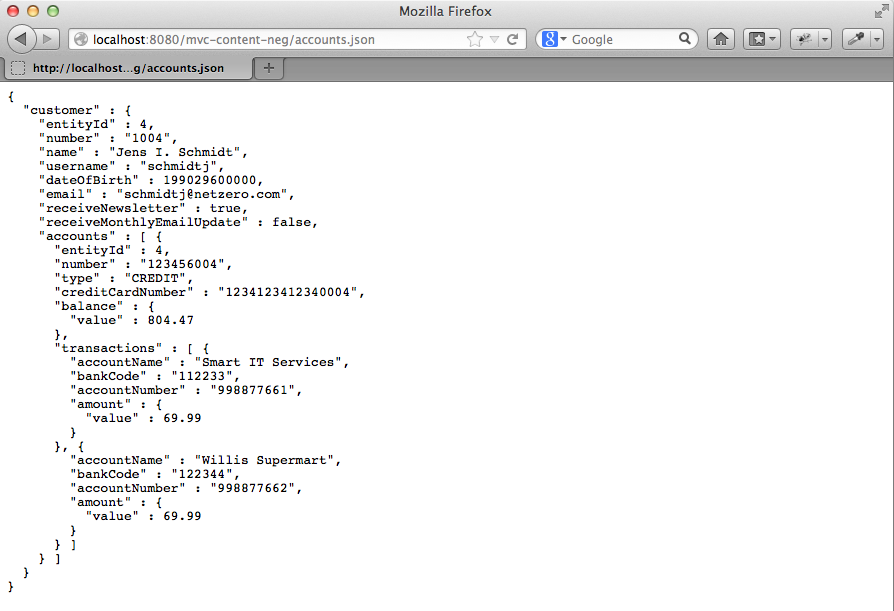
How does the system know whether to convert to XML or JSON? Because of content negotiation - any one of the three (PPA Strategy) options discussed above will be used depending on how the ContentNegotiationManager is configured. In this case the URL ends in accounts.json because the path-extension is the only strategy enabled.
In the sample code you can switch between XML or Java Configuration of MVC by setting an active profile in the web.xml. The profiles are “xml” and “javaconfig” respectively.
Combining Data and Presentation Formats
Spring MVC’s REST support builds on the existing MVC Controller framework. So it is possible to have the same web-applications return information both as raw data (like JSON) and using a presentation format (like HTML).
Both techniques can easily be used side by side in the same controller, like this:
@Controller

class AccountController {

    // RESTful method

    @RequestMapping(value="/accounts", produces={"application/xml", "application/json"})

    @ResponseStatus(HttpStatus.OK)

    public @ResponseBody List<Account> listWithMarshalling(Principal principal) {

        return accountManager.getAccounts(principal);

    }

    // View-based method

    @RequestMapping("/accounts")

    public String listWithView(Model model, Principal principal) {

        // Call RESTful method to avoid repeating account lookup logic

        model.addAttribute( listWithMarshalling(principal) );

        // Return the view to use for rendering the response

        return ¨accounts/list¨;

    }

}
There is a simple Pattern here: the @ResponseBody method handles all data access and integration with the underlying service layer (the AccountManager). The second method calls the first and sets up the response in the Model for use by a View. This avoids duplicated logic.
To determine which of the two @RequestMapping methods to pick, we are again using our PPA content negotiation strategy. It allows the produces option to work. URLs ending with accounts.xml or accounts.json map to the first method, any other URLs ending in accounts.anything map to the second.
Another Approach
Alternatively we could do the whole thing with just one method if we used views to generate all possible content-types. This is where the ContentNegotiatingViewResolver comes in and that will be the subject of my next post.
Acknoweldgements
I would like to thank Rossen Stoyanchev for his help in writing this post. Any errors are my own.
Addendum: The Annotated Account Class
Added 2 June 2013.
Since there were some questions on how to annotate a class for JAXB, here is part of the Account class. For brevity I have omitted the data-members, and all methods except the annotated getters. I could annotate the data-members directly if preferred (just like JPA annotations in fact). Remember that Jackson can marshal objects to JSON using these same annotations.
/**

 * Represents an account for a member of a financial institution. An account has

 * zero or more {@link Transaction}s and belongs to a {@link Customer}. An aggregate entity.

 */

@Entity

@Table(name = "T_ACCOUNT")

@XmlRootElement

public class Account {

	// data-members omitted ...

	public Account(Customer owner, String number, String type) {

		this.owner = owner;

		this.number = number;

		this.type = type;

	}

	/**

	 * Returns the number used to uniquely identify this account.

	 */

	@XmlAttribute

	public String getNumber() {

		return number;

	}

	/**

	 * Get the account type.

	 *

	 * @return One of "CREDIT", "SAVINGS", "CHECK".

	 */

	@XmlAttribute

	public String getType() {

		return type;

	}

	/**

	 * Get the credit-card, if any, associated with this account.

	 *

	 * @return The credit-card number or null if there isn't one.

	 */

	@XmlAttribute

	public String getCreditCardNumber() {

		return StringUtils.hasText(creditCardNumber) ? creditCardNumber : null;

	}

	/**

	 * Get the balance of this account in local currency.

	 *

	 * @return Current account balance.

	 */

	@XmlAttribute

	public MonetaryAmount getBalance() {

		return balance;

	}

	/**

	 * Returns a single account transaction. Callers should not attempt to hold

	 * on or modify the returned object. This method should only be used

	 * transitively; for example, called to facilitate reporting or testing.

	 *

	 * @param name

	 *            the name of the transaction account e.g "Fred Smith"

	 * @return the beneficiary object

	 */

	@XmlElement   // Make these a nested <transactions> element

	public Set<Transaction> getTransactions() {

		return transactions;

	}

    // Setters and other methods ...

}
https://spring.io/blog/2013/05/11/content-negotiation-using-spring-mvc
Content Negotiation using Spring MVC的更多相关文章
- Spring MVC Content Negotiation 转载
Spring MVC Content Negotiation 2017年11月15日 00:21:21 carl-zhao 阅读数:2983 Spring MVC有两种方式生成output的方法: ...
- springboot Serving Web Content with Spring MVC
Serving Web Content with Spring MVC This guide walks you through the process of creating a "hel ...
- ajax使用向Spring MVC发送JSON数据出现 org.springframework.web.HttpMediaTypeNotSupportedException: Content type 'application/x-www-form-urlencoded;charset=UTF-8' not supported错误
ajax使用向Spring MVC发送JSON数据时,后端Controller在接受JSON数据时报org.springframework.web.HttpMediaTypeNotSupportedE ...
- 使用Spring MVC创建 REST API
1.REST的基础知识 当谈论REST时,有一种常见的错误就是将其视为“基于URL的Web服务”——将REST作为另一种类型的远程过程调用(remote procedurecall,RPC)机制,就像 ...
- 第16章-使用Spring MVC创建REST API
1 了解REST 1.1 REST的基础知识 REST与RPC几乎没有任何关系.RPC是面向服务的,并关注于行为和动作:而REST是面向资源的,强调描述应用程序的事物和名词. 为了理解REST是什么, ...
- Spring7:基于注解的Spring MVC(下篇)
Model 上一篇文章<Spring6:基于注解的Spring MVC(上篇)>,讲了Spring MVC环境搭建.@RequestMapping以及参数绑定,这是Spring MVC中最 ...
- Spring MVC学习笔记——SiteMesh的使用(转)
转自 SiteMesh的使用 SiteMesh的介绍就不多说了,主要是用来统一页面风格,减少重复编码的. 它定义了一个过滤器,然后把页面都加上统一的头部和底部. 需要先在WEB-INF/lib下引入s ...
- [Java] Spring MVC 知识点
云图: @Service 用于标注业务层组件. 在 Spring-servlet 配置xml中,component-scan 标签默认情况下自动扫描指定路径下的包(含所有子包),将带有@Compone ...
- [Java] Maven 建立 Spring MVC 工程
GIT: https://github.com/yangyxd/Maven.SpringMVC.Web 1. 建立 WebApp 工程 下一步: 下一步: 选择 maven-archetype-web ...
随机推荐
- sklearn使用小记GridSearchCV
def test_grid_search(): from sklearn import datasets,svm iris = datasets.load_iris() parameters = {' ...
- 反射获取属性DisplayName特性名字以及属性值
/// <summary> /// 反射获取所有DisplayName标记值 /// </summary> /// <typeparam name="T&quo ...
- javascript快速排序的思考
还记得三个月前,学习过快速排序,示例所讲的python快速排序十分易于理解,然而网上学习的c#的快速排序当时就懵逼的,现在已经全忘了,大概记得个思路 在学习完了一些高级的js方法后,今天用js模拟了p ...
- dotNet core 应用部署centos
---恢复内容开始--- 阅读目录 需要安装的插件以及支撑架构 安装dotnetSDK 安装jexus 安装supervisord 遇到问题汇总 注意事项.扩展延伸 需要安装的插件以及支撑架构 1.d ...
- Asp.Net MVC EF之一:使用Database类在EF框架中执行Sql语句
引言 从EF6开始,增加了DateBase类,他通过从 DbContext 对象获取此类的实例.可用于管理支持数据库上下文或连接的实际数据库.这包括创建.删除和检查数据库的存在. 在6以前,我们使用E ...
- 918. Maximum Sum Circular Subarray
Given a circular array C of integers represented by A, find the maximum possible sum of a non-empty ...
- django 获取request请求对象及response响应对象中的各种属性值
django request对象和HttpResponse对象 HttpRequest对象(除非特殊说明,所有属性都是只读,session属性是个例外) HttpRequest.scheme 请求方案 ...
- Apache TraceEnable关闭与测试方法
系统环境:OS: RHEL5.6_x64Apache: httpd-2.2.11 关闭方法:在主配置文件httpd.conf中添加配置:TraceEnable off可以直接配置在ServerRoot ...
- 2014年10月Android面试总结
最近打算跳槽,所以到外面逛了一圈,发现外面的世界还是比较精彩的,同时也认识了自己的一些不足,以及作为一个Android开发者,自己后面需要掌握的东西做一下列举. 先介绍下本人的工作经历吧,本人11年7 ...
- HttpClient和HttpURLConnection的使用和区别(上)
转自:点击打开链接 相信很多Android开发者碰到涉及到Http协议的需求时,都和我一样在犹豫是使用HttpClient还是使用HttpURLConnection呢.我在网上也搜索了很多文章,来分析 ...