
树莓派与Arduino Leonardo使用NRF24L01无线模块通信之基于RF24库 (二) 发送自定义数据
在我的项目里,树莓派主要作为中心节点,用于接收数据,Arduino作为子节点,用于发送数据,考虑到以后会有很多子节点,但又不至于使得代码过于繁琐,因此所有的传输数据添加一个头部编号用于区分不同节点。
nrf24l01支持的数据最大为4个字节,因此使用最高位的一个字节(8位)作为节点编号,剩余三个字节用于传输数据。以下为具体代码:
Arduino Leonardo程序
主要用于发送数据给树莓派,同时接收树莓派的响应数据。
#include <SPI.h>

#include "RF24.h"

#include <SPI.h>

#include "RF24.h"

#include <printf.h>

/****************** User Config ***************************/

/***      Set this radio as radio number 0 or 1         ***/

bool radioNumber = ;

/* Hardware configuration: Set up nRF24L01 radio on SPI bus plus pins 7 & 8 */

RF24 radio(,);

/**********************************************************/

byte addresses[][] = {"1Node","2Node"};

// Used to control whether this node is sending or receiving

bool role = ;

//这个是我们即将建立的传输渠道编码

//!!要和另一个模块的一致

const uint64_t pipes = 0xE8E8F0F0E1LL;

//这个变量会保持我们接受到的信息

//变量类型一定要和传过来的一样

//要传输的数据

unsigned long sendData = ;

unsigned long head = 0x01000000;//高8位为头标志,根据标志不同区分不同发送源,0x00为中心主节点

unsigned long receData;

void setup() {

  Serial.begin();

  printf_begin();

  Serial.println(F("RF24/examples/GettingStarted"));

  radio.begin();

  radio.setPALevel(RF24_PA_MAX);

  radio.openWritingPipe(pipes);

}

void loop() {

  unsigned long data = sendData+head;

   Serial.print("Sending:");

   Serial.println(data);

   bool ok = radio.write(&data,sizeof(unsigned long));

   if(ok){

      radio.startListening();

      delay(); //延时,用于响应返回时间

      if(radio.available()){

          radio.read(&receData,sizeof(unsigned long));//读取的数据为1时,表示正常

          Serial.print("Response:");

          Serial.println(receData);

        }

      radio.stopListening();

    }

} // Loop
结果如下:
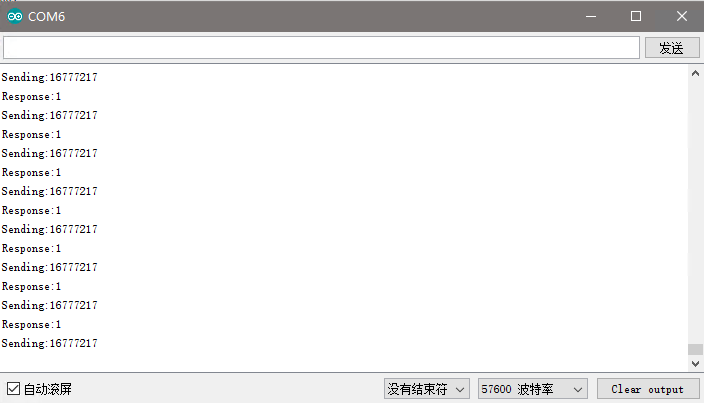
树莓派程序
树莓派主要用于接收数据,同时发出响应。
#include <cstdlib>

#include <iostream>

#include <sstream>

#include <string>

#include <unistd.h>

#include <RF24/RF24.h>

using namespace std;

//

// Hardware configuration

// Configure the appropriate pins for your connections

/****************** Raspberry Pi ***********************/

// Radio CE Pin, CSN Pin, SPI Speed

// Setup for GPIO 22 CE and CE0 CSN with SPI Speed @ 4Mhz

//RF24 radio(RPI_V2_GPIO_P1_22, BCM2835_SPI_CS0, BCM2835_SPI_SPEED_4MHZ);

// NEW: Setup for RPi B+

//RF24 radio(RPI_BPLUS_GPIO_J8_15,RPI_BPLUS_GPIO_J8_24, BCM2835_SPI_SPEED_8MHZ);

// Setup for GPIO 15 CE and CE0 CSN with SPI Speed @ 8Mhz

//RF24 radio(RPI_V2_GPIO_P1_15, RPI_V2_GPIO_P1_24, BCM2835_SPI_SPEED_8MHZ);

// RPi generic:

RF24 radio(,);

/*** RPi Alternate ***/

//Note: Specify SPI BUS 0 or 1 instead of CS pin number.

// See http://tmrh20.github.io/RF24/RPi.html for more information on usage

//RPi Alternate, with MRAA

//RF24 radio(15,0);

//RPi Alternate, with SPIDEV - Note: Edit RF24/arch/BBB/spi.cpp and  set 'this->device = "/dev/spidev0.0";;' or as listed in /dev

//RF24 radio(22,0);

/****************** Linux (BBB,x86,etc) ***********************/

// Setup for ARM(Linux) devices like BBB using spidev (default is "/dev/spidev1.0" )

//RF24 radio(115,0);

//BBB Alternate, with mraa

// CE pin = (Header P9, Pin 13) = 59 = 13 + 46

//Note: Specify SPI BUS 0 or 1 instead of CS pin number.

//RF24 radio(59,0);

/********** User Config *********/

// Assign a unique identifier for this node, 0 or 1

bool radioNumber = ;

/********************************/

// Radio pipe addresses for the 2 nodes to communicate.

const uint64_t pipes = 0xE8E8F0F0E1LL;

unsigned long  receData;

unsigned long  respData=0x01;

unsigned long  head=0x00000000;

int main(int argc, char** argv){

  cout << "RF24/examples/GettingStarted/\n";

  // Setup and configure rf radio

  radio.begin();

  // optionally, increase the delay between retries & # of retries

  radio.setRetries(,);

  // Dump the configuration of the rf unit for debugging

  radio.printDetails();

  radio.openReadingPipe(,pipes);

/***********************************/

  // This simple sketch opens two pipes for these two nodes to communicate

  // back and forth.

  radio.startListening();

  cout << "Listening .... \n";

  // forever loop

  while ()

  {

  // Pong back role.  Receive each packet, dump it out, and send it back

  //

  // if there is data ready

  if ( radio.available() )

  {

    // Fetch the payload, and see if this was the last one.

    while(radio.available()){

        radio.read( &receData, sizeof(unsigned long) );

    }

    radio.stopListening();

    unsigned long data = respData+head;

    radio.write( &data, sizeof(unsigned long) );

    // Now, resume listening so we catch the next packets.

    radio.startListening();

    // Spew it

    printf("Got payload(%d) %lu...\n",sizeof(unsigned long), receData);

    delay(); //Delay after payload responded to, minimize RPi CPU time

    }

  } // forever loop

  return ;

}
结果如下:

上图中数据“16777217”用八进制表示为“0x01000001”,第一个字节的0x01表示从节点head=0x01000000发来的数据,数据为data=0x000001。
树莓派与Arduino Leonardo使用NRF24L01无线模块通信之基于RF24库 (二) 发送自定义数据的更多相关文章
- 树莓派与Arduino Leonardo使用NRF24L01无线模块通信之基于RF24库 (六) 树莓派查询子节点温湿度数据
nrl24l01每次只能发送4个字节,前面说到,第一个字节用于源节点,第二个字节用于目的节点.因此只剩下两个字节用于温度和湿度,一个字节只有八位,需要表示温湿度的正负数,因此每个字节的第一位表示正负符 ...
- 树莓派与Arduino Leonardo使用NRF24L01无线模块通信之基于RF24库 (五) 树莓派单子节点发送数据
本项目中各个节点和树莓派的通信不区分信道,因此如果由树莓派发送给特定节点的数据会被所有节点接收到,因此子节点可以判别该数据是否发给自己的,需要在数据的第二个字节中加入目标节点的编号(第一个字节为源节点 ...
- 树莓派与Arduino Leonardo使用NRF24L01无线模块通信之基于RF24库 (三) 全双工通信
设计思路 Arduino Leonardo初始化为发送模式,发送完成后,立即切换为接收模式,不停的监听,收到数据后立即切换为发送模式,若超过一定时间还为接收到数据,则切换为发送模式. 树莓派初始化为接 ...
- 树莓派与Arduino Leonardo使用NRF24L01无线模块通信之基于RF24库 (四) 树莓派单子节点查询
考虑到项目的实际需要,树莓派作为主机,应该只在需要的时候查询特定节点发送的数据,因此接收到数据后需要根据头部判断是否是自己需要的数据,如果不是继续接收数据,超过一定时间未查询到特定节点的数据,则退出程 ...
- 树莓派与Arduino Leonardo使用NRF24L01无线模块通信之基于RF24库 (一) 配置与测试
引脚连接说明 与树莓派的连线 NRF24L01 => 树莓派 GND => GND VCC => 3.3V CE = ...
- STC8H开发(五): SPI驱动nRF24L01无线模块
目录 STC8H开发(一): 在Keil5中配置和使用FwLib_STC8封装库(图文详解) STC8H开发(二): 在Linux VSCode中配置和使用FwLib_STC8封装库(图文详解) ST ...
- nRF2401A/nRF24L01/nRF24L01+无线模块最常见问题汇集(转)
俗话说:每个人一生下来什么都会的,都是通过自己努力和探索出来的,NRF系列芯片,刚开始都好奇心加兴趣才来捣鼓它的,刚开始做硬件和软件,没有收发数据弄得整个人头都快炸开了,所以在此和大家分享一下前辈的经 ...
- [51单片机] nRF24L01 无线模块 测试 按键-灯-远程控制
哈哈,穷吊死一个,自己做的一个超简单的板还没有电源提供,只得借助我的大开发板啦.其实这2个模块是完全可以分开的,无线嘛,你懂得!进入正题,这个实验的功能就是一个发送模块(大的那个板)连接4个按键,通过 ...
- nRF24L01无线模块笔记
nRF24L01模块 官网链接: https://www.nordicsemi.com/Products/nRF24-series 常见的无线收发模块, 工作在2.4GHz频段, 适合近距离遥控和数据 ...
随机推荐
- Python的open函数文件读写线程不安全,logging模型文件读写线程安全!
工作中遇到的问题:如何在多线程的程序中同时记录日志? 最初图省事,使用了最原始的open函数来写日志,因为开始使用的写文件模式的是追加('a'),发现并没有线程不安全的现象,各个线程的的日志信息都写入 ...
- 时间序列分析工具箱——tibbletime
目录 时间序列分析工具箱--tibbletime tibbletime 的用途 加载包 数据 教程:tibbletime 初始化一个 tbl_time 对象 时间序列函数 翻译自<Demo We ...
- JavaWeb总结(十五)
AJAX(Asynchronous JavaScript and XML(异步的 JavaScript 和 XML)) AJAX的作用是什么? 在无需重新加载整个网页的情况下,能够更新部分网页的技术 ...
- PyQt5 笔记(02):嵌套布局
如前一篇笔记,我们还是只讨论两层嵌套布局的情况. 前面的布局有一个缺点:有三个内层布局,则需要三个空部件.那若有十个内层布局呢?显然会让人不舒服. 刚才在玩 Qt Designer 时,发现了一个更好 ...
- 学习OpenCV——SVM
学习OpenCV——SVM 学习SVM,首先通过http://zh.wikipedia.org/wiki/SVM, 再通过博客http://blog.csdn.net/yang_xian521/art ...
- LeetCode总结
LeetCode总结 所有代码见我的github.不过一般leetcode上答案也一大堆,最好还是自己动动手,收获比较大. 100 知识点:递归,二叉树 难度Easy,主要是注意对当p和q均为null ...
- Spring restTemplate
什么是RestTemplate RestTemplate是Spring提供的用于访问Rest服务的客户端,提供了多种便捷访问远程HTTP服务的方法,能够大大提高客户端的编写效率. 项目中注入Res ...
- c# url链接转成二维码图片,再转成byte[]二进制流,输出到前段ajax
需要用到的 dll 添加引用 代码: //获取配置文件设置的url string urllink = ConfigurationManager.AppSettings["urllink&qu ...
- 办公区公网Ip访问不到阿里云ECS
办公区公网Ip访问不到阿里云ECS 工作中遇见这样的问题, Hadoop 部署在办公区内网, 而应用有些的数据在阿里云ECS主机中,现在hadoop 访问ECS 却访问不到ESC ,最终电话咨询阿里云 ...
- jmeter汉化
测试需要许多工具辅助工作,我们在使用这些工具之前需要对工具有一定的了解,第一步就是需要安装特定的软件. 因为工具基本上都是英文版的,所以菜鸟使用就面临汉化的问题,下面介绍几种汉化的办法: 一.万事不决 ...