
geoserver的rest服务介绍,搭建java程序
在geoserver中使用 Restlet 来提供所有的rest服务,并且geoserver中所有的在/rest目录下的请求都被看作为一个restful server,下图就是rest服务的调用过程
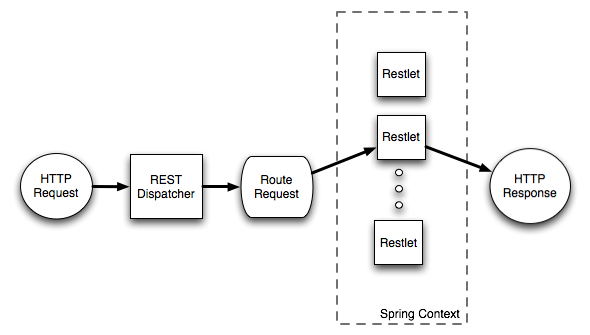
当新建一个项目的时候需要新建一个 pom.xml到meven项目中
<project xmlns="http://maven.apache.org/POM/4.0.0"

   xmlns:xsi="http://www.w3.org/2001/XMLSchema-instance"

   xsi:schemaLocation="http://maven.apache.org/POM/4.0.0 http://maven.apache.org/maven-v4_0_0.xsd ">

  <modelVersion>4.0.0</modelVersion>

  <groupId>org.geoserver</groupId>

  <artifactId>hello_rest</artifactId>

  <packaging>jar</packaging>

  <version>1.0-SNAPSHOT</version>

  <name>hello_rest</name>

  <dependencies>

    <dependency>

      <groupId>org.geoserver</groupId>

      <artifactId>gs-rest</artifactId>

      <version>2.8-SNAPSHOT</version> <!-- change this to the proper GeoServer version -->

    </dependency>

    <dependency>

      <groupId>org.geoserver</groupId>

      <artifactId>gs-main</artifactId>

      <version>2.8-SNAPSHOT</version> <!-- change this to the proper GeoServer version -->

      <classifier>tests</classifier>

      <scope>test</scope>

    </dependency>

    <dependency>

      <groupId>junit</groupId>

      <artifactId>junit</artifactId>

      <version>4.11</version>

      <scope>test</scope>

    </dependency>

    <dependency>

      <groupId>com.mockrunner</groupId>

      <artifactId>mockrunner</artifactId>

      <version>0.3.6</version>

     <scope>test</scope>

    </dependency>

  </dependencies>

  <build>

    <plugins>

      <plugin>

        <artifactId>maven-compiler-plugin</artifactId>

        <configuration>

          <source>1.8</source>

          <target>1.8</target>

        </configuration>

     </plugin>

   </plugins>

  </build>

</project>

建立项目的时候需要继承一个类,以及实现其中的方法
The class org.geoserver.rest.AbstractResource is a convenient base class available when creating new resources. Create a new class called HelloResource in the package org.geoserver.hellorest, which extends from AbstractResource.
package org.geoserver.hellorest;

import java.util.List;

import org.geoserver.rest.AbstractResource;

import org.geoserver.rest.format.DataFormat;

import org.restlet.data.Request;

import org.restlet.data.Response;

public class HelloResource extends AbstractResource {

   @Override

   protected List<DataFormat> createSupportedFormats(Request request, Response response) {

      return null;

   }

}
The first method to implement is createSupportedFormats(). The purpose of this method is to create mapping from an extension, to a particular format. For now the goal will be to return the text “Hello World” when a ”.txt” extension is requested by the client.
import java.util.ArrayList;

import org.geoserver.rest.format.StringFormat;

...

@Override

protected List<DataFormat> createSupportedFormats(Request request, Response response) {

   List<DataFormat> formats = new ArrayList();

   formats.add(new StringFormat( MediaType.TEXT_PLAIN ));

   return formats;

}
The next step is to override the handleGet() method. This method is called when a GET request is made for the resource.
@Override

public void handleGet() {

   //get the appropriate format

   DataFormat format = getFormatGet();

   //transform the string "Hello World" to the appropriate response

   getResponse().setEntity(format.toRepresentation("Hello World"));

}
The above makes use of the getFormatGet() method, whose purpose is to determine the extension being requested by the client, and look up the appropriate format for it. In this case when the client requests the ”.txt” extension, the StringFormat setup in the previous step will be found.
创建一个application context
The next step is to create an application context that tells GeoServer about the resource created in the previous section. Create the directory src/main/resources under the root of the hello_rest module:
[hello_rest]% mkdir src/main/resources
Add the following applicationContext.xml file to the src/main/resources directory under the root of thehello_rest module.
 <!DOCTYPE beans PUBLIC "-//SPRING//DTD BEAN//EN" "http://www.springframework.org/dtd/spring-beans.dtd">

 <beans>

    <bean id="hello" class="org.geoserver.hellorest.HelloResource"/>

    <bean id="helloMapping" class="org.geoserver.rest.RESTMapping">

       <property name="routes">

          <map>

            <entry>

              <key><value>/hello.{format}</value></key>

              <value>hello</value>

            </entry>

         </map>

      </property>

    </bean>

</beans>
There are two things to note above. The first is the hello bean which is an instance of the HelloResourceclass created in the previous section. The second is the helloMapping bean, which defines a template for the uri in which the resource will be accessed. The above mapping specifies that the resource will be located at /rest/hello.{format} where format is the representation being requested by the client. As implemented hello.txt is the only supported representation
geoserver的rest服务介绍,搭建java程序的更多相关文章
- linux(ubuntu) 搭建java程序运行环境
一:简介 ubuntu 系统的和linux差不多,我们需要在系统上搭建java程序运行环境,需要安装jdk,mysql这两个软件,tomcat是绿色版,直接通过taz -zxvf tomcat 就可以 ...
- Java基础知识强化之网络编程笔记25:Android网络通信之 Future接口介绍(Java程序执行超时)
1. Future接口简介 在Java中,如果需要设定代码执行的最长时间,即超时,可以用Java线程池ExecutorService类配合Future接口来实现. Future接口是Java标准API ...
- 将springboot打包成的jar文件做成windows服务,解决java程序自启动问题
https://blog.csdn.net/weixin_40411331/article/details/80193376 https://blog.csdn.net/qq_33188180/art ...
- 将Java程序作成exe文件的几种方法【转载】
看到网上有同志的介绍将Java程序作成exe文件的方法,写的不错,但是也许是这篇文章完成的时间比较早,许多内容已经不合适了.我在这里补充几条: 一.exe4j 说明:exe4j可以将Jar文件制作成e ...
- 搭建java开发环境
windows 去Oracle官网下载exe文件,双击安装. 修改系统环境变量(我的电脑 -> 属性 -> 高级 -> 环境变量). JAVA_HOME: D:\Java\jdk1. ...
- java程序运行时内存分配详解
java程序运行时内存分配详解 这篇文章主要介绍了java程序运行时内存分配详解 ,需要的朋友可以参考下 一. 基本概念 每运行一个java程序会产生一个java进程,每个java进程可能包含一个 ...
- 从安装linux(centos7.6)系统到部署springboot java程序到k8s(大纲)
本文说明从安装linux系统开始,一直到在k8s运行springboot程序全过程 本文假设在自己电脑操作,因此linux系统使用vmware虚拟机,linux发行版使用centos 7.6.1810 ...
- Java魔法堂:以Windows服务的形式运行Java程序
一.前言 由于防止维护人员误操作关闭Java控制台程序,因此决定将其改造为以Windows服务的形式运行.弄了一个上午总算搞定了,下面记录下来,以供日后查阅. 二.Java Service Wrapp ...
- 【转】介绍Jython,第一部分:轻轻松松写JAVA程序
本文转自:http://www.ibm.com/developerworks/cn/education/java/j-jython1/index.html 关于本教程 本教程介绍哪些内容? 这个两部分 ...
随机推荐
- python学习之RabbitMQ-----消息队列
RabbitMQ队列 首先我们在讲rabbitMQ之前我们要说一下python里的queue:二者干的事情是一样的,都是队列,用于传递消息 在python的queue中有两个一个是线程queue,一个 ...
- 使用Larave5.6l提交POST请求出现The page has expired due to inactivity错误
使用Larave5.6l提交POST请求出现The page has expired due to inactivity错误 一般是由于没有添加 csrf造成的 在表单下面的 第一个行 添加如下代码即 ...
- OpenCL 图像卷积 3 使用 CPU
▶ CPU 图像卷积,共四种方法.分别为基本串行,使用模板,使用局部内存,使用AVX指令优化 ● 全部的代码,仅在主函数中选择调用的函数名即可. #include <stdio.h> #i ...
- ubuntu 安装 环境
svn https://blog.csdn.net/leibris/article/details/72982804 https://blog.csdn.net/frankchen ...
- leetcode83
/** * Definition for singly-linked list. * public class ListNode { * public int val; * public ListNo ...
- leetcode13
public class Solution { private int ChangeToInt(char c) { ; string s = c.ToString(); switch (s) { ca ...
- HTML网页Table解析
procedure TForm27.Button1Click(Sender: TObject); var doc2: IHTMLDocument2; doc3: IHTMLDocument3; ita ...
- js 层随着滚动条上下移动
var tips; var theTop = 10; /*这是默认高度,越大越往下*/ var old = theTop; function moveTips() { var tt = 0; if ( ...
- Nginx 错误汇总
1. Upstream timed out (110: Connection timed out) while reading response header from upstream 这种情况主要 ...
- struts2的异常配置
1:当我们出现异常我们浏览器会直接暴露我们的技术结构,会给我们的项目带来一些安全隐患.2:当这种错误出现,给用户感觉是非常不友好.3:怎么解决 1:如果处理找不到action方法的错误呢? 在Stru ...