
spring boot整合RabbitMQ(Fanout模式)
1.Fanout Exchange介绍
Fanout Exchange 消息广播的模式,不管路由键或者是路由模式,会把消息发给绑定给它的全部队列,如果配置了routing_key会被忽略。
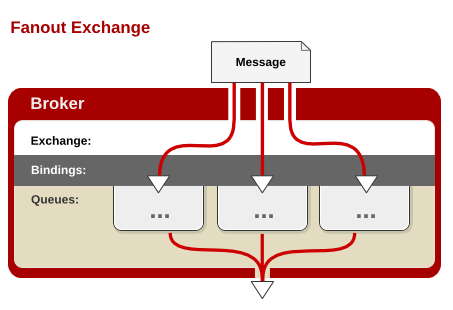
如上图所示,即当使用fanout交换器时,他会将消息广播到与该交换器绑定的所有队列上,这有利于你对单条消息做不同的反应。
例如存在以下场景:一个web服务要在用户完善信息时,获得积分奖励,这样你就可以创建两个对列,一个用来处理用户信息的请求,另一个对列获取这条消息是来完成积分奖励的任务。
2.代码示例
1).Queue配置类
FanoutRabbitConfig.java类:
package com.example.rabbitmqfanout;
import org.springframework.amqp.core.Binding;
import org.springframework.amqp.core.BindingBuilder;
import org.springframework.amqp.core.FanoutExchange;
import org.springframework.amqp.core.Queue;
import org.springframework.context.annotation.Bean;
import org.springframework.context.annotation.Configuration;
@Configuration
public class FanoutRabbitConfig {
//创建队列
@Bean
public Queue AMessage() {
return new Queue("fanout.A");
}
//创建队列
@Bean
public Queue BMessage() {
return new Queue("fanout.B");
}
//创建队列
@Bean
public Queue CMessage() {
return new Queue("fanout.C");
}
//创建Fanout交换器
@Bean
FanoutExchange fanoutExchange() {
return new FanoutExchange("fanoutExchange");
}
//将对列绑定到Fanout交换器
@Bean
Binding bindingExchangeA(Queue AMessage,FanoutExchange fanoutExchange) {
return BindingBuilder.bind(AMessage).to(fanoutExchange);
}
//将对列绑定到Fanout交换器
@Bean
Binding bindingExchangeB(Queue BMessage, FanoutExchange fanoutExchange) {
return BindingBuilder.bind(BMessage).to(fanoutExchange);
}
//将对列绑定到Fanout交换器
@Bean
Binding bindingExchangeC(Queue CMessage, FanoutExchange fanoutExchange) {
return BindingBuilder.bind(CMessage).to(fanoutExchange);
}
}
2).消息生产者
FanoutSender.java类:
package com.example.rabbitmqfanout.rabbitmq;
import org.springframework.amqp.core.AmqpTemplate;
import org.springframework.beans.factory.annotation.Autowired;
import org.springframework.stereotype.Component;
@Component
public class FanoutSender {
@Autowired
private AmqpTemplate rabbitTemplate;
public void send() {
String context = "hi, fanout msg ";
System.out.println("Sender : " + context);
this.rabbitTemplate.convertAndSend("fanoutExchange","", context);
}
}
3).消息消费者
FanoutReceiverA.java类:
package com.example.rabbitmqfanout.rabbitmq;
import org.springframework.amqp.rabbit.annotation.RabbitHandler;
import org.springframework.amqp.rabbit.annotation.RabbitListener;
import org.springframework.stereotype.Component;
@Component
@RabbitListener(queues = "fanout.A")
public class FanoutReceiverA {
@RabbitHandler
public void process(String message) {
System.out.println("fanout Receiver A : " + message);
}
}
FanoutReceiverB.java类:
package com.example.rabbitmqfanout.rabbitmq;
import org.springframework.amqp.rabbit.annotation.RabbitHandler;
import org.springframework.amqp.rabbit.annotation.RabbitListener;
import org.springframework.stereotype.Component;
@Component
@RabbitListener(queues = "fanout.B")
public class FanoutReceiverB {
@RabbitHandler
public void process(String message) {
System.out.println("fanout Receiver B: " + message);
}
}
FanoutReceiverC.java类:
package com.example.rabbitmqfanout.rabbitmq;
import org.springframework.amqp.rabbit.annotation.RabbitHandler;
import org.springframework.amqp.rabbit.annotation.RabbitListener;
import org.springframework.stereotype.Component;
@Component
@RabbitListener(queues = "fanout.C")
public class FanoutReceiverC {
@RabbitHandler
public void process(String message) {
System.out.println("fanout Receiver C: " + message);
}
}
4).测试
FanoutTest.java类:
package com.example.rabbitmqfanout.rabbitmq;
import org.junit.Test;
import org.junit.runner.RunWith;
import org.springframework.beans.factory.annotation.Autowired;
import org.springframework.boot.test.context.SpringBootTest;
import org.springframework.test.context.junit4.SpringRunner;
@RunWith(SpringRunner.class)
@SpringBootTest
public class FanoutTest {
@Autowired
private FanoutSender sender;
@Test
public void fanoutSender() throws Exception {
sender.send();
}
}
spring boot整合RabbitMQ(Fanout模式)的更多相关文章
- Spring Boot (十三): Spring Boot 整合 RabbitMQ
1. 前言 RabbitMQ 是一个消息队列,说到消息队列,大家可能多多少少有听过,它主要的功能是用来实现应用服务的异步与解耦,同时也能起到削峰填谷.消息分发的作用. 消息队列在比较主要的一个作用是用 ...
- spring boot整合RabbitMQ(Direct模式)
springboot集成RabbitMQ非常简单,如果只是简单的使用配置非常少,springboot提供了spring-boot-starter-amqp项目对消息各种支持. Direct Excha ...
- Spring Boot 整合 rabbitmq
一.消息中间件的应用场景 异步处理 场景:用户注册,信息写入数据库后,需要给用户发送注册成功的邮件,再发送注册成功的邮件. 1.同步调用:注册成功后,顺序执行发送邮件方法,发送短信方法,最后响应用户 ...
- Spring Boot整合Rabbitmq
Spring Boot应用中整合RabbitMQ,并实现一个简单的发送.接收消息的例子来对RabbitMQ有一个直观的感受和理解. 在Spring Boot中整合RabbitMQ是一件非常容易的事,因 ...
- spring boot 2.x 系列 —— spring boot 整合 RabbitMQ
文章目录 一. 项目结构说明 二.关键依赖 三.公共模块(rabbitmq-common) 四.服务消费者(rabbitmq-consumer) 4.1 消息消费者配置 4.2 使用注解@Rabbit ...
- spring boot 整合 RabbitMQ 错误
1.错误 org.springframework.beans.factory.BeanCreationException: Error creating bean with name 'org.spr ...
- spring boot整合RabbitMQ(Topic模式)
1.Topic交换器介绍 Topic Exchange 转发消息主要是根据通配符. 在这种交换机下,队列和交换机的绑定会定义一种路由模式,那么,通配符就要在这种路由模式和路由键之间匹配后交换机才能转发 ...
- Spring Boot整合RabbitMQ详细教程
原文:https://blog.csdn.net/qq_38455201/article/details/80308771 1.首先我们简单了解一下消息中间件的应用场景 异步处理 场景说明:用户注册后 ...
- spring boot 整合 RabbitMq (注解)
1.增加rabbitmq的依赖包 <!-- ampq 依赖包 --> <dependency> <groupId>org.springframework.boot& ...
随机推荐
- 基于图像切换器(imageSwitcher)的支持动画的图片浏览器
利用GridView和ImageSwitcher的基本用法 public class MainActivity extends Activity { int[] imageIds = new int[ ...
- Chrome报错:跨域问题处理( Access-Control-Allow-Origin)_ 用于本地测试的快捷解决方法
报错提示如下: XMLHttpRequest cannot load http://www.xxxx.com/264/Data/GetScreenInfo. No 'Access-Control-Al ...
- button设置边宽和圆角
UIButton *meifuButton = [UIButton buttonWithType:UIButtonTypeSystem]; [meifuButton setTit ...
- dlib安装教程(for linux)
https://blog.csdn.net/LoHiauFung/article/details/78454905 https://www.linuxidc.com/Linux/2017-11/148 ...
- MySQL性能调优与架构设计——第 15 章 可扩展性设计之Cache与Search的利用
第 15 章 可扩展性设计之Cache与Search的利用 前言: 前面章节部分所分析的可扩展架构方案,基本上都是围绕在数据库自身来进行的,这样是否会使我们在寻求扩展性之路的思维受到“禁锢”,无法更为 ...
- Java中JNI的使用详解第三篇:JNIEnv类型中方法的使用
转自: http://blog.csdn.net/jiangwei0910410003/article/details/17466369 上一篇说道JNIEnv中的方法的用法,这一篇我们就来通过例子来 ...
- Reactor 模式在Netty中的应用
Reactor 模式在Netty中的应用 典型的Rector模式 mainReactor 服务端创建成功后,会监听Accept操作,其中ServerSocketchannel中的PipeLine中现在 ...
- PAT甲 1029. Median (25) 2016-09-09 23:11 27人阅读 评论(0) 收藏
1029. Median (25) 时间限制 1000 ms 内存限制 65536 kB 代码长度限制 16000 B 判题程序 Standard 作者 CHEN, Yue Given an incr ...
- muduo网络库学习之MutexLock类、MutexLockGuard类、Condition类、CountDownLatch类封装中的知识点
一.MutexLock 类 class MutexLock : boost::noncopyable 二.MutexLockGuard类 class MutexLockGuard : bo ...
- 从SEQUENCE跳号说起
http://blog.csdn.net/agaric717/article/details/6690890 一个应用上线后发现一个使用SEQUENCE值来生成的主键经常出现断号,而且断号不是一两个, ...