
[D3] 9. Scatter Plot
Up until now we've just looked at bar charts. A handy chart, no doubt, but D3 offers a variety of charts you can work with. In this lesson we'll convert the bar chart into a basic scatter (or bubble) chart.
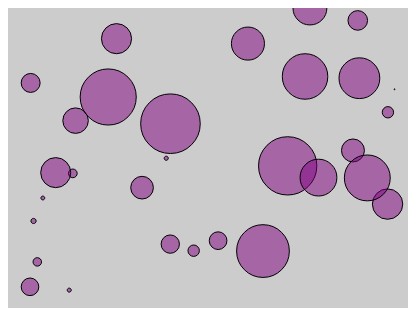
<!DOCTYPE html>

<html>

<head lang="en">

    <meta charset="UTF-8">

    <title></title>

    <script src="../bower_components/underscore/underscore-min.js"></script>

    <script src="../ventor/d3.min.js"></script>

    <style type="text/css">

        body

        {

            padding-top: 50px;

            padding-left: 100px;

        }

        #chartArea {

            width: 400px;

            height: 300px;

            background-color: #CCC;

        }

        .bar

        {

            display: inline-block;

            width: 20px;

            height: 75px; /* Gets overriden by D3-assigned height below */

            margin-right: 2px;

           /* fill: teal; *//* SVG doesn't have background prop, use fill instead*/

            z-index:99;

        }

        .bubble {

            display: inline-block;

            fill: purple;

            fill-opacity: 0.5;

            stroke: black;

            stroke-weight: 1px;

        }

    </style>

</head>

<body>

<section id="chartArea"></section>

<script>

    var dataset = _.map(_.range(30), function(num) {

        return {

            x: Math.random() * 100,

            y: Math.random() * 100,

            r: Math.random() * 30

        }

    }), //reandom generate 15 data from 1 to 50

            margin = {top: 0, bottom: 0, left: 0, right: 0},

            w = 400 - margin.left - margin.right,

            h = 300 -margin.top - margin.bottom;

    var svg = d3.select('#chartArea').append('svg')

            .attr('width', w + margin.left + margin.right)

            .attr('height', h + margin.top + margin.bottom)

            .append('g') //The last step is to add a G element which is a graphics container in SBG.

            .attr('transform', 'translate(' + margin.left + ', ' + margin.top + ')'); //Then offset that graphic element by our left and top margins.

    var yScale = d3.scale.linear()

            .domain([0, d3.max(dataset, function(d) {

                return d.y; //tell the max function just need to care about y prop

            })])

            .range([h, 0]);

    var xScale = d3.scale.linear()

            .domain([0, 100])

            .range([0, w]);

    svg.selectAll('circle')

            .data(dataset)

            .enter()

            .append('circle')// svg doesn't have div, use rect instead

            .attr('class', "bubble")

            .attr('cx', function(each_data, index){

                return xScale(each_data.x);

            })

            .attr('cy', function(each_data){

                return yScale(each_data.y);

            })

            .attr('r', function(each_data, i){

                return each_data.r;

            });

</script>

</body>

</html>
[D3] 9. Scatter Plot的更多相关文章
- [D3] Build a Scatter Plot with D3 v4
Scatter plots, sometimes also known as bubble charts, are another common type of visualization. They ...
- Matplotlib学习---用matplotlib画散点图,气泡图(scatter plot, bubble chart)
Matplotlib里有两种画散点图的方法,一种是用ax.plot画,一种是用ax.scatter画. 一. 用ax.plot画 ax.plot(x,y,marker="o",co ...
- [Python] Scatter Plot for daily return
Sploe = 2: means that SPY move up 1, ABC move up 2 Correlation: how close those dots close to the li ...
- use matplotlib to draw scatter plot
There are many pionts in this kind of table. How to do it? We can use scatter() to draw it. Code: im ...
- D3 JS study notes
如何使用d3来解析自定义格式的数据源? var psv = d3.dsvFormat("|"); // This parser can parse pipe-delimited t ...
- d3基础图形模板笔记
散点图(scatter plot): http://bl.ocks.org/weiglemc/6185069 雷达图(radar): http://xgfe.github.io/uploads/che ...
- matplotlib多plot可视化
代码: # -*- coding: utf-8 -*- """ Created on Thu Jul 12 16:37:47 2018 @author: zhen &qu ...
- Python基础-画图:matplotlib.pyplot.scatter
转载自博客:https://blog.csdn.net/qiu931110/article/details/68130199 matplotlib.pyplot.scatter 1.scatter函数 ...
- Python中scatter函数参数用法详解
1.scatter函数原型 2.其中散点的形状参数marker如下: 3.其中颜色参数c如下: 4.基本的使用方法如下: #导入必要的模块 import numpy as np import matp ...
随机推荐
- Morgan stanley 电话面试
首先是聊项目, 不会涉及到具体的技术问题 1.C和C++的区别:C++里的RTTI 2.vector 和 list的区别 : casting operator ; smart pointer. 3.数 ...
- Spring MVC 环境搭建(maven+SpringMVC+mybatis+Freemarker)
Spring MVC 环境搭建(maven+SpringMVC+mybatis+Freemarker) 一.准备工作 1.Eclipse Java EE IDE(4.4.1) 2.JDK 3.Tomc ...
- Uva 1354 Mobile Computing
题目链接 题意: 在一个宽为r 的房间里, 有s个砝码, 每个天平的一端要么挂砝码, 要么挂另一个天平, 并且每个天平要保持平衡. 求使得所有砝码都放在天平上, 且总宽度不超过房间宽度的最大值. 思路 ...
- Cocos2d-x 3.0 beta 中加入附加项目,解决无法打开包括文件:“extensions/ExtensionMacros.h”: No such file or directory”
Cocos2d-x 3.0 Alpha 1开始 对目录结构进行了整合.结果有些附加项目也被在项目中被精简出去. 比如说如果你需要使用CocoStdio导出的JSON.或使用Extensions扩展库, ...
- python学习之--内置函数:
Python内置函数: Python内置了很多有用的函数,我们可以直接调用.要调用一个函数,需要知道函数的名称和参数,比如求绝对值的函数abs,只有一个参数. 1. 内置函数调用之--abs()函数: ...
- NWERC 2012 Problem J Joint Venture
刚刚开始想的是用二分的方法做,没想到这个题目这么水,直接暴力就行: 代码: #include<cstdio> #include<algorithm> #define maxn ...
- hdu 4751
一道很简单的题,不过在比赛的时候没有写出来: 刚刚看到这个题,我以为是一个图论题,后来发现其实就是一个暴力的题: 用bfs,因为一个人与他不认识的人肯定不会在一个集合,如果判断出现冲突则分配失败,否则 ...
- hdu 4731
一道找规律的题,但今天的智商捉急,一直都想不到点子上: 比赛之后和别人讨论的时候,在n=2的情况下,前面两个是aa,后面就接着很多个aababb,然后最后再判断下就行了~~~ 以后对于这种题还是不要太 ...
- [topcoder]BestRoads
http://community.topcoder.com/stat?c=problem_statement&pm=10172&rd=13515 http://community.to ...
- 带文字的ImageButton[自定义]
今天Android项目中遇到一个ImageButton控件上面要显示文字,无奈自定义了一个ImageButton,继承自ImageButton.其实就是override这个控件的onDraw(Canv ...