
Activity与Service之间交互并播放歌曲的实现代码
Activity与Service之间交互并播放歌曲,为了方便,我把要播放的歌曲定死了,大家可以灵活改进
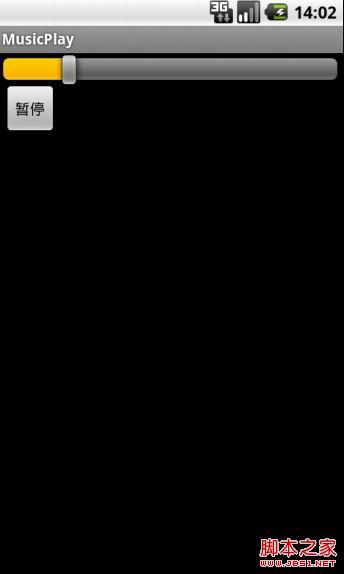
MService:
import android.app.Service;
import android.content.Intent;
import android.media.MediaPlayer;
import android.os.Binder;
import android.os.Environment;
import android.os.IBinder;
import android.util.Log;
public class MService extends Service{
MyBinder myBinder = new MyBinder();
private MediaPlayer mediaPlayer;
public class MyBinder extends Binder{
MService getService(){
return MService.this;
}
}
@Override
public IBinder onBind(Intent intent) {
// TODO Auto-generated method stub
Log.v("CAT", "onBind");
return myBinder;
}
@Override
public void onCreate() {
// TODO Auto-generated method stub
super.onCreate();
Log.v("CAT", "onCreate");
try {
mediaPlayer = new MediaPlayer();
mediaPlayer.setDataSource(Environment.getExternalStorageDirectory() + "/mp3/trhxn.mp3");
mediaPlayer.prepare();
} catch (Exception e) {
// TODO Auto-generated catch block
Log.v("CAT", "fail");
e.printStackTrace();
}
}
@Override
public void onDestroy() {
// TODO Auto-generated method stub
super.onDestroy();
Log.v("CAT", "onDestroy");
}
@Override
public int onStartCommand(Intent intent, int flags, int startId) {
// TODO Auto-generated method stub
Log.v("CAT", "onStartCommand");
return super.onStartCommand(intent, flags, startId);
}
@Override
public boolean onUnbind(Intent intent) {
// TODO Auto-generated method stub
Log.v("CAT", "onUnbind");
return false;
}
public void start(){
mediaPlayer.start();
}
public void pause(){
mediaPlayer.pause();
}
public void stop(){
mediaPlayer.stop();
mediaPlayer.release();
}
public int getDuration(){
return mediaPlayer.getDuration();
}
public int getCurrentPosition(){
return mediaPlayer.getCurrentPosition();
}
public void seekTo(int position){
mediaPlayer.seekTo(position);
}
}
MusicPlayActivity:
import android.app.Activity;
import android.content.ComponentName;
import android.content.Intent;
import android.content.ServiceConnection;
import android.os.Bundle;
import android.os.Handler;
import android.os.IBinder;
import android.util.Log;
import android.view.View;
import android.view.View.OnClickListener;
import android.widget.Button;
import android.widget.SeekBar;
public class MusicPlayActivity extends Activity {
/** Called when the activity is first created. */
MService mService;
private ServiceConnection conn = new ServiceConnection(){
@Override
public void onServiceConnected(ComponentName arg0, IBinder arg1) {
// TODO Auto-generated method stub
mService = ((MService.MyBinder)arg1).getService();
Log.v("CAT", "getServiced");
}
@Override
public void onServiceDisconnected(ComponentName name) {
// TODO Auto-generated method stub
mService = null;
}
};
private SeekBar seekBar;
private Button playBT;
private boolean isPlaying = false;
private boolean isBinded = false;
private Handler mHandler;
@Override
public void onCreate(Bundle savedInstanceState) {
super.onCreate(savedInstanceState);
setContentView(R.layout.main);
Intent intent = new Intent(MusicPlayActivity.this, MService.class);
if(!isBinded){
bindService(intent, conn, BIND_AUTO_CREATE);
isBinded = true;
}
seekBar = (SeekBar) findViewById(R.id.seekBar);
playBT = (Button) findViewById(R.id.startBT);
mHandler = new Handler();
seekBar.setOnSeekBarChangeListener(new SeekBar.OnSeekBarChangeListener() {
@Override
public void onStopTrackingTouch(SeekBar seekBar) {}
@Override
public void onStartTrackingTouch(SeekBar seekBar) {}
@Override
public void onProgressChanged(SeekBar seekBar, int progress,
boolean fromUser) {
if(fromUser){
mService.seekTo((progress*mService.getDuration())/100);
}
}
});
playBT.setOnClickListener(new OnClickListener() {
@Override
public void onClick(View v) {
// TODO Auto-generated method stub
if(!isPlaying){
mService.start();
isPlaying = true;
playBT.setText("暂停");
mHandler.post(seekBarThread);
}else{
mService.pause();
isPlaying = false;
playBT.setText("播放");
mHandler.removeCallbacks(seekBarThread);
}
}
});
}
Runnable seekBarThread = new Runnable() {
@Override
public void run() {
// TODO Auto-generated method stub
seekBar.setProgress((mService.getCurrentPosition()*100)/mService.getDuration());
mHandler.postDelayed(seekBarThread, 200);
}
};
}
Activity与Service之间交互并播放歌曲的实现代码的更多相关文章
- activity与service之间的通信方式
Activity之间的通信 1.activity与activity的通信可以通过Intent来封装数据,startActivityForResult()来实现,当跳转的activity调用finish ...
- activity 与 service 之间的通信
activity和service通信:通过binder 举个我实际项目中的例子:在service中下载更新应用 首先是下载更新apk的service: public class UpdateVersi ...
- Activity 与 Service 之间的消息传递
BgService代码 public class BgService extends Service { public static final String TAG = "BgServic ...
- 通过bind实现activity与service的交互
先点bind按钮实现onCreate,在点击start给service传值(get方法) xml: <RelativeLayout xmlns:android="http://sche ...
- Activity与Service数据交互:Binder、bindService的用法
package com.lixu.jiaohu; import com.lixu.jiaohu.MyAppService.Mybind; import android.app.Activity; im ...
- Android四大组件应用系列——Activity与Service交互实现APK下载
Servic与Activity相比它没有界面,主要是在后台执行一些任务,Service有两种启动方法startService()和bindService(),startService方式Service ...
- Android中Activity、Service和线程之间的通信
Activity.Service和线程应该是Android编程中最常见的几种类了,几乎大多数应用程序都会涉及到这几个类的编程,自然而然的,也就会涉及到三者之间的相互通信,本文就试图简单地介绍一下这三者 ...
- 201709012工作日记--activity与service的通信机制
service生命周期 Service主要包含本地类和远程类. Service不是Thread,Service 是android的一种机制,当它运行的时候如果是Local Service,那么对应的 ...
- Android Activity与Service的交互方式
参考: http://blog.csdn.net/gebitan505/article/details/18151203 实现更新下载进度的功能 1. 通过广播交互 Server端将目前的下载进度,通 ...
随机推荐
- Redhat_AS5下安装MySQL5.0总结
一.引言 使用Linux也有几年时间了,由于公司要做radius服务器用用到MySQL.从网上找了些资料. 二.安装Mysql 1.下载MySQL的安装文件 安装MySQL需要下面两个文件: MySQ ...
- C#中Bitmap类 对图像の操作 可检测图片完整性
try { Bitmap bm = new Bitmap(pics[ip]); BitmapToBytes(bm).Reverse().Take(2); } catch (Exception ex) ...
- html标签全称和功能介绍
html标签全称和功能介绍,里面有些大家不常用的,主要是方便大家查找检索 按字母顺序排列 DTD:指示在哪种 XHTML 1.0 DTD 中允许该标签.S=Strict, T=Transition ...
- OpenCV——mixChannels函数
mixChannels Copies specified channels from input arrays to the specified channels of output arrays. ...
- java使用iText生成pdf表格
转载地址:http://www.open-open.com/code/view/1424011530749 首先需要你自己下载itext相关的jar包并添加引用,或者在maven中添加如下引用配置: ...
- JSP内置对象--pageContent,request,response,session,application,config,out,page,exception
- zend笔记
ZEND_STRL(str) 等价于 (str), (sizeof(str)-1) ZEND_STRS(str)等价于 (str), (sizeof(str))
- SQL 比较中文字符串
/* declare @str1 varchar(200),@str2 varchar(200) set @str1=N'江西省南昌市其它区高新区火炬大道809号' set @str2=N'江西省南昌 ...
- wget mirror
wget -r -np -c xxx-url-xxx -r: recursive-np: no-parent-c: continue -D: domains to follow, comma sepa ...
- java方法:flush()
flush本意是冲刷,这个方法大概取自它引申义冲马桶的意思,马桶有个池子,你往里面扔东西,会暂时保存在池子里,只有你放水冲下去,东西才会进入下水道. 同理很多流都有一个这样的池子,专业术语叫缓冲区,当 ...