
Android四大组件应用系列——Activity与Service交互实现APK下载
Servic与Activity相比它没有界面,主要是在后台执行一些任务,Service有两种启动方法startService()和bindService(),startService方式Service不可交互,可一直在后台即便应用结束,bindService方式可通过ServiceConnection获得运行的Service实例的方式实现Activity和Service之间的交互,通常Activity退出则绑定的服务也就取消了。我们可以通过同时执行启动服务和绑定服务的方式实现Service交互同时又使服务可一直在后台运行直到任务完成,下面我们就使用Service来实现Apk下载任务
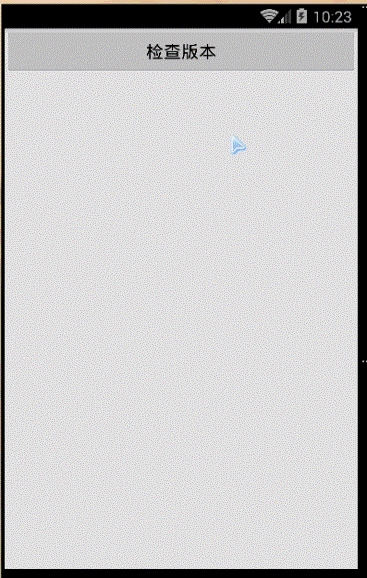
实现如图所示效果:
| 一、编写应用起始界面(CheckUpdateActivity) |

单击“检查版本”执行代码如下:
public void checkUpdate(View view){

    //先进行网络版本检查,代码这里不做讲解

    showDownload();//转到下载界面

}

public void showDownload(){

    Intent intent=new Intent(CheckUpdateActivity.this,DownloadActivity.class);

    startActivity(intent);

}
| 二、 Activity与Service通信实现App下载(DownloadActivity+DownloadService) |
1、DownloadActivity
1.1先看一下界面
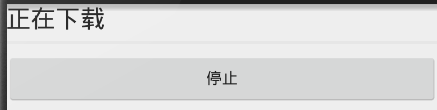
xml文件如下:
<RelativeLayout ...>

    <TextView

        android:layout_width="wrap_content"

        android:layout_height="wrap_content"

        android:textAppearance="?android:attr/textAppearanceLarge"

        android:text="正在下载"

        android:id="@+id/textView"

        android:layout_alignParentTop="true" />

    <ProgressBar

        style="?android:attr/progressBarStyleHorizontal"

        android:layout_width="match_parent"

        android:layout_height="wrap_content"

        android:id="@+id/pbDownload"

        android:layout_below="@+id/textView"

        android:layout_alignParentLeft="true"

        android:layout_alignParentStart="true"

        android:max="100"

        android:progress="0"

        android:indeterminate="false" />

    <Button

        android:layout_width="match_parent"

        android:layout_height="wrap_content"

        android:text="停止"

        android:id="@+id/btStop"

        android:layout_below="@+id/pbDownload"

        android:layout_alignLeft="@+id/pbDownload"

        android:layout_alignStart="@+id/pbDownload" android:onClick="onCancel" />

</RelativeLayout>
1.2、DownloadActivity代码:
1.2.1构建界面:
protected void onCreate(Bundle savedInstanceState) {

    super.onCreate(savedInstanceState);

    setContentView(R.layout.activity_download);

    pbDownload=(ProgressBar)super.findViewById(R.id.pbDownload);

    app=(MyApp)super.getApplication();

}
1.2.2 在onResume()中启动下载服务:
@Override

protected void onResume() {

    super.onResume();

    startDownload();

}

private void startDownload(){

    if(!app.isDownloadIng()){

        Intent intent=new Intent(DownloadActivity.this,DownloadService.class);

        super.startService(intent);//启动服务下载服务,可以确保应用结束下载服务仍然执行

        super.bindService(intent, conn, Service.BIND_AUTO_CREATE);//同时绑定服务,可通过ServiceConnection获得Binder实现与Service的通信

        app.setIsDownloadIng(true);

    }

}
1.2.3创建ServiceConnnection
private DownloadService.DownloadBind bind;

private ServiceConnection conn=new ServiceConnection() {

    @Override

    public void onServiceConnected(ComponentName name, IBinder service) {

        bind=(DownloadService.DownloadBind)service;//获得binder

        bind.start();//调用DownloadService实例中的start(),执行后台下载任务

        bind.setOnBackResult(result);//调用DownloadService实例中的setOnBackResult()

    }

    @Override

    public void onServiceDisconnected(ComponentName name) {

        bind=null;

    }

};
1.2.4定义回调接口(ICallbackResult),实现根据下载的百分比设置进度条
public interface ICallbackResult {

    public void OnBackResult(Object Result);

}

private ICallbackResult result=new ICallbackResult() {

    @Override

    public void OnBackResult(Object result) {

        if("finish".equals(result)){//如果传入“finish”表示下载完成

            finish();

            isFinished=true;

            return ;

        }

        int progress=(Integer)result;

        pbDownload.setProgress(progress);//改变进度条

    }

};
1.2.5取消下载,单击停止按钮
public void onCancel(View view){

    isCancel=true;

    app.setIsDownloadIng(false);

    bind.cancelNotification();

    finish();

}

1.2.5 Activity结束,停止服务

protected void onDestroy() {

    super.onDestroy();

    if(isFinished||isCancel){//如果下载完成或用户取消下载停止后台服务,否则服务仍在后台运行

        stopService(new Intent(this, DownloadService.class));//停止后台服务

    }

    if(bind!=null){

        unbindService(conn);//取消服务绑定

    }

}
2、使用DownloadService承载下载任务
2.1初始化
private MyApp app;

private NotificationManager notificationManager;

@Override

public void onCreate() {

    super.onCreate();

    app=(MyApp)super.getApplication();

notificationManager=(NotificationManager)super.getSystemService(Context.NOTIFICATION_SERVICE);

}
2.2启动服务
@Override

public int onStartCommand(Intent intent, int flags, int startId) {

    isStart=true;

    return Service.START_STICKY;

}
2.3绑定服务
@Override

public IBinder onBind(Intent intent) {

    isStart=true;

   return new DownloadBind();

}
2.4 DownloadBind—— Service实例中Binder组件,实现与DownloadActivity之间通信
public class  DownloadBind extends Binder{

 public void start(){

        startupNotification();//在信息栏显示下载通知信息

        startDownload();//执行下载任务

    }

  public void setOnBackResult(DownloadActivity.ICallbackResult iCallbackResult){

        callbackResult=iCallbackResult;

    }

  public void cancelNotification(){

        mNotification.tickerText="已经取消下载";

        notificationManager.cancel(NOTIFY_ID);//取消通知栏信息

        stopDownload=true;

    }

}
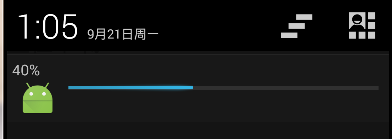
2.5 实现向提示栏发送下载通知
执行效果:

startupNotifiaction()代码:
private final int NOTIFY_ID=0;

private Notification mNotification;

private void startupNotification(){

    mNotification=new NotificationCompat.Builder(this).build();

    mNotification.icon=R.mipmap.ic_launcher;

    mNotification.tickerText="正在下载";

    mNotification.defaults=Notification.DEFAULT_SOUND;

    RemoteViews view=new RemoteViews(super.getPackageName(),R.layout.notification_download);

    mNotification.contentView=view;

    Intent intent=new Intent(this,DownloadActivity.class);

    intent.setFlags(Intent.FLAG_ACTIVITY_SINGLE_TOP);

    PendingIntent contentIntent=PendingIntent

            .getActivity(this, 0, intent, PendingIntent.FLAG_UPDATE_CURRENT);

    intent.setAction(Intent.ACTION_MAIN);

    intent.addCategory(Intent.CATEGORY_LAUNCHER);

    mNotification.contentIntent=contentIntent;

    notificationManager.notify(NOTIFY_ID, mNotification);

}
2.6 startDownload()启动线程执行下载任务:
private Thread downloadThread;

private void startDownload(){

    downloadThread=new Thread(new Runnable() {

        @Override

        public void run() {

            downApk();//这里模拟实现网络下载功能

        }

    });

    downloadThread.start();

}

downApk()实现连接网络并下载并保存文件,这里模拟实现网络下载功能

private int progress=0;

private int lastLength=10*1024*1024;//剩余文件的大小,初始值为文件总尺寸

private int count=0;//已经下载的数据大小

private boolean stopDownload=false;

private void downApk(){

    while(lastLength>0&&!stopDownload){

        try {

            Thread.sleep(2000);

            count+=1*1024*1024;

            lastLength=lastLength-1*1024*1024;

            progress=(int)((float)count/(10*1024*1024)*100);

            if(progress>1){

                Message msg=mhandler.obtainMessage();

                msg.what=1;

                msg.arg1=progress;

                mhandler.sendMessage(msg);

                callbackResult.OnBackResult(progress);//通过ICallBackResult回调OnBackResult(),实现更改DownloadActivity中进度条的值

            }

        } catch (InterruptedException e) {

            e.printStackTrace();

        }

    }

    mhandler.sendEmptyMessage(0);//表示下载完成

    app.setIsDownloadIng(false);

    callbackResult.OnBackResult("finish");

}
2.7 文件下载的异步通信
private Handler mhandler=new Handler(){

    @Override

    public void handleMessage(Message msg) {

        switch (msg.what){

            case 0://表示下载完成

                stopSelf();//停止当前服务

                notificationManager.cancel(NOTIFY_ID);//关闭下载提示栏

                isStart=false;

                break;

            case 1://表示产生>1的百分比的变化

                int progress=(Integer)msg.arg1;

                RemoteViews contentView=mNotification.contentView;

                contentView.setTextViewText(R.id.tvProgress,progress+"%");//显示百分比数据

                contentView.setProgressBar(R.id.pbUpdate, 100, progress, false);//改变进度条

                mNotification.defaults=0;//取消声音提示

                notificationManager.notify(NOTIFY_ID, mNotification);//通知下载提示栏的更新

                break;

        }

    }

};
| 三、其他 |
3.1 MyApp记录应用共享的信息数据
public class MyApp extends Application {

        private boolean isDownloadIng=false;//记录是否正在下载应用

        @Override

        public void onCreate() {

                super.onCreate();

        }

        public boolean isDownloadIng() {

                return isDownloadIng;

        }

        public void setIsDownloadIng(boolean isDownloadIng) {

                this.isDownloadIng = isDownloadIng;

        }

}
3.2 AndroidMainifest.xml
<application

    android:allowBackup="true"

    android:icon="@mipmap/ic_launcher"

    android:label="@string/app_name"

    android:theme="@style/AppTheme"

    android:name="com.jerehedu.service.MyApp">

    <activity

        android:name="com.jerehedu.service.CheckUpdateActivity"

        android:label="@string/title_activity_check_update" >

        <intent-filter>

            <action android:name="android.intent.action.MAIN" />

            <category android:name="android.intent.category.LAUNCHER" />

        </intent-filter>

    </activity>

    <activity

        android:name="com.jerehedu.service.DownloadActivity"

        android:label="@string/title_activity_download" >

    </activity>

    <service

        android:name="com.jerehedu.service.DownloadService"

        android:enabled="true"

        android:exported="true" >

    </service>

</application>
出处:http://www.cnblogs.com/jerehedu/
版权声明:本文版权归烟台杰瑞教育科技有限公司和博客园共有,欢迎转载,但未经作者同意必须保留此段声明,且在文章页面明显位置给出原文连接,否则保留追究法律责任的权利。
技术咨询:

Android四大组件应用系列——Activity与Service交互实现APK下载的更多相关文章
- Android四大组件应用系列5——使用AIDL实现跨进程调用Service
一.问题描述 Android应用程序的四大组件中Activity.BroadcastReceiver.ContentProvider.Service都可以进行跨进程.在上一篇我们通过ContentPr ...
- Android四大组件应用系列——使用BroadcastReceiver和Service实现倒计时
一.问题描述 Service组件可以实现在后台执行一些耗时任务,甚至可以在程序退出的情况下,让Service在后台继续保持运行状态.Service分本地服务和远程服务,Local地服务附在主进程上的m ...
- Android四大组件应用系列——使用ContentProvider实现跨进程通讯
一.问题描述 如何在Android中实现不同应用之间的通讯(既跨进程进行调用)?Android提供了多种实现方式,使我们可以实现跨进程访问Activity.通过ContentProvider跨进程访问 ...
- Android四大组件应用系列——实现电话拦截和电话录音
一.问题描述 使用BordercastReceiver和Service组件实现下述功能: 1.当手机处于来电状态,启动监听服务,对来电进行监听录音. 2.设置电话黑名单,当来电是黑名单电话,则直接挂断 ...
- Android四大组件之一:Activity
介绍:活动是最基本的Android组件之一,在应用程序中,一个活动通常就是一个用户界面,每一个活动都被实现为一个独立的类,并且从活动几类中继承, 活动类将会显示由View控件组成的用户接口,并对时间E ...
- Android四大组件--活动(Activity)
1. 概念 说明: 1). 创建和销毁 onCreate 和 onDestory 应用场景:当界面销毁的时候存储一些数据,在onCreate创建的时候回显数据: 例如:发短信:写短信写到一半,按hom ...
- Android 四大组件学习之Activity六
本节学习Activity的状态保存与恢复. 先用样例開始: 布局文件主要是实现例如以下.大家自行编写 Activity逻辑代码: public class FiveActivity extends A ...
- Android四大组件初识之Activity
一.Activity的生命周期 Activity生命周期是一系列方法调用.熟悉各个方法调用时间,我们在创建activity就能根据具体实现选择合适的方法覆盖. 1. 覆盖Activity的生命周期方 ...
- Android四大组件之——Activity的生命周期(图文详解)
转载请在文章开头处注明本博客网址:http://www.cnblogs.com/JohnTsai 联系方式:JohnTsai.Work@gmail.com [Andro ...
随机推荐
- inoremap nnoremap vnoremap
原贴:https://www.xuebuyuan.com/zh-hant/1116162.html inoremap nnoremap vnoremap i insert 在插入模式有效 n 在 普通 ...
- 区间dp的一些模式和总结
参考博客:https://blog.csdn.net/my_sunshine26/article/details/77141398 https://blog.csdn.net/qq_38569113/ ...
- MVC开发中的常见错误-05-无法将类型“System.Data.Entity.Infrastructure.DbQuery<BBFJ.OA.Model.RoleInfo>”转换为“System.Collections.Generic.List<BBFJ.OA.Model.RoleInfo>”
List<RoleInfo> roleInfoList = (List<RoleInfo>)ViewBag.AllRoles; 错误原因很明确了 ViewBag.AllRole ...
- gitlab的docker安装,非标准端口,如何处理?
这个问题的定义是: 如果我们不是用的80端口对外提供服务, 但gitlab的docker容器里的nginx却是80端口, 那么,在我们clone代码时,带的Http地址也会是80端口,这显然会出现问题 ...
- hihocoder 1343 : Stable Members【拓扑排序】
hihocoder #1343:题目 解释:一个学习小组,一共有N个学员,一个主管.每个学员都有自己的导师(一个或者多个),导师可以是其他学员也可以是主管.每周学员都要把自己的学习报告和收到的报告提交 ...
- mongodb 备份
本篇文章来自于阿里云技术专家郑涔(明俨)在2018年<Redis.MongoDB.HBase大咖直播大讲堂>技术直播峰会中的分享,该分享整体由四个部分构成: 1.MongoDB备份恢复 2 ...
- java算法:统计数字-将数字转换成字符串,然后使用字符串String.valueOf()方法进行判断
题目: 计算数字 k 在 0 到 n 中的出现的次数,k 可能是 0~9 的一个值. 样例 样例 1: 输入: k = 1, n = 1 输出: 1 解释: 在 [0, 1] 中,我们发现 1 出现了 ...
- Codeforces 643C Levels and Regions 斜率优化dp
Levels and Regions 把dp方程列出来, 把所有东西拆成前缀的形式, 就能看出可以斜率优化啦. #include<bits/stdc++.h> #define LL lon ...
- PHP Excel导入日期单元格处理
PHPExcel导入Excel文件,对Excel中日期单元格处理 /** * 判断字符串是否是日期格式 * @param $date * @param $format * @return bool * ...
- 图论之二分图-HihoCoder1121
题目链接:https://hihocoder.com/problemset/problem/1121 二分图的相关概念:https://blog.csdn.net/qq_36345036/articl ...