
4. SQL Server数据库状态监控 - 作业状态
原文:4. SQL Server数据库状态监控 - 作业状态
有很多地方可以设置定时任务,比如:Windows的计划任务,Linux下的crontab,各种开发工具里的timer组件。SQL Server也有它的定时任务组件 SQL Server Agent,基于它可以方便的部署各种数据库相关的作业(job)。
一. 作业历史纪录
作业的历史纪录按时间采用FIFO原则,当累积的作业历史纪录达到上限时,就会删除最老的纪录。
1. 作业历史纪录数配置
所有作业总计纪录条数默认为1000,最多为999999条;单个作业总计记录条数默认为100,最多为999999条。有下面2种方式可以进行修改:
(1) SSMS/SQL Server Agent/属性/历史;
(2) 未记载的扩展存储过程,SQL Server 2005及以后版本适用,以下脚本将记录数设回默认值:
EXEC msdb.dbo.sp_set_sqlagent_properties

 @jobhistory_max_rows=-1,

 @jobhistory_max_rows_per_job=-1

GO
2. 删除作业历史纪录
(1) SSMS/SQL Server Agent/右击作业文件夹或某个作业/查看历史纪录/清除
在SQL Server 2000中会一次清除所有作业历史记录,SQL Server 2005 及以后版本可以有选择的清除某个作业/某个时间之前的历史纪录;
(2) SQL Server 2005及以后版本,提供了系统存储过程如下:
--清除所有作业15天前的纪录

DECLARE @OldestDate datetime

SET @OldestDate = GETDATE()-15

EXEC msdb.dbo.sp_purge_jobhistory

    @oldest_date=@OldestDate

--清除作业”Test”3天前的纪录

DECLARE @OldestDate datetime

DECLARE @JobName varchar(256)

SET @OldestDate = GETDATE()-3

SET @JobName = 'Test'

EXEC msdb.dbo.sp_purge_jobhistory

    @job_name=@JobName,

    @oldest_date=@OldestDate
作业历史纪录数有上限,通常不需要手动去删除。
3. 保留作业历史纪录
即便设置了历史记录上限到999999,如果作业很多,加之作业运行很频繁,最终历史记录还是会被慢慢删除掉。
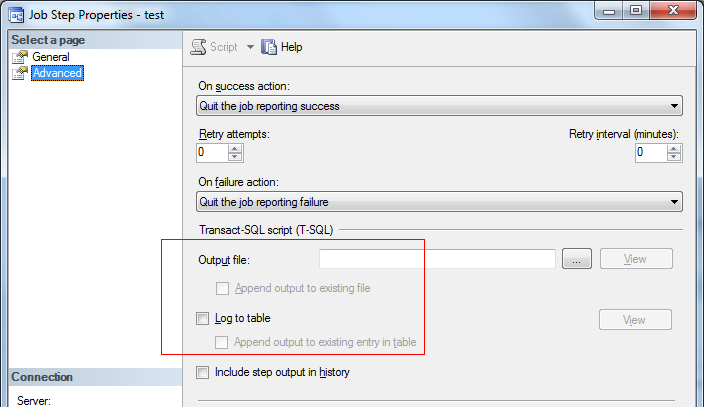
如果想要保留某些作业历史的记录,可以打开作业属性/步骤/编辑/高级,选择将这个步骤的历史记录输出到文件/自定义表中,如下图:
二. 作业运行状态
界面上可以通过: SSMS/SQL Server Agent/右击作业文件夹或某个作业/查看历史纪录,如下用SQL 语句检查作业状态。
1. 作业上次运行状态及时长
利用系统表msdb.dbo.sysjobhistory:
(1) 表中的run_status字段表示作业上次运行状态,有0~3共4种状态值,详见帮助文档,另外在2005的帮助文档中写到:sysjobhistory的run_status为4表示运行中,经测试是错误的,在2008的帮助中已没有4这个状态;
(2) 表中run_duration字段表示作业上次运行时长,格式为HHMMSS,比如20000则表示运行了2小时。
如下脚本查看所有作业最后一次运行状态及时长:
if OBJECT_ID('tempdb..#tmp_job') is not null

    drop table #tmp_job

--只取最后一次结果

select job_id,

       run_status,

       CONVERT(varchar(20),run_date) run_date,

       CONVERT(varchar(20),run_time) run_time,

       CONVERT(varchar(20),run_duration) run_duration

  into #tmp_job

  from msdb.dbo.sysjobhistory jh1

 where jh1.step_id = 0

   and (select COUNT(1) from msdb.dbo.sysjobhistory jh2

        where jh2.step_id = 0

          and (jh1.job_id = jh2.job_id)

          and (jh1.instance_id <= jh2.instance_id))=1

--排除syspolicy_purge_history这个系统作业

select a.name job_name,

       case b.run_status when 0 then 'Failed'

                         when 1 then 'Succeeded'

                         when 2 then 'Retry'

                         when 3 then 'Canceled'

       else 'Unknown'

       end as job_status,

       LEFT(run_date,4)+'-'+SUBSTRING(run_date,5,2)+'-'+RIGHT(run_date,2)

       +SPACE(1)

       +LEFT(RIGHT(1000000+run_time,6),2)+':'

            +SUBSTRING(RIGHT(1000000+run_time,6),3,2)+':'

            +RIGHT(RIGHT(1000000+run_time,6),2) as job_started_time,

       +LEFT(RIGHT(1000000+run_duration,6),2)+':'

            +SUBSTRING(RIGHT(1000000+run_duration,6),3,2)+':'

            +RIGHT(RIGHT(1000000+run_duration,6),2) as job_duration

  from msdb.dbo.sysjobs a

  left join    #tmp_job b

    on a.job_id=b.job_id

 where a.name not in ('syspolicy_purge_history')

   and a.enabled = 1

 order by b.run_status asc,a.name,b.run_duration desc
2. 作业当前运行状态及时长
什么时候可能要检查作业的当前状态?
(1) 需要关闭SQL Server或SQL Server Agent服务时;
(2) 等到当前作业完成,有后续动作;
(3) 纯粹只是查看当前作业运行到哪个步骤等等。
通过SSMS/SQL Server Agent/右击作业文件夹或某个作业/查看历史纪录,看到的作业历史记录存放在:
select * from msdb.dbo.sysjobhistory
需要注意的是:至少作业已完成第一步运行,sysjobhistory表中才会有作业历史纪录,若当前作业没有完成任何一个步骤,那表里就不会有本次运行纪录。所以作业当前状态用有时无法通过sysjobhistory查看,尤其是作业只有1个步骤且运行时间很长时。
2.1. SQL Server 2005及以后版本
(1) 当前运行状态:系统存储过程msdb.dbo.sp_help_job,返回所有作业的运行状态(current_execution_status),共7种状态值,详见帮助文档。查看所有作业状态如下:
exec msdb..sp_help_job
(2) 当前运行时长:系统存储过程sp_help_job无法获得作业运行时长,可通过新增的系统表sysjobactivity来查看。查看正在运行的作业如下:
select a.name,

       b.start_execution_date,

       DATEDIFF(MI,b.start_execution_date,GETDATE()) as job_duration

  from msdb..sysjobs a

 inner join msdb..sysjobactivity b

    on a.job_id = b.job_id

 where b.start_execution_date is not null

   and b.stop_execution_date is null
以下脚本结合sp_help_job和sysjobactivity,得到作业的当前状态及时长:
exec sp_configure 'show advanced options',1

RECONFIGURE

exec sp_configure 'Ad Hoc Distributed Queries',1

RECONFIGURE

if OBJECT_ID('tempdb..#jobinfo') is not null

    drop table #jobinfo

select * into #jobinfo

from openrowset('sqloledb', 'server=(local);trusted_connection=yes','exec msdb.dbo.sp_help_job')

select a.name,

       j.current_execution_status,

       b.start_execution_date,

       DATEDIFF(MI,b.start_execution_date,GETDATE()) as job_duration_minute

  from msdb..sysjobs a

 inner join msdb..sysjobactivity b

    on a.job_id = b.job_id

 inner join #jobinfo j

    on a.job_id = j.job_id

 where b.start_execution_date is not null

   and b.stop_execution_date is null
2.2. SQL Server 2000沿用过来的方法
在SQL Server 2000时,没有sysjobactivity这个系统表,通常借助sysprocesses监视作业的当前运行状态及时长。
select j.name,

       p.status as current_execution_status,

       p.last_batch as start_execution_date,

       ISNULL(DATEDIFF(MI, p.last_batch, GETDATE()), 0) as job_duration_minute

  from msdb.dbo.sysjobs j, master..sysprocesses p

 where p.program_name like 'SQLAgent - TSQL JobStep (Job%'

   and substring((cast(j.job_id as varchar(36))),7,2) +

       substring((cast(j.job_id as varchar(36))),5,2) +

       substring((cast(j.job_id as varchar(36))),3,2) +

       substring((cast(j.job_id as varchar(36))),1,2) +

       substring((cast(j.job_id as varchar(36))),12,2) +

       substring((cast(j.job_id as varchar(36))),10,2) +

       substring((cast(j.job_id as varchar(36))),17,2) +

       substring((cast(j.job_id as varchar(36))),15,2) +

       substring((cast(j.job_id as varchar(36))),20,4) +

       substring((cast(j.job_id as varchar(36))),25,12)

           = substring((cast(p.program_name as varchar(75))),32,32)
sysprocesses里获得的作业编号跟sysjobs里是不一致的,所以上面进行了转换,通常只转换job_id的前8位字符也行,如下脚本做了job_id的简化转换,并检查作业已运行超过30分钟:
declare @MaxMinutes int

    set @MaxMinutes = 30

select j.name,

       p.status as current_execution_status,

       p.last_batch as start_execution_date,

       ISNULL(DATEDIFF(MI, p.last_batch, GETDATE()), 0) as job_duration_minute

  from msdb..sysjobs j

 inner join master..sysprocesses p

    on substring(left(cast(j.job_id as varchar(36)),8),7,2) +

       substring(left(cast(j.job_id as varchar(36)),8),5,2) +

       substring(left(cast(j.job_id as varchar(36)),8),3,2) +

       substring(left(cast(j.job_id as varchar(36)),8),1,2) = substring(p.program_name,32,8)

 where p.program_name like 'SQLAgent - TSQL JobStep (Job%'

   and ISNULL(DATEDIFF(MI, p.last_batch, GETDATE()), 0) > @MaxMinutes
还有种比较笨的方法,在要监视的所有作业中增加一个步骤,如 : select GETDATE() 放在第一步,这样在sysjobhistory中就会有步骤1的运行纪录了,以此为起点,可以计算已运行时长。如果有很多已经部署的job,这确实不是个好办法。
又或者,在每个作业最后一步,放一个检查的步骤,这样所有状态时长全都监视到了,问题是如果作业运行时间过长,最后的检查步骤根本无法被运行到。
三. 作业状态告警
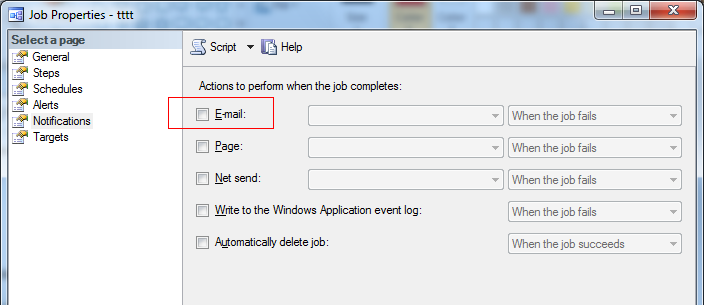
作业在完成后,自己有状态检查和告警机制,通常选择邮件告警,如下图:
但这仅限对作业最终运行状态监视:
(1) 没有运行结束的作业无法告警,或者说对作业的运行时长没有监视;
(2) 如果作业在某个中间步骤设置了:失败后继续下一步,后续的作业步骤都成功,那么作业最终状态不会显示会失败,不会触发告警,如下脚本检查每个作业的所有步骤最后一次运行状态:
if OBJECT_ID('tempdb..#tmp_job_step') is not null

    drop table #tmp_job_step

select jh1.job_id,

       jh1.step_id,

       jh1.run_status,

       CONVERT(varchar(20),jh1.run_date) run_date,

       CONVERT(varchar(20),jh1.run_time) run_time,

       CONVERT(varchar(20),jh1.run_duration) run_duration

  into #tmp_job_step

  from msdb.dbo.sysjobhistory jh1

 where (select COUNT(1) from msdb.dbo.sysjobhistory jh2

        where (jh1.job_id = jh2.job_id and jh1.step_id = jh2.step_id)

          and (jh1.instance_id <= jh2.instance_id))=1

select a.name job_name,

       s.step_name,

       case b.run_status when 0 then 'Failed'

                         when 1 then 'Succeeded'

                         when 2 then 'Retry'

                         when 3 then 'Canceled'

       else 'Unknown'

       end as job_status,

       LEFT(run_date,4)+'-'+SUBSTRING(run_date,5,2)+'-'+RIGHT(run_date,2)

       +SPACE(1)

       +LEFT(RIGHT(1000000+run_time,6),2)+':'

            +SUBSTRING(RIGHT(1000000+run_time,6),3,2)+':'

            +RIGHT(RIGHT(1000000+run_time,6),2) as job_started_time,

       +LEFT(RIGHT(1000000+run_duration,6),2)+':'

            +SUBSTRING(RIGHT(1000000+run_duration,6),3,2)+':'

            +RIGHT(RIGHT(1000000+run_duration,6),2) as job_duration

  from msdb.dbo.sysjobs a

  left join    #tmp_job_step b

    on a.job_id=b.job_id

 inner join msdb.dbo.sysjobsteps s

    on b.job_id = s.job_id and b.step_id = s.step_id

 where a.name not in ('syspolicy_purge_history')

   and a.enabled = 1

 order by b.run_status asc,a.name,b.run_duration desc
小结
SQL Server Agent作业自身的告警机制,有时并不够用,所以还需要部署另外的作业,来检查其他所有作业的运行状况,大致步骤如下 :
(1) 部署数据库邮件;
(2) 部署作业:定时检查其他所有作业/步骤状态,发邮件告警;
作业运行时长可以在这一并检查,有时一些作业运行了很多天没结束还没人知道,也可以考虑放在性能监控里,和其他数据库请求一起监控。但是对于时长,通常需要有个性能基线,如果没有的话直接和历史最大值相比也是不错的选择。
4. SQL Server数据库状态监控 - 作业状态的更多相关文章
- sql server数据库状态监控
sql server数据库监控 转自:https://www.cnblogs.com/seusoftware/category/500793.html 6. SQL Server数据库监控 - 如 ...
- 2. SQL Server数据库状态监控 - 错误日志
原文:2. SQL Server数据库状态监控 - 错误日志 无论是操作系统 (Unix 或者Windows),还是应用程序 (Web 服务,数据库系统等等) ,通常都有自身的日志机制,以便故障时追溯 ...
- 3. SQL Server数据库状态监控 - 可用空间
原文:3. SQL Server数据库状态监控 - 可用空间 数据库用来存放数据,那么肯定需要存储空间,所以对磁盘空间的监视自然就很有必要了. 一. 磁盘可用空间 1. 操作系统命令或脚本.接口或工具 ...
- 5. SQL Server数据库性能监控 - 当前请求
原文:5. SQL Server数据库性能监控 - 当前请求 对于在线运行的系统,当前数据库性能监控,通常监视以下几点: (1) 是否有阻塞 (Blocking); (2) 是否有等待 (Waitin ...
- SQL SERVER数据库状态(脱机,联机,可疑)及SQL设置语句详解
首先我们应该知道数据库总是处于一个特定的状态中,下面先来了解一下数据库的常见的三种状态:1,脱机:我们可以在Microsoft SQL Server Management中看到该数据库,但该数据库 ...
- SQL SERVER数据库状态
一个SQL SERVER数据库会处于很多种状态,例如 ONLINE .RESTORING .RECOVERING .RECOVERY_PENDING .SUSPECT.EMERGENCY .OFFL ...
- SQL Server 数据库状态选项
选项 1. single_user(单用户),multi_user(多用户),restricted_user(受限用户); 描述数据库的用户访问属性,它们互斥,设置其中任何一个选项就会取消对其它选项的 ...
- SQL Server 数据库状态选项-用户使用
选项 1. single_user(单用户),multi_user(多用户),restricted_user(受限用户); 描述数据库的用户访问属性,它们互斥,设置其中任何一个选项就会取消对其它选项的 ...
- SQL Server数据库状态和文件状态
数据库状态 (database states) 查询数据库的当前状态 : 1.查询所有数据库的状态 ,通过sys.databases目录视图的state_desc列 user master go se ...
随机推荐
- Linux在device is busy处理
在Linux管理umount设备时,时常会遇到"device is busy", 假设umount一个文件系统碰到这样的情况.而且你并没有在所需卸载的文件夹下.那么非常可能实用户或 ...
- Android对于静默安装和卸载
在一般情况下,Android系统安装apk会有一个安装界面,用户可以单击确定或取消apk设备. 但在实际的项目需求中,有一种需求.就是希望apk在后台安装(不出现安装界面的提示),这样的安装方式称为静 ...
- 一个好用的web甘特图
前些天一直在弄web甘特图,发现网上很多web甘特图框架,但大部分是收费的.偶尔发现了向日葵甘特图 感觉不错,特此写下来一方面当做记录,另一方面也为寻找web甘特图的同学们少走一些弯路,双赢嘛~ ...
- HDU 4085 Steiner树
主题链接:pid=4085">http://acm.hdu.edu.cn/showproblem.php? pid=4085 由于这题专门花一晚上学习斯坦纳树.找到比較好的学习资料,链 ...
- 快速解读GC日志(转)
本文是 Plumbr 发行的 Java垃圾收集手册 的部分内容.文中将介绍GC日志的输出格式, 以及如何解读GC日志, 从中提取有用的信息.我们通过 -XX:+UseSerialGC 选项,指定JVM ...
- Swiftly语言学习1
单纯值: 1.let常量声明,var声明变量(同时宣布福值,编译器会自己主动判断出类型) var myVariable = 42 myVariable 50 let myConstant = 42 l ...
- Controller与Action
Controller与Action 我们知道在MVC5和之前的版本,两个框架的生命周期是不一样的,在新版MVC6中,MVC Controller/Web API Controller已经合二为一了,本 ...
- C#二维码生成
C#二维码生成,这里使用开源的ThoughtWorks.QRCode.dll库. 1.下载ThoughtWorks.QRCode.dll库文件,并引用到项目中. 2.创建QRCodeHandler.c ...
- oracle_五千万数据插入测试
--创建表 tab_a -- create table tab_a (id int primary key not null,pid int); --创建序列 /** create sequence ...
- DirectX11 学习笔记3 - 创建一个立方体 和 轴
该方案将在进一步的程序 面向对象. 独立的模型类.更像是一个框架. 其中以超过遇到了一个非常有趣的问题,.获得一晚.我读了好几遍,以找到其他的列子.必须放在某些功能Render里面实时更新,而不是仅仅 ...