
[转]8 Regular Expressions You Should Know
Regular expressions are a language of their own. When you learn a new programming language, they're this little sub-language that makes no sense at first glance. Many times you have to read another tutorial, article, or book just to understand the "simple" pattern described. Today, we'll review eight regular expressions that you should know for your next coding project.
Background Info on Regular Expressions
This is what Wikipedia has to say about them:
In computing, regular expressions provide a concise and flexible means for identifying strings of text of interest, such as particular characters, words, or patterns of characters. Regular expressions (abbreviated as regex or regexp, with plural forms regexes, regexps, or regexen) are written in a formal language that can be interpreted by a regular expression processor, a program that either serves as a parser generator or examines text and identifies parts that match the provided specification.
Now, that doesn't really tell me much about the actual patterns. The regexes I'll be going over today contains characters such as \w, \s, \1, and many others that represent something totally different from what they look like.
If you'd like to learn a little about regular expressions before you continue reading this article, I'd suggest watching the Regular Expressions for Dummies screencast series.
The eight regular expressions we'll be going over today will allow you to match a(n): username, password, email, hex value (like #fff or #000), slug, URL, IP address, and an HTML tag. As the list goes down, the regular expressions get more and more confusing. The pictures for each regex in the beginning are easy to follow, but the last four are more easily understood by reading the explanation.
The key thing to remember about regular expressions is that they are almost read forwards and backwards at the same time. This sentence will make more sense when we talk about matching HTML tags.
Note: The delimiters used in the regular expressions are forward slashes, "/". Each pattern begins and ends with a delimiter. If a forward slash appears in a regex, we must escape it with a backslash: "\/".
1. Matching a Username

Pattern:
|
1
|
/^[a-z0-9_-]{3,16}$/ |
Description:
We begin by telling the parser to find the beginning of the string (^), followed by any lowercase letter (a-z), number (0-9), an underscore, or a hyphen. Next, {3,16} makes sure that are at least 3 of those characters, but no more than 16. Finally, we want the end of the string ($).
String that matches:
my-us3r_n4m3
String that doesn't match:
th1s1s-wayt00_l0ngt0beausername (too long)
2. Matching a Password

Pattern:
|
1
|
/^[a-z0-9_-]{6,18}$/ |
Description:
Matching a password is very similar to matching a username. The only difference is that instead of 3 to 16 letters, numbers, underscores, or hyphens, we want 6 to 18 of them ({6,18}).
String that matches:
myp4ssw0rd
String that doesn't match:
mypa$$w0rd (contains a dollar sign)
3. Matching a Hex Value

Pattern:
|
1
|
/^#?([a-f0-9]{6}|[a-f0-9]{3})$/ |
Description:
We begin by telling the parser to find the beginning of the string (^). Next, a number sign is optional because it is followed a question mark. The question mark tells the parser that the preceding character — in this case a number sign — is optional, but to be "greedy" and capture it if it's there. Next, inside the first group (first group of parentheses), we can have two different situations. The first is any lowercase letter between a and f or a number six times. The vertical bar tells us that we can also have three lowercase letters between a and f or numbers instead. Finally, we want the end of the string ($).
The reason that I put the six character before is that parser will capture a hex value like #ffffff. If I had reversed it so that the three characters came first, the parser would only pick up #fff and not the other three f's.
String that matches:
#a3c113
String that doesn't match:
#4d82h4 (contains the letter h)
4. Matching a Slug

Pattern:
|
1
|
/^[a-z0-9-]+$/ |
Description:
You will be using this regex if you ever have to work with mod_rewrite and pretty URL's. We begin by telling the parser to find the beginning of the string (^), followed by one or more (the plus sign) letters, numbers, or hyphens. Finally, we want the end of the string ($).
String that matches:
my-title-here
String that doesn't match:
my_title_here (contains underscores)
5. Matching an Email
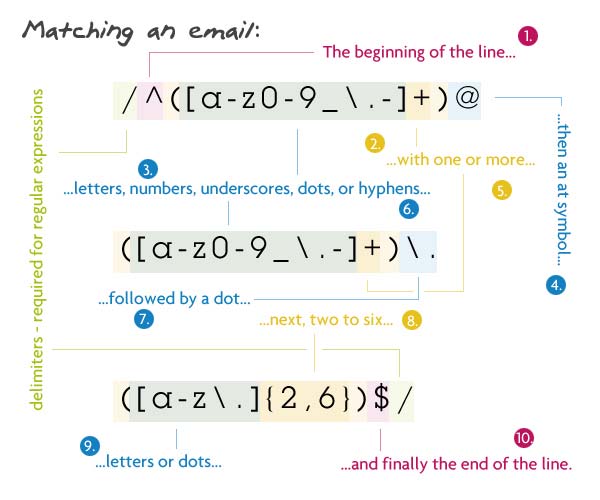
Pattern:
|
1
|
/^([a-z0-9_\.-]+)@([\da-z\.-]+)\.([a-z\.]{2,6})$/ |
Description:
We begin by telling the parser to find the beginning of the string (^). Inside the first group, we match one or more lowercase letters, numbers, underscores, dots, or hyphens. I have escaped the dot because a non-escaped dot means any character. Directly after that, there must be an at sign. Next is the domain name which must be: one or more lowercase letters, numbers, underscores, dots, or hyphens. Then another (escaped) dot, with the extension being two to six letters or dots. I have 2 to 6 because of the country specific TLD's (.ny.us or .co.uk). Finally, we want the end of the string ($).
String that matches:
john@doe.com
String that doesn't match:
john@doe.something (TLD is too long)
6. Matching a URL

Pattern:
|
1
|
/^(https?:\/\/)?([\da-z\.-]+)\.([a-z\.]{2,6})([\/\w \.-]*)*\/?$/ |
Description:
This regex is almost like taking the ending part of the above regex, slapping it between "http://" and some file structure at the end. It sounds a lot simpler than it really is. To start off, we search for the beginning of the line with the caret.
The first capturing group is all option. It allows the URL to begin with "http://", "https://", or neither of them. I have a question mark after the s to allow URL's that have http or https. In order to make this entire group optional, I just added a question mark to the end of it.
Next is the domain name: one or more numbers, letters, dots, or hypens followed by another dot then two to six letters or dots. The following section is the optional files and directories. Inside the group, we want to match any number of forward slashes, letters, numbers, underscores, spaces, dots, or hyphens. Then we say that this group can be matched as many times as we want. Pretty much this allows multiple directories to be matched along with a file at the end. I have used the star instead of the question mark because the star says zero or more, not zero or one. If a question mark was to be used there, only one file/directory would be able to be matched.
Then a trailing slash is matched, but it can be optional. Finally we end with the end of the line.
String that matches:
http://net.tutsplus.com/about
String that doesn't match:
http://google.com/some/file!.html (contains an exclamation point)
7. Matching an IP Address

Pattern:
|
1
|
/^(?:(?:25[0-5]|2[0-4][0-9]|[01]?[0-9][0-9]?)\.){3}(?:25[0-5]|2[0-4][0-9]|[01]?[0-9][0-9]?)$/ |
Description:
Now, I'm not going to lie, I didn't write this regex; I got it from here. Now, that doesn't mean that I can't rip it apart character for character.
The first capture group really isn't a captured group because
|
1
|
|
was placed inside which tells the parser to not capture this group (more on this in the last regex). We also want this non-captured group to be repeated three times — the {3} at the end of the group. This group contains another group, a subgroup, and a literal dot. The parser looks for a match in the subgroup then a dot to move on.
The subgroup is also another non-capture group. It's just a bunch of character sets (things inside brackets): the string "25" followed by a number between 0 and 5; or the string "2" and a number between 0 and 4 and any number; or an optional zero or one followed by two numbers, with the second being optional.
After we match three of those, it's onto the next non-capturing group. This one wants: the string "25" followed by a number between 0 and 5; or the string "2" with a number between 0 and 4 and another number at the end; or an optional zero or one followed by two numbers, with the second being optional.
We end this confusing regex with the end of the string.
String that matches:
73.60.124.136 (no, that is not my IP address :P)
String that doesn't match:
256.60.124.136 (the first group must be "25" and a number between zero and five)
8. Matching an HTML Tag

Pattern:
|
1
|
/^<([a-z]+)([^<]+)*(?:>(.*)<\/\1>|\s+\/>)$/ |
Description:
One of the more useful regexes on the list. It matches any HTML tag with the content inside. As usually, we begin with the start of the line.
First comes the tag's name. It must be one or more letters long. This is the first capture group, it comes in handy when we have to grab the closing tag. The next thing are the tag's attributes. This is any character but a greater than sign (>). Since this is optional, but I want to match more than one character, the star is used. The plus sign makes up the attribute and value, and the star says as many attributes as you want.
Next comes the third non-capture group. Inside, it will contain either a greater than sign, some content, and a closing tag; or some spaces, a forward slash, and a greater than sign. The first option looks for a greater than sign followed by any number of characters, and the closing tag. \1 is used which represents the content that was captured in the first capturing group. In this case it was the tag's name. Now, if that couldn't be matched we want to look for a self closing tag (like an img, br, or hr tag). This needs to have one or more spaces followed by "/>".
The regex is ended with the end of the line.
String that matches:
<a href="http://net.tutsplus.com/">Nettuts+</a>
String that doesn't match:
<img src="img.jpg" alt="My image>" /> (attributes can't contain greater than signs)
Conclusion
I hope that you have grasped the ideas behind regular expressions a little bit better. Hopefully you'll be using these regexes in future projects! Many times you won't need to decipher a regex character by character, but sometimes if you do this it helps you learn. Just remember, don't be afraid of regular expressions, they might not seem it, but they make your life a lot easier. Just try and pull out a tag's name from a string without regular expressions! ;)
[转]8 Regular Expressions You Should Know的更多相关文章
- PCRE Perl Compatible Regular Expressions Learning
catalog . PCRE Introduction . pcre2api . pcre2jit . PCRE Programing 1. PCRE Introduction The PCRE li ...
- 8 Regular Expressions You Should Know
Regular expressions are a language of their own. When you learn a new programming language, they're ...
- 转载:邮箱正则表达式Comparing E-mail Address Validating Regular Expressions
Comparing E-mail Address Validating Regular Expressions Updated: 2/3/2012 Summary This page compares ...
- Regular Expressions --正则表达式官方教程
http://docs.oracle.com/javase/tutorial/essential/regex/index.html This lesson explains how to use th ...
- Regular Expressions in Grep Command with 10 Examples --reference
Regular expressions are used to search and manipulate the text, based on the patterns. Most of the L ...
- [Regular Expressions] Find Plain Text Patterns
The simplest use of Regular Expressions is to find a plain text pattern. In this lesson we'll look a ...
- [Regular Expressions] Introduction
var str = "Is this This?"; //var regex = new RegExp("is", "gi"); var r ...
- Introducing Regular Expressions 学习笔记
Introducing Regular Expressions 读书笔记 工具: regexbuddy:http://download.csdn.net/tag/regexbuddy%E7%A0%B4 ...
- 正则表达式(Regular expressions)使用笔记
Regular expressions are a powerful language for matching text patterns. This page gives a basic intr ...
随机推荐
- 分享Mvc3+NInject+EF+LigerUI权限系统
分享Mvc3+NInject+EF+LigerUI权限系统 前段时间时不时看到有园友的分享权限系统,于是本人突发奇想,也想写一个玩玩,就利用晚上时间,陆陆续续花了一周多样子,写了如今这个权限系统, ...
- 数据结构中的棧在C#中的实现
数据结构中的棧在C#中的实现 一.大致学习 棧是一种面向表的数据结构,棧中的数据只能在标的某一短进行添加和删除操作,是一种典型的(LIFO)数据结构. 现实生活中的理解:自助餐厅的盘子堆,人们总是从顶 ...
- 分享.net常见的内存泄露及解决方法
分享.net常见的内存泄露及解决方法 关于内存泄漏的问题,之前也为大家介绍过,比如:<C++中内存泄漏的检测方法介绍>,是关于C++内存泄漏的.今天为大家介绍的是关于.NET内存泄漏的问题 ...
- Left 、right join使用笔记
用过很多次left join,right join,看到查询出的结果,知道可能是没用left join.或者right join导致的结果,但都是用一次,网上查一次使用规则,学到的东西只是皮毛.今天用 ...
- [置顶] javascript-基于对象or面向对象?
最近完成了javascript的初级学习,在这个学习的视频中,我特别注意了两个词,解释性语言和对象,javascript按照我的理解,应该是种解释性语言,他有关于面向对象的思想的体现,但是,他和vb一 ...
- javascript操作写入txt文件及消息: Automation 服务器不能创建对象问题
简单的写入txt代码: function WriteTxt() { var fso, tf; fso = new ActiveXObject("Scripting.Fil ...
- Ubuntu下JDK+Tomcat+MySql环境的搭建
主机在阿里云上,所以网络的配置都省了,只剩下软件的安装和配置 1.安装mysql 1.1 apt-get install mysql-server-5.5 安装过程中,有两次提示输入 mysql 的 ...
- mysql建立、删除索引及使用
同步发布:http://www.yuanrengu.com/index.php/2017-01-13.html 一.索引的作用 一般的应用系统,读写比例在10:1左右,而且插入操作和一般的更新操作很少 ...
- SpringAOP导致@Autowired依赖注入失败
之前用springAOP做了个操作日志记录,这次在往其他类上使用的时候,service一直注入失败,找了网上好多内容,发现大家都有类似的情况出现,但是又和自己的情况不太符合.后来总结自己的情况发现:方 ...
- CentOS 7下安装X Window
1.网上其他人都这么说: yum check-update yum groupinstall "X Window System" ... 但是运行yum groupinstall ...