
tensorflow(六)
一、TensorBoard可视化工具
TensorBoard实现形式为web应用程序,这为提供分布式、跨系统的图形界面服务带来了便利。
1.使用流程
SummaryOps->Session--(input)-->FileWriter---(add)--->Event file---(load)-->TensorBoard
import tensorflow as tf

with tf.name_scope('graph') as scope:

     matrix1 = tf.constant([[3., 3.]],name ='matrix1')  #1 row by 2 column

     matrix2 = tf.constant([[2.],[2.]],name ='matrix2') # 2 row by 1 column

     product = tf.matmul(matrix1, matrix2,name='product')

sess = tf.Session()

writer = tf.summary.FileWriter("/data/logs/", sess.graph) #第一个参数指定生成文件的目录。

init = tf.global_variables_initializer()

sess.run(init)
命令行执行 tensorboard --logdir=/data/logs
打开localhost:6006
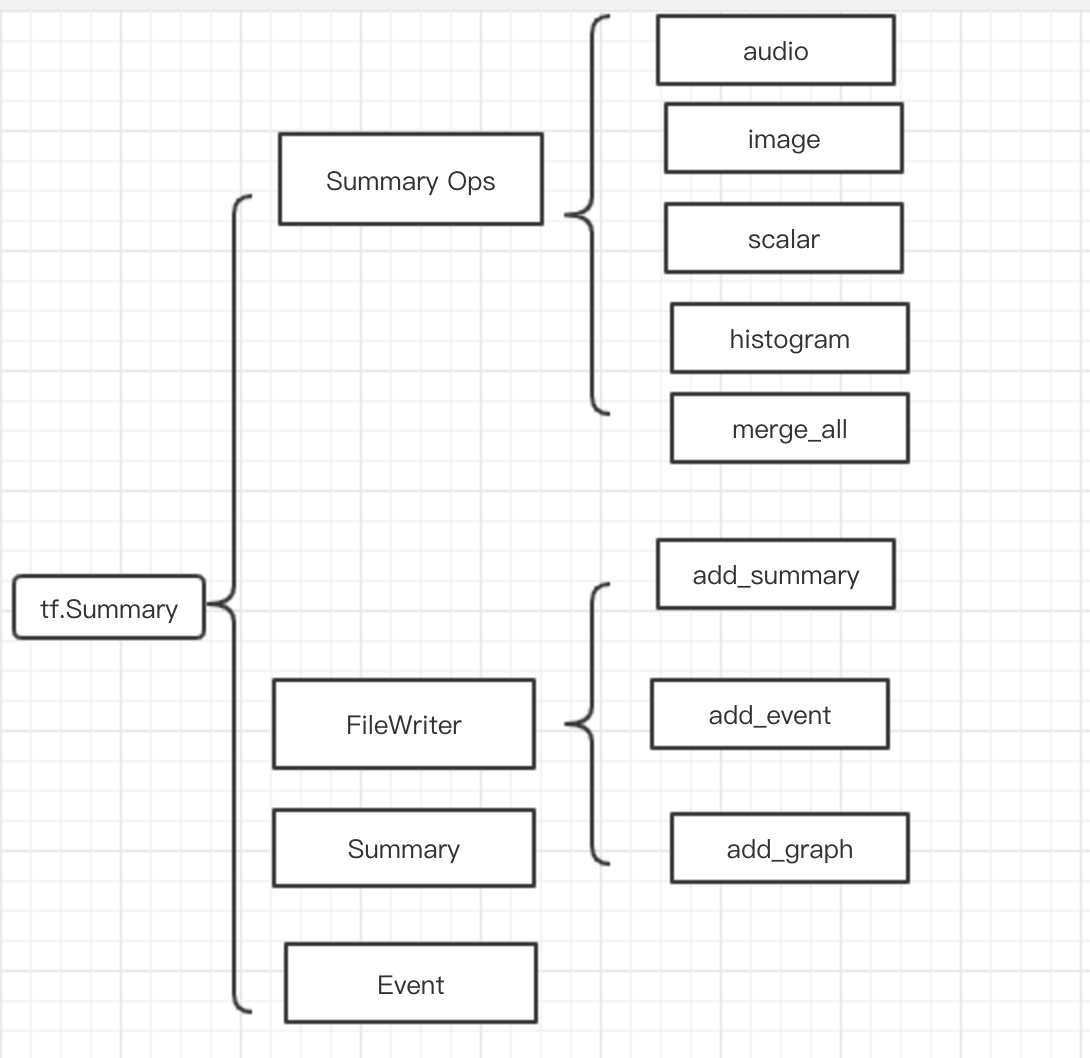
如图所示,tf.summary 模块的功能
2.可视化数据流图
通过with tf.name_scope('sc_name'):定义一个名字可以把一些列操作定义为一个节点,在图上展示为一个节点
点击加号可以展示节点内详情
from __future__ import absolute_import

from __future__ import division

from __future__ import print_function

import tensorflow as tf

from tensorflow.examples.tutorials.mnist import input_data

mnist = input_data.read_data_sets('/Users/quxiaoyuan/work/data/mnist',one_hot=True)

with tf.name_scope('input'):

    x = tf.placeholder(tf.float32,[None,784],name='x-input')

    y_ = tf.placeholder(tf.float32,[None,10],name='y-input')

with tf.name_scope('softmax_layer'):

    with tf.name_scope('weights'):

        weights = tf.Variable(tf.zeros([784,10]))

    with tf.name_scope('biases'):

        biases = tf.Variable(tf.zeros([10]))

    with tf.name_scope('Wx_plus_b'):

        y = tf.matmul(x,weights) + biases

with tf.name_scope('cross_entropy'):

    diff = tf.nn.softmax_cross_entropy_with_logits(labels=y_,logits=y)

    with tf.name_scope('total'):

        cross_entropy = tf.reduce_mean(diff)

        tf.summary.scalar('cross_entropy',cross_entropy)

with tf.name_scope('train'):

    train_step = tf.train.AdamOptimizer(0.001).minimize(cross_entropy)

with tf.name_scope('accuracy'):

    with tf.name_scope('correct_prediction'):

        correct_prediction = tf.equal(tf.argmax(y,1),tf.argmax(y_,1))

    with tf.name_scope('accuracy'):

        accuracy = tf.reduce_mean(tf.cast(correct_prediction,tf.float32))
3.ft.summary操作
add_summay生成折线图
with tf.name_scope('cross_entropy'):

    diff = tf.nn.softmax_cross_entropy_with_logits(labels=y_,logits=y)

    with tf.name_scope('total'):

        cross_entropy = tf.reduce_mean(diff)

        tf.summary.scalar('cross_entropy',cross_entropy)

with tf.name_scope('train'):

    train_step = tf.train.AdamOpimizer(0.01).minimize(cross_entropy)

with tf.name_scope('accuracy'):

    with tf.name_scope('correct_prediction'):

        correct_prediction = tf.equal(tf.argmax(y,1),tf.argmax(y_,1))

    with tf.name_scope('accuracy'):

        accuracy = tf.reduce_mean(tf.cast(correct_prediction,tf.float32))

        tf.summary.scalar('accuracy',accuracy)

merged = tf.summary.merge_all()

for i in range(FLAGS.max_step):

    if i % FLAGS.max_step == 0:

        summary, acc = sess.run([merged,accuracy],feed_dict=feed_dict(False))

        witer.add_summary(summary,i)
histogram生成数据分布图
with tf.name_scope('softmax_layer'):

    with tf.name_scope('weights'):

        weights = tf.Variable(tf.zeros([784,10]))

        tf.summary.histogram('weights',weights)
tf.summary.image生成图像
with tf.name_scope('input'):

    x = tf.placeholder(tf.float32,[None,784],name='x-input')

    y_ = tf.placeholder(tf.float32,[None,10],name='y-input')

with tf.name_scope('input_reshape'):

    image_shaped_input = tf.reshape(x,[-1,28,28,1])

    tf.summary.image('input',image_shaped_input,10)
tensorflow(六)的更多相关文章
- TensorFlow(六):tensorboard网络结构
# MNIST数据集 手写数字 import tensorflow as tf from tensorflow.examples.tutorials.mnist import input_data # ...
- TF Boys (TensorFlow Boys ) 养成记(六)
圣诞节玩的有点嗨,差点忘记更新.祝大家昨天圣诞节快乐,再过几天元旦节快乐. 来继续学习,在/home/your_name/TensorFlow/cifar10/ 下新建文件夹cifar10_train ...
- 第四百一十六节,Tensorflow简介与安装
第四百一十六节,Tensorflow简介与安装 TensorFlow是什么 Tensorflow是一个Google开发的第二代机器学习系统,克服了第一代系统DistBelief仅能开发神经网络算法.难 ...
- TF Boys (TensorFlow Boys ) 养成记(六): CIFAR10 Train 和 TensorBoard 简介
圣诞节玩的有点嗨,差点忘记更新.祝大家昨天圣诞节快乐,再过几天元旦节快乐. 来继续学习,在/home/your_name/TensorFlow/cifar10/ 下新建文件夹cifar10_train ...
- TensorFlow从1到2(六)结构化数据预处理和心脏病预测
结构化数据的预处理 前面所展示的一些示例已经很让人兴奋.但从总体看,数据类型还是比较单一的,比如图片,比如文本. 这个单一并非指数据的类型单一,而是指数据组成的每一部分,在模型中对于结果预测的影响基本 ...
- 第六节,TensorFlow编程基础案例-保存和恢复模型(中)
在我们使用TensorFlow的时候,有时候需要训练一个比较复杂的网络,比如后面的AlexNet,ResNet,GoogleNet等等,由于训练这些网络花费的时间比较长,因此我们需要保存模型的参数. ...
- TensorFlow从入门到理解(六):可视化梯度下降
运行代码: import tensorflow as tf import numpy as np import matplotlib.pyplot as plt from mpl_toolkits.m ...
- 『PyTorch x TensorFlow』第六弹_从最小二乘法看自动求导
TensoFlow自动求导机制 『TensorFlow』第二弹_线性拟合&神经网络拟合_恰是故人归 下面做了三个简单尝试, 利用包含gradients.assign等tf函数直接构建图进行自动 ...
- tensorFlow(六)应用-基于CNN破解验证码
TensorFlow基础见前博客 简介 传统的验证码识别算法一般需要把验证码分割为单个字符,然后逐个识别.本教程将验证码识别问题转化为分类的问题,实现对验证码进行整体识别. 步骤简介 本教程一共分为四 ...
随机推荐
- 剑指offer_1.19_Day_3
替换空格 请实现一个函数,将一个字符串中的每个空格替换成“%20”.例如,当字符串为We Are Happy.则经过替换之后的字符串为We%20Are%20Happy. Javascript_V8 f ...
- 使用软件模拟spi 时序时注意点
软件模拟 spi 时序有以下几个点需要注意: cs 使能后到第一个 sck 边沿需要延时. 最后一个sck 边沿到下一个 cs 需要延时. sck 的高电平和低电平本身需要维持时间. mosi 需要先 ...
- 服务器io资源查看
资源查看命令安装 yum provides /usr/bin/find #查看命令是哪个软件包安装的 执行 yum provides */netstat 命令就可以看到提供命令的工具包net-tool ...
- i春秋-web-爆破3
首先,是PHP代码审计,看懂就能解出来题. <?php error_reporting(0); session_start(); require('./flag.php'); if(!isset ...
- spring boot集成mybatis(2) - 使用pagehelper实现分页
Spring Boot 集成教程 Spring Boot 介绍 Spring Boot 开发环境搭建(Eclipse) Spring Boot Hello World (restful接口)例子 sp ...
- 已知root用户密码并登录,修改mysql用户名密码方法
首先进入命令行下:以root用户登录,命令:mysql -uroot -p 回车 输入密码:mysql>use mysql:mysql>UPDATE user SET password=P ...
- redis常用命令--strings
strings常用命令: set key value:存值 get key:取值 append key value:在值后追加值 strlen key:获取长度 mset key1 value1 ke ...
- 线程与进程 concurrent.futures模块
https://docs.python.org/3/library/concurrent.futures.html 17.4.1 Executor Objects class concurrent.f ...
- CSS的Flex弹性布局概念
1.Flex概念: Flex是Flexible Box的缩写,顾名思义为“弹性布局”,用来为盒装模型提供最大的灵活性. 任何一个容器都可以指定为Flex 布局. 设为flex布局以后,子元素的floa ...
- PAT A1009-1012
A 1009 Product of Polynomials (25 point(s)) 读懂题意就行. #include <cstdio> #include <iostream> ...