
JS在线代码编辑器多种方案monaco-editor,vue-monaco-editor
前言
JavaScript在线代码编辑器。
需要代码提示,关键字高亮,能够格式化代码。(不需要在线运行)
简简单单的需求。
源码地址:https://github.com/FannieGirl/vue-monaco-editor
方案一: Monaco-editor
简介:微软的开源项目,开源中国上面的在线代码编辑器也是用的这个(我就是顺着藤爬到Monaco editor的)
有 ‘在线 VS code’ 美称
官网:https://microsoft.github.io/monaco-editor/
优点:多语言支持,代码提示(内置函数蛮多的)。文档很清晰,API很详细了。更重要的是给出的案例非常多。
缺点:一开始摸不着头脑(本人是在vue项目使用),静态资源的引用是魔鬼(官方就是ES5方式资源引用),最好的方案是要搭配 webpack plugin 使用
找了那么多的资料,没见几个demo写的好(这也是我要再写一篇的原因啦 争取看到的人都可以快速上手)
源码:https://github.com/Microsoft/monaco-editor
案例:https://github.com/Microsoft/monaco-editor-samples/ 一定要看这个,官方给你展示各种功能(一套git pull 下来,在本地环境直接看demo),
鬼知道我走了多少冤枉路。
本人案例展示,直接上源码吗?哈哈哈。
 npm install monaco-edtior //安装

 test.vue //新建一个文件

 <template>

     <div ref="container" style="width:800px;height:600px;border:1px solid grey;text-align: left"></div>

 </template>

 <script>

     import * as monaco from "monaco-editor"; // 包体很大了 但是demo可以跑起来

     export default{

         mounted() {

             var editor = monaco.editor.create(this.$refs.container, {

                 value: [

                     'function x() {',

                     '\tconsole.log("Hello world!");',

                     '}'

                 ].join('\n'),

                 language: 'javascript',

                 minimap:{

                     enabled:false

                 },

                 selectOnLineNumbers: true,

                 roundedSelection: false,

                 cursorStyle: 'line', // 光标样式

                 automaticLayout: false, // 自动布局

                 glyphMargin: true, // 字形边缘

                 useTabStops: false,

                 fontSize: 16, // 字体大小

                 autoIndent: false //自动布局

             });

         }

     }

 </script>
JavaScript 参考这个案例!!!

方案二 vue-monaco-editor(没错就是别人集成好的)
原因:monaco 按需求加载太难了,官方案例也是在静态资源中引用 node_model中的(地狱来了)
针对这个有两种解决方案
方案一:资源引用哪家强,就到前端找webpack
方案二:本人偷懒,直接用vue-Monaco-editor(Rect 有的)
再次上源码,哈哈哈哈哈
方案一的源码
npm install monaco-editor-webpack-plugin //安装

const MonacoWebpackPlugin = require('monaco-editor-webpack-plugin');

module.exports = {

    // ......

    configureWebpack: {

        plugins: [

            new MonacoWebpackPlugin({

                // available options are documented at https://github.com/Microsoft/monaco-editor-webpack-plugin#options

                languages: ['javascript', 'css', 'html', 'typescript', 'json']

            })

        ]

    }

};
方案二的源码
<template>

    <div id="app">

        <MonacoEditor

                height="300"

                width="1200"

                class="vs"

                style="text-align: left;background-color: #fff"

                language="javascript"

                :code="code"

                :editorOptions="options"

                @mounted="onMounted"

                @codeChange="onCodeChange"

        >

        </MonacoEditor>

    </div>

</template>

<script>

    import MonacoEditor from 'vue-monaco-editor'

    export default {

        data() {

            return {

                code: '',

                editor:null,

                options: {

                    theme: "vs",

                    selectOnLineNumbers: true,

                    roundedSelection: false,

                    readOnly: false,

                    automaticLayout: true,

                    glyphMargin: true,

                    showFoldingControls: "always",

                    formatOnPaste: true,

                    formatOnType: true,

                    folding: true,

                }

            }

        },

        components: {

            MonacoEditor

        },

        methods:{

            onMounted (editor) {

                this.editor = editor;

            },

            onCodeChange(editor) {},

        }

    }

</script>

<style>

</style>
前方有坑
同一个项目里面
既安装了vue-monaco-editor 又安装了Monaco-editor
然后 就不会智能提示了(2333)
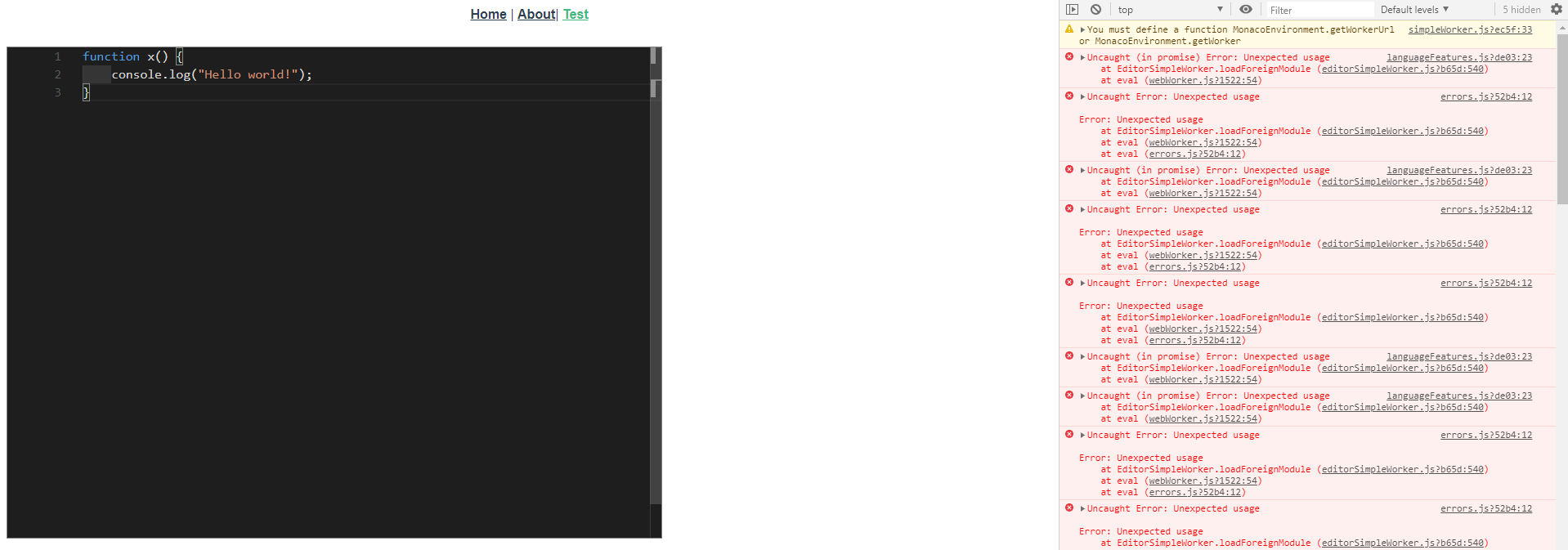
这个问题,emmm(稍后解决吧,我再搞codemirror的)
算了codeMirror 再分一篇文章
JS在线代码编辑器多种方案monaco-editor,vue-monaco-editor的更多相关文章
- Js的在线代码编辑器:CodeMirror
github地址:https://github.com/codemirror/CodeMirror/tree/master/demo 里面包含需要的js.css文件以及大量的示例 官网:https:/ ...
- (视频) 《快速创建网站》 3.2 WordPress多站点及Azure在线代码编辑器 - 扔掉你的ftp工具吧,修改代码全部云端搞定
本文是<快速创建网站>系列的第6篇,如果你还没有看过之前的内容,建议你点击以下目录中的章节先阅读其他内容再回到本文. 访问本系列目录,请点击:http://devopshub.cn/tag ...
- JS实现单例模式的多种方案
JS实现单例模式的多种方案 今天在复习设计模式中的-创建型模式,发现JS实现单例模式的方案有很多种,稍加总结了一下,列出了如下的6种方式与大家分享 大体上将内容分为了ES5(Function)与ES6 ...
- 20个最强的基于浏览器的在线代码编辑器 - OPEN资讯
20个最强的基于浏览器的在线代码编辑器 - OPEN资讯 20个最强的基于浏览器的在线代码编辑器
- ACE Editor在线代码编辑器简介及使用引导
转自博客:https://www.cnblogs.com/cz-xjw/p/6476179.html ACE 是一个开源的.独立的.基于浏览器的代码编辑器,可以嵌入到任何web页面或JavaScrip ...
- 在线代码编辑器CodeMirror简介
1.什么是Code Mirror 最近做一个项目需要在网页上实现一个代码编辑器,支持语法高亮.自动缩进.智能提示等功能.发现Code Mirror刚好满足所有需求.Code Mirror是由js写的一 ...
- CodeMirror在线代码编辑器使用
CodeMirror官网地址为:https://codemirror.net/ CodeMirror作为一款代码编辑器,其应用场景主要是在线网站写代码.如现在的leetcode.洛谷.code-vs等 ...
- 在线代码编辑器 Codemirror 的轻量级 React 组件
代码编辑器 CodeMirror 的轻量级 React 组件 demo @uiw-react.github.io/react-codemirror/ 特性:
- CodeMirror 在线代码编辑器
像百度编辑器插件部分.菜鸟教程示例等高德地图都在使用,这里也记录一下: CodeMirror是一个用于编辑器文本框textarea代码高亮javascript插件...... vue 中使用 参见:h ...
随机推荐
- 《Java多线程编程实战指南(核心篇)》阅读笔记
<Java多线程编程实战指南(核心篇)>阅读笔记 */--> <Java多线程编程实战指南(核心篇)>阅读笔记 Table of Contents 1. 线程概念 1.1 ...
- [noip模拟]小猫爬山<迭代深搜>
[题目描述]: Freda和rainbow饲养了N只小猫,这天,小猫们要去爬山.经历了千辛万苦,小猫们终于爬上了山顶,但是疲倦的它们再也不想徒步走下山了(呜咕>_<). Freda和rai ...
- 并查集例题02.带权并查集(poj1182)
Description 动物王国中有三类动物A,B,C,这三类动物的食物链构成了有趣的环形.A吃B, B吃C,C吃A.现有N个动物,以1-N编号.每个动物都是A,B,C中的一种,但是我们并不知道它到底 ...
- Django之auth用户认证
auth模块 from django.contrib import auth django.contrib.auth中提供了许多方法,这里主要介绍其中的三个: authenticate() 提供 ...
- VAuditDemo-文件包含漏洞的审计
包含漏洞 include.require等先关函数,include($file) 文件包含漏洞的问题在于参数可控(路径.文件名.后缀) include($path.$filename.$ext) 包含 ...
- Light of future-冲刺集合
table th:nth-of-type(1) { width: 85px; } table th:nth-of-type(2){ width: 80px; } table th:nth-of-typ ...
- js中常见的数据加密与解密的方法
加密在我们前端的开发中也是经常遇见的.本文只把我们常用的加密方法进行总结.不去纠结加密的具体实现方式(密码学,太庞大了). 常见的加密方式 常见的加密算法基本分为这几类, 线性散列算法(签名算法)MD ...
- Shell:Day05.笔记
交互输入与for语句 1.交互输入 read Python中用input()函数,进行输入: read命令同时可以定义多个变量值:而输入的内容默认以空格为分隔符,将值输入到对应的变量中: 如果默认 ...
- 【图机器学习】cs224w Lecture 7 - 节点的表示
目录 Node Embedding Random Walk node2vec TransE Embedding Entire Graph Anonymous Walk Reference 转自本人:h ...
- pyecharts的使用及总结
包的下载及配置 这个包的相应的配置较多,版本也不兼容,总结一下 预览:pyecharts画图 pip pyecharts pip 各级别地图(6.7个左右) pip jupyter环境 [为了生成pn ...