
浅析selenium的PageFactory模式
前面的文章介绍了selenium的PO模式,见文章:http://www.cnblogs.com/qiaoyeye/p/5220827.html。下面介绍一下PageFactory模式。
1.首先介绍FindBy类:
For example, these two annotations point to the same element:
 @FindBy(id = "foobar") WebElement foobar;

 @FindBy(how = How.ID, using = "foobar") WebElement foobar;
and these two annotations point to the same list of elements:
 @FindBy(tagName = "a") List<WebElement> links;

 @FindBy(how = How.TAG_NAME, using = "a") List<WebElement> links;
用来分别查找单个元素和多个元素的两种用法,支持的类型有:className、css、id、linkText、name、partialLinkText、tagName、xpath。
How支持的类型和上面差不多。
2.接着介绍PageFactory类
Factory class to make using Page Objects simpler and easier.
它提供的方法都是静态的,可以直接调用,我们在用完findby后,需要进行元素初始化,则需要调用下面的方法
initElements(ElementLocatorFactory factory, java.lang.Object page)、initElements(FieldDecorator decorator, java.lang.Object page)、initElements(WebDriver driver, java.lang.Class<T> pageClassToProxy)、initElements(WebDriver driver, java.lang.Object page)
我们在实际使用中可以这样用:
PageFactory.initElements(dr, XXX.class);
或者
PageFactory.initElements(new AjaxElementLocatorFactory(dr, 10) ,XXX.class);
后者加入了初始化元素时等待时间。
3.在代码中如何设计
a.新建一个BasePage类
class BasePage {

    WebDriver dr;

    private final int TIMEOUT = 10;

    BasePage() {}

    BasePage(WebDriver dr) {

        this.dr = dr;

        PageFactory.initElements(new AjaxElementLocatorFactory(dr, TIMEOUT) , this);

    }

    BasePage(WebDriver dr, final String title) {

        this.dr = dr;

        //如果不进行判断,

        WebDriverWait wait = new WebDriverWait(dr,TIMEOUT);

        try{

            boolean flag = wait.until(new ExpectedCondition<Boolean>(){

                @Override

                public Boolean apply(WebDriver arg0) {

                    // TODO Auto-generated method stub

                    String acttitle = arg0.getTitle();

                    return acttitle.equals(title);

                }});

        }catch(TimeoutException te) {

            throw new IllegalStateException("当前不是预期页面,当前页面title是:" + dr.getTitle());

        }

        PageFactory.initElements(new AjaxElementLocatorFactory(dr, TIMEOUT) , this);

    }

    void fun2() {}

    void fun3() {}

}
b.建两个页面类LoginPage和HomePage,分别继承BasePage
class LoginPage extends BasePage{

    @FindBy(id="UserName")

    @CacheLookup //加入缓存,更新值的时候先从缓存中取

    private WebElement input_username;

    @FindBy(css="html body div.loginbox div#NoCodeLogin.formbox.errorBox div#ElongLogin div#password_tip.inputbox.login_pw input.blur")

    @CacheLookup

    private WebElement temp_input_password;

    @FindBy(id="PassWord")

    @CacheLookup

    private WebElement input_password;

    //WebDriver dr;

    /*

    @FindBy(name="captcha")

    @CacheLookup

    WebElement input_imgcode;

    @FindBy(css="html.show-app-promotion-bar.cssanimations.csstransforms.csstransitions.flexbox.no-touchevents.no-mobile body.zhi.no-auth div.index-main div.index-main-body div.desk-front.sign-flow.clearfix.sign-flow-simple div.view.view-signin form div.group-inputs div.input-wrapper.captcha-module div.captcha-container img.js-refresh-captcha.captcha")

    @CacheLookup

    WebElement imgcode;*/

    @FindBy(className="loginbtn")

    @CacheLookup

    private WebElement button_submit;

    LoginPage(WebDriver dr) {

        super(dr);

    }

    LoginPage(WebDriver dr, String titile) {

        super(dr, titile);

    }

    HomePage login() {

        typeusername("0000");

        typepassword("111111");

        button_submit.click();

        return new HomePage(dr,"艺龙机票】机票查询,特价机票,打折飞机票-艺龙旅行网eLong.com");

    }

    void typeusername(String name) {

        input_username.clear();

        input_username.sendKeys(name);

    }

    void typepassword(String password) {

        temp_input_password.click();

        input_password.clear();

        input_password.sendKeys(password);

    }

    void formsubmit() {

    }

}

class HomePage extends BasePage {

    HomePage(WebDriver dr) {

        super(dr);

        // TODO Auto-generated constructor stub

    }

    public HomePage(WebDriver dr, String title) {

        // TODO Auto-generated constructor stub

        super(dr, title);

    }

    @FindBy(id="btnSearch")

    private WebElement btn_search;

}
c.建一个测试类,做为入口
package com.test;

import java.util.concurrent.TimeUnit;

import org.openqa.selenium.TimeoutException;

import org.openqa.selenium.WebDriver;

import org.openqa.selenium.WebElement;

import org.openqa.selenium.safari.SafariDriver;

import org.openqa.selenium.support.CacheLookup;

import org.openqa.selenium.support.FindBy;

import org.openqa.selenium.support.PageFactory;

import org.openqa.selenium.support.pagefactory.AjaxElementLocatorFactory;

import org.openqa.selenium.support.ui.ExpectedCondition;

import org.openqa.selenium.support.ui.ExpectedConditions;

import org.openqa.selenium.support.ui.WebDriverWait;

/**

 * @author  qiaojiafei

 * @version 创建时间:2016年4月22日 下午1:26:59

 * 类说明

 */

public class TestFactory {

    public static void main(String args[]) {

        WebDriver dr = new SafariDriver();

        dr.get("https://secure.elong.com/passport/login_cn.html");

        String logintitle = "会员登录–elong.com艺龙旅行网";

        LoginPage lp = new LoginPage(dr, logintitle);

        HomePage hp = lp.login();

    }

}
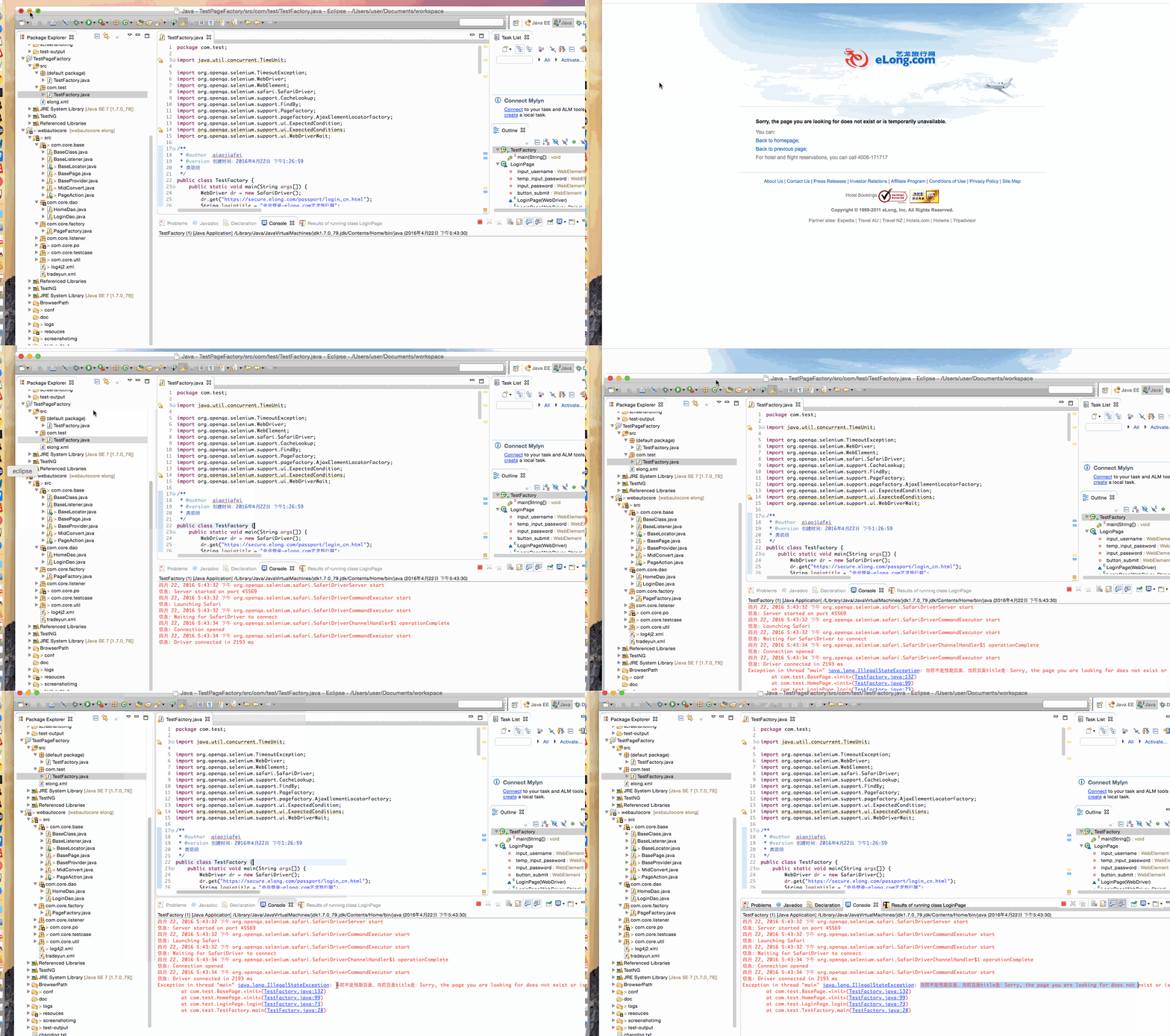
到底为止结束,在每个页面的构造方法,加入页面title的验证,是为了保证跳转的页面与预期的页面一致后,再进行页面元素的初始化,否则,页面都没跳转正确,就进行元素初始化时多余的。
浅析selenium的PageFactory模式的更多相关文章
- 浅析selenium的PageFactory模式 PageFactory初始化pageobject
1.首先介绍FindBy类: For example, these two annotations point to the same element: @FindBy(id = "foob ...
- 在Python中实现PageFactory模式
关于 PageFactory 的概念主要是Java中内置了PageFactory类. import org.openqa.selenium.support.PageFactory; …… 例子,htt ...
- selenium page object模式
页面对象模式将测试代码和被测试页面的元素及操作进行分离,以降低页面元素的变化对测试代码的影响.每个被测试的页面都会被定义一个类,类中会定位元素和操作. 如果不使用page object模式,则相同的操 ...
- 转在Python中实现PageFactory模式
转自: http://www.cnblogs.com/fnng/p/5092383.html 关于 PageFactory 的概念主要是Java中内置了PageFactory类. import org ...
- Selenium+java - PageFactory设计模式
前言 上一小节我们已经学习了Page Object设计模式,优势很明显,能更好的体现java的面向对象思想和封装特性.但同时也存在一些不足之处,那就是随着这种模式使用,随着元素定位获取,元素定位与页面 ...
- 记我的第二次自动化尝试——selenium+pageobject+pagefactory实现自动化下单、退款、撤销回归测试
需求: 系统需要做下单.退款.撤销的回归测试,有下单页面,所以就想到用selenium做WEB UI 自动化 项目目录结构: common包上放通用的工具类方法和浏览器操作方法 pageobject包 ...
- 浅析selenium的page object模式
selenium目前比较流行的设计模式就是page object,那么到底什么是page object呢,简单来说,就是把页面作为对象,在使用中传递页面对象,来使用页面对象中相应的成员或者方法,能更好 ...
- Selenium的PageFactory在大型项目中的应用
出路出路,走出去了,总是会有路的:困难苦难,困在家里就是难. 因为最近遇到的技术问题一直没找到可行的解决办法,一直在翻看selenium的源代码,之前写测试代码的时候就是拿来即用,写什么功能啊,就按手 ...
- Selenium的PageFactory & PageObject 在大型项目中的应用
因为最近遇到的技术问题一直没找到可行的解决办法,一直在翻看selenium的源代码,之前写测试代码的时候就是拿来即用,写什么功能啊,就按手动的操作步骤去转换,近日看到一个文章,又去wiki上查了查,觉 ...
随机推荐
- .Net中的并行编程-2.ConcurrentStack的实现与分析
在上篇文章<.net中的并行编程-1.基础知识>中列出了在.net进行多核或并行编程中需要的基础知识,今天就来分析在基础知识树中一个比较简单常用的并发数据结构--.net类库中无锁栈的实现 ...
- .net实现与excel的数据交互、导入导出
应该说,一套成熟的基于web的管理系统,与用户做好的excel表格进行数据交互是一个不可或缺的功能,毕竟,一切以方便客(jin)户(qian)为宗旨. 本人之前从事PHP的开发工作,熟悉PHP的都应该 ...
- 让T4脱离VS生成代码
让T4脱离VS生成代码 最近项目快结束:空闲时间相对多一点:为了以后工作方便点:索性研究了VS的T4: 写个代码生成器:以后可以通过代码生成器调用项目里面的Dll直接生成代码或者xml: 应用以下两个 ...
- Windows8.1下安装NoSQL-- mongodb安装使用
1. 官方下载monodb:http://www.mongodb.org/downloads 现在最新版本3.0 2. 以下载Windows 64-bit为例官方最新版的没有分开, 32位和64位是应 ...
- [JS]笔记12之事件机制--事件冒泡和捕获--事件监听--阻止事件传播
-->事件冒泡和捕获-->事件监听-->阻止事件传播 一.事件冒泡和捕获 1.概念:当给子元素和父元素定义了相同的事件,比如都定义了onclick事件,点击子元素时,父元素的oncl ...
- director.js:客户端的路由---简明中文教程
1.引子 最近学用director.js,那是相当的简单易学易使用.不过开始学的时候,搜搜过后,却没有发现相关的中文教程.于是决定硬啃E文,翻译备用的同时也当是给自己上课并加深对它的理解. direc ...
- JavaScript函数的4种调用方法详解
在JavaScript中,函数是一等公民,函数在JavaScript中是一个数据类型,而非像C#或其他描述性语言那样仅仅作为一个模块来使用.函数有四种调用模式,分别是:函数调用形式.方法调用形式.构造 ...
- Unity V3 初步使用 —— 为我的.NET项目从简单三层架构转到IOC做准备
[声明]由于本人表达能力有限,为避免不必要的误人子弟,本文将不会涉及IOC与DI,仅仅描述新版本Unity 3的使用(非Unity 3D,如果您想看的是Unity 3D请立即离开,否则莫怪此处“谋财害 ...
- Sharepoint学习笔记—习题系列--70-576习题解析 -(Q116-Q120)
Question 116 You are helping a corporate IT department create a SharePoint 2010 information archite ...
- 【转】自定义UITableViewCell(registerNib: 与 registerClass: 的区别)
自定义UITableViewCell大致有两类方法: 使用nib 1.xib中指定cell的Class为自定义cell类型(注意不是设置File's Owner的class) 2.调用 tableVi ...