
GeneralUpdate2.1.0发布
GeneralUpdate
- GeneralUpdate是基于.net framwork开发的一款(c/s应用)自动升级程序。该组件将更新的核心部分抽离出来方便应用于多种项目当中目前适用于wpf,控制台应用,winfrom。相比以前更方便的是不需要在过分关注源码可直接通过nuget直接使用。
- 如果有任何使用问题可以在Github的issues上进行提问我会每周统一找时间解决并解答bug或者问题。或者联系文章末尾的联系方式会有人解答。
- 每次迭代新版本doc文件夹中的帮助文档也会随之更新,各位开发者请多关注。
- 如果该组件能够帮助到您,希望可以点个Strat和关注一下文档末尾的联系方式。您的支持是对开源作者最大的支持与帮助。
How to use it:
Gitee(码云)地址:
- https://gitee.com/Juster-zhu/GeneralUpdate
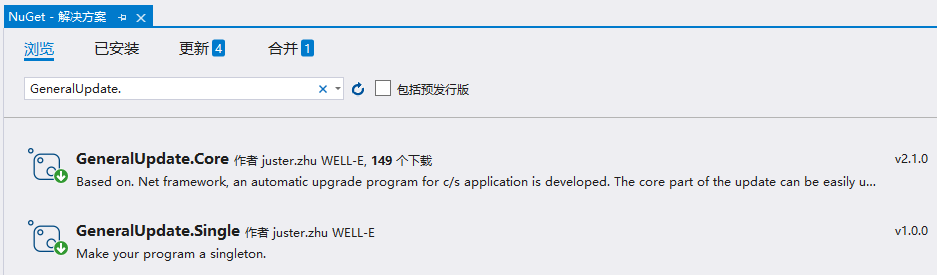
Nuget地址:
- https://www.nuget.org/packages/GeneralUpdate.Core/
- https://www.nuget.org/packages/GeneralUpdate.Single/

GitHub地址:
- Address:https://github.com/WELL-E/AutoUpdater/tree/autoupdate2
- Issues:https://github.com/WELL-E/AutoUpdater/issues
1.版本更新2020-8-30
在新的发布中,GeneralUpdate.Core-2.1.0版本新增断点续传功能。
在新的发布中,新增了组件 GeneralUpdate.Single-1.0.0,它将为程序带来单例运行功能,防止自动更新程序开启多个。
2.更新流程
1.客户端程序启动,向服务器获取更新信息解析并比对是否需要更新。
2.解析进程传参。例如:本机版本号、最新版本号、下载地址、解压路径、安装路径等。
3.客户端程序启动更新程序(GeneralUpdate),关闭自身(客户端把自己关掉)。
4.自动更新程序(GeneralUpdate)根据传递的更新信息进行, (1)下载、(2)MD5校验、(3)解压、(4)删除更新文件、(5)替换更新文件、(6)关闭更新程序自身、(7)启动客户端。
5.完成更新
3.进程之间相互调用
此段代码来自于msdn
using System;

using System.Diagnostics;

using System.ComponentModel;

namespace MyProcessSample

{

    class MyProcess

    {

        // Opens the Internet Explorer application.

        void OpenApplication(string myFavoritesPath)

        {

            // Start Internet Explorer. Defaults to the home page.

            Process.Start("IExplore.exe");

            // Display the contents of the favorites folder in the browser.

            Process.Start(myFavoritesPath);

        }

        // Opens urls and .html documents using Internet Explorer.

        void OpenWithArguments()

        {

            // url's are not considered documents. They can only be opened

            // by passing them as arguments.

            Process.Start("IExplore.exe", "www.northwindtraders.com");

            // Start a Web page using a browser associated with .html and .asp files.

            Process.Start("IExplore.exe", "C:\\myPath\\myFile.htm");

            Process.Start("IExplore.exe", "C:\\myPath\\myFile.asp");

        }

        // Uses the ProcessStartInfo class to start new processes,

        // both in a minimized mode.

        void OpenWithStartInfo()

        {

            ProcessStartInfo startInfo = new ProcessStartInfo("IExplore.exe");

            startInfo.WindowStyle = ProcessWindowStyle.Minimized;

            Process.Start(startInfo);

            startInfo.Arguments = "www.northwindtraders.com";

            Process.Start(startInfo);

        }

        static void Main()

        {

            // Get the path that stores favorite links.

            string myFavoritesPath =

                Environment.GetFolderPath(Environment.SpecialFolder.Favorites);

            MyProcess myProcess = new MyProcess();

            myProcess.OpenApplication(myFavoritesPath);

            myProcess.OpenWithArguments();

            myProcess.OpenWithStartInfo();

        }

    }

}
3.GeneralUpdate.Core-2.1.0使用方式
#region Launch1
        args = new string[6] {

            "0.0.0.0",

            "1.1.1.1",

            "https://github.com/WELL-E",

             "http://192.168.50.225:7000/update.zip",

             @"E:\PlatformPath",

            "509f0ede227de4a662763a4abe3d8470",

             };

        GeneralUpdateBootstrap bootstrap = new GeneralUpdateBootstrap();//自动更新引导类

        bootstrap.DownloadStatistics += OnDownloadStatistics;//下载进度通知事件

        bootstrap.ProgressChanged += OnProgressChanged;//更新进度通知事件

        bootstrap.Strategy<DefultStrategy>().//注册策略,可自定义更新流程

            Option(UpdateOption.Format, "zip").//指定更新包的格式,目前只支持zip

            Option(UpdateOption.MainApp, "your application name").//指定更新完成后需要启动的主程序名称不需要加.exe直接写名称即可

            Option(UpdateOption.DownloadTimeOut,60).//下载超时时间(单位:秒),如果不指定则默认超时时间为30秒。

            RemoteAddress(args).//这里的参数保留了之前的参数数组集合

            Launch();//启动更新

        #endregion

        #region Launch2

        /*

         * Launch2

         * 新增了第二种启动方式

         * 流程:

         * 1.指定更新地址,https://api.com/GeneralUpdate?version=1.0.0.1 在webapi中传入客户端当前版本号

         * 2.如果需要更新api回返回给你所有的更新信息(详情内容参考 /Models/UpdateInfo.cs)

         * 3.拿到更新信息之后则开始http请求更新包

         * 4.下载

         * 5.解压

         * 6.更新本地文件

         * 7.关闭更新程序

         * 8.启动配置好主程序

         * 更新程序必须跟主程序放在同级目录下

         */

        //GeneralUpdateBootstrap bootstrap2 = new GeneralUpdateBootstrap();

        //bootstrap2.DownloadStatistics += OnDownloadStatistics;

        //bootstrap2.ProgressChanged += OnProgressChanged;

        //bootstrap2.Strategy<DefultStrategy>().

        //    Option(UpdateOption.Format, "zip").

        //    Option(UpdateOption.MainApp, "").

		//	  Option(UpdateOption.DownloadTimeOut,60).//下载超时时间(单位:秒),如果不指定则默认超时时间为30秒。

        //    RemoteAddress(@"https://api.com/GeneralUpdate?version=1.0.0.1").//指定更新地址

        //    Launch();

        #endregion

    private static void OnProgressChanged(object sender, ProgressChangedEventArgs e)

    {

        if (e.Type == ProgressType.Updatefile)

        {

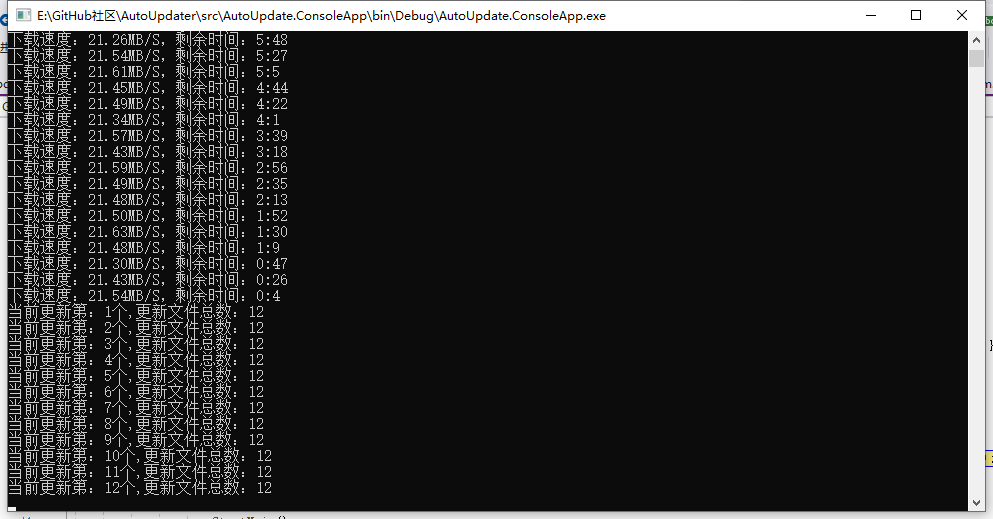
            var str = $"当前更新第:{e.ProgressValue}个,更新文件总数:{e.TotalSize}";

            Console.WriteLine(str);

        }

        if (e.Type == ProgressType.Done)

        {

            Console.WriteLine("更新完成");

        }

    }

    private static void OnDownloadStatistics(object sender, DownloadStatisticsEventArgs e)

    {

        Console.WriteLine($"下载速度:{e.Speed},剩余时间:{e.Remaining.Minute}:{e.Remaining.Second}");

    }
3.GeneralUpdate.Single-1.0.0使用方式
/// <summary>

/// App.xaml 的交互逻辑

/// </summary>

public partial class App : Application, ISingleInstanceApp

{

    private const string AppId = "{7F280539-0814-4F9C-95BF-D2BB60023657}";

    [STAThread]

    protected override void OnStartup(StartupEventArgs e)

    {

        string[] resultArgs = null;

        if (e.Args == null || e.Args.Length == 0)

        {

            resultArgs = new string[6] {

            "0.0.0.0",

            "1.1.1.1",

            "https://github.com/WELL-E",

             "http://192.168.50.225:7000/update.zip",

             @"E:\PlatformPath",

            "509f0ede227de4a662763a4abe3d8470",

             };

        }

        else

        {

            resultArgs = e.Args;

        }

        if (resultArgs.Length != 6) return;

        if (SingleInstance<App>.InitializeAsFirstInstance(AppId))

        {

            var win = new MainWindow();

            var vm = new MainViewModel(resultArgs, win.Close);

            win.DataContext = vm;

            var application = new App();

            application.InitializeComponent();

            application.Run(win);

            SingleInstance<App>.Cleanup();

        }

    }

    public bool SignalExternalCommandLineArgs(IList<string> args)

    {

        if (this.MainWindow.WindowState == WindowState.Minimized)

        {

            this.MainWindow.WindowState = WindowState.Normal;

        }

        this.MainWindow.Activate();

        return true;

    }

}
4.问答Q&A
Q1.如果版本迭代多次,跨版本更新,该怎么办呢?
A1:只要不是框架级别的更新都是可以更新的。 不管你迭代多少次跨了多少个版本,你把最终的包放到服务器上就行了。这个里面没有涉及到增量更新,所以你更新多了直接把所有的新文件覆盖上去就行了。
Q2.GeneralUpdate是跟客户端是一个整体吗?
A2: 不是,GeneralUpdate是一个独立于客户端的程序。
Q3:能不能增量更新、失败自动回滚、更新本地数据或配置文件?
A3: 目前不能。(该功能已在开发计划当中)。
Q4:GeneralUpdate是如何更新的?
A4: 更新的方式为把本地原有的客户端文件进行覆盖。
GeneralUpdate2.1.0发布的更多相关文章
- Visual Studio Code 1.0发布,支持中文在内9种语言
Visual Studio Code 1.0发布,支持中文在内的9种语言:Simplified Chinese, Traditional Chinese, French, German, Italia ...
- Apache Flume 1.7.0 发布,日志服务器
Apache Flume 1.7.0 发布了,Flume 是一个分布式.可靠和高可用的服务,用于收集.聚合以及移动大量日志数据,使用一个简单灵活的架构,就流数据模型.这是一个可靠.容错的服务. 本次更 ...
- Percona Server 5.6.33-79.0 发布
Percona Server 5.6.33-79.0 发布了,该版本基于 MySQL 5.6.33,包含了所有的 bug 修复,是Percona Server 5.6 系列中的正式版本.该版本主要是修 ...
- Rubinius 2.0 发布,Ruby 虚拟机
Rubinius 2.0 发布了,官方发行说明请看这里. Rubinius是一个运行Ruby程序的虚拟机,其带有Ruby的核心库. Rubinius的设计决定了其调试功能的强大,使得在运行时常规的Ru ...
- Restful.Data v2.0发布,谢谢你们的支持和鼓励
v1.0发布后,承蒙各位博友们的热心关注,也给我不少意见和建议,在此我真诚的感谢 @冰麟轻武 等朋友,你们的支持和鼓励,是这个开源项目最大的推动力. v2.0在除了细枝末节外,在功能上主要做了一下更新 ...
- 网页动物园2.0发布,经过几个月的努力,采用JAVA编写!
网页动物园2.0发布,经过几个月的努力,采用JAVA编写! 网页动物园2.0 正式发布!游戏发布 游戏名称: 网页动物园插件 游戏来源: 原创插件 适用版本: Discuz! X1.5 - X3.5 ...
- Redisson-Parent 2.5.0 和 3.0.0 发布
Redisson-Parent 2.5.0 和 3.0.0 发布了,Redisson 是基于 Redis 服务之上构建的分布式.可伸缩的 Java 数据结构,高级的 Redis 客户端. Rediss ...
- Rsync 3.1.0 发布,文件同步工具
文件同步工具Rsync 3.1.0发布.2013-09-29 上一个版本还是2011-09-23的3.0.9 过了2年多.Rsync基本是Linux上文件同步的标准了,也可以和inotify配合做实时 ...
- EasyCriteria 3.0 发布
EasyCriteria 3.0 发布了,这是一个全新的版本,进行了大量的重构.官方发行说明请看:http://uaihebert.com/?p=1898 EasyCriteria 是一个轻量级的框架 ...
随机推荐
- PHP crc32() 函数
实例 输出 crc32() 的结果:高佣联盟 www.cgewang.com <?php $str = crc32("Hello World!"); printf(" ...
- 2020牛客暑假多校训练营 第二场 E Exclusive OR FWT
LINK:Exclusive OR 没做出 原因前面几篇说过了. 根据线性基的知识容易推出 不超过\(w=log Mx\)个数字即可拼出最大值 其中Mx为值域. 那么考虑w+2个数字显然也为最大值.. ...
- Codeforces Round #654 (Div. 2) A~E 题解
LINK:CF R 654 div2 前言:F题是一个线段树分类讨论的题目 比赛的时候没看 赛后感觉没什么意思 所以咕掉了. 记事:第一次笼统的写一场比赛的题目 可能是我这场比赛打的太差了 题目不难 ...
- 6.29 省选模拟赛 坏题 AC自动机 dp 图论
考场上随手构造了一组数据把自己卡掉了 然后一直都是掉线状态了. 最后发现这个东西不是subtask -1的情况不多 所以就没管无解直接莽 写题有点晚 故没调出来.. 考虑怎么做 容易想到建立AC自动机 ...
- layui在odoo12上的应用,用widget覆盖原字段视图
layui是一个前端框架,提供了许多前端的组件等,layui的详情自己官网地址:https://www.layui.com/doc/去查看 下面说一下最近用layui遇到的问题和解决方式: 问题:近期 ...
- x86架构:实模式下的中断
https://www.cnblogs.com/Philip-Tell-Truth/p/5317983.html 这里有详细的过程说明.文字很多,为了方便阅读和理解,提炼了一些要点后归纳.整理了如 ...
- js如何从一个数组中随机取出n个不同且不重复的值
前言 一位正在学习前端的菜鸟,虽菜,但还未放弃. 给大家画张图了解思路 以下是代码 function randomArr(arr,num){ let newArr = [];//创建一个新数组 for ...
- IDEA必备插件系列-Rainbow Brackets(彩虹括号)
Rainbow Brackets ,就是彩虹括号,各种鲜明颜色的括号 这个一个开源的项目: https://github.com/izhangzhihao/intellij-rainbow-brack ...
- 谈谈MySql索引
刚刚学习完丁奇老师<MySql 实战 45 讲>专栏中的索引部分,图文并茂的风格解开了我之前的许多疑惑,并且学习到许多新的东西,在此做个笔记,方便后续复习.由于 MySql 中存在多种存储 ...
- JavaScript package.json里添加git-cz
git-cz官网 0.目的 => 替代git commit, 丰富提交的内容 1.安装包 npm install commitizen cz-conventional-changelog --s ...