
家庭记账本APP开发准备(二)
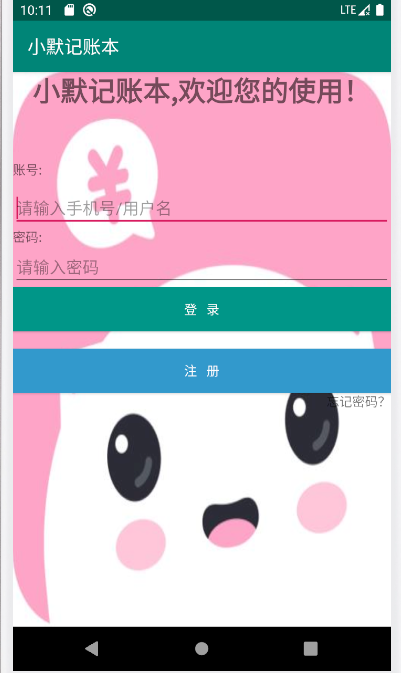
今天学习了选项卡,为记账本的分类做了准备。主登录界面进行了优化,但仍未实现各个组件之间的跳转。
选项卡
activity_main.xml
<?xml version="1.0" encoding="utf-8"?>

<TabHost xmlns:android="http://schemas.android.com/apk/res/android"

    xmlns:app="http://schemas.android.com/apk/res-auto"

    xmlns:tools="http://schemas.android.com/tools"

    android:layout_width="match_parent"

    android:layout_height="match_parent"

    android:id="@android:id/tabhost"

    tools:context=".MainActivity">

    <LinearLayout

        android:layout_width="match_parent"

        android:layout_height="match_parent"

        android:orientation="vertical">

        <TabWidget

            android:layout_height="wrap_content"

            android:layout_width="match_parent"

            android:id="@android:id/tabs"

            ></TabWidget>

        <FrameLayout

            android:layout_width="match_parent"

            android:layout_height="match_parent"

            android:id="@android:id/tabcontent"

            ></FrameLayout>

    </LinearLayout>

</TabHost>
tab1.xml
<?xml version="1.0" encoding="utf-8"?>

<LinearLayout xmlns:android="http://schemas.android.com/apk/res/android"

    android:orientation="vertical"

    android:id="@+id/left"

    android:layout_width="match_parent"

    android:layout_height="match_parent">

    <ImageView

        android:layout_width="match_parent"

        android:layout_height="match_parent"

        android:src="@drawable/bg"/>

</LinearLayout>
tab2.xml
<?xml version="1.0" encoding="utf-8"?>

<LinearLayout xmlns:android="http://schemas.android.com/apk/res/android"

    android:orientation="vertical"

    android:id="@+id/right"

    android:layout_width="match_parent"

    android:layout_height="match_parent">

    <ImageView

        android:layout_width="match_parent"

        android:layout_height="match_parent"

        android:src="@drawable/img"/>

</LinearLayout>
MainActivity.java
package com.example.xuanxiang;

import androidx.appcompat.app.AppCompatActivity;

import android.os.Bundle;

import android.view.LayoutInflater;

import android.widget.TabHost;

public class MainActivity extends AppCompatActivity {

    @Override

    protected void onCreate(Bundle savedInstanceState) {

        super.onCreate(savedInstanceState);

        setContentView(R.layout.activity_main);

        TabHost tabHost =(TabHost) findViewById(android.R.id.tabhost);

        tabHost.setup();//初始化 添加标签页

        LayoutInflater inflater =LayoutInflater.from(this);

        inflater.inflate(R.layout.tab1,tabHost.getTabContentView());

        inflater.inflate(R.layout.tab2,tabHost.getTabContentView());

        tabHost.addTab(tabHost.newTabSpec("tab1").setIndicator("选项一").setContent(R.id.left));

        tabHost.addTab(tabHost.newTabSpec("tab2").setIndicator("选项二").setContent(R.id.right));

    }

}
优化美化后的主界面..........
家庭记账本APP开发准备(二)的更多相关文章
- 家庭记账本APP开发准备(三)
单选框(RadioButton) 通过设置单选框,可以将非此即彼的问题进行解决,成功学会并应用了手机端单项选择框; 复选框(CheckBox) 学习复选框是为了给使用软件的人更多的选择,在其他选择框后 ...
- 家庭记账本APP开发准备(一)
1.登录界面 通过学习比较 登录界面采用线性布局(LinearLayout) 下面是相关源码 activity_main.xml ?xml version="1.0" encodi ...
- 简单记账本APP开发一
在对Android的一些基础的知识有了一定了解,以及对于AndroidStudio的如何使用有了 一定的熟悉后,决定做一个简单的记账本APP 开发流程 1.记账本的页面 2.可以添加新的账目 (一)页 ...
- 进度1_家庭记账本App
今天完成了昨天的初步构想,详细介绍见上一篇博客,具体项目结构和案例如下: MainActivity.java: package com.example.familybooks; import andr ...
- 家庭版记账本app开发完成
经过这几天关于android的相关学习,对于家庭版记账本app以及开发结束. 实现的功能为:用户的注册.登录.添加支出账单.添加收入账单.显示所有的该用户的账单情况(收入和支出).生产图表(直观的显示 ...
- 简单记账本APP开发二
今天主要是进行了适配器的编写,数据库的创建以及对完善了业务逻辑,简单的APP到此已经通过测试可以使用.
- 家庭版记账本app开发之关于(数据库查找出数据)圆饼图的生成
这次完成的主要的怎样从数据库中调出数据.之后通过相关的数据,生成想要的圆饼图.以方便用户更加直观的看见关于账本的基本情况. 在圆饼图生成中用到了一些外部资源 具体的import如下: import c ...
- 家庭记账本web开发
这个系统的整体结构: GitHub:https://github.com/lq1998lq/Test.git com.action包: package com.action; import java. ...
- 进度4_家庭记账本App
在上一个博客中,我学习了用Fragment进行数据的传值,但是出现了好多问题,我通过百度查阅资料发现fregment在进行数值传输的时候有的语法不能使用,并且不方便的进行数据库的使用,所以我在原来的家 ...
随机推荐
- Django之实现登录随机验证码
登录验证码是每个网站登录时的基本标配,网上也有很多相应的文章, 但是从生成验证码到 应用到自己的网站上的全步骤,并没有看到很多, 为了节约大家的时间,我把整体步骤写下来, 即拿即用哈 1. 生成随机验 ...
- ArcGIS api for javascript querytask 返回结果上限1000的问题
我用的是ArcServer 10.2,打开ArcCatalog找到自己发布的服务,右键Service Properties,左侧点击Parameters,右侧有一个Maximum number of ...
- ResponseBodyAdvice如何处理返回值是字符串的问题
项目中使用ResponseBodyAdvice同一封装返回格式,对于一般的类型都没有问题,但是处理字符串时,遇到了类型转换的问题,debug一步一步跟踪,原来是对于字符串的ContentType是“t ...
- 题解 洛谷 P3247 【[HNOI2016]最小公倍数】
题意可以转化为是否能找一条从\(u\)到\(v\)的路径,经过的边的\(a\)和\(b\)的最大值恰好都是询问所给定的值. 若只有\(a\)的限制,可以将询问离线,对边和询问都从小到大排序,然后双指针 ...
- 跟老刘学运维day03~新手必须掌握的Linux命令(3)
第2章 Linux命令 今天已经跟老刘学习运维第三天了,前两天对虚拟机和Linux系统的安装进行了深入的学习,今天开始命令的学习 系统状态检测命令 1.ifconfig 2.uname:查看系统内 ...
- 跟老刘学运维day02~部署虚拟环境安装Linux系统(1)
第1章 部署虚拟环境安装Linux系统 所谓“工欲善其事,必先利其器” 1.准备工具 VmwareWorkStation 15.5——虚拟机软件(必需) RedHatEnterpriseLinux ...
- jQuery与javascript
jQuery 是一个 JavaScript 库,jQuery 极大地简化了 JavaScript 编程. javaScript(js)和jQuery(jq) 都是找元素.操作元素 Dom操作的区别: ...
- 02_HTML01
学于黑马和传智播客联合做的教学项目 感谢 黑马官网 传智播客官网 微信搜索"艺术行者",关注并回复关键词"软件测试"获取视频和教程资料! b站在线视频 HTML ...
- Oracle帐户被锁了,如何解锁
原文链接:https://jingyan.baidu.com/article/25648fc144b76b9191fd0087.html 背景:Oracle帐户在密码被连续输入错误3次的情况下就会锁定 ...
- Python列表函数和方法
Python列表函数和方法: 函数: len(列表名): 返回列表长度 # len(列表名): # 返回列表长度 lst = [1,2,3,'a','b','c'] print("lst 列 ...