
pyspider architecture--官方文档
原文地址:http://docs.pyspider.org/en/latest/Architecture/
Architecture
This document describes the reason why I made pyspider and the architecture.
Why
Two years ago, I was working on a vertical search engine. We are facing following needs on crawling:
collect 100-200 websites, they may on/offline or change their templates at any time
We need a really powerful monitor to find out which website is changing. And a good tool to help us write script/template for each website.
data should be collected in 5min when website updated
We solve this problem by check index page frequently, and use something like 'last update time' or 'last reply time' to determine which page is changed. In addition to this, we recheck pages after X days in case to prevent the omission.
pyspider will never stop as WWW is changing all the time
Furthermore, we have some APIs from our cooperators, the API may need POST, proxy, request signature etc. Full control from script is more convenient than some global parameters of components.
Overview
The following diagram shows an overview of the pyspider architecture with its components and an outline of the data flow that takes place inside the system.
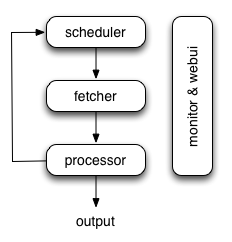
Components are connected by message queue. Every component, including message queue, is running in their own process/thread, and replaceable. That means, when process is slow, you can have many instances of processor and make full use of multiple CPUs, or deploy to multiple machines. This architecture makes pyspider really fast. benchmarking.
Components
Scheduler
The Scheduler receives tasks from newtask_queue from processor. Decide whether the task is new or requires re-crawl. Sort tasks according to priority and feeding them to fetcher with traffic control (token bucket algorithm). Take care of periodic tasks, lost tasks and failed tasks and retry later.
All of above can be set via self.crawl API.
Note that in current implement of scheduler, only one scheduler is allowed.
Fetcher
The Fetcher is responsible for fetching web pages then send results to processor. For flexible, fetcher support Data URI and pages that rendered by JavaScript (via phantomjs). Fetch method, headers, cookies, proxy, etag etc can be controlled by script via API.
Phantomjs Fetcher
Phantomjs Fetcher works like a proxy. It's connected to general Fetcher, fetch and render pages with JavaScript enabled, output a general HTML back to Fetcher:
scheduler -> fetcher -> processor

                |

            phantomjs

                |

             internet
Processor
The Processor is responsible for running the script written by users to parse and extract information. Your script is running in an unlimited environment. Although we have various tools(like PyQuery) for you to extract information and links, you can use anything you want to deal with the response. You may refer to Script Environment and API Reference to get more information about script.
Processor will capture the exceptions and logs, send status(task track) and new tasks to scheduler, send results to Result Worker.
Result Worker (optional)
Result worker receives results from Processor. Pyspider has a built-in result worker to save result to resultdb. Overwrite it to deal with result by your needs.
WebUI
WebUI is a web frontend for everything. It contains:
- script editor, debugger
- project manager
- task monitor
- result viewer, exporter
Maybe webui is the most attractive part of pyspider. With this powerful UI, you can debug your scripts step by step just as pyspider do. Starting or stop a project. Finding which project is going wrong and what request is failed and try it again with debugger.
Data flow
The data flow in pyspider is just as your seen in diagram above:
- Each script has a callback named
on_start, when you press theRunbutton on WebUI. A new task ofon_startis submitted to Scheduler as the entries of project. - Scheduler dispatches this
on_starttask with a Data URI as a normal task to Fetcher. - Fetcher makes a request and a response to it (for Data URI, it's a fake request and response, but has no difference with other normal tasks), then feeds to Processor.
- Processor calls the
on_startmethod and generated some new URL to crawl. Processor send a message to Scheduler that this task is finished and new tasks via message queue to Scheduler (here is no results foron_startin most case. If has results, Processor send them toresult_queue). - Scheduler receives the new tasks, looking up in the database, determine whether the task is new or requires re-crawl, if so, put them into task queue. Dispatch tasks in order.
- The process repeats (from step 3) and wouldn't stop till WWW is dead ;-). Scheduler will check periodic tasks to crawl latest data.
pyspider architecture--官方文档的更多相关文章
- Spring 4 官方文档学习 Spring与Java EE技术的集成
本部分覆盖了以下内容: Chapter 28, Remoting and web services using Spring -- 使用Spring进行远程和web服务 Chapter 29, Ent ...
- OGR 官方文档
OGR 官方文档 http://www.gdal.org/ogr/index.html The OGR Simple Features Library is a C++ open source lib ...
- cassandra 3.x官方文档(5)---探测器
写在前面 cassandra3.x官方文档的非官方翻译.翻译内容水平全依赖本人英文水平和对cassandra的理解.所以强烈建议阅读英文版cassandra 3.x 官方文档.此文档一半是翻译,一半是 ...
- Cuda 9.2 CuDnn7.0 官方文档解读
目录 Cuda 9.2 CuDnn7.0 官方文档解读 准备工作(下载) 显卡驱动重装 CUDA安装 系统要求 处理之前安装的cuda文件 下载的deb安装过程 下载的runfile的安装过程 安装完 ...
- hbase官方文档(转)
FROM:http://www.just4e.com/hbase.html Apache HBase™ 参考指南 HBase 官方文档中文版 Copyright © 2012 Apache Soft ...
- HBase官方文档
HBase官方文档 目录 序 1. 入门 1.1. 介绍 1.2. 快速开始 2. Apache HBase (TM)配置 2.1. 基础条件 2.2. HBase 运行模式: 独立和分布式 2.3. ...
- Spring Cloud官方文档中文版-服务发现:Eureka客户端
官方文档地址为:http://cloud.spring.io/spring-cloud-static/Dalston.SR2/#_spring_cloud_netflix 文中例子我做了一些测试在:h ...
- Akka Typed 官方文档之随手记
️ 引言 近两年,一直在折腾用FP与OO共存的编程语言Scala,采取以函数式编程为主的方式,结合TDD和BDD的手段,采用Domain Driven Design的方法学,去构造DDDD应用(Dom ...
- Lagom 官方文档之随手记
引言 Lagom是出品Akka的Lightbend公司推出的一个微服务框架,目前最新版本为1.6.2.Lagom一词出自瑞典语,意为"适量". https://www.lagomf ...
- 【AutoMapper官方文档】DTO与Domin Model相互转换(上)
写在前面 AutoMapper目录: [AutoMapper官方文档]DTO与Domin Model相互转换(上) [AutoMapper官方文档]DTO与Domin Model相互转换(中) [Au ...
随机推荐
- 2018最新WordPress缩略图设置方法
缩略图设置的方法很多,但都不全面,且很多教程已经失效了,其中使用插件来实现,可是那些插件都使用过都不能实现效果,所以我整理了一份使用代码实现缩略图的方法. 1.找到网站根目录/wp-content/t ...
- (转载)更新到Retrofit2的一些技巧
更新到Retrofit2的一些技巧 作者 小武站台 关注 2016.02.22 22:13* 字数 1348 阅读 1621评论 0喜欢 5赞赏 1 原文链接:Tips on updating to ...
- 2019苏州凯美瑞德Java开发面试
第四家Kmerit,苏州园区,出门晚了差点迟到,一点五十五到达,先花了一小时笔试,后来两个人技术面试,四点二十出了大楼. 一.笔试 1.单选,知识点很散,涉及数据结构链表,数组,树,堆,数据库,网络, ...
- vue 返回上一页在原来的位置
http://www.jb51.net/article/118592.htm http://blog.csdn.net/qq_26598303/article/details/51189235 htt ...
- Arduino UNO R3
Arduino 常见型号 当然还有 LilyPad,附图: 最常见的自然是UNO,最新版是第三版R3: 国内也有一些改进的板子.我用的是一般的板子,拿到货也只能默默了. 简介 The Uno is a ...
- Python操作Oracle
[root@oracle02 pythonsoftware]# rpm -ivh oracle-instantclient-basic-11.1.0.1-1.x86_64.rpm Preparing. ...
- gcc和g++的区别和联系
gcc和g++都是GNU(一个组织)的编译器. 1.对于.c后缀的文件,gcc把它当做是C程序:g++当做是C++程序: 2.对于.cpp后缀的文件,gcc和g++都会当做c++程序. 3.编译阶段, ...
- Win7系统无法记住网络访问的凭据怎么办?
访问内网其他IP时已经打勾记住我的凭据了,但是注销或者重启Win7系统之后,又得重新输入用户名跟密码怎么办? 下面就为大家介绍一下如何让Win7系统记住网络访问的凭据. 以上问题还会引发,重启后无法正 ...
- NOIP 膜你题 DAY2
NOIp膜你题 Day2 duliu 出题人:ZAY 题解 这就是一道组合数问题鸭!!! 可是泥为什么没有推出式子!! 首先我们知道的是 m 盆花都要摆上,然后他们的顺序不定(主人公忘记 ...
- luogu 3467 [POI2008]PLA-Postering 单调栈
题目描述: Description N个矩形,排成一排. 现在希望用尽量少的矩形海报Cover住它们. Input 第一行给出数字N,代表有N个矩形.N在[1,250000] 下面N行,每行给出矩形的 ...