
WPF 用Clip属性实现蒙板特效
上一篇,已简单介绍Clip属性的用法,这一篇用它来实现简单蒙板功能,很简单,直接上代码
<Window x:Class="擦除效果.MainWindow"
xmlns="http://schemas.microsoft.com/winfx/2006/xaml/presentation"
xmlns:x="http://schemas.microsoft.com/winfx/2006/xaml"
Title="MainWindow" Height="537" Width="866" MouseMove="canvas_MouseMove" MouseDown="Window_MouseDown" MouseUp="Window_MouseUp">
<Grid>
<Rectangle Height="100" HorizontalAlignment="Left" Margin="164,92,0,0" Name="rectangle1" Stroke="Black" VerticalAlignment="Top" Width="200" Fill="Lime" />
<Button Content="Button" Height="83" HorizontalAlignment="Left" Margin="526,109,0,0" Name="button1" VerticalAlignment="Top" Width="115" Click="button1_Click" />
<Grid x:Name="grid" Background="#88FFFFFF" ></Grid>
</Grid>
<Window.Background>
<ImageBrush ImageSource="/擦除效果;component/Images/s01.jpg" />
</Window.Background>
</Window>
后台:
public partial class MainWindow : Window
{
private bool isDown = false;
public MainWindow()
{
InitializeComponent();
RectangleGeometry rg = new RectangleGeometry();
rg.Rect = new Rect(0, 0, this.Width, this.Height);
gridGeometry = Geometry.Combine(gridGeometry, rg, GeometryCombineMode.Union, null);
grid.Clip = gridGeometry;
}
PathGeometry gridGeometry = new PathGeometry();
private void canvas_MouseMove(object sender, MouseEventArgs e)
{
if (isDown)
{
EllipseGeometry rg = new EllipseGeometry();
rg.Center = e.GetPosition(this);
rg.RadiusX = 50;
rg.RadiusY = 50;
//排除几何图形
gridGeometry = Geometry.Combine(gridGeometry, rg, GeometryCombineMode.Exclude, null);
grid.Clip = gridGeometry;
}
}
private void button1_Click(object sender, RoutedEventArgs e)
{
MessageBox.Show("OK!");
}
private void Window_MouseDown(object sender, MouseButtonEventArgs e)
{
isDown = true;
}
private void Window_MouseUp(object sender, MouseButtonEventArgs e)
{
isDown = false;
}
}
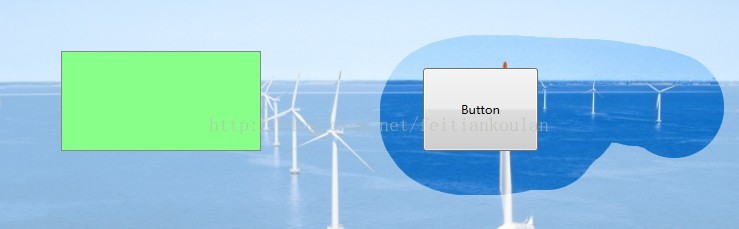
效果如下:
WPF 用Clip属性实现蒙板特效的更多相关文章
- SVG 2D入门9 - 蒙板
SVG支持的蒙板 SVG支持多种蒙板特效,使用这些特性,我们可以做出很多很炫的效果.至于中文中把mask叫做"蒙板"还是"遮罩"就不去区分了,这里都叫做蒙板吧. ...
- CLIP PATH (MASK) GENERATOR是一款在线制作生成clip-path路径的工具,可以直接生成SVG代码以及配合Mask制作蒙板。
CLIP PATH (MASK) GENERATOR是一款在线制作生成clip-path路径的工具,可以直接生成SVG代码以及配合Mask制作蒙板. CLIP PATH (MASK) GENERATO ...
- WPF通过不透明蒙板切割显示子控件
版权声明:本文为博主原创文章,遵循 CC 4.0 BY-SA 版权协议,转载请附上原文出处链接和本声明.本文链接:https://blog.csdn.net/Backspace110/article/ ...
- WPF 元素裁剪 Clip 属性
本文介绍如何在 WPF 使用 Clip 裁剪元素 在 WPF 的 UIElement 提供了 Clip 属性,这个属性默认是空,但是如果设置了这个属性就会对元素进行裁剪 这个属性是一个 Geometr ...
- WPF弹出带蒙板的消息框
效果图 思路 拿到父级窗体的内容,放入一个容器里,再在容器里放入一个半透明层.将整个容器赋给父级窗体的内容. 关闭时反向操作. 代码 消息窗弹出时 /// <summary> /// 弹出 ...
- WPF蒙板弹窗
由于界面设计需要,要给弹窗添加蒙板效果,在百度和google搜索了半天,竟然没有一个满意的方案,最后只能自己想办法实现了一个,原理还是比较简单的,现在分享给大家. 先看一下效果.. 原理其实 ...
- NeHe OpenGL教程 第二十课:蒙板
转自[翻译]NeHe OpenGL 教程 前言 声明,此 NeHe OpenGL教程系列文章由51博客yarin翻译(2010-08-19),本博客为转载并稍加整理与修改.对NeHe的OpenGL管线 ...
- 利用 js 实现弹出蒙板(model)功能
关于 js 实现一个简单的蒙板功能(model) 思路: 创建一个蒙板, 设置蒙板的堆叠顺序保证能将其它元素盖住 position: absolute; top: 0; left: 0; displa ...
- ListView鼠标框选实现蓝色蒙板
此问题留心已久,今日方悉心求之,记录心得. ListView控件,不论Delphi中的TListView还是c#中的ListView,在开启其MultiSelect属性时,鼠标框选只是显示框张,如下图 ...
随机推荐
- 【20.23%】【codeforces 740A】Alyona and copybooks
time limit per test1 second memory limit per test256 megabytes inputstandard input outputstandard ou ...
- Mahout快速入门教程 分类: B10_计算机基础 2015-03-07 16:20 508人阅读 评论(0) 收藏
Mahout 是一个很强大的数据挖掘工具,是一个分布式机器学习算法的集合,包括:被称为Taste的分布式协同过滤的实现.分类.聚类等.Mahout最大的优点就是基于hadoop实现,把很多以前运行于单 ...
- [Vue] Preload Data using Promises with Vue.js and Nuxt.js
Nuxt.js allows you to return a Promise from your data function so that you can asynchronously resolv ...
- [Docker] Download and Remove Docker Images
Learn the basics of downloading and pulling Docker images from Docker Hub. Learn the difference betw ...
- 2、Cocos2dx 3.0游戏开发找小三之引擎简单介绍
尊重开发人员的劳动成果,转载的时候请务必注明出处:http://blog.csdn.net/haomengzhu/article/details/27094663 引擎简单介绍 Cocos2d-x 的 ...
- 【Lucene4.8教程之三】搜索 2014-06-21 09:53 1532人阅读 评论(0) 收藏
1.关键类 Lucene的搜索过程中涉及的主要类有以下几个: (1)IndexSearcher:执行search()方法的类 (2)IndexReader:对索引文件进行读操作,并为IndexSear ...
- [转载]Ocelot简易教程(一)Ocelot是什么
Ocelot简易教程(一)Ocelot是什么 简单的说Ocelot是一个用.NET Core实现并且开源的API网关技术. 可能你又要问了,什么是API网关技术呢?Ocelot又有什么特别呢?我们又该 ...
- 解决Eclipse 启动后总是Building WorkSpace(sleeping)
打开eclipse后eclipse总是在Building WorkSpace(sleeping),我的解决方案是,Project -> Building AutoMatically关闭就好了,以 ...
- 用户之间imp的问题
今天同事说申请了一个从生产导出的dump文件,须要导入測试库进行測试. 之前做的基本都是本库导出,本库导入的操作,比如:imp test/***@test tables=tbl_fuel file=H ...
- html5 video标签如何禁止视频下载
html5 video标签如何禁止视频下载 一.总结 一句话总结:bing方法给video对象绑定return false的匿名方法. 1.html5 video标签如何禁止视频下载? bing方法给 ...