
第17章 Redis概述
17.2.1 在Windows下安装Redis
https://github.com/ServiceStack/redis-windows/tree/master/downloads
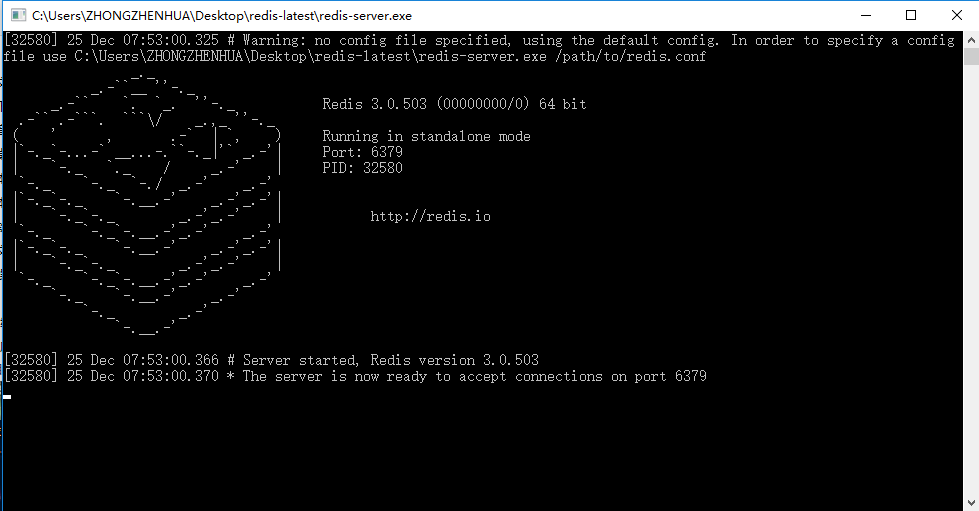
redis-server redis.windows.conf
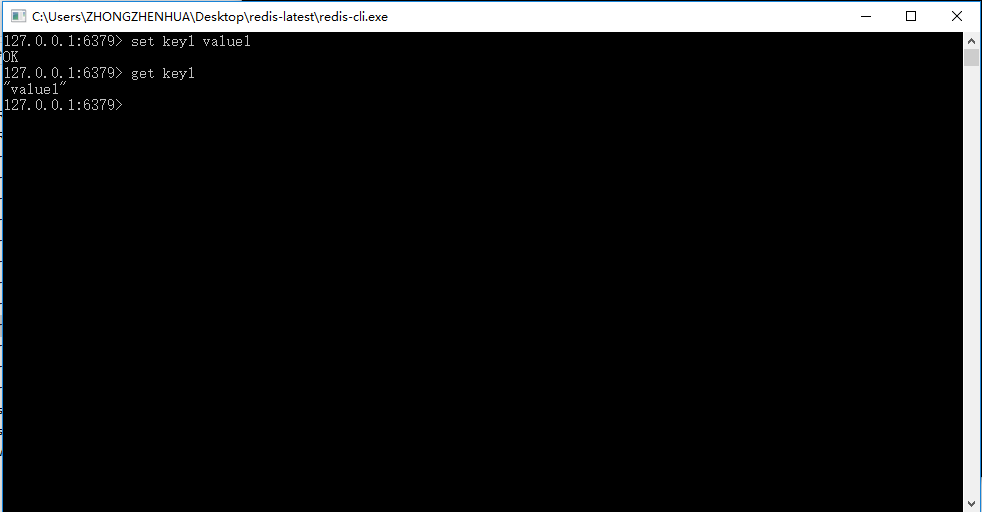
17.3.1 在Java程序中使用Redis
http://mvnrepository.com/artifact/redis.clients/jedis/2.9.0
Java连接Redis
package com.ssm.chapter17.jedis;

import redis.clients.jedis.Jedis;

import redis.clients.jedis.JedisPool;

import redis.clients.jedis.JedisPoolConfig;

public class JedisTest {

   public void testJdedis(){

   Jedis jedis = testPool().getResource();

   //Jedis jedis = new Jedis("localhost", 6379);//连接Redis

   //jedis.auth("password");//如果需密码

   int i =0;//记录操作次数

   try{

   long start = System.currentTimeMillis();// 开始毫秒数

   while(true){

       long end = System.currentTimeMillis();

       if (end-start >= 1000) {// 当大于等于1000毫秒(相当于1秒)时,结束操作

           break;

       }

       i++;

       jedis.set("test" + i, i + "");

   }

   } finally{// 关闭连接

       jedis.close();

   }

   System.out.println("redis每秒操作:" + i + "次");//打印1秒内对Redis的操作次数

}

}
使用Redis连接池
  private JedisPool testPool(){

    JedisPoolConfig poolCfg = new JedisPoolConfig();

    // 最大空闲数

    poolCfg.setMaxIdle(50);

    // 最大连接数

    poolCfg.setMaxTotal(100);

    // 最大等待毫秒数

    poolCfg.setMaxWaitMillis(20000);

    // 使用配置创建连接池

    JedisPool pool = new JedisPool(poolCfg, "localhost");

    // 从连接池中获取单个连接

    Jedis jedis = pool.getResource();

    // 如果需密码

    // jedis.auth("password")

      return pool;

  }
package com.ssm.chapter17.main;

import com.ssm.chapter17.jedis.JedisTest;

public class Chapter17Main {

   public static void main(String[] args) {

       testJedis();

}

   private static void testJedis() {

       JedisTest jedisTest = new JedisTest();

       jedisTest.testJdedis();

   }

}
17.3.2 在Spring中使用Redis
使用Spring配置JedisPoolConfig对象
    <bean id="poolConfig" class="redis.clients.jedis.JedisPoolConfig">

        <!-- 最大空闲数 -->

        <property name="maxIdle" value="50"></property>

        <!-- 最大连接数 -->

        <property name="maxTotal" value="100"></property>

        <!-- 最大等待时间 -->

        <property name="maxWaitMillis" value="20000"></property>

    </bean>
配置JedisConnectionFactory
    <bean id="connectionFactory"

        class="org.springframework.data.redis.connection.jedis.JedisConnectionFactory">

        <property name="hostName" value="localhost"></property>

        <property name="port" value="6379"></property>

        <!-- <property name="password" ref="password"></property> -->

        <property name="poolConfig" ref="poolConfig"></property>

    </bean>
配置Spring RedisTemplate
<bean id="jdkSerializationRedisSerializer"

        class="org.springframework.data.redis.serializer.JdkSerializationRedisSerializer"></bean>

    <bean id="stringRedisSerializer"

       class="org.springframework.data.redis.serializer.StringRedisSerializer"></bean>

    <bean id="redisTemplate" class="org.springframework.data.redis.core.RedisTemplate">

       <property name="connectionFactory" ref="connectionFactory"></property>

       <property name="keySerializer" ref="stringRedisSerializer"></property>

       <property name="valueSerializer" ref="jdkSerializationRedisSerializer"></property>

    </bean>
使用Redis保存角色类对象
package com.ssm.chapter17.pojo;

import java.io.Serializable;

/**

 * 注意,对象要可序列化,需要实现Serializable接口,往往要重写serialVersionUID

 *

 * @author zhongzh

 *

 */

public class Role implements Serializable{

    /**

     *

     */

    private static final long serialVersionUID = 6977402643848374753L;

    private long id;

    private String roleName;

    private String note;

    public long getId() {

        return id;

    }

    public void setId(long id) {

        this.id = id;

    }

    public String getRoleName() {

        return roleName;

    }

    public void setRoleName(String roleName) {

        this.roleName = roleName;

    }

    public String getNote() {

        return note;

    }

    public void setNote(String note) {

        this.note = note;

    }

}
使用RedisTemplate保存Role对象
   private static void testSpring() {

       ApplicationContext applicationContext = new ClassPathXmlApplicationContext("applicationContext.xml");

       RedisTemplate redisTemplate = applicationContext.getBean(RedisTemplate.class);

       Role role = new Role();

       role.setId(1L);

       role.setRoleName("role_name_1");

       role.setNote("role_note_1");

       redisTemplate.opsForValue().set("role_1", role);

       Role role1 = (Role) redisTemplate.opsForValue().get("role_1");

       System.out.println(role.getRoleName());

   }
使用SessionCallback接口
   private static void testSessionCallback(){

       ApplicationContext applicationContext = new ClassPathXmlApplicationContext("applicationContext.xml");

       RedisTemplate redisTemplate = applicationContext.getBean(RedisTemplate.class);

       Role role = new Role();

       role.setId(1);

       role.setRoleName("role_name_1");

       role.setNote("role_note_1");

       SessionCallback<Role> sessionCallback = new SessionCallback<Role>() {

        public Role execute(RedisOperations ops)

                throws DataAccessException {

            // TODO Auto-generated method stub

            ops.boundValueOps("role_1").set(role);

            return (Role) ops.boundValueOps("role_1").get();

        }

    };

    Role savedRole = (Role) redisTemplate.execute(sessionCallback);

    System.out.println(savedRole.getId());

   }
应改为:
private static void testSessionCallback(){

       ApplicationContext applicationContext = new ClassPathXmlApplicationContext("applicationContext.xml");

       RedisTemplate redisTemplate = applicationContext.getBean(RedisTemplate.class);

       final Role role = new Role();

       role.setId(1);

       role.setRoleName("role_name_1");

       role.setNote("role_note_1");

       SessionCallback<Role> sessionCallback = new SessionCallback<Role>() {

        public Role execute(RedisOperations ops)

                throws DataAccessException {

            // TODO Auto-generated method stub

            ops.boundValueOps("role_1").set(role);

            return (Role) ops.boundValueOps("role_1").get();

        }

    };

    Role savedRole = (Role) redisTemplate.execute(sessionCallback);

    System.out.println(savedRole.getId());

   }
第17章 Redis概述的更多相关文章
- 第17章 中介者模式(Mediator Pattern)
原文 第17章 中介者模式(Mediator Pattern) 中介者模式 概述: 在软件开发中,我们有时会碰上许多对象互相联系互相交互的情况,对象之间存在复杂的引用关系,当需求更改时,对系统进 ...
- SSM框架学习笔记_第1章_SpringIOC概述
第1章 SpringIOC概述 Spring是一个轻量级的控制反转(IOC)和面向切面(AOP)的容器框架. 1.1 控制反转IOC IOC(inversion of controller)是一种概念 ...
- 第一章 数据库概述、MySQL的安装和配置
第一章 数据库概述.MySQL的安装和配置 1.为什么要使用数据库 最早是纸质文件来存储数据 缺点:不易保存,占用空间大 计算机出现以后,采用软件来进行保存(excel) 缺点:容易损坏 文件 ...
- Laxcus大数据管理系统2.0(2)- 第一章 基础概述 1.1 基于现状的一些思考
第一章 基础概述 1.1 基于现状的一些思考 在过去十几年里,随着互联网产业的普及和高速发展,各种格式的互联网数据也呈现爆炸性增长之势.与此同时,在数据应用的另一个重要领域:商业和科学计算,在各种新兴 ...
- CSS3秘笈第三版涵盖HTML5学习笔记13~17章
第13章,构建基于浮动的布局 使用的是float(浮动)属性 注:float:none值将取消所有浮动,通常只用来取消元素中已经应用的浮动. 切记:不需要给正文的div设计宽度,即使设计成固定宽度也不 ...
- 《深入Java虚拟机学习笔记》- 第17章 异常
<深入Java虚拟机学习笔记>- 第17章 异常
- JavaScript高级程序设计(第三版)学习笔记11、12、17章
章, DOM扩展 选择符 API Selector API Level1核心方法querySelector .querySelectorAll,兼容的浏览器可以使用 Document,Element ...
- C++ Primer Plus 文章17章 进,输出和文件
文章17章 进.输出和文件 1.当到达输入句子.他将刷新输出缓冲区满输出电流 2.streambuf分类 它提供了用于各种操作的一个缓冲 ios_base类表示流的一般特征 ios基础的类ios_ba ...
- 【RL-TCPnet网络教程】第17章 RL-TCPnet之UDP通信
第17章 RL-TCPnet之UDP通信 本章节为大家讲解RL-TCPnet的UDP通信实现,学习本章节前,务必要优先学习第16章UDP用户数据报协议基础知识.有了这些基础知识之后,再搞本章 ...
随机推荐
- 团队作业-Beta版本发布
这个作业属于哪个课程 <课程的链接> 这个作业要求在哪里 <作业要求的链接> 团队名称 Three cobblers 这个作业的目标 Beta版本发布报 ...
- 安装sql server 2008 R2出现 创建usersettings/microsoft.sqlserver.configuration.landingpage.properties.setter
造成这个原因是由于先装了VS(我之前安装的是vs2012)开发环境造成的,需要删除 路径为 C:\Users\Administrator\AppData\Local\Microsoft_Corpora ...
- ORACLE锁表解锁
SELECT object_name, machine, s.sid, s.serial# FROM gv$locked_object l, dba_objects o, gv$session s W ...
- excel 打开显示安装office自定义项 安装期间出错的解决方法
用管理员身份运行EXCEL,转到COM加载项,删除对应加载项,即可. 注:上下两张图中的加载项信息不一致,仅作图示参考.
- .net mvc DropDownListFor下拉列表使用(验证)方法
@Html.DropDownListFor(model => model.SchoolId, new SelectList(ViewBag.SelectList, "SchoolTyp ...
- [接口管理平台] eoLinker AMS 专业版 V3.5 :加入数据结构管理、通用函数管理、API 快速测试等近 30 项更新
eoLinker AMS是集API文档管理.API自动化测试.开发协作三位一体的综合API开发管理平台,是中国最大的在线API管理平台.目前eoLinker AMS已经为来自全球的超过两万家企业托管超 ...
- javascript实现:在N个字符串中找出最长的公子串
'use strict' module.exports = function 找出最长公子串 (...strings) { let setsOfSubstrings = [] strings.redu ...
- [USACO5.5]隐藏口令Hidden Password [最小表示法模板]
最小表示法就是一个字符串构成一个环,找以哪个点为开头字典序最小. 然后我们就可以用n2的算法愉快的做啦~实际上有O(n)的做法的,就是用两个指针扫,如果这两个位置的字典序相等,就一起往后,如果某一个大 ...
- SPU、SKU、ARPU是什么,我来记录一下我的理解
在电商系统里经常会提到“商品”.“单品”.“SPU”.“SKU”这几个词,那么这几个词到底是什么意思呢? 既然不知道是什么,那么我们就查一下:SPU = Standard Product Unit ( ...
- 调用的方法里接收一个List<>类型的参数,里面是自定义的EC类, 我要通过反射构建这List对象
public static object CreateGeneric(Type generic, Type innerType, params object[] args) ...