
CentOS7 firewall与iptables防火墙的使用与开放端口
- 如何关闭firewall并开启iptables防火墙
- 如何使用firewall防火墙
如何关闭firewall并开启iptables防火墙
1、停止firewall
systemctl stop firewalld.service
2、禁止firewall开机启动
systemctl disable firewalld.service3、查看firewall运行状态(关闭后显示为not running,开启后显示running)
firewall-cmd --state4、安装iptables-services
yum -y install iptables-services5、修改防火墙的配置文件
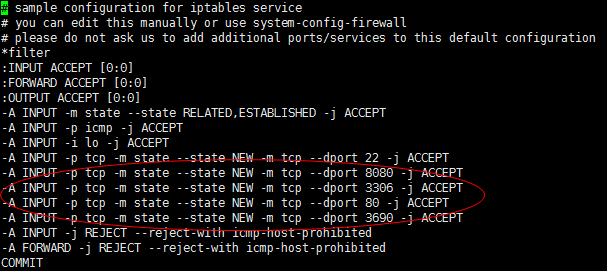
vi /etc/sysconfig/iptables 6、添加端口80,8080,3306,3690端口
-A INPUT -p tcp -m state --state NEW -m tcp --dport 8080 -j ACCEPT

-A INPUT -p tcp -m state --state NEW -m tcp --dport 3306 -j ACCEPT

-A INPUT -p tcp -m state --state NEW -m tcp --dport 80 -j ACCEPT

-A INPUT -p tcp -m state --state NEW -m tcp --dport 3690 -j ACCEPT
请注意添加的位置,应在22端口的上面或者下面,但是不应在最底
7、重启防火墙
systemctl enable iptables.service至此修改防火墙完毕
以下是iptables防火墙如何打开关闭,开机自启动等命令
查看防火墙状态:service iptables status

开启防火墙(重启后永久生效):chkconfig iptables on

关闭防火墙(重启后永久生效):chkconfig iptables off

开启防火墙(即时生效,重启后失效):service iptables start

关闭防火墙(即时生效,重启后失效):service iptables stop

重启防火墙:service iptables restartd
如何使用firewall防火墙
1.启动防火墙

systemctl start firewalld

2.禁用防火墙

systemctl stop firewalld

3.设置开机启动

systemctl enable firewalld

4.停止并禁用开机启动

sytemctl disable firewalld

5.重启防火墙

firewall-cmd --reload

6.查看状态

systemctl status firewalld或者 firewall-cmd --state

7.查看版本

firewall-cmd --version

8.查看帮助

firewall-cmd --help

9.查看区域信息

firewall-cmd --get-active-zones

10.查看指定接口所属区域信息

firewall-cmd --get-zone-of-interface=eth0

11.拒绝所有包

firewall-cmd --panic-on

12.取消拒绝状态

firewall-cmd --panic-off

13.查看是否拒绝

firewall-cmd --query-panic

14.将接口添加到区域(默认接口都在public)

firewall-cmd --zone=public --add-interface=eth0(永久生效再加上 --permanent 然后reload防火墙)

15.设置默认接口区域

firewall-cmd --set-default-zone=public(立即生效,无需重启)

16.更新防火墙规则

firewall-cmd --reload或firewall-cmd --complete-reload(两者的区别就是第一个无需断开连接,就是firewalld特性之一动态

添加规则,第二个需要断开连接,类似重启服务)

17.查看指定区域所有打开的端口

firewall-cmd --zone=public --list-ports

18.在指定区域打开端口(记得重启防火墙)

firewall-cmd --zone=public --add-port=80/tcp(永久生效再加上 --permanent)

说明:

–zone 作用域

–add-port=8080/tcp 添加端口,格式为:端口/通讯协议

–permanent #永久生效,没有此参数重启后失效本文章笔记版本地址:http://ccdd6ec5.wiz03.com/share/s/3cTmX51TMQ-b2QTact03UPg81Cx5GE3-YkP62WU81u09UMFe
CentOS7 firewall与iptables防火墙的使用与开放端口的更多相关文章
- Ubuntu系统中防火墙的使用和开放端口
目录 Ubuntu系统 防火墙的使用和开放端口 1.安装防火墙 2.查看防火墙状态 3.开启.重启.关闭防火墙 4.Ubuntu添加开放.关闭端口 5.开放规定协议的端口 6.关闭指定协议端口 7.开 ...
- Centos7下安装iptables防火墙
说明:centos7默认使用的firewalld防火墙,由于习惯使用iptables做防火墙,所以在安装好centos7系统后,会将默认的firewall关闭,并另安装iptables进行防火墙规则设 ...
- 在centos7上安装iptables防火墙
规则配置: iptables -P OUTPUT ACCEPT 1.关闭原先CentOS7自带的firewall防火墙: systemctl stop firewalld 2.安装或更新iptable ...
- CentOS7安装配置iptables防火墙
转载请注明出处:http://blog.csdn.net/l1028386804/article/details/50779761 CentOS7默认的防火墙不是iptables,而是firewall ...
- linux中firewall与iptables防火墙服务
火墙firewall-cmd --state 查看火墙的状态firewall-cmd --get-active-zones 目前所处的域firewall-cmd --get-default-zone ...
- 在iptables防火墙下开启vsftpd的端口
在开启vsftpd端口后发现用客户端工具能登陆,但无法浏览文件和新建文件.此时看了一下ftp的协议,发现ftp有主动模式和被动模式.在服务端开21端口是让客户端进来,并没有出去的端口,还在服务端开启出 ...
- Iptables防火墙NAT地址转换与端口转发
开启系统转发功能: [root@localhost /]# vim /etc/sysctl.conf # Generated by iptables-save v1.4.7 on Thu May 12 ...
- Linux 防火墙 | Linux 服务器如何开放端口 配置防火墙
sudo ufw status(如果你是root,则去掉sudo,ufw status)可检查防火墙的状态,我的返回的是:inactive(默认为不活动).sudo ufw version防火墙版本: ...
- iptables防火墙常用命令
iptables防火墙启动停止和基本操作 iptables是centos7之前常用的防火墙,在centos7上使用了firewall 防火墙基本操作: # 查询防火墙状态 service iptabl ...
随机推荐
- Linux初接触设置笔记01
没事装Linux尝试一下,来来回回装无数次,把刚开始需要设置的东西自己收藏一下,针对Centos7 装完Centos默认会覆盖windows引导,所以首先要做的是恢复windows的引导,如果不恢复, ...
- WIN内核线程池函数
线程池 (本章节中样例都是用 VS2010 编译调试的) 线程池编写必须在 Windows Vista 操作系统(以及以上版本号的操作系统)下,且 C++ 编译器版本号至少是 VS2008 线程池的功 ...
- sparksql load/save
java public class LoadAndSaveDemo { private static SparkConf conf = new SparkConf().setAppName(" ...
- java中unicode utf-8以及汉字之间的转换工具类
1. 汉字字符串与unicode之间的转换 1.1 stringToUnicode /** * 获取字符串的unicode编码 * 汉字"木"的Uni ...
- htmlunit 模拟登录 数字验证码
使用htmlunit的好处有两点,相比httpclient,htmlunit是对浏览器的模拟,比如你定位一个按钮,就可以执行click()方法,此外不需要象在httpclient中一样编写复杂的代码, ...
- List<Map<String, String>> 开启 Map<String, List<String>>
将List变成Map结构体,下面的文字是没有水平! 写作方法传送前土壤很长一段时间.我不知道有没有好的解决办法.我们也希望提供! Map<String, String> map1 = ne ...
- Linux四个常用的指挥机关处理具体的解释
原版的Blog.转载请注明出处 http://blog.csdn.net/hello_hwc?viewmode=contents 权限 对于文件 r 可读 w 可写 x 可运行 对于文件夹 r 能够列 ...
- phpstudy2018升级MySQL5.5为5.7.24教程(图文)
原文: phpstudy2018升级MySQL5.5为5.7教程(图文) 一.MySQL官网下载MySQL5.7版本,我这里下载的是MySQL5.7.24. 二.直接到D:phpStudyPHPTut ...
- 2.RabbitMQ的quick start
1.首先要安装 RabbitMQ Client 2.创建一个控制台项目 取名 Publisher代码如下: using RabbitMQ.Client; using System; using Sys ...
- 重设windows10中的sub linux系统用户密码
原文:重设windows10中的sub linux系统用户密码 版权声明:本文为博主原创文章,转载请注明出处. https://blog.csdn.net/haiyoung/article/detai ...