
SpringBoot实现文件上传
前言参考:快速开发第一个SpringBoot应用
这篇文章会讲解如何使用SpringBoot完成一个文件上传的过程,并且附带一些SpringBoot开发中需要注意的地方
首先我们写一个文件上传的html页面:picUpload.html
<!DOCTYPE HTML>

<html>

    <head>

        <title>pictureUploading</title>

        <meta http-equiv="Content-Type" content="text/html;charset=UTF-8 ">

    </head>

    <body>

        <form enctype="multipart/form-data" method="post" action="/upload">

            文件:<input type="file" name="fileUpload"/>

            <input type="submit" value="上传"/>

        </form>

    </body>

</html>
注意form标签里的enctype属性必须指定为:multipart/form-data。
下面我们看看通过Quick Start得到的项目的初始目录结构:
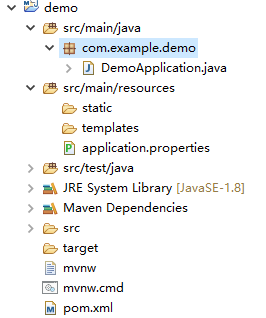
SpringBoot官方文档告诉我们,statis这个目录里面应该存放一些静态文件,比如 css、js、image并且可以直接被外部访问到。而templates这个目录则存放一些静态页面,如jsp、html、ftl。并且template这个目录里的内容外部是访问不到的。按照规范,我们将picUpload.html文件放到templates目录下。
现在通过:localhost:8080/index.html是访问不到该页面的。按照以前学习SpringMVC的经验,应该写一个controller,通过这个controller跳转到picUpload.html页面上去,再返回给用户。
下面我们新建一个controller,用做页面的跳转:
@Controller

public class ToHtmlController {

    @RequestMapping("/picUpload")

    public String picUpload(){

        return "picUpload";

    }

}
此时如果我们启动项目,并访问localhost:8080/picUpload这个url,页面会报错如下:
Whitelabel Error Page
This application has no explicit mapping for /error, so you are seeing this as a fallback.
Mon Jun 04 19:10:46 CST 2018
There was an unexpected error (type=Internal Server Error, status=500).
Circular view path [picUpload]: would dispatch back to the current handler URL [/picUpload] again. Check your ViewResolver setup! (Hint: This may be the result of an unspecified view, due to default view name generation.)
注意最后一句提示,意思就是我们没有指明模板引擎,这里我们使用thymeleaf,在pom.xml文件中添加如下依赖:
<dependency>

        <groupId>org.springframework.boot</groupId>

        <artifactId>spring-boot-starter-thymeleaf</artifactId>

</dependency>
然后启动项目,访问localhost:8080/picUpload,看到页面如下:
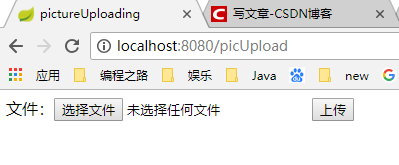
当选择完文件,点击上传按钮后,form表单会按照action属性值的url进行后端访问action="/upload",此时我们应该写一个controller来接收前端传来的图片,并将图片放到项目的static目录下。
图片处理controller如下:
/**

 * 图片上传

 * @author 吴洋

 *

 */

@RestController

public class PicUploadController {

    @PostMapping("/upload")

    public Object upload(MultipartFile fileUpload){

        //获取文件名

        String fileName = fileUpload.getOriginalFilename();

        //获取文件后缀名

        String suffixName = fileName.substring(fileName.lastIndexOf("."));

        //重新生成文件名

        fileName = UUID.randomUUID()+suffixName;

        //指定本地文件夹存储图片

        String filePath = "D:/SpringBoot/demo/src/main/resources/static/";

        try {

            //将图片保存到static文件夹里

            fileUpload.transferTo(new File(filePath+fileName));

            return new Massage(0,"success to upload");

        } catch (Exception e) {

            e.printStackTrace();

            return new Massage(-1,"fail to upload");

        }

    }

}
这里我新建了一个Message类,来向前端返回是否上传成功的信息。
public class Massage {

    //0表示成功;-1表示失败

    int status;

    //向前端返回的内容

    String massage;

    public Massage() {

        super();

    }

    public Massage(int status, String massage) {

        super();

        this.status = status;

        this.massage = massage;

    }

    //get/set方法

}
此时我们启动项目,并访问localhost:8080/picUpload,选择图片,点击上传。页面返回如下:
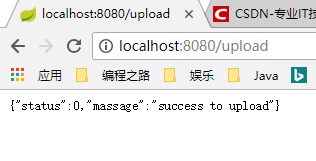
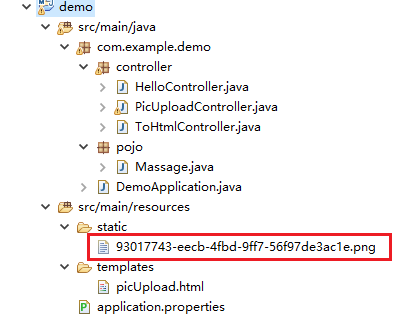
说明图片上传成功了,refresh项目,可以看到static目录下出现了我们上传的图片,并且名称也随机改变了。
SpringBoot实现文件上传的更多相关文章
- SpringBoot图文教程4—SpringBoot 实现文件上传下载
有天上飞的概念,就要有落地的实现 概念+代码实现是本文的特点,教程将涵盖完整的图文教程,代码案例 文章结尾配套自测面试题,学完技术自我测试更扎实 概念十遍不如代码一遍,朋友,希望你把文中所有的代码案例 ...
- SpringBoot 整合文件上传 elment Ui 上传组件
SpringBoot 整合文件上传 elment Ui 上传组件 本文章记录 自己学习使用 侵权必删! 前端代码 博主最近在学 elment Ui 所以 前端使用 elmentUi 的 upload ...
- springboot+web文件上传和下载
一.首先安装mysql数据库,开启web服务器. 二.pom.xml文件依赖包配置如下: <?xml version="1.0" encoding="UTF-8&q ...
- SpringBoot(3) 文件上传和访问
springboot文件上传 MultipartFile file,源自SpringMVC MultipartFile 对象的transferTo方法,用于文件保存(效率和操作比原先用FileOutS ...
- SpringBoot的文件上传
先在src/main/resources下新建一个static目录用以存放html页面,简单的html页面如下 <!DOCTYPE html> <html> <head& ...
- springBoot的文件上传功能
知识点: 后台:将上传的图片写入指定服务器路径,保存起来,返回上传后的图片路径(在springBoot中,参考博客:http://blog.csdn.net/change_on/article/det ...
- SpringBoot下文件上传与下载的实现
原文:http://blog.csdn.net/colton_null/article/details/76696674 SpringBoot后台如何实现文件上传下载? 最近做的一个项目涉及到文件上传 ...
- Angular14 利用Angular2实现文件上传的前端、利用springBoot实现文件上传的后台、跨域问题
一.angular2实现文件上传前端 Angular2使用ng2-file-upload上传文件,Angular2中有两个比较好用的上传文件的第三方库,一个是ng2-file-upload,一个是ng ...
- springboot 修改文件上传大小限制
springboot 1.5.9文件上传大小限制spring:http:multipart:maxFileSize:50MbmaxRequestSize:50Mb springboot 2.0文件上传 ...
随机推荐
- 自己动手编写一个VS插件(七)
作者:朱金灿 来源:http://blog.csdn.net/clever101 继续开发VS插件.今天在添加ATL控件时出现一个"未能返回新代码元素"的错误,如下图: 解决办法是 ...
- QT开发环境的建立以及QTE4.6.3、tslib1.4的移植过程
1.首先是建立Linux开发环境1.1.在windowsXP下安装博创公司提供的虚拟机软件VMware Workstation,版本为VMware-workstation-full-7.0.1-227 ...
- mysql中常见的存储引擎和索引类型
存储引擎 1. 定义 存储引擎说白了就是如何存储数据.如何为存储的数据建立索引和如何更新.查询数据等技术的实现方法.因为在关系数据库中数据的存储是以表的形式存储的,所以存储引擎也可以称为表类 ...
- 使用MVVM DataTemplate在WPF XAML视图之间切换
原文 使用MVVM DataTemplate在WPF XAML视图之间切换 更新:这个技术的改进版本,一个不创建视图,可以在以下链接找到: http://www.technical-recipes.c ...
- 静态库、动态库,dll文件、lib文件,隐式链接、显式链接浅见
静态链接.动态链接 静态库和动态库分别应用在静态链接方式和动态链接方式中,所谓静态链接方式是指在程序执行之前完成所有的链接工作,把静态库一起打包合入,生成一个可执行的目标文件(EXE文件).所谓动态链 ...
- matlab 稀疏矩阵(sparse matrix)
参数的设置:spparms() spparms('spumoni', 3);:Set sparse monitor flag to obtain diagnostic output 1. 创建稀疏矩阵 ...
- 你所不知道的 Kindle - 阅读微信公众号文章
Kindle 是一款非常优秀的阅读设备,它为我们提供了非常舒服的阅读体验,并且配合强大的亚马逊图书资源,应该是目前最好的阅读设备之一.Kindle 在已有的成就下还一直在努力提升用户体验.为中国用户开 ...
- Eucalyptus企业云计算(建立能够和Amazon EC2兼容的云)
Eucalyptus是与一个在加利福尼亚大学的研究性项目,创建了一个使企业能够使用它们内部IT资源(包括服务器.存储系统.网络设备)的开源界面,来建立能够和Amazon EC2兼容的云. “Eucal ...
- SICP 1.17-1.19
1.16 -------------> 不考虑0的情况 <------------ (define (fe b n) (define (fet m c) (cond ((= m n) c) ...
- 【C#】WindowsAPICodePack-Shell使用教程
原文:[C#]WindowsAPICodePack-Shell使用教程 1.首先在项目中添加WindowsAPICodePack的Nuget包. 点击安装即可. 2.获取<我的电脑>的 ...