
(转)OpenLayers3基础教程——OL3 介绍interaction
http://blog.csdn.net/gisshixisheng/article/details/46808647
概述:
本节主要讲述OL3的交互操作interaction,重点介绍draw,select以及modify。
接口说明:
OL3的interaction继承自ol.interaction.defaults,下面实现了以下几中交互操作:
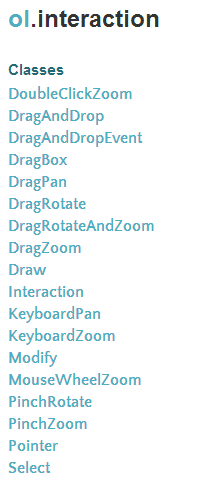
创建方式为:
var interaction = new ol.interaction.InteractionType({options});
添加和移除方式为:
map.addInteraction(draw);
map.removeInteraction(draw);
1、draw
ol.interaction.Draw
new ol.interaction.Draw(options)
| Name | Type | Description | |||
|---|---|---|---|---|---|
options |
Options.
|
||||
Fires:
drawend(ol.DrawEvent) - Triggered upon feature draw end
drawstart(ol.DrawEvent) - Triggered upon feature draw start
Extends
Methods
on(type, listener, opt_this){goog.events.Key} inherited
| Name | Type | Description |
|---|---|---|
type |
string | Array.<string> |
The event type or array of event types. |
listener |
function |
The listener function. |
this |
Object |
The object to use as |
2、select
ol.interaction.Select
new ol.interaction.Select(opt_options)
| Name | Type | Description | |||
|---|---|---|---|---|---|
options |
Options.
|
||||
Extends
Methods
getFeatures(){ol.Collection.<ol.Feature>}
3、modify
ol.interaction.Modify
new ol.interaction.Modify(options)
| Name | Type | Description | |||
|---|---|---|---|---|---|
options |
Options.
|
||||
Extends
Methods
on(type, listener, opt_this){goog.events.Key} inherited
| Name | Type | Description |
|---|---|---|
type |
string | Array.<string> |
The event type or array of event types. |
listener |
function |
The listener function. |
this |
Object |
The object to use as |
实现实例:
1、draw
- <html xmlns="http://www.w3.org/1999/xhtml">
- <head>
- <meta http-equiv="Content-Type" content="text/html; charset=utf-8" />
- <title>Ol3 draw</title>
- <link rel="stylesheet" type="text/css" href="http://localhost/ol3/css/ol.css"/>
- <style type="text/css">
- body, #map {
- border: 0px;
- margin: 0px;
- padding: 0px;
- width: 100%;
- height: 100%;
- font-size: 13px;
- }
- .form-inline{
- position: absolute;
- top: 10pt;
- right: 10pt;
- z-index: 99;
- }
- </style>
- <script type="text/javascript" src="http://localhost/ol3/build/ol.js"></script>
- <script type="text/javascript" src="http://localhost/jquery/jquery-1.8.3.js"></script>
- <script type="text/javascript">
- function init(){
- var format = 'image/png';
- var bounds = [73.4510046356223, 18.1632471876417,
- 134.976797646506, 53.5319431522236];
- var untiled = new ol.layer.Image({
- source: new ol.source.ImageWMS({
- ratio: 1,
- url: 'http://localhost:8081/geoserver/lzugis/wms',
- params: {'FORMAT': format,
- 'VERSION': '1.1.1',
- LAYERS: 'lzugis:province',
- STYLES: ''
- }
- })
- });
- var projection = new ol.proj.Projection({
- code: 'EPSG:4326',
- units: 'degrees'
- });
- var map = new ol.Map({
- controls: ol.control.defaults({
- attribution: false
- }),
- target: 'map',
- layers: [
- untiled
- ],
- view: new ol.View({
- projection: projection
- })
- });
- map.getView().fitExtent(bounds, map.getSize());
- var source = new ol.source.Vector();
- var vector = new ol.layer.Vector({
- source: source,
- style: new ol.style.Style({
- fill: new ol.style.Fill({
- color: 'rgba(255, 0, 0, 0.2)'
- }),
- stroke: new ol.style.Stroke({
- color: '#ffcc33',
- width: 2
- }),
- image: new ol.style.Circle({
- radius: 7,
- fill: new ol.style.Fill({
- color: '#ffcc33'
- })
- })
- })
- });
- map.addLayer(vector);
- var typeSelect = document.getElementById('type');
- var draw; // global so we can remove it later
- function addInteraction() {
- var value = typeSelect.value;
- if (value !== 'None') {
- draw = new ol.interaction.Draw({
- source: source,
- type: /** @type {ol.geom.GeometryType} */ (value)
- });
- map.addInteraction(draw);
- }
- }
- /**
- * Let user change the geometry type.
- * @param {Event} e Change event.
- */
- typeSelect.onchange = function(e) {
- map.removeInteraction(draw);
- addInteraction();
- };
- addInteraction();
- }
- </script>
- </head>
- <body onLoad="init()">
- <div id="map">
- <form class="form-inline">
- <label>选择绘制类型:</label>
- <select id="type">
- <option value="None">None</option>
- <option value="Point">点</option>
- <option value="LineString">线</option>
- <option value="Polygon">多边形</option>
- </select>
- </form>
- </div>
- </body>
- </html>
2、select
- <html xmlns="http://www.w3.org/1999/xhtml">
- <head>
- <meta http-equiv="Content-Type" content="text/html; charset=utf-8" />
- <title>Ol3 select</title>
- <link rel="stylesheet" type="text/css" href="http://localhost/ol3/css/ol.css"/>
- <style type="text/css">
- body, #map {
- border: 0px;
- margin: 0px;
- padding: 0px;
- width: 100%;
- height: 100%;
- font-size: 13px;
- }
- .form-inline{
- position: absolute;
- top: 10pt;
- right: 10pt;
- z-index: 99;
- }
- </style>
- <script type="text/javascript" src="http://localhost/ol3/build/ol.js"></script>
- <script type="text/javascript" src="http://localhost/jquery/jquery-1.8.3.js"></script>
- <script type="text/javascript">
- var point = "POINT(103.584297498027 36.119086450265)";
- var line = "MULTILINESTRING((106.519115206186 36.119086450265,108.967127809811 36.5936423859273))";
- var polygon = "MULTIPOLYGON(((106.519115206186 29.4789248520356,108.967127809811 34.2761116373967,113.226682886935 23.1830703234799)))";
- var wkts = [point, line, polygon];
- var wktformat = new ol.format.WKT();
- function init(){
- var format = 'image/png';
- var bounds = [73.4510046356223, 18.1632471876417,
- 134.976797646506, 53.5319431522236];
- var untiled = new ol.layer.Image({
- source: new ol.source.ImageWMS({
- ratio: 1,
- url: 'http://localhost:8081/geoserver/lzugis/wms',
- params: {'FORMAT': format,
- 'VERSION': '1.1.1',
- LAYERS: 'lzugis:province',
- STYLES: ''
- }
- })
- });
- var projection = new ol.proj.Projection({
- code: 'EPSG:4326',
- units: 'degrees'
- });
- var features = new Array();
- for(var i=0;i<wkts.length;i++){
- var feature = wktformat.readFeature(wkts[i]);
- feature.getGeometry().transform('EPSG:4326', 'EPSG:4326');
- features.push(feature);
- }
- var vector = new ol.layer.Vector({
- source: new ol.source.Vector({
- features: features
- }),
- style: new ol.style.Style({
- fill: new ol.style.Fill({
- color: 'rgba(255, 0, 0, 0.2)'
- }),
- stroke: new ol.style.Stroke({
- color: '#ffcc33',
- width: 2
- }),
- image: new ol.style.Circle({
- radius: 7,
- fill: new ol.style.Fill({
- color: '#ffcc33'
- })
- })
- })
- });
- var map = new ol.Map({
- controls: ol.control.defaults({
- attribution: false
- }),
- target: 'map',
- layers: [
- untiled, vector
- ],
- view: new ol.View({
- projection: projection
- })
- });
- map.getView().fitExtent(bounds, map.getSize());
- //选择对象
- var select = null; // ref to currently selected interaction
- // select interaction working on "singleclick"
- var selectSingleClick = new ol.interaction.Select();
- // select interaction working on "click"
- var selectClick = new ol.interaction.Select({
- condition: ol.events.condition.click
- });
- // select interaction working on "mousemove"
- var selectMouseMove = new ol.interaction.Select({
- condition: ol.events.condition.mouseMove
- });
- var selectElement = document.getElementById('selecttype');
- var changeInteraction = function() {
- if (select !== null) {
- map.removeInteraction(select);
- }
- var value = selectElement.value;
- if (value == 'singleclick') {
- select = selectSingleClick;
- } else if (value == 'click') {
- select = selectClick;
- } else if (value == 'mousemove') {
- select = selectMouseMove;
- } else {
- select = null;
- }
- if (select !== null) {
- map.addInteraction(select);
- }
- };
- /**
- * onchange callback on the select element.
- */
- selectElement.onchange = changeInteraction;
- changeInteraction();
- }
- </script>
- </head>
- <body onLoad="init()">
- <div id="map">
- <form class="form-inline">
- <label>选择高亮方式:</label>
- <select id="selecttype">
- <option value="none" selected>None</option>
- <option value="singleclick">单击</option>
- <option value="click">点击</option>
- <option value="mousemove">鼠标经过</option>
- </select>
- </form>
- </div>
- </body>
- </html>
3、modify
- <html xmlns="http://www.w3.org/1999/xhtml">
- <head>
- <meta http-equiv="Content-Type" content="text/html; charset=utf-8" />
- <title>Ol3 modify</title>
- <link rel="stylesheet" type="text/css" href="http://localhost/ol3/css/ol.css"/>
- <style type="text/css">
- body, #map {
- border: 0px;
- margin: 0px;
- padding: 0px;
- width: 100%;
- height: 100%;
- font-size: 13px;
- }
- </style>
- <script type="text/javascript" src="http://localhost/ol3/build/ol.js"></script>
- <script type="text/javascript" src="http://localhost/jquery/jquery-1.8.3.js"></script>
- <script type="text/javascript">
- var point = "POINT(103.584297498027 36.119086450265)";
- var line = "MULTILINESTRING((106.519115206186 36.119086450265,108.967127809811 36.5936423859273))";
- var polygon = "MULTIPOLYGON(((106.519115206186 29.4789248520356,108.967127809811 34.2761116373967,113.226682886935 23.1830703234799)))";
- var wkts = [point, line, polygon];
- var wktformat = new ol.format.WKT();
- function init(){
- var format = 'image/png';
- var bounds = [73.4510046356223, 18.1632471876417,
- 134.976797646506, 53.5319431522236];
- var untiled = new ol.layer.Image({
- source: new ol.source.ImageWMS({
- ratio: 1,
- url: 'http://localhost:8081/geoserver/lzugis/wms',
- params: {'FORMAT': format,
- 'VERSION': '1.1.1',
- LAYERS: 'lzugis:province',
- STYLES: ''
- }
- })
- });
- var projection = new ol.proj.Projection({
- code: 'EPSG:4326',
- units: 'degrees'
- });
- var features = new Array();
- for(var i=0;i<wkts.length;i++){
- var feature = wktformat.readFeature(wkts[i]);
- feature.getGeometry().transform('EPSG:4326', 'EPSG:4326');
- features.push(feature);
- }
- var vector = new ol.layer.Vector({
- source: new ol.source.Vector({
- features: features
- }),
- style: new ol.style.Style({
- fill: new ol.style.Fill({
- color: 'rgba(255, 0, 0, 0.2)'
- }),
- stroke: new ol.style.Stroke({
- color: '#ffcc33',
- width: 2
- }),
- image: new ol.style.Circle({
- radius: 7,
- fill: new ol.style.Fill({
- color: '#ffcc33'
- })
- })
- })
- });
- var select = new ol.interaction.Select();
- var modify = new ol.interaction.Modify({
- features: select.getFeatures()
- });
- vector.on("afterfeaturemodified",function(evt){
- console.log(evt);
- });
- var map = new ol.Map({
- interactions: ol.interaction.defaults().extend([select, modify]),
- controls: ol.control.defaults({
- attribution: false
- }),
- target: 'map',
- layers: [
- untiled, vector
- ],
- view: new ol.View({
- projection: projection
- })
- });
- map.getView().fitExtent(bounds, map.getSize());
- }
- </script>
- </head>
- <body onLoad="init()">
- <div id="map">
- </div>
- </body>
- </html>
(转)OpenLayers3基础教程——OL3 介绍interaction的更多相关文章
- OpenLayers3基础教程——OL3 介绍control
概述: 本文讲述的是Ol3中的control的介绍和应用. OL2和OL3 control比較: 相比較Ol2的control,OL3显得特别少,下图分别为Ol2和Ol3的control: Ol2的c ...
- (转) OpenLayers3基础教程——OL3 介绍control
http://blog.csdn.net/gisshixisheng/article/details/46761535 概述: 本文讲述的是Ol3中的control的介绍和应用. OL2和OL3 co ...
- OpenLayers3基础教程——OL3之Popup
概述: 本节重点讲述OpenLayers3中Popup的调用时实现,OL3改用Overlay取代OL2的Popup功能. 接口简单介绍: overlay跟ol.control.Control一样,是一 ...
- (转)OpenLayers3基础教程——OL3基本概念
http://blog.csdn.net/gisshixisheng/article/details/46756275 OpenLayers3基础教程——OL3基本概念 从本节开始,我会陆陆续续的更新 ...
- OpenLayers3基础教程——OL3基本概念
从本节開始,我会陆陆续续的更新有关OL3的相关文章--OpenLayers3基础教程,欢迎大家关注我的博客,同一时候也希望我的博客可以给大家带来一点帮助. 概述: OpenLayers 3对OpenL ...
- (转)OpenLayers3基础教程——OL3之Popup
http://blog.csdn.net/gisshixisheng/article/details/46794813 概述: 本节重点讲述OpenLayers3中Popup的调用时实现,OL3改用O ...
- ActiveMQ基础教程----简单介绍与基础使用
概述 ActiveMQ是由Apache出品的,一款最流行的,能力强劲的开源消息总线.ActiveMQ是一个完全支持JMS1.1和J2EE 1.4规范的 JMS Provider实现,它非常快速,支持多 ...
- Embedded Linux Primer----嵌入式Linux基础教程--章节介绍
章节介绍 第一章,“导引”,简要介绍了Linux被迅速应用在嵌入式环境的驱动因素,介绍了与嵌入式Linux相关的几个重要的标准和组织. 第二章,“第一个嵌入式经历”,介绍了与后几章所构建的嵌入式Lin ...
- (转) OpenLayers3基础教程——加载资源
概述: 本节讲述如何在Ol3中加载wms图层并显示到地图中. Ol3下载: 你可以在OL官网去下载,下载地址为http://openlayers.org/download/,也可以去我的百度云盘下载, ...
随机推荐
- mysql grant 用户权限总结
https://blog.csdn.net/anzhen0429/article/details/78296814
- nyoj_91_阶乘之和_201312131321
阶乘之和 时间限制:3000 ms | 内存限制:65535 KB 难度:3 描述 给你一个非负数整数n,判断n是不是一些数(这些数不允许重复使用,且为正数)的阶乘之和,如9 ...
- 【ACM】NYOJ_288_Time_20130725
Time时间限制:1000 ms | 内存限制:65535 KB 难度:2描述 Digital clock use 4 digits to express time, each digit is ...
- Java设计模式——外观模式
JAVA 设计模式 外观模式 用途 外观模式 (Facade) 为子系统中的一组接口提供一个一致的界面,此模式定义了一个高层接口,这个接口使得这一子系统更加容易使用. 外观模式是一种结构型模式. 结构
- pthread2
下面我们来看看这个demo #include <stdio.h> #include <pthread.h> #include <unistd.h> #include ...
- spring mvc dispatcherservlet处理request流程
1.dispatcherservlet接收到请求后,doDispatch(request,response) 2.doDispatch()里进行handlermapping,handlermappin ...
- umask函数的使用方法 - 怎样进行权限位的设置
以下程序创建了两个文件,创建foo文件时,umask值为0,创建第二个时,umask值禁止全部组和其它用户的訪问权限. 測试结果: 測试结果能够看出更改进程的文件模式掩码并不影响其父进程(经常是she ...
- 《python源代码剖析》笔记 Python虚拟机框架
本文为senlie原创,转载请保留此地址:http://blog.csdn.net/zhengsenlie 1. Python虚拟机会从编译得到的PyCodeObject对象中依次读入每一条字节码指令 ...
- Pycharm之Terminal使用
相当于doc命令,即工程所在目录shift+右键命令窗口打开的doc 1.清屏 ------ cls 清除屏幕上的所有显示,光标置于屏幕左上角.
- @SpringBootApplication注解
@SpringBootApplication注解表明了SpringBoot的核心功能,即自动配置. @SpringBootApplication(主配置类): @SpringBootConfigura ...