
(转)OpenLayers3基础教程——OL3之Popup
http://blog.csdn.net/gisshixisheng/article/details/46794813
概述:
本节重点讲述OpenLayers3中Popup的调用时实现,OL3改用Overlay代替OL2的Popup功能。
接口简介:
overlay跟ol.control.Control一样,是一个可见的窗口,但是不和Control一样,不是固定在地图区域的某个部分,而是显示在一个地图坐标上,随着地图的移动或者缩放而移动的。其调用方式如下:
- var popup = new ol.Overlay({
- element: document.getElementById('popup')
- });
- popup.setPosition(coordinate);
- map.addOverlay(popup);
new ol.Overlay(options)
| Name | Type | Description | |||||||||||||||||||||
|---|---|---|---|---|---|---|---|---|---|---|---|---|---|---|---|---|---|---|---|---|---|---|---|
options |
Overlay options.
|
||||||||||||||||||||||
Fires:
change:element(ol.ObjectEvent)change:map(ol.ObjectEvent)change:offset(ol.ObjectEvent)change:position(ol.ObjectEvent)change:positioning(ol.ObjectEvent)
Extends
Observable Properties
| Name | Type | Settable | ol.ObjectEvent type | Description |
|---|---|---|---|---|
element |
Element | undefined | yes | change:element |
The Element containing the overlay. |
map |
ol.Map | undefined | yes | change:map |
The map that the overlay is part of. |
offset |
Array.<number> | yes | change:offset |
The offset. |
position |
ol.Coordinate | undefined | yes | change:position |
The spatial point that the overlay is anchored at. |
positioning |
ol.OverlayPositioning | yes | change:positioning |
How the overlay is positioned relative to its point on the map. |
Methods
getElement(){Element|undefined}
-
Get the DOM element of this overlay.
Returns:
The Element containing the overlay.
getMap(){ol.Map|undefined}
-
Get the map associated with this overlay.
Returns:
The map that the overlay is part of.
getOffset(){Array.<number>}
-
Get the offset of this overlay.
Returns:
The offset.
getPosition(){ol.Coordinate|undefined}
-
Get the current position of this overlay.
Returns:
The spatial point that the overlay is anchored at.
getPositioning(){ol.OverlayPositioning}
-
Get the current positioning of this overlay.
Returns:
How the overlay is positioned relative to its point on the map.
on(type, listener, opt_this){goog.events.Key} inherited
-
Listen for a certain type of event.
Name Type Description typestring | Array.<string> The event type or array of event types.
listenerfunction The listener function.
thisObject The object to use as
thisinlistener.Returns:
Unique key for the listener.
once(type, listener, opt_this){goog.events.Key} inherited
-
Listen once for a certain type of event.
Name Type Description typestring | Array.<string> The event type or array of event types.
listenerfunction The listener function.
thisObject The object to use as
thisinlistener.Returns:
Unique key for the listener.
setElement(element)
-
Set the DOM element to be associated with this overlay.
Name Type Description elementElement | undefined The Element containing the overlay.
setMap(map)
-
Set the map to be associated with this overlay.
Name Type Description mapol.Map | undefined The map that the overlay is part of.
setOffset(offset)
-
Set the offset for this overlay.
Name Type Description offsetArray.<number> Offset.
setPosition(position)
-
Set the position for this overlay.
Name Type Description positionol.Coordinate | undefined The spatial point that the overlay is anchored at.
setPositioning(positioning)
-
Set the positioning for this overlay.
Name Type Description positioningol.OverlayPositioning how the overlay is positioned relative to its point on the map.
un(type, listener, opt_this) inherited
-
Unlisten for a certain type of event.
Name Type Description typestring | Array.<string> The event type or array of event types.
listenerfunction The listener function.
thisObject The object which was used as
thisby thelistener.
unByKey(key) inherited
-
Removes an event listener using the key returned by
on()oronce().Name Type Description keygoog.events.Key Key.
上面的内容是OL3 的API中关于overlay的部分。
调用示例:
1、popup样式
- body, #map {
- border: 0px;
- margin: 0px;
- padding: 0px;
- width: 100%;
- height: 100%;
- font-size: 13px;
- }
- .ol-popup {
- display: none;
- position: absolute;
- background-color: white;
- -moz-box-shadow: 0 1px 4px rgba(0,0,0,0.2);
- -webkit-filter: drop-shadow(0 1px 4px rgba(0,0,0,0.2));
- filter: drop-shadow(0 1px 4px rgba(0,0,0,0.2));
- border: 1px solid #cccccc;
- bottom: 12px;
- left: -50px;
- width: 200px;
- }
- .ol-popup:after, .ol-popup:before {
- top: 100%;
- border: solid transparent;
- content: " ";
- height: 0;
- width: 0;
- position: absolute;
- pointer-events: none;
- }
- .ol-popup:after {
- border-top-color: white;
- border-width: 10px;
- left: 48px;
- margin-left: -10px;
- }
- .ol-popup:before {
- border-top-color: #cccccc;
- border-width: 11px;
- left: 48px;
- margin-left: -11px;
- }
- .popup-title{
- font-weight: bold;
- border-bottom:1px solid #cccccc;
- padding: 5px 8px;
- }
- .popup-content{
- padding: 5px 8px;
- }
- .ol-popup-closer {
- text-decoration: none;
- position: absolute;
- top: 6px;
- right: 6px;
- }
- .ol-popup-closer:after {
- content: "✖";
- }
2、popup容器
- <div id="map">
- <div id="popup" class="ol-popup">
- <a href="#" id="popup-closer" class="ol-popup-closer"></a>
- <div id="popup-title" class="popup-title"></div>
- <div id="popup-content" class="popup-content"></div>
- </div>
- </div>
3、实现js
- var container = document.getElementById('popup');
- var content = document.getElementById('popup-content');
- var title = document.getElementById('popup-title');
- var closer = document.getElementById('popup-closer');
- closer.onclick = function(){
- container.style.display = 'none';
- closer.blur();
- return false;
- };
- var overlay = new ol.Overlay({
- element: container
- });
- map.addOverlay(overlay);
- map.on('click', function(evt) {
- var coordinate = evt.coordinate;
- var hdms = ol.coordinate.toStringHDMS(ol.proj.transform(
- coordinate, 'EPSG:4326', 'EPSG:4326'));
- overlay.setPosition(coordinate);
- content.innerHTML = '<p>You clicked here:</p><code>' + hdms +
- '</code>';
- container.style.display = 'block';
- title.innerHTML = "提示信息";
- title.style.display = 'block';
- map.getView().setCenter(coordinate);
- });
示例完整代码如下:
- <html xmlns="http://www.w3.org/1999/xhtml">
- <head>
- <meta http-equiv="Content-Type" content="text/html; charset=utf-8" />
- <title>Ol3 popup</title>
- <link rel="stylesheet" type="text/css" href="http://localhost/ol3/css/ol.css"/>
- <style type="text/css">
- body, #map {
- border: 0px;
- margin: 0px;
- padding: 0px;
- width: 100%;
- height: 100%;
- font-size: 13px;
- }
- .ol-popup {
- display: none;
- position: absolute;
- background-color: white;
- -moz-box-shadow: 0 1px 4px rgba(0,0,0,0.2);
- -webkit-filter: drop-shadow(0 1px 4px rgba(0,0,0,0.2));
- filter: drop-shadow(0 1px 4px rgba(0,0,0,0.2));
- border: 1px solid #cccccc;
- bottom: 12px;
- left: -50px;
- width: 200px;
- }
- .ol-popup:after, .ol-popup:before {
- top: 100%;
- border: solid transparent;
- content: " ";
- height: 0;
- width: 0;
- position: absolute;
- pointer-events: none;
- }
- .ol-popup:after {
- border-top-color: white;
- border-width: 10px;
- left: 48px;
- margin-left: -10px;
- }
- .ol-popup:before {
- border-top-color: #cccccc;
- border-width: 11px;
- left: 48px;
- margin-left: -11px;
- }
- .popup-title{
- font-weight: bold;
- border-bottom:1px solid #cccccc;
- padding: 5px 8px;
- }
- .popup-content{
- padding: 5px 8px;
- }
- .ol-popup-closer {
- text-decoration: none;
- position: absolute;
- top: 6px;
- right: 6px;
- }
- .ol-popup-closer:after {
- content: "✖";
- }
- </style>
- <script type="text/javascript" src="http://localhost/ol3/build/ol.js"></script>
- <script type="text/javascript" src="http://localhost/jquery/jquery-1.8.3.js"></script>
- <script type="text/javascript">
- function init(){
- var format = 'image/png';
- var bounds = [73.4510046356223, 18.1632471876417,
- 134.976797646506, 53.5319431522236];
- var untiled = new ol.layer.Image({
- source: new ol.source.ImageWMS({
- ratio: 1,
- url: 'http://localhost:8081/geoserver/lzugis/wms',
- params: {'FORMAT': format,
- 'VERSION': '1.1.1',
- LAYERS: 'lzugis:capital',
- STYLES: ''
- }
- })
- });
- var projection = new ol.proj.Projection({
- code: 'EPSG:4326',
- units: 'degrees'
- });
- var container = document.getElementById('popup');
- var content = document.getElementById('popup-content');
- var title = document.getElementById('popup-title');
- var closer = document.getElementById('popup-closer');
- closer.onclick = function(){
- container.style.display = 'none';
- closer.blur();
- return false;
- };
- var overlay = new ol.Overlay({
- element: container
- });
- map.addOverlay(overlay);
- var map = new ol.Map({
- controls: ol.control.defaults({
- attribution: false
- }),
- target: 'map',
- layers: [untiled],
- overlays: [overlay],
- view: new ol.View({
- projection: projection
- })
- });
- map.getView().fitExtent(bounds, map.getSize());
- map.on('click', function(evt) {
- var coordinate = evt.coordinate;
- var hdms = ol.coordinate.toStringHDMS(ol.proj.transform(
- coordinate, 'EPSG:4326', 'EPSG:4326'));
- overlay.setPosition(coordinate);
- content.innerHTML = '<p>You clicked here:</p><code>' + hdms +
- '</code>';
- container.style.display = 'block';
- title.innerHTML = "提示信息";
- title.style.display = 'block';
- map.getView().setCenter(coordinate);
- });
- }
- </script>
- </head>
- <body onLoad="init()">
- <div id="map">
- <div id="popup" class="ol-popup">
- <a href="#" id="popup-closer" class="ol-popup-closer"></a>
- <div id="popup-title" class="popup-title"></div>
- <div id="popup-content" class="popup-content"></div>
- </div>
- </div>
- </body>
- </html>
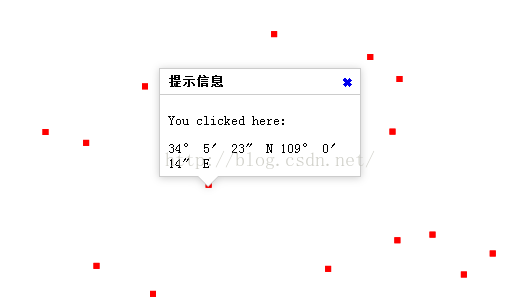
实现后的效果如下:
(转)OpenLayers3基础教程——OL3之Popup的更多相关文章
- OpenLayers3基础教程——OL3之Popup
概述: 本节重点讲述OpenLayers3中Popup的调用时实现,OL3改用Overlay取代OL2的Popup功能. 接口简单介绍: overlay跟ol.control.Control一样,是一 ...
- (转)OpenLayers3基础教程——OL3基本概念
http://blog.csdn.net/gisshixisheng/article/details/46756275 OpenLayers3基础教程——OL3基本概念 从本节开始,我会陆陆续续的更新 ...
- OpenLayers3基础教程——OL3 介绍control
概述: 本文讲述的是Ol3中的control的介绍和应用. OL2和OL3 control比較: 相比較Ol2的control,OL3显得特别少,下图分别为Ol2和Ol3的control: Ol2的c ...
- OpenLayers3基础教程——OL3基本概念
从本节開始,我会陆陆续续的更新有关OL3的相关文章--OpenLayers3基础教程,欢迎大家关注我的博客,同一时候也希望我的博客可以给大家带来一点帮助. 概述: OpenLayers 3对OpenL ...
- (转) OpenLayers3基础教程——OL3 介绍control
http://blog.csdn.net/gisshixisheng/article/details/46761535 概述: 本文讲述的是Ol3中的control的介绍和应用. OL2和OL3 co ...
- (转)OpenLayers3基础教程——OL3 介绍interaction
http://blog.csdn.net/gisshixisheng/article/details/46808647 概述: 本节主要讲述OL3的交互操作interaction,重点介绍draw,s ...
- (转) OpenLayers3基础教程——加载资源
概述: 本节讲述如何在Ol3中加载wms图层并显示到地图中. Ol3下载: 你可以在OL官网去下载,下载地址为http://openlayers.org/download/,也可以去我的百度云盘下载, ...
- openlayers3入门教程
...
- Chrome扩展开发基础教程(附HelloWorld)
1 概述 Chrome扩展开发的基础教程,代码基于原生JS+H5,教程内容基于谷歌扩展开发官方文档. 2 环境 Chrome 88.0.4324.96 Chromium 87.0.4280.141 B ...
随机推荐
- web开发如何使用高德地图API(四)通过AMap.Marker自定义标点
说两句: 以下内容除了我自己写的部分,其他部分在高德开放平台都有(可点击外链访问). 我所整理的内容以实际项目为基础希望更有针对性的,更精简. 点击直奔主题. 准备工作: 首先,注册开发者账号,成为高 ...
- Master Nginx(8) - Troubleshooting Techniques
Analyzing log files Error log file formats Error log file entry examples Configuring advanced loggin ...
- ES解除索引只读限制
kibana dev Tools 执行:PUT _settings { "index": { "blocks": { "rea ...
- 相克军_Oracle体系_随堂笔记 PPT
http://www.cnblogs.com/jyzhao/category/581259.html http://download.csdn.net/detail/yzj149286454/8960 ...
- IntelliJ IDEA 16 EAP新特性一览
IntelliJ IDEA 16 EAP新特性一览 作者:chszs,未经博主同意不得转载.经许可的转载需注明作者和博客主页:http://blog.csdn.net/chszs IntelliJ I ...
- ExtJs 日期相加,Grid表格列可编辑
1.日期相加: Ext.Date.add(new Date(), Ext.Date.DAY, 15) 2.Grid表格列可编辑: { header : "实际已交货量", ...
- 集成CCFlow工作流与GPM的办公系统驰骋CCOA介绍(二)
GPM怎样控制菜单权限以及菜单的增删显示 因为CCOA中仅仅有属于admin才干够进行权限管理与流程设计.password为pub. 1.加入CCOA功能菜单 进入GPM后,找到编号为CCOA的信息后 ...
- ConcurrentDictionary中的 TryRemove
class A { internal int value; } ConcurrentDictionary<int, A> dic = new ConcurrentDictionary< ...
- 我在Suse 11 Sp3上使用anaconda安装TensorFlow的过程记录
我在Suse 11 Sp3上使用anaconda安装TensorFlow的过程记录 准备安装包: gcc48 glibc--SP4-DVD-x86_64-GM-DVD1.iso tensorflow_ ...
- golang LMDB入门例子——尼玛,LMDB的文档真的是太少了
使用的是这个库:https://github.com/szferi/gomdb 安装: go get github.com/szferi/gomdb 代码: package main import ( ...