
C# html生成图片保存下载
最近有个需求,需要把内容生成图片,我找到一些资料可以将html页面生成图片并保存下载
下面是简单的实现
1.html页面
@{

    Layout = null;

}

<!DOCTYPE html>

<html>

<head>

    <meta name="viewport" content="width=device-width" />

    <title>Index</title>

</head>

<body>

    <div>

        @if (ViewBag.type == )

        {

            <input type="button" value="保存" id="btnD" onclick="down()" />

        }

        <table>

            <tr>

                <th>Id</th>

                <th>姓名</th>

                <th>年龄</th>

            </tr>

            @foreach (var item in ViewBag.list)

            {

                <tr>

                    <td>@item.Id</td>

                    <td>@item.Name</td>

                    <td>@item.Age</td>

                </tr>

            }

        </table>

    </div>

    <script src="~/Scripts/jquery-3.3.1.js"></script>

    <script>

        function down() {

            $.ajax({

                url: "/test/GetfileName",

                type: "get",

                success: function (json) {

                    window.location.href = '/test/DownImg?fileName=' + json;

                }

            })

        }

    </script>

</body>

</html>
2.控制器
using System;

using System.Collections.Generic;

using System.Drawing;

using System.Linq;

using System.Web;

using System.Web.Mvc;

using WebApplication2.Content;

using System.IO;

namespace WebApplication2.Controllers

{

    public class TestController : Controller

    {

        // GET: Test

        public ActionResult Index(int type=)

        {

            List<Student> list = new List<Student>();

            for (int i = ; i < ; i++)

            {

                Student stu = new Student();

                stu.Id =  + ;

                stu.Name = "张三"+i.ToString();

                stu.Age =  + i;

                list.Add(stu);

            }

            ViewBag.list = list;

            ViewBag.type = type;

            return View();

        }

        public string GetfileName()

        {
        //调用

            Bitmap m_Bitmap = WebSnapshotsHelper.GetWebSiteThumbnail("http://localhost:64806/Test/Index?type=1", 800, 1200, 800, 1200); //宽高根据要获取快照的网页决定

            var path = Server.MapPath("/Content/img/");

            if (!Directory.Exists(path))

                Directory.CreateDirectory(path);

            var fileName =Guid.NewGuid()+ ".jpeg";

            m_Bitmap.Save(path + fileName, System.Drawing.Imaging.ImageFormat.Jpeg); //图片格式可以自由控制

            return fileName;

        }

        public ActionResult DownImg(string fileName)

        {

            var path = Server.MapPath("/Content/img/")+ fileName;

            return File(path, "image/jpeg", fileName);

        }

    }

    public class Student

    {

        public int Id { get; set; }

        public string Name { get; set; }

        public int Age { get; set; }

    }

}
3.新建类 WebSnapshotsHelper 我是b/s做的,所以需要引用 System.Windows.Forms
using System;

using System.Collections.Generic;

using System.Drawing;

using System.Linq;

using System.Threading;

using System.Web;

using System.Windows.Forms;

namespace WebApplication2.Content

{

    public class WebSnapshotsHelper

    {

        Bitmap m_Bitmap;

        string m_Url;

        int m_BrowserWidth, m_BrowserHeight, m_ThumbnailWidth, m_ThumbnailHeight;

        public WebSnapshotsHelper(string Url, int BrowserWidth, int BrowserHeight, int ThumbnailWidth, int ThumbnailHeight)

        {

            m_Url = Url;

            m_BrowserHeight = BrowserHeight;

            m_BrowserWidth = BrowserWidth;

            m_ThumbnailWidth = ThumbnailWidth;

            m_ThumbnailHeight = ThumbnailHeight;

        }

        public static Bitmap GetWebSiteThumbnail(string Url, int BrowserWidth, int BrowserHeight, int ThumbnailWidth, int ThumbnailHeight)

        {

            WebSnapshotsHelper thumbnailGenerator = new WebSnapshotsHelper(Url, BrowserWidth, BrowserHeight, ThumbnailWidth, ThumbnailHeight);

            return thumbnailGenerator.GenerateWebSiteThumbnailImage();

        }

        public Bitmap GenerateWebSiteThumbnailImage()

        {

            Thread m_thread = new Thread(new ThreadStart(_GenerateWebSiteThumbnailImage));

            m_thread.SetApartmentState(ApartmentState.STA);

            m_thread.Start();

            m_thread.Join();

            return m_Bitmap;

        }

        private void _GenerateWebSiteThumbnailImage()

        {

            WebBrowser m_WebBrowser = new WebBrowser();

            //## 这边把脚本错误的压制设置为true.

            m_WebBrowser.ScriptErrorsSuppressed = true;

            m_WebBrowser.ScrollBarsEnabled = false;

            m_WebBrowser.Navigate(m_Url);

            m_WebBrowser.DocumentCompleted += new WebBrowserDocumentCompletedEventHandler(WebBrowser_DocumentCompleted);

            while (m_WebBrowser.ReadyState != WebBrowserReadyState.Complete)

                Application.DoEvents();

            m_WebBrowser.Dispose();

        }

        private void WebBrowser_DocumentCompleted(object sender, WebBrowserDocumentCompletedEventArgs e)

        {

            WebBrowser m_WebBrowser = (WebBrowser)sender;

            m_WebBrowser.ClientSize = new Size(this.m_BrowserWidth, this.m_BrowserHeight);

            m_WebBrowser.ScrollBarsEnabled = false;

            m_Bitmap = new Bitmap(m_WebBrowser.Bounds.Width, m_WebBrowser.Bounds.Height);

            m_WebBrowser.BringToFront();

            m_WebBrowser.DrawToBitmap(m_Bitmap, m_WebBrowser.Bounds);

            m_Bitmap = (Bitmap)m_Bitmap.GetThumbnailImage(m_ThumbnailWidth, m_ThumbnailHeight, null, IntPtr.Zero);

            // 设置文档窗口错误的处理。

            m_WebBrowser.Document.Window.Error += OnWebBrowserDocumentWindowError;

        }

        /// <summary>

        /// 对WEB浏览器处理错误的处理

        /// </summary>

        /// <param name="sender"></param>

        /// <param name="e"></param>

        private void OnWebBrowserDocumentWindowError(object sender, HtmlElementErrorEventArgs e)

        {

            e.Handled = true;

        }

    }

}
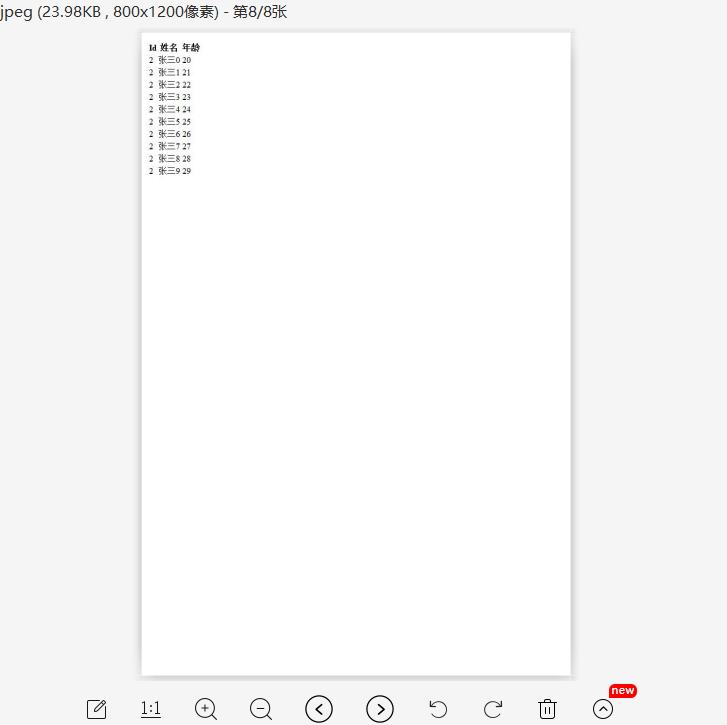
生成结果

C# html生成图片保存下载的更多相关文章
- 微信小程序导出当前画布指定区域的内容并生成图片保存到本地相册(canvas)
最近在学小程序,在把当前画布指定区域的内容导出并生成图片保存到本地这个知识点上踩坑了. 这里用到的方法是: wx.canvasToTempFilePath(),该方法作用是把当前画布指定区域的内容导出 ...
- yum 保存下载的rpm 包
yum 保存下载的rpm 包 1 [root@bogon pluginconf.d]# vim /etc/yum.conf [main]cachedir=/var/cache/yum/$basearc ...
- MVC 生成图片,下载文件(图片不存在本地,在网上下载)
/// <summary> /// 生成图片 /// </summary> /// <param name="collection"></ ...
- 移动端js模拟截屏生成图片并下载功能的实现方案
一.根据PM需求如下: 移动端wap 实现将二维码生成图片下载至用户手机相册保存 二.根据现有思路: 1.使用第三方工具html2canvas,将页面中指定范围的dom转换为canvas 2.随后使用 ...
- vue 页面生成图片保存
需求:将页面中的元素转成图片,支持保存或下载.要求下载的图片包含页面背景,头像,用户名,文本为"我的邀请码"和个人二维码. 实现:将页面绘制到canvas中,生成base64图片链 ...
- MVC 生成图片,下载文件
/// <summary> /// 生成图片 /// </summary> /// <param name="collection"></ ...
- 如何模拟一个http请求并把response的内容保存下载下来,导出到excel中(结尾福利)
def doExport(self): # 模拟一个http请求 url = u'%s?dumptype=investigation&dumpid=%s&timezone=8' % ( ...
- C# ASP.NET 手写板并生成图片保存
前端: @{ Layout = null; } <!DOCTYPE html> <html lang="zh-CN"> <head> <t ...
- 通过JS将BSAE64生成图片并下载
HTML:<div style="display:block;margin:0 auto;width:638px;height:795px;"><div id=& ...
随机推荐
- 在Vue 中调用数据出现属性不存在的问题
这已经是我在调用数据时趟过几次的坑了,索性记录下来防止后面再犯: 一般我们请求数据来渲染一个页面的时候,请求下来的数据基本上都是数组或是对象,再通过列表循环和插值表达式渲染的页面:在data 中提前声 ...
- HttpMessageNotWritableException: Could not write JSON: Infinite recursion (StackOverflowError); nested exception is com.fasterxml.jackson.databind.JsonMappingException: Infinite
org.springframework.http.converter.HttpMessageNotWritableException: Could not write JSON: Infinite r ...
- P1083 合并序列
题目描述 有N个单词和字符串T,按字典序输出以字符串T为前缀的所有单词. 输入格式 输入文件第一行包含一个正整数N: 接下来N行,每行一个单词,长度不超过100: 最后一行包含字符串T. 已知:1≤N ...
- js简单实现promise
function myPromise(fn){ let status='pending',successCallback=[],failedCallback=[],data=null,reason=n ...
- ZR提高失恋测2(9.7)
ZR提高失恋测2(9.7) 网址http://www.zhengruioi.com/contest/392 版权原因,不放题面 A 首先,我们发现对于匹配串\(s\)中所有满足\(s_i \not = ...
- luoguP2679 子串
luoguP2679 子串 个人感觉\(noip\)系列中挺好的一道DP题目. 题面有点难理解. 我们设\(f_{i,j,k,0/1}\)表示\(A\)串前\(i\)个字符,匹配\(B\)串前\(j\ ...
- MFC 获取本机IP、网络ip和物理地址
获取本机Ip CString CNet::GetLocalIP() { WSADATA wsaData; , ), &wsaData); ) { return ""; } ...
- 初识Ubuntu 18.04(更换系统头像,截图,sy)
其实我认识ubuntu也有一段时间了,只是我一直沉迷Windows无法自拔,但是熟悉一下ubuntu的环境对于各项比赛以及今后的工作还是很有用处的,不过在未来的很长一段时间里,我只会以一个普通用户的身 ...
- python 找出字符串中出现次数最多的字母
# 请大家找出s=”aabbccddxxxxffff”中 出现次数最多的字母 # 第一种方法,字典方式: s="aabbccddxxxxffff" count ={} for i ...
- Ambari+HDP+HDF离线安装包下载清单
Ambari 2.7.3 Repositories OS Format URL RedHat 7 CentOS 7 Oracle Linux 7 Base URL http://public-repo ...