
vue 页面生成图片保存
需求:将页面中的元素转成图片,支持保存或下载。要求下载的图片包含页面背景,头像,用户名,文本为“我的邀请码”和个人二维码。
实现:将页面绘制到canvas中,生成base64图片链接,支持移动端的长按保存图片。
技术与插件:vue,qrcodejs2,html2canvas,nutUI
示例:以下将代码分成了三部分,合成便是一个完整的vue单页。
HTML代码:
<template>

  <div class="poster">

    <div class="hb" ref="imageTest">

      <img src="../../assets/images/4399_09180407154.jpg" alt="" class="hb-img">

      <p class="hb-name">旋风小土豆</p>

      <div class="hb-qc">

        <p class="hb-yqm">我的邀请码</p>

        <div class="codeImg" id="qrCode"></div>

      </div>

    </div>

    <div class="close" @click="handleClose">

      <nut-icon type="circle-cross" ></nut-icon>

    </div>

    <div class="save-btn" >

      <nut-button

        block

        shape="circle"

        @click="setCanvas"

      >

        保存图片

      </nut-button>

    </div>

    <nut-popup v-model="show">

      <img :src="cvImg" alt="" class="cv-img">

    </nut-popup>

  </div>

</template>
SCRIPT:
<script>

import QRCode from 'qrcodejs2'

import html2canvas from 'html2canvas'

export default {

  props: {

  },

  data () {

    return {

      show: false,

      cvImg: ''

    }

  },

  components: {

  },

  created () {

    this.$nextTick(() => {

      this.getQC()

    })

  },

  mounted () {

  },

  watch: {

  },

  methods: {

    handleClose () {

      console.log('关闭')

      this.$router.go(-1)

    },

    getQC () {

      let qrcode = new QRCode('qrCode', {

        width: 150,

        height: 150, // 高度

        text: `${location.origin}${location.pathname}`, // 要生成二维码的链接(或当前页面地址)

        colorDark: '#000',

        colorLight: '#fff',

        correctLevel: QRCode.CorrectLevel.H

      })

      console.log(qrcode, `${location.origin}${location.pathname}`)

    },

    setCanvas () {

      const canvas = document.createElement('canvas')

      // 获取要生成图片的 DOM 元素

      let canvasDom = this.$refs.imageTest

      // 获取指定的宽高

      const width = parseInt(window.getComputedStyle(canvasDom).width)

      const height = parseInt(window.getComputedStyle(canvasDom).height)

      // 宽高扩大 2 倍 处理图片模糊

      canvas.width = width * 2

      canvas.height = height * 2

      canvas.style.width = width / 2 + 'px'

      canvas.style.height = height / 2 + 'px'

      const context = canvas.getContext('2d')

      context.scale(1, 1)

      const options = {

        backgroundColor: null,

        canvas: canvas,

        useCORS: true

      }

      html2canvas(canvasDom, options).then(canvas => {

        // 生成图片地址

        this.imgUrl = canvas.toDataURL('image/png')

        this.cvImg = this.imgUrl

        this.show = true

      })

    }

  }

}

</script>
CSS代码:
<style lang="scss" scoped>

.hb{

  @include wh(100%, 100vh);

  background: url(../../assets/images/c_bg.jpg) no-repeat;

  background-size: 100%;

  .hb-img{

    @include wh(80px, 80px);

    margin-top: 100px;

    border-radius: 10px;

  }

  .hb-name{

    color: #FFFFFF;

    margin: 10px 0;

    font-size: 18px;

  }

  .hb-qc{

    @include wh(80%, 260px);

    margin: 20px auto;

    background-color: rgba(255,255,255, 0.7);

    border-radius: 20px;

    text-align: center;

    .hb-yqm{

      padding: 10px 20px;

      text-align: left;

      font-size: 14px;

      color: #D37D42;

    }

    .codeImg{

      display: flex;

      justify-content: center;

      margin-top: 20px;

    }

  }

  .hb-desc{

    @include wh(100%, auto);

  }

}

.cv-img{

  @include wh(100%, 80vh);

}

.close{

  position: absolute;

  top: 40px;

  left: 40px;

  @include wh(40px, 40px);

}

.save-btn{

  position: absolute;

  bottom:  50px;

  @include wh(100%, auto);

}

/deep/ .nut-button{

  background: linear-gradient(315deg, rgba(50,213,236, 0.5) 0%, rgba(40,205,231, 0.5) 100%);

  color: #2D2D2D;

  border: 1px solid rgba(50,213,236, 1);

}

/deep/ .nut-button.block{

  @include wh(80%, 40px);

}

/deep/ .popup-box{

  animation-duration: 0.3s;

  width: 82%;

  position: fixed;

  max-height: 100%;

  z-index: 2002;

  text-align: center;

  display: flex;

}

</style>
结果成图:

点击保存图片:
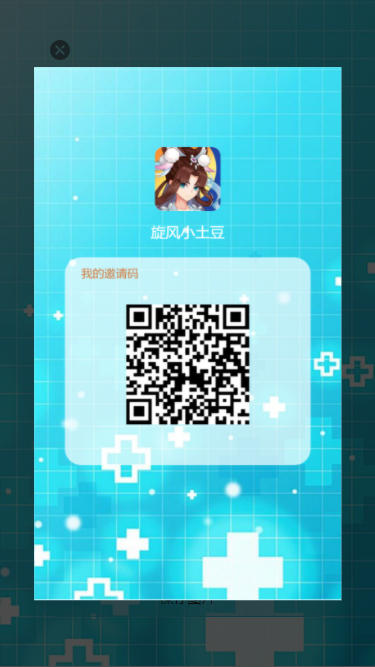
下载后的图片:

vue 页面生成图片保存的更多相关文章
- 使用 html2canvas 点击保存时把当前页面生成图片
style: #box{ background-image:url('./img/pone.png') } body: <div id="box" ...
- 微信小程序中把页面生成图片
这个问题我上网搜了一下,答案有多种,但是真正能用的没有几何.很多答案都是雷同,有的网友也不负责任,直接拿来照抄,自己也不跑一遍看看.哎,不说了,说多了全是泪.希望我们的技术达人在分享的时候,能够真实的 ...
- 将HTML页面自动保存为PDF文件并上传的两种方式(一)-前端(react)方式
一.业务场景 公司的样本检测报告以React页面的形式生成,已调整为A4大小的样式并已实现分页,业务上需要将这个网页生成PDF文件,并上传到服务器,后续会将这个文件发送给客户(这里不考虑). 二.原来 ...
- C# html生成图片保存下载
最近有个需求,需要把内容生成图片,我找到一些资料可以将html页面生成图片并保存下载 下面是简单的实现 1.html页面 @{ Layout = null; } <!DOCTYPE html&g ...
- Vue页面内公共的多类型附件图片上传区域并适用折叠面板
在前端项目中,附件上传是很常用的功能,几乎所有的app相关项目中都会使用到,一般在选择使用某个前端UI框架时,可以查找其内封装好的图片上传组件,但某些情况下可能并不适用于自身的项目需求,本文中实现的附 ...
- iframe嵌套vue页面打开新窗口
iframe嵌套vue页面时目录结构为下图: 此时出口文件指向index.html, 所以只需要用a标签动态拼接href, 并设置属性 target="_blank" ,即可在if ...
- python 全栈开发,Day92(编程式的导航,vue页面布局,marked包的使用)
昨日内容回顾 1. 组件间的传值 1. bus --> 空Vue对象 通过向bus对象抛出自定义事件的方式在组件间传递信息 2. 注意事项: 1. bus.$on()应该在组件mounted(挂 ...
- 微信小程序导出当前画布指定区域的内容并生成图片保存到本地相册(canvas)
最近在学小程序,在把当前画布指定区域的内容导出并生成图片保存到本地这个知识点上踩坑了. 这里用到的方法是: wx.canvasToTempFilePath(),该方法作用是把当前画布指定区域的内容导出 ...
- Vue页面骨架屏(一)
在开发webapp的时候总是会受到首屏加载时间过长的影响,主流的解决方法是在载入完成之前显示loading图效果,而一些大公司会配置一套服务端渲染的架构来解决这个问题.考虑到ssr所要解决的一系列问题 ...
随机推荐
- HTTP 请求过程以及报文结构
目录 HTTP 请求流程 HTTP 请求报文 请求行 方法字段(Request Method) URL字段(Uniform Resource Locator) HTTP 协议版本字段(略) 请求/响应 ...
- PHP 弱类型 && CODE/COMMADN injection
CODE/COMMAND INJECTION CODE INJECTION https://www.freebuf.com/sectool/168653.html EXAMPLE1 <?php ...
- poj-3046 Ant Counting【dp】【母函数】
题目链接:戳这里 题意:有A只蚂蚁,来自T个家族,每个家族有ti只蚂蚁.任取n只蚂蚁(S <= n <= B),求能组成几种集合? 这道题可以用dp或母函数求. 多重集组合数也是由多重背包 ...
- Bootstrap导航组件
Bootstrap 中的导航组件都依赖同一个 .nav 类,状态类也是共用的.改变修饰类可以改变样式. 标签页 注意 .nav-tabs 类依赖 .nav 基类 <ul class=" ...
- vue项目webpack打包后修改配置文件
从webpack打包结构中我们知道,vue中有一个存放外部资源的文件夹static,它里面的文件是不会被打包编译的,所以我们就可以利用外部引入js的方式将我们的想要的数据在index.html中以js ...
- Linux Centos7发送QQ邮件
一.关闭本机的sendmail服务或者postfix服务 #sendmial service sendmail stop chkconfig sendmail off #postfix service ...
- matplotlib 单figure多图
method 1 import numpy as np import matplotlib.pyplot as plt fg, axes = plt.subplots(1, 2, figsize=(1 ...
- CSS multi colors circle
CSS multi colors circle <!DOCTYPE html> <html lang="zh-Hans"> <head> < ...
- Learning JavaScript with MDN (call, apply, bind)
Learning JavaScript with MDN (call, apply, bind) call, apply, bind Object.prototype.toString() 检测 js ...
- css3 units & 1 turn
css3 units & 1 turn One full circle is 1turn, 180deg === 0.5turn degrees, gradians, radians, tur ...