
vuex之module
由于使用单一状态树,应用的所有状态会集中到一个比较大的对象。当应用变得非常复杂时,store 对象就有可能变得相当臃肿。
为了解决以上问题,Vuex 允许我们将 store 分割成模块(module)。每个模块拥有自己的 state、mutation、action、getter、甚至是嵌套子模块——从上至下进行同样方式的分割:
- 在src下建立文件夹store,用于存放各个模块以及根级别的文件
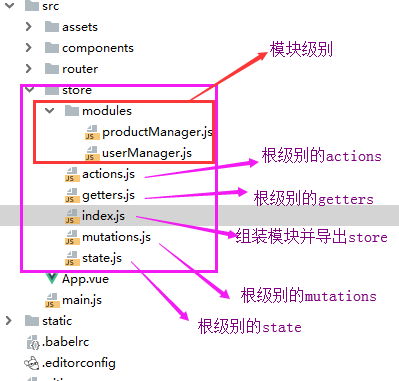
- 在index.js文件中导出store
import Vue from 'vue'

import Vuex from 'vuex'

import state from './state'

import mutations from './mutations'

import getters from './getters'

import actions from './actions'

import userManager from './modules/userManager'

import productManager from './modules/productManager'

Vue.use(Vuex);

//组装模块并导出 store 的地方

export default new Vuex.Store({

  //根节点相关

  state,

  mutations,

  getters,

  actions,

  //模块相关

  modules: {

    um:userManager,

    pm:productManager,

  },

});
- 在main.js文件的Vue实例中注册store
import Vue from 'vue'

import App from './App'

import router from './router'

import store from './store/index'

new Vue({

  el: '#app',

  router,

  store, //注册store

  components: {App},

  template: '<App/>'

});
- 模块级别的文件中写于自己相关的代码
1、访问模块局部的状态
对于模块内部的 mutation 和 getter,接收的第一个参数是模块的局部状态对象。
//局部mutations

  mutations: {

    //action中提交该mutation

    GETALLPRODUCT(state, data) {

      //当页面DOM元素即页面结构加载完成后执行此方法

      state.ProductList = data;

    },

  },

//局部getters,根节点状态会作为第三个参数暴露出来

  getters: {

    getHotProduct (state,getters,rootState) {

      return state.ProductList.filter(product => product.type === 1)

    },

    getHotProductById: (state) => (id) => {

      return state.ProductList.find(product => product.id === id)

    }

  }

}
同样,对于模块内部的 action,局部状态通过 context.state 暴露出来,根节点状态则为 context.rootState:
 actions: {

    getAllProduct(context) {

      //局部状态通过 context.state 暴露出来,根节点状态则为 context.rootState:

      //发送get请求获取API数据

      axios.get(' http://127.0.0.1:8000/api/Productdata/')

        .then((response) => {

          // handle success

          context.commit('GETALLPRODUCT', response.data);

          console.log('getters',context.getters.getHotProduct)

        })

}
2、命名空间
默认情况下,模块内部的 action、mutation 和 getter 是注册在全局命名空间的——这样使得多个模块能够对同一 mutation 或 action 作出响应。
如果希望你的模块具有更高的封装度和复用性,你可以通过添加 namespaced: true 的方式使其成为带命名空间的模块。当模块被注册后,它的所有 getter、action 及 mutation 都会自动根据模块注册的路径调整命名。
export default {

  namespaced: true, //拥有自己的命名空间

  state: {

    ProductList: [],

  },

  mutations: {

  },

  actions: {

  },

  getters: {

    getHotProductById: (state) => (id) => {

      return state.ProductList.find(product => product.id === id)

    }

  }

}
此时,在组件中调用就需要根据路径进行调用:
2.1 调用模块中的state
    computed: {

      UserList() {

        return this.$store.state.um.UserList //UserList 是在模块中定义的state状态

      },

    },
2.2 调用模块中getters
        computed:{

          hotProductArray(){

            return this.$store.getters['pm/getHotProduct'] //调用无参getters

          }

        }

      methods:{

          getProductById(){

        this.$store.getters['pm/getHotProductById'](this.id) //调用有参数的getters

              }

          }

      },
2.3 提交actions
        mounted() {

          this.$store.dispatch("pm/getAllProduct") //提交局部模块的actions

        },
3、在带命名空间的模块注册全局 action
若需要在带命名空间的模块注册全局 action,你可添加 root: true,并将这个 action 的定义放在函数 handler 中。
    //在有命名空间actions中注册全局action因为有root: true,

    getAllUserList: {

      root: true,

      handler (context, payload) {

        //发送get请求获取API数据

        axios.get(' http://127.0.0.1:8000/api/userdata/')

          .then((response) => {

            // handle success

            context.commit('um/GETALLUSER', response.data); //全局中使用局部的mutation

            console.log(response.data)

          })

          .catch((error) => {

            // handle error

            console.log(error);

          })

          .finally(() => {

            // always executed

          });

      } // -> 'someAction'

    },
此时虽然这个antion在某个模块文件内,但是确实全局的命名空间,因此像分发action这类的操作可以直接这样:
this.$store.dispatch("getAllUserList");
参考文档:https://vuex.vuejs.org/zh/guide/modules.html
vuex之module的更多相关文章
- vuex中module的命名空间概念
vuex中module的命名空间概念 默认情况下,模块内部的 action.mutation 和 getter 是注册在全局命名空间的. 弊端1:不同模块中有相同命名的mutations.action ...
- vuex的module的简单实用方法
当我们的项目越来越大的时候,我们就开始使用vuex来管理我们的项目的状态.但是如果vuex的状态多了呢,这个时候module就登场了.看了一下官方的文档,很详细,但是没有demo让初学者很头疼.那我就 ...
- Vuex基础-Module
官方API地址:https://vuex.vuejs.org/zh/guide/modules.html 前面几节课写的user.js就称为一个module,这样做的原因是:由于使用单一状态树,应用的 ...
- [Vuex系列] - Module的用法(终篇)
于使用单一状态树,应用的所有状态会集中到一个比较大的对象.当应用变得非常复杂时,store 对象就有可能变得相当臃肿.为了解决以上问题,Vuex 允许我们将 store 分割成模块(module).每 ...
- vuex之module的使用
一.module的作用 由于使用单一状态树,应用的所有状态会集中到一个比较大的对象.当应用变得非常复杂时,store 对象就有可能变得相当臃肿. 为了解决以上问题,Vuex 允许我们将 store 分 ...
- 深入理解Vuex 模块化(module)
todo https://www.jb51.net/article/124618.htm
- 【mock】后端不来过夜半,闲敲mock落灯花 (mockjs+Vuex+Vue实战)
mock的由来[假] 赵师秀:南宋时期的一位前端工程师 诗词背景:在一个梅雨纷纷的夜晚,正处于项目编码阶段,书童却带来消息:写后端的李秀才在几个时辰前就赶往临安度假去了,!此时手头仅有一个简单 ...
- Vuex、Flux、Redux、Redux-saga、Dva、MobX
https://www.jqhtml.com/23003.html 这篇文章试着聊明白这一堆看起来挺复杂的东西.在聊之前,大家要始终记得一句话:一切前端概念,都是纸老虎. 不管是Vue,还是 Reac ...
- vuex分模块2
深入理解Vuex 模块化(module) 转载 2017-09-26 作者:ClassName 我要评论 本篇文章主要介绍了Vuex 模块化(module),小编觉得挺不错的,现在分享给大 ...
随机推荐
- Hibernate4教程六(2):基本实现原理
整体流程 1:通过configuration来读cfg.xml文件 2:得到SessionFactory 工厂 3:通过SessionFactory 工厂来创建Session实例 4:通过Sessio ...
- Maven入门指南11:使用Nexus搭建Maven私服
1 . 私服简介 私服是架设在局域网的一种特殊的远程仓库,目的是代理远程仓库及部署第三方构件.有了私服之后,当 Maven 需要下载构件时,直接请求私服,私服上存在则下载到本地仓库:否则,私服请求外部 ...
- easyui grid单元格类型
在实际应用中可能会碰到不同的需求,比如会根据每行不同的参数或属性设置来设置同列不同的editor类型,这时原有的例子就显的有点太过简单,不能实现我们的需求,现在应用我在项目中的操作为例,显示下实现同列 ...
- tar - tar 档案文件管理程序的 GNU 版本。
总览 tar [ - ] A --catenate --concatenate | c --create | d --diff --compare | r --append | t --list | ...
- 对称性——cf405d
以后碰到这种题就应该往对称性想:设x的对称数x‘是1e6-x+1 对于任意一组对称数x+x'-2=1e6-1,2e6-(x+x')=1e6-1,即X集合Y集合同时加上任意一组对称数都是可以的 枚举每个 ...
- 微信小程序 在使用wx.request时显示加载中
微信小程序中,向后台请求数据是,通常想给用户提示正在加载中,如下图: 我们可以用wx.showLoading(OBJECT),当请求服务器的地方多了,怎么才能不每次都要去调用函数,我们只要对wx.re ...
- 1242 斐波那契数列的第N项
1242 斐波那契数列的第N项 基准时间限制:1 秒 空间限制:131072 KB 分值: 0 难度:基础题 斐波那契数列的定义如下: F(0) = 0 F(1) = 1 F(n) = F( ...
- js读取json数据
{ "code": 0, "msg": null, "data": { "pageNum": 1, "page ...
- (转)C#中String跟string的“区别”
string是c#中的类,String是.net Framework的类(在C# IDE中不会显示蓝色) C# string映射为.net Framework的String 如果用string,编译器 ...
- Vue 学习笔记之 —— 表单输入绑定
Vue 中文文档 https://cn.vuejs.org/ 不多说,直接上干货. v-model 指定,用来在input textarea 等表单元素上创建双向数据绑定,负责监听用户的输入事件,以及 ...