
Vuex基础-Module
官方API地址:https://vuex.vuejs.org/zh/guide/modules.html
前面几节课写的user.js就称为一个module,这样做的原因是:由于使用单一状态树,应用的所有状态会集中到一个比较大的对象。当应用变得非常复杂时,store 对象就有可能变得相当臃肿。每个模块又是独立的store,拥有自己的 state、mutation、action、getter、甚至是嵌套子模块——从上至下进行同样方式的分割。
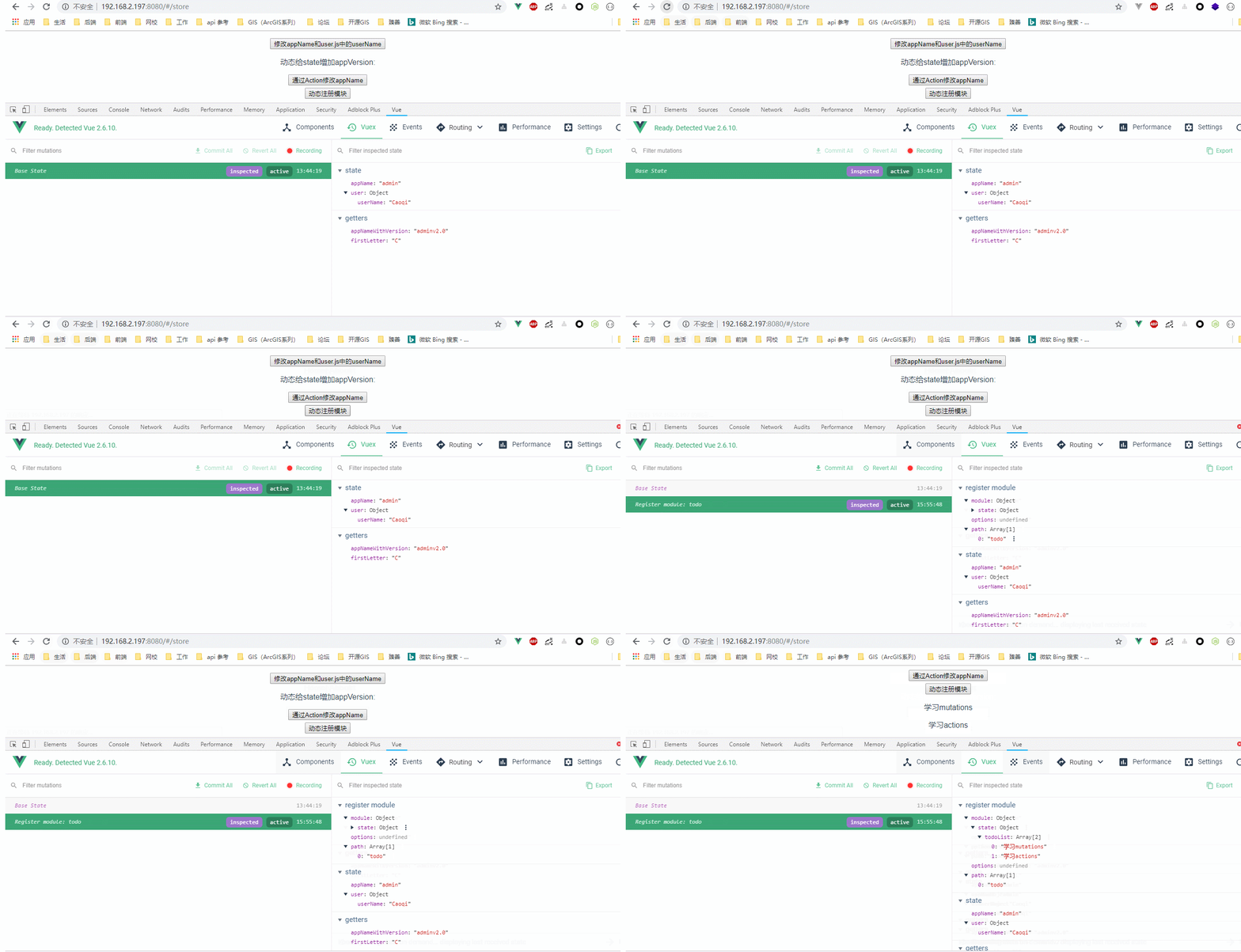
下面以在根store对象动态注册模块为例来对module做演示:
store.vue代码:
<template>

  <div>

    <a-input :value="inputValue" @input="handlerInput"></a-input>

    <p>{{ inputValue }} -> lastLetter is {{ inputValueLastLetter }}</p>

    <p>appName: {{ appName }}, appNameWithVersion : {{ appNameWithVersion }}</p>

    <p>userName : {{ userName }}, firstLetter is : {{ firstLetter }}</p>

    <button @click="handleChangeAppName">修改appName和user.js中的userName</button>

    <p>动态给state增加appVersion: {{ appVersion }}</p>

    <button @click="handleActionChangeAppName">通过Action修改appName</button>

    <button @click="registerModule">动态注册模块</button>

   <p v-for="(li, index) in todoList" :key="index">{{ li }}</p>

  </div>

</template>

<script>

import AInput from "_c/AInput.vue";

import AShow from "_c/AShow.vue";

//变量的解构赋值

import { mapState, mapGetters, mapMutations, mapActions } from "vuex";

import { stat } from "fs";

export default {

  name: "store",

  data() {

    return {

      inputValue: ""

    };

  },

  components: {

    AInput: AInput,

    AShow: AShow

  },

  computed: {

    //ES6展开操作符 mapState展开会形成一个对象 使用对象展开运算符将此对象混入到外部对象中

    ...mapState({

      appName: state => state.appName,

      appVersion: state => state.appVersion,

      userName: state => state.user.userName,

      todoList: state => (state.todo ? state.todo.todoList : [])

    }),

    // 使用对象展开运算符将 getter 混入 computed 对象中

    // ...mapGetters(["appNameWithVersion"]),

    appNameWithVersion() {

      //通过属性访问getters,Getter 会暴露为 store.getters 对象,可以以属性的形式访问这些值:

      return this.$store.getters.appNameWithVersion;

    },

    ...mapGetters(["firstLetter"]),

    inputValueLastLetter() {

      return this.inputValue.substr(-1, 1);

    }

  },

  methods: {

    handlerInput(val) {

      this.inputValue = val;

    },

    //

    ...mapMutations([

      "SET_USER_NAME", //将 `this.SET_USER_NAME()` 映射为 `this.$store.commit('SET_USER_NAME')`

      "SET_APP_NAME" //将 `this.SET_APP_NAME()` 映射为 `this.$store.commit('SET_APP_NAME')`

    ]),

    ...mapActions([

      "updateAppName" //将 `this.updateAppName()` 映射为 `this.$store.dispatch('updateAppName')`

    ]),

    handleChangeAppName() {

      this.SET_APP_NAME({

        appName: "newAppName"

      });

      this.SET_USER_NAME({

        userName: "shuyujie"

      });

      this.$store.commit("SET_APP_VERSION");

    },

    handleActionChangeAppName() {

      //第一种调用Action的方法

      //this.$store.dispatch('updateAppName')

      //第二种调用Action的方法

      this.updateAppName();

    },

    registerModule() {

      this.$store.registerModule( "todo", {

        state: {

          todoList: ["学习mutations", "学习actions"]

        }

      });

   }

  }

};

</script>
效果图:
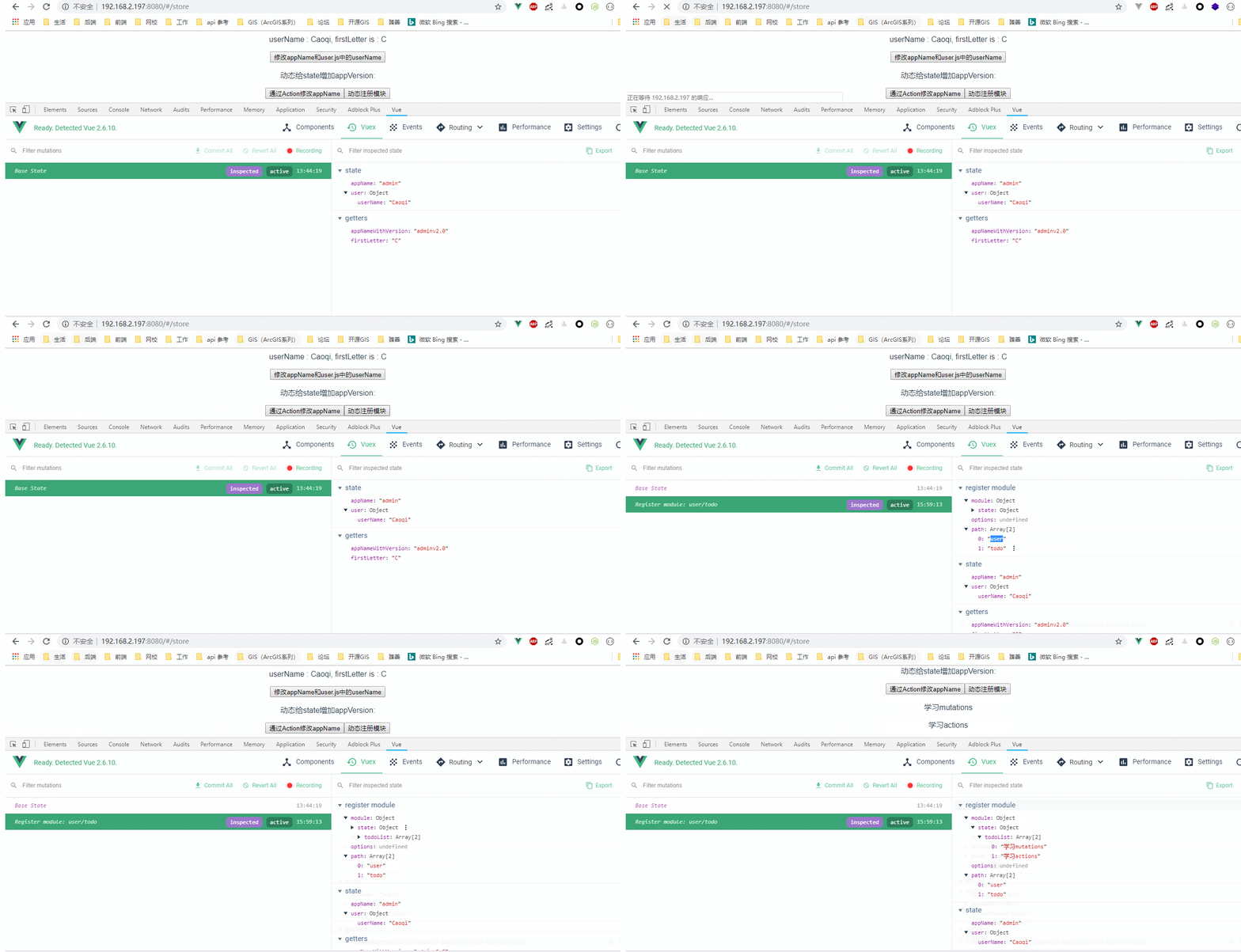
若给user动态一个模块,则store.vue组件代码:
<template>

  <div>

    <a-input :value="inputValue" @input="handlerInput"></a-input>

    <p>{{ inputValue }} -> lastLetter is {{ inputValueLastLetter }}</p>

    <p>appName: {{ appName }}, appNameWithVersion : {{ appNameWithVersion }}</p>

    <p>userName : {{ userName }}, firstLetter is : {{ firstLetter }}</p>

    <button @click="handleChangeAppName">修改appName和user.js中的userName</button>

    <p>动态给state增加appVersion: {{ appVersion }}</p>

    <button @click="handleActionChangeAppName">通过Action修改appName</button>

    <button @click="registerModule">动态注册模块</button>

    <p v-for="(li, index) in todoList" :key="index">{{ li }}</p>

  </div>

</template>

<script>

import AInput from "_c/AInput.vue";

import AShow from "_c/AShow.vue";

//变量的解构赋值

import { mapState, mapGetters, mapMutations, mapActions } from "vuex";

import { stat } from "fs";

export default {

  name: "store",

  data() {

    return {

      inputValue: ""

    };

  },

  components: {

    AInput: AInput,

    AShow: AShow

  },

  computed: {

    //ES6展开操作符 mapState展开会形成一个对象 使用对象展开运算符将此对象混入到外部对象中

    ...mapState({

      appName: state => state.appName,

      appVersion: state => state.appVersion,

      userName: state => state.user.userName,

      todoList: state => (state.user.todo ? state.user.todo.todoList : [])

    }),

    // 使用对象展开运算符将 getter 混入 computed 对象中

    // ...mapGetters(["appNameWithVersion"]),

    appNameWithVersion() {

      //通过属性访问getters,Getter 会暴露为 store.getters 对象,可以以属性的形式访问这些值:

      return this.$store.getters.appNameWithVersion;

    },

    ...mapGetters(["firstLetter"]),

    inputValueLastLetter() {

      return this.inputValue.substr(-1, 1);

    }

  },

  methods: {

    handlerInput(val) {

      this.inputValue = val;

    },

    //

    ...mapMutations([

      "SET_USER_NAME", //将 `this.SET_USER_NAME()` 映射为 `this.$store.commit('SET_USER_NAME')`

      "SET_APP_NAME" //将 `this.SET_APP_NAME()` 映射为 `this.$store.commit('SET_APP_NAME')`

    ]),

    ...mapActions([

      "updateAppName" //将 `this.updateAppName()` 映射为 `this.$store.dispatch('updateAppName')`

    ]),

    handleChangeAppName() {

      this.SET_APP_NAME({

        appName: "newAppName"

      });

      this.SET_USER_NAME({

        userName: "shuyujie"

      });

      this.$store.commit("SET_APP_VERSION");

    },

    handleActionChangeAppName() {

      //第一种调用Action的方法

      //this.$store.dispatch('updateAppName')

      //第二种调用Action的方法

      this.updateAppName();

    },

    registerModule() {

      this.$store.registerModule(["user", "todo"], {

        state: {

          todoList: ["学习mutations", "学习actions"]

        }

      });

    }

  }

};

</script>
效果图:
此外需要注意的是,若模块使用了命名空间(namespaced:true),则访问模块中定义的模块时候需要采用这种方式:
...mapMutations("user/xxx",[

      "SET_USER_NAME", //将 `this.SET_USER_NAME()` 映射为 `this.$store.commit('SET_USER_NAME')`

      "SET_APP_NAME" //将 `this.SET_APP_NAME()` 映射为 `this.$store.commit('SET_APP_NAME')`

    ])
Vuex基础-Module的更多相关文章
- Vuex 基础
其他章节请看: vue 快速入门 系列 Vuex 基础 Vuex 是 Vue.js 官方的状态管理器 在vue 的基础应用(上)一文中,我们已知道父子之间通信可以使用 props 和 $emit,而非 ...
- vuex中module的命名空间概念
vuex中module的命名空间概念 默认情况下,模块内部的 action.mutation 和 getter 是注册在全局命名空间的. 弊端1:不同模块中有相同命名的mutations.action ...
- vuex的module的简单实用方法
当我们的项目越来越大的时候,我们就开始使用vuex来管理我们的项目的状态.但是如果vuex的状态多了呢,这个时候module就登场了.看了一下官方的文档,很详细,但是没有demo让初学者很头疼.那我就 ...
- vuex 基础:教程和说明
作者注:[2016.11 更新]这篇文章是基于一个非常旧的 vuex api 版本而写的,代码来自于2015年12月.但是,它仍能针对下面几个问题深入探讨: vuex 为什么重要 vuex 如何工作 ...
- Vuex基础-Mutation
借助官网的一张图,更改 Vuex 的 store 中的状态的唯一方法是提交 mutation.不可以直接对其进行赋值改变.需要注意的是,mutations只能做一些同步的操作. 代码结构: ...
- Vuex基础-Getter
官方地址:https://vuex.vuejs.org/zh/guide/getters.html Vuex 允许我们在 store 中定义“getter”(可以认为是 store 的计算属性).就像 ...
- Vuex基础-State
官方地址:https://vuex.vuejs.org/zh/guide/state.html 由于 Vuex 的状态存储是响应式的,从 store 实例中读取状态最简单的方法就是在计算属性中返回某个 ...
- [Vuex系列] - Module的用法(终篇)
于使用单一状态树,应用的所有状态会集中到一个比较大的对象.当应用变得非常复杂时,store 对象就有可能变得相当臃肿.为了解决以上问题,Vuex 允许我们将 store 分割成模块(module).每 ...
- vuex之module的使用
一.module的作用 由于使用单一状态树,应用的所有状态会集中到一个比较大的对象.当应用变得非常复杂时,store 对象就有可能变得相当臃肿. 为了解决以上问题,Vuex 允许我们将 store 分 ...
随机推荐
- cURL使用教程及实例演示
curl里面的函数不多,主要有: curl_init — 初始化一个CURL会话curl_setopt — 为CURL调用设置一个选项curl_exec — 执行一个CURL会话curl_close ...
- 问题:iis配置json;结果:如何配置iis支持.json格式的文件
如何配置iis支持.json格式的文件 | 浏览:1357 | 更新:2015-04-05 11:00 | 标签:软件 1 2 3 4 5 6 7 分步阅读 现在大家在制作HTM5的一些小场景,小游戏 ...
- LNMP 1.1 php编译安装
LNMP 是 Linux nginx mysql php nginx和apache一样也是一种web服务.在静态web服务中nginx更胜一筹.在动态中不比apache有优势. LNMP的mysql ...
- java 截取替换掉括号 包括括号中的内容
public static void main(String[] args) { String company = "华厦世纪(厦门)地产"; // System.out.prin ...
- 基于ActiveMQ的Topic的数据同步——消费者持久化
前面一章中介绍了activemq的初步实现:基于ActiveMQ的Topic的数据同步——初步实现 下面来解决持久化订阅的问题: (1)使用queue,即队列时,每个消息只有一个消费者,所以,持久化很 ...
- 解决列表中增加字典覆盖之前相同key的字典
dic = {} lst = [] # 先声明一个字典和一个列表 dic['name'] = "chenrun" lst.append(dic) print(lst) dic[&q ...
- Call requires API level 7 (current min is 1):(问题解决)
在一个导入的项目里修改加入webView的时候设置缩放属性的设置报错: Call requires API level 7 (current min is 1): android.webkit.Web ...
- div+css学习笔记一(转)
div+css学习笔记一 (2011-05-12 07:32:08) 标签: div css 居中 背景图片 ie6 ie7 margin 杂谈 分类: 网页制作 1.IE6中用了float之后导致m ...
- Luogu 2149 [SDOI2009]Elaxia的路线
感觉这题可以模板化. 听说spfa死了,所以要练堆优化dijkstra. 首先对$x_{1},y_{1},x_{2},y_{2}$各跑一遍最短路,然后扫一遍所有边看看是不是同时在两个点的最短路里面,如 ...
- Luogu 3676 小清新数据结构题
推荐博客: http://www.cnblogs.com/Mychael/p/9257242.html 感觉还挺好玩的 首先考虑以1为根,把每一个点子树的权值和都算出来,记为$val_{i}$,那么在 ...