
vuex之module
由于使用单一状态树,应用的所有状态会集中到一个比较大的对象。当应用变得非常复杂时,store 对象就有可能变得相当臃肿。
为了解决以上问题,Vuex 允许我们将 store 分割成模块(module)。每个模块拥有自己的 state、mutation、action、getter、甚至是嵌套子模块——从上至下进行同样方式的分割:
- 在src下建立文件夹store,用于存放各个模块以及根级别的文件
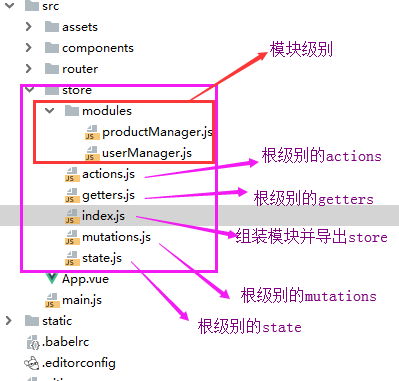
- 在index.js文件中导出store
import Vue from 'vue'

import Vuex from 'vuex'

import state from './state'

import mutations from './mutations'

import getters from './getters'

import actions from './actions'

import userManager from './modules/userManager'

import productManager from './modules/productManager'

Vue.use(Vuex);

//组装模块并导出 store 的地方

export default new Vuex.Store({

  //根节点相关

  state,

  mutations,

  getters,

  actions,

  //模块相关

  modules: {

    um:userManager,

    pm:productManager,

  },

});
- 在main.js文件的Vue实例中注册store
import Vue from 'vue'

import App from './App'

import router from './router'

import store from './store/index'

new Vue({

  el: '#app',

  router,

  store, //注册store

  components: {App},

  template: '<App/>'

});
- 模块级别的文件中写于自己相关的代码
1、访问模块局部的状态
对于模块内部的 mutation 和 getter,接收的第一个参数是模块的局部状态对象。
//局部mutations

  mutations: {

    //action中提交该mutation

    GETALLPRODUCT(state, data) {

      //当页面DOM元素即页面结构加载完成后执行此方法

      state.ProductList = data;

    },

  },

//局部getters,根节点状态会作为第三个参数暴露出来

  getters: {

    getHotProduct (state,getters,rootState) {

      return state.ProductList.filter(product => product.type === 1)

    },

    getHotProductById: (state) => (id) => {

      return state.ProductList.find(product => product.id === id)

    }

  }

}
同样,对于模块内部的 action,局部状态通过 context.state 暴露出来,根节点状态则为 context.rootState:
 actions: {

    getAllProduct(context) {

      //局部状态通过 context.state 暴露出来,根节点状态则为 context.rootState:

      //发送get请求获取API数据

      axios.get(' http://127.0.0.1:8000/api/Productdata/')

        .then((response) => {

          // handle success

          context.commit('GETALLPRODUCT', response.data);

          console.log('getters',context.getters.getHotProduct)

        })

}
2、命名空间
默认情况下,模块内部的 action、mutation 和 getter 是注册在全局命名空间的——这样使得多个模块能够对同一 mutation 或 action 作出响应。
如果希望你的模块具有更高的封装度和复用性,你可以通过添加 namespaced: true 的方式使其成为带命名空间的模块。当模块被注册后,它的所有 getter、action 及 mutation 都会自动根据模块注册的路径调整命名。
export default {

  namespaced: true, //拥有自己的命名空间

  state: {

    ProductList: [],

  },

  mutations: {

  },

  actions: {

  },

  getters: {

    getHotProductById: (state) => (id) => {

      return state.ProductList.find(product => product.id === id)

    }

  }

}
此时,在组件中调用就需要根据路径进行调用:
2.1 调用模块中的state
    computed: {

      UserList() {

        return this.$store.state.um.UserList //UserList 是在模块中定义的state状态

      },

    },
2.2 调用模块中getters
        computed:{

          hotProductArray(){

            return this.$store.getters['pm/getHotProduct'] //调用无参getters

          }

        }

      methods:{

          getProductById(){

        this.$store.getters['pm/getHotProductById'](this.id) //调用有参数的getters

              }

          }

      },
2.3 提交actions
        mounted() {

          this.$store.dispatch("pm/getAllProduct") //提交局部模块的actions

        },
3、在带命名空间的模块注册全局 action
若需要在带命名空间的模块注册全局 action,你可添加 root: true,并将这个 action 的定义放在函数 handler 中。
    //在有命名空间actions中注册全局action因为有root: true,

    getAllUserList: {

      root: true,

      handler (context, payload) {

        //发送get请求获取API数据

        axios.get(' http://127.0.0.1:8000/api/userdata/')

          .then((response) => {

            // handle success

            context.commit('um/GETALLUSER', response.data); //全局中使用局部的mutation

            console.log(response.data)

          })

          .catch((error) => {

            // handle error

            console.log(error);

          })

          .finally(() => {

            // always executed

          });

      } // -> 'someAction'

    },
此时虽然这个antion在某个模块文件内,但是确实全局的命名空间,因此像分发action这类的操作可以直接这样:
this.$store.dispatch("getAllUserList");
参考文档:https://vuex.vuejs.org/zh/guide/modules.html
vuex之module的更多相关文章
- vuex中module的命名空间概念
vuex中module的命名空间概念 默认情况下,模块内部的 action.mutation 和 getter 是注册在全局命名空间的. 弊端1:不同模块中有相同命名的mutations.action ...
- vuex的module的简单实用方法
当我们的项目越来越大的时候,我们就开始使用vuex来管理我们的项目的状态.但是如果vuex的状态多了呢,这个时候module就登场了.看了一下官方的文档,很详细,但是没有demo让初学者很头疼.那我就 ...
- Vuex基础-Module
官方API地址:https://vuex.vuejs.org/zh/guide/modules.html 前面几节课写的user.js就称为一个module,这样做的原因是:由于使用单一状态树,应用的 ...
- [Vuex系列] - Module的用法(终篇)
于使用单一状态树,应用的所有状态会集中到一个比较大的对象.当应用变得非常复杂时,store 对象就有可能变得相当臃肿.为了解决以上问题,Vuex 允许我们将 store 分割成模块(module).每 ...
- vuex之module的使用
一.module的作用 由于使用单一状态树,应用的所有状态会集中到一个比较大的对象.当应用变得非常复杂时,store 对象就有可能变得相当臃肿. 为了解决以上问题,Vuex 允许我们将 store 分 ...
- 深入理解Vuex 模块化(module)
todo https://www.jb51.net/article/124618.htm
- 【mock】后端不来过夜半,闲敲mock落灯花 (mockjs+Vuex+Vue实战)
mock的由来[假] 赵师秀:南宋时期的一位前端工程师 诗词背景:在一个梅雨纷纷的夜晚,正处于项目编码阶段,书童却带来消息:写后端的李秀才在几个时辰前就赶往临安度假去了,!此时手头仅有一个简单 ...
- Vuex、Flux、Redux、Redux-saga、Dva、MobX
https://www.jqhtml.com/23003.html 这篇文章试着聊明白这一堆看起来挺复杂的东西.在聊之前,大家要始终记得一句话:一切前端概念,都是纸老虎. 不管是Vue,还是 Reac ...
- vuex分模块2
深入理解Vuex 模块化(module) 转载 2017-09-26 作者:ClassName 我要评论 本篇文章主要介绍了Vuex 模块化(module),小编觉得挺不错的,现在分享给大 ...
随机推荐
- svn - Subversion 命令行客户端工具
SYNOPSIS 总览 svn command [options] [args] OVERVIEW 概述 Subversion 是一个版本控制系统,允许保存旧版本的文件和目录 (通常是源代码),保存一 ...
- java多线程面试题_线程并发面试题
1.什么是线程?线程是操作系统能够进行运算调度的最小单位,它被包含在进程之中,是进程中的实际运作单位.程序员可以通过它进行多处理器编程,你可以使用多线程对运算密集型任务提速.比如,如果一个线程完成一个 ...
- Android项目中实现native调用
转载自搜狗测试公众号,本人学习使用,侵权删 最近小编在做公司输入法项目中java与native交互部分的测试,先简单学习了java代码调用native代码的实现原理,本次与大家一起分享jni协议,了解 ...
- lombok 注解简单介绍
一.Lombok 的简单介绍和使用 Lombok是一个可以帮助我们简化 Java 代码编写的工具类,通过采用注解的方式简化了 JavaBean 的编写,使我们写的类更加简洁. 1. 添加 Lombok ...
- JDK1.8之后的新特性和新接口
接口的旧特性: 就特性下接口中只有: 常量(必须赋值) 抽象方法abstract(和final static private三个关键字冲突) interface Inter { //int a ; / ...
- HBase与Hive交互操作案例
HBase与Hive交互操作 1.环境准备 因为我们后续可能会在操作Hive的同时对HBase也会产生影响,所以Hive需要持有操作HBase的Jar,那么接下来拷贝Hive所依赖的Jar包(或者使用 ...
- [NOIP模拟测试11] 题解
A.string 和河北的一道省选题很像.考场上写的暴力桶排,正解其实就是优化一下这个思路. 开线段树维护字符串中每个字母出现的次数.对于每条询问,区间查询.区间赋值维护即可. 另外,本题卡常严重,正 ...
- selenium之 文件上传所有方法整理总结
本文转载“灰蓝”的原创博客.http://blog.csdn.net/huilan_same/article/details/52439546 文件上传是所有UI自动化测试都要面对的一个头疼问题,今天 ...
- requests_html爬虫小练习
爬取豆瓣TOP250 from requests_html import HTMLSession #新建一个html文件,将相应的代码放入,运行查看结果,如果页面全部渲染则直接根据页面信息获得数据: ...
- AI应用在金融领域,如何能够在商业上有所突破
AI应用在金融领域,如何能够在商业上有所突破 如今,随着社会不断发展,技术不断进步,国内外各大金融机构已经在大数据.人工智能.区块链等新技术上有很多尝试,智能客服.智能投顾等新金融形式也早已不新鲜.那 ...