
Redis远程连接报错解决
今天测试了一下在本机(win10系统)远程连接 centos下的redis,结果报了以下错误:
Exception in thread "main" redis.clients.jedis.exceptions.JedisDataException: DENIED Redis is running in protected mode because protected mode is enabled, no bind address was specified, no authentication password is requested to clients. In this mode connections are only accepted from the loopback interface. If you want to connect from external computers to Redis you may adopt one of the following solutions:
1) Just disable protected mode sending the command 'CONFIG SET protected-mode no' from the loopback interface by connecting to Redis from the same host the server is running, however MAKE SURE Redis is not publicly accessible from internet if you do so. Use CONFIG REWRITE to make this change permanent.
2) Alternatively you can just disable the protected mode by editing the Redis configuration file, and setting the protected mode option to 'no', and then restarting the server
3) If you started the server manually just for testing, restart it with the '--protected-mode no' option.
4) Setup a bind address or an authentication password. NOTE: You only need to do one of the above things in order for the server to start accepting connections from the outside.
at redis.clients.jedis.Protocol.processError(Protocol.java:127)
at redis.clients.jedis.Protocol.process(Protocol.java:161)
at redis.clients.jedis.Protocol.read(Protocol.java:215)
at redis.clients.jedis.Connection.readProtocolWithCheckingBroken(Connection.java:340)
at redis.clients.jedis.Connection.getStatusCodeReply(Connection.java:239)
at redis.clients.jedis.BinaryJedis.ping(BinaryJedis.java:196)
at com.example.redis.JedisTest.main(JedisTest.java:24)
英语勉强及格的我勉强看了一下这段恼人的英文,貌似有以下解决方案:
1.修改redis.conf配置文件,将绑定的ip地址端口号给注释掉。(redis默认绑定本机地址,所以其他IP连接不上,将这一行注释掉:# bind 127.0.0.1)

2.Linux上的redis默认处于安全保护模式,因此我们无法建立连接,提供了两种解决方法,
2.1 一在redis.conf中设置保护模式为no(protected-mode no),如下图:

2.2 redis默认是不需要密码的,可以直接登录,在这里我们加上安全认证,即加上连接密码(requirepass "my_keyword"),见下图 :
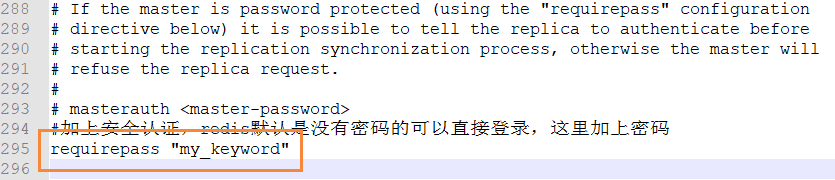
值得注意的是,这样修改后,在测试代码中要加上密码:jedis.auth("my_keyword");完整测试代码为:
import redis.clients.jedis.Jedis;
public class TestPing {
public static void main(String[] args)
{
Jedis jedis = new Jedis("12.345.678.789",6379);
jedis.auth("my_keyword");
System.out.println(jedis.ping());
}
}
最后,杀掉redis的相关进程并重启服务,记得启动时一定要指定配置文件。我的启动命令为:/usr/local/redis/bin/redis-server /usr/local/redis/etc/redis.conf
完美解决!
来都来了,点个推荐再走呗!
Redis远程连接报错解决的更多相关文章
- redis远程连接报错记录
错误如下 redis可视化工具连接测试 telnet ip 6379 修改关键参数如下 #开通外网访问 # bind 127.0.0.1 #以后台方式运行 daemonize no #取消保护模式,保 ...
- Mysql远程连接报错:SQL Error (1130): Host '192.168.61.128' is not allowed to connect to this MySQL server
Mysql远程连接报错:SQL Error (1130): Host '192.168.0.18' is not allowed to connect to this MySQL server ...
- VS Code远程链接报错Could not establish connection to “hz.matpool.com”
VS Code远程链接报错Could not establish connection to "hz-t2.matpool.com" 输出的部分内容 安装Git git for w ...
- 远程桌面报错解决:No Remote Desktop License Servers Available
摘 要 用户发来反馈,使用部门Windows跳板机报错:The remote session was disconnected because there are no Remote Desktop ...
- mysq远程连接报错,host..
在本机登入mysql后,更改"mysql"数据库里的"user"表里的"host"项,从"localhost"改为'%' ...
- windows 远程连接报错
在windows7上或者windows10上远程连接服务器报错("连接错误"),试了网上的方法,发现是服务器安装ssl证书关闭了ssh服务,开启ssh服务后,重启电脑就可以解决这个 ...
- redis远程连接不上解决办法
结构:PC-A 运行redis client,PC-B运行redis server PC-B方面 在server中,修改配置文件redis.windows-service.conf中的: 1.注释 # ...
- Mysql远程连接报错:SQL Error (1130): Host '192.168.6.128' is not allowed to connect to this MySQL server
通过SQLyog连接linux中的MySQL报错问题:SQL Error (1130): Host '192.168.6.128' is not allowed to connect to this ...
- pymysql模块操作数据库及连接报错解决方法
import pymysql sql = "select host,user,password from user" #想要执行的MySQL语句 #sql = 'create da ...
随机推荐
- K8s中Pod健康检查源代码分析
了解k8s中的Liveness和Readiness Liveness: 表明是否容器正在运行.如果liveness探测为fail,则kubelet会kill掉容器,并且会触发restart设置的策略. ...
- CF986F Oppa Funcan Style Remastered
CF986F Oppa Funcan Style Remastered 不错的图论转化题! 题目首先转化成:能否用若干个k的非1因数的和=n 其次,因数太多,由于只是可行性,不妨直接都用质因子来填充! ...
- saltStack 状态模块(状态间的关系)
unless onlyif:状态间的条件判断,主要用于cmd状态模块 常用方法: onlyif:检查的命令,仅当'onlyif' 选项指向的命令返回true时才执行name 定义的命 unle ...
- ES6学习笔记第一天
## 三.const和let **3.1 const** const用来定义常量,所谓的常量就是值一旦给定后就不变,一次定义终身不变的量 const a = 10; a = 20; 上面的a就是一个常 ...
- Python--day69--ORM正反向查找(外键)
ForeignKey操作 正向查找 对象查找(跨表) 语法: 对象.关联字段.字段 示例: book_obj = models.Book.objects.first() # 第一本书对象 prin ...
- nginx 301 将不带www域名,重定向到www域名
// nginx 官方推荐 server { listen 80; server_name example.org; return 301 http://www.example.org$request ...
- Python--day40--主线程和子线程代码讲解
1,最简单的线程例子: 2,多线程并发: import time from threading import Thread #多线程并发 def func(n): time.sleep(1) prin ...
- H3C OSPF协议工作过程概述
- requires php ~7.1 -> your PHP version (7.0.18) does not satisfy that requirement
一个大兄弟本地用了 PHP 7.1 进行开发,而我本地是 PHP 7.0, 于是悲剧发生了. composer install 之后报错 Loading composer repositories w ...
- C# 通过编程的方法在桌面创建回收站快捷方式
基本所有的桌面都会存在回收站快捷方式,如果想要多创建几个快捷方式,点开就是回收站,请看本文的方法 在引用 Windows Script Host Object Model 这个 COM 方法之后可以使 ...