
spring-boot之简单定时任务
首先是pom.xml依赖:
<project xmlns="http://maven.apache.org/POM/4.0.0" xmlns:xsi="http://www.w3.org/2001/XMLSchema-instance"

    xsi:schemaLocation="http://maven.apache.org/POM/4.0.0 http://maven.apache.org/maven-v4_0_0.xsd">

    <modelVersion>4.0.0</modelVersion>

    <groupId>com.springboot.samples</groupId>

    <artifactId>SpringBoot_Cron</artifactId>

    <packaging>war</packaging>

    <version>0.0.1-SNAPSHOT</version>

    <name>SpringBoot_Cron Maven Webapp</name>

    <url>http://maven.apache.org</url>

    <parent>

        <groupId>org.springframework.boot</groupId>

        <artifactId>spring-boot-starter-parent</artifactId>

        <version>1.2.5.RELEASE</version>

    </parent>

    <dependencies>

        <dependency>

            <groupId>junit</groupId>

            <artifactId>junit</artifactId>

            <version>3.8.1</version>

            <scope>test</scope>

        </dependency>

        <!-- http://mvnrepository.com/artifact/javax.servlet/javax.servlet-api -->

        <dependency>

            <groupId>javax.servlet</groupId>

            <artifactId>javax.servlet-api</artifactId>

            <version>3.1.0</version>

        </dependency>

        <dependency>

            <groupId>org.springframework.boot</groupId>

            <artifactId>spring-boot-starter</artifactId>

        </dependency>

    </dependencies>

    <build>

        <finalName>SpringBoot_Cron</finalName>

    </build>

</project>
然后是定时任务类ScheduledTask:
package hello;

import java.text.SimpleDateFormat;

import java.util.Date;

import org.springframework.scheduling.annotation.Scheduled;

import org.springframework.stereotype.Component;

@Component

public class ScheduledTask {

    private static final SimpleDateFormat dateFormat = new SimpleDateFormat("yyyy-MM-dd HH:mm:ss");

    private Integer count0 = 1;

    private Integer count1 = 1;

    private Integer count2 = 1;

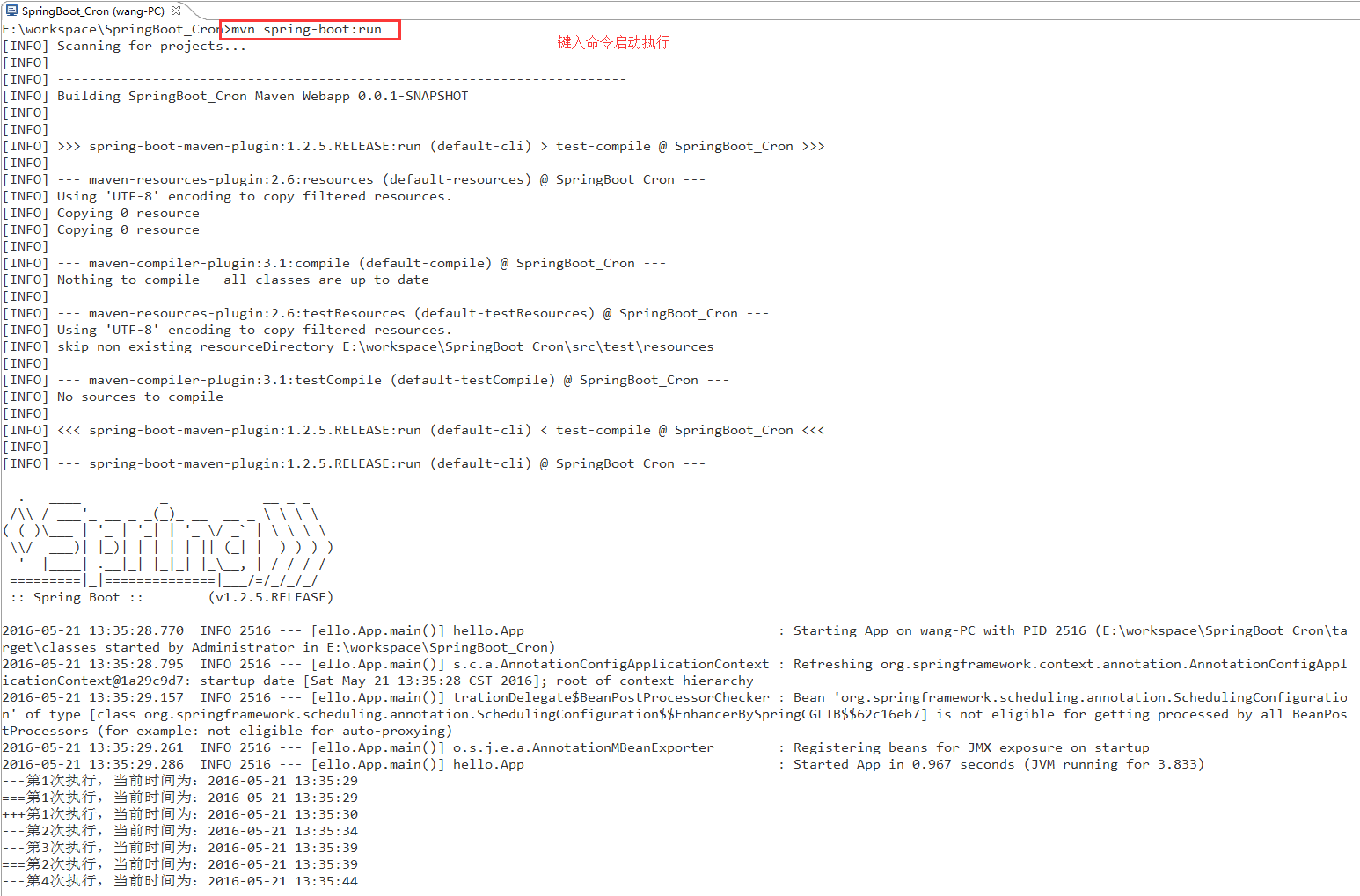
    @Scheduled(fixedRate = 5000)        //fixedRate = 5000表示每隔5000ms,Spring scheduling会调用一次该方法,不论该方法的执行时间是多少

    public void reportCurrentTime() throws InterruptedException {

        System.out.println(String.format("---第%s次执行,当前时间为:%s", count0++, dateFormat.format(new Date())));

    }

    @Scheduled(fixedDelay = 10000)        //fixedDelay = 5000表示当方法执行完毕5000ms后,Spring scheduling会再次调用该方法

    public void reportCurrentTimeAfterSleep() throws InterruptedException {

        System.out.println(String.format("===第%s次执行,当前时间为:%s", count1++, dateFormat.format(new Date())));

    }

    @Scheduled(cron = "*/15 * * * * *")        //cron = "*/5 * * * * * *"提供了一种通用的定时任务表达式,这里表示每隔5秒执行一次

    public void reportCurrentTimeCron() throws InterruptedException {

        System.out.println(String.format("+++第%s次执行,当前时间为:%s", count2++, dateFormat.format(new Date())));

    }

}
cron表达式的规则:
*/15 * * * * * 从左至右依次为:分钟(0-59)、小时(1-23)、日期(1-31)、月份(1-12)、星期(0-6,0表示周日)
*/15表示分钟间隔15执行一次即15s执行一次,cron详细介绍猛戳:http://www.manpagez.com/man/5/crontab/
最后是Spring Boot启动类:
package hello;

import org.springframework.boot.SpringApplication;

import org.springframework.boot.autoconfigure.SpringBootApplication;

import org.springframework.scheduling.annotation.EnableScheduling;

@SpringBootApplication

@EnableScheduling

public class App {

    public static void main(String[] args) {

        SpringApplication.run(App.class, args);

    }

}
spring-boot之简单定时任务的更多相关文章
- 【spring boot】spring boot中使用定时任务配置
spring boot中使用定时任务配置 =============================================================================== ...
- Spring Boot(九):定时任务
Spring Boot(九):定时任务 一.pom包配置 pom包里面只需要引入springboot starter包即可 <dependencies> <dependency> ...
- Spring Boot项目简单上手+swagger配置+项目发布(可能是史上最详细的)
Spring Boot项目简单上手+swagger配置 1.项目实践 项目结构图 项目整体分为四部分:1.source code 2.sql-mapper 3.application.properti ...
- Spring boot 注解简单备忘
Spring boot 注解简单备忘 1.定义注解 package com.space.aspect.anno;import java.lang.annotation.*; /** * 定义系统日志注 ...
- spring boot 基础篇 -- 定时任务
在日常项目中,常常会碰到定时监控项目中某个业务的变化,下面是spring boot 集成的定时任务具体配置: @Component public class IndexWarningScheduled ...
- Spring Boot Mybatis简单使用
Spring Boot Mybatis简单使用 步骤说明 build.gradle:依赖添加 application.properties:配置添加 代码编写 测试 build.gradle:依赖添加 ...
- Spring Boot 中实现定时任务的两种方式
在 Spring + SpringMVC 环境中,一般来说,要实现定时任务,我们有两中方案,一种是使用 Spring 自带的定时任务处理器 @Scheduled 注解,另一种就是使用第三方框架 Qua ...
- Spring boot中的定时任务(计划任务)
从Spring3.1开始,计划任务在Spring中实现变得异常的简单.首先通过配置类注解@EnableScheduling来开启对计划任务的支持,然后再要执行的计划任务的方法上注释@Scheduled ...
- spring-boot-route(二十)Spring Task实现简单定时任务
Spring Task是Spring 3.0自带的定时任务,可以将它看作成一个轻量级的Quartz,功能虽然没有Quartz那样强大,但是使用起来非常简单,无需增加额外的依赖,可直接上手使用. 一 如 ...
- spring boot一个简单用户管理DEMO
概述 该Demo旨在部署一个简单spring boot工程,包含数据编辑和查看功能 POM配置 <?xml version="1.0" encoding="UTF- ...
随机推荐
- 企业库连接形式简单例子记录 EnterpriseLibrary.Data
结构图 webconfig 配置正确的连接字符串 <connectionStrings> <add name="DBConnection" connectionS ...
- javaweb报错:java.lang.NumberFormatException: null
报错环境: JSP向Severlet页面传值,当Serverlet页执行以下语句时,后台日志报错 int softType = Integer.parseInt(request.getParamete ...
- Subway Pursuit (二分)(交互题)
题目来源:codeforces1039B Subway Pursuit 题目大意: 在1到n里有一个运动的点,要求找到这个点,每次可以查询一个区间内有没有这个点,每次这个点往左或者往右移动1到k个位置 ...
- VSM Import Cluster功能验证一(准备篇)
一.概述 本文档记录了VSM Import Cluster功能验证过程及过程中遇到的问题. 二.准备 2.1.网络规划 1) Management Network:VSM控制节点对其他节点的管理网络, ...
- less配置
一.sublime text需要下载考拉,然后要 一直打开着: 1.编译工具用koala编译 下载地址:http://koala-app.com/index-zh.html 2.LESS中的注释: 可 ...
- HTML中DOM元素的子节点为空?!firstChild, lastChild, childeNodes[]为空
- ListView ,GridView 通用适配器
前言 接近半年的时间没有写博客了,今年公司的项目有点多,比较忙,没时间写,这是其一.其次是,这半年来,有时间的时候,我都会看看自己以前写的博客,也许是以前刚刚写博客,经验不足,感觉写出来的博客质量很不 ...
- Vim Clutch | 面向脚踏板编程
简评:这是使用硬件制作的一个离合器踏板,控制 Vim 的 insert mode 和 normal mode ~ Github 上有个关于 Vim 的项目,项目作者 Aleksandr Levchuk ...
- 在makefile中打印错误或警告信息
在makefile中打印警告或者错误消息的方法: $(warning xxxxx) 或者 $(error xxxxx) 输出变量方式为: $(warning $(XXX))
- C语言编译器和IDE的选择
什么是编译器: CPU只认识几百个二进制形式的指令,C语言对CPU而言简直就是天书.C语言是用固定的词汇与格式组织起来,简单直观,程序员容易识别和理解. 这时候就需要一个工具,将C语言代码转换成CPU ...