
Android ViewGroup onInterceptTouchEvent
public boolean onInterceptTouchEvent (MotionEvent ev)
Implement this method to intercept all touch screen motion events. This allows you to watch events as they are dispatched to
your children, and take ownership of the current gesture at any point.
Using this function takes some care, as it has a fairly complicated interaction with View.onTouchEvent(MotionEvent), and using it
requires implementing that method as well as this one in the correct way. Events will be received in the following order:
1)You will receive the down event here.
2)The down event will be handled either by a child of this view group, or given to your own onTouchEvent() method to handle;
this means you should implement onTouchEvent() to return true, so you will continue to see the rest of the gesture. Also, by
returning true from onTouchEvent(), you will not receive any following events in onInterceptTouchEvent() and all touch processing
must happen in onTouchEvent() like normal.
3)For as long as you return false from this function, each following event will be delivered first here and then to the target's
onTouchEvent().
4)If you return true from here, you will not receive any following events. the target view will receive the same event but with
the action ACTION_CANCEL, and all further events will be delivered to your onTouchEvent() method and no longer appear here.
1)在 onInterceptTouchEvent()接收到down事件
2)ViewGroup 或者 ViewGroup里面的 View 都可以处理 down事件
3)只要onInterceptTouchEvent()返回false, 则剩下的事件都会先发送到onInterceptTouchEvent(),再发送到目标对象的onTouchEvent()
4)如果onInterceptTouchEvent()返回true, 则剩下的事件不会发送到ViewGroup 的 onInterceptTouchEvent()和目标对象的onTouchEvent()
只会发送给ViewGroup 的 onTouchEvent()
Returns:
- Return true to steal motion events from the children and have them dispatched to this ViewGroup through onTouchEvent().
The current target will receive an ACTION_CANCEL event, and no further messages will be delivered here.
返回true会调用ViewGroup的onTouchEvent()。
一。实验代码
1.ViewGroup
public class GlingLayout extends FrameLayout {

    private static String tag = GlingLayout.class.getSimpleName();

    public GlingLayout(Context context){

        super(context);

    }

    public GlingLayout(Context context, AttributeSet attrs) {

        super(context, attrs);

    }

    @Override

    public boolean onInterceptTouchEvent(MotionEvent ev) {

        switch (ev.getAction()) {

        case MotionEvent.ACTION_DOWN:

            Log.e(tag, " --- down");

            break;

        case MotionEvent.ACTION_MOVE:

            Log.e(tag, "  --- move");

            break;

        case MotionEvent.ACTION_UP:

            Log.e(tag, "  --- up");

            break;

        case MotionEvent.ACTION_CANCEL:

            Log.e(tag, "  ---  cancel");

            break;

        default:

            break;

        }

        return false;

    }

    @Override

    public boolean onTouchEvent(MotionEvent event) {

        switch (event.getAction()) {

        case MotionEvent.ACTION_DOWN:

            Log.e(tag, " --------------------- down");

            break;

        case MotionEvent.ACTION_MOVE:

            Log.e(tag, "  ------------------ move");

            break;

        case MotionEvent.ACTION_UP:

            Log.e(tag, "  -----------------  up");

            break;

        case MotionEvent.ACTION_CANCEL:

            Log.e(tag, "  -----------------  cancel");

            break;

        default:

            break;

        }

        return true;

    }

}
2.View
package com.gl;

import android.content.Context;

import android.util.AttributeSet;

import android.util.Log;

import android.view.MotionEvent;

import android.widget.Button;

public class GlingButton extends Button {

    private static String tag = GlingButton.class.getSimpleName();

    public GlingButton(Context context){

        super(context);

    }

    public GlingButton(Context context, AttributeSet attrs) {

        super(context, attrs);

    }

    @Override

    public boolean onTouchEvent(MotionEvent event) {

        switch (event.getAction()) {

        case MotionEvent.ACTION_DOWN:

            Log.e(tag, " down  ---------------");

            break;

        case MotionEvent.ACTION_MOVE:

            Log.e(tag, " move  --------------- ");

            break;

        case MotionEvent.ACTION_UP:

            Log.e(tag, "  up  ---------------");

            break;

        case MotionEvent.ACTION_CANCEL:

            Log.e(tag, " cancel  ---------------");

            break;

        default:

            break;

        }

        return true;

    }

}
二.结果
1.onInterceptTouchEvent返回false时
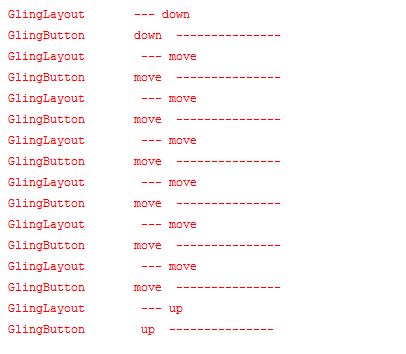
2.1.onInterceptTouchEvent返回true时

三。让ViewGroup不能截断TouchEvent
public void requestDisallowInterceptTouchEvent (boolean disallowIntercept)
Called when a child does not want this parent and its ancestors to intercept touch events with onInterceptTouchEvent(MotionEvent).
This parent should pass this call onto its parents. This parent must obey this request for the duration of the touch (that is, only clear the flag after this parent has received an up or a cancel.
Parameters
Android ViewGroup onInterceptTouchEvent的更多相关文章
- ViewGroup onInterceptTouchEvent,ViewGroup onTouchEvent,View onTouchEvent执行顺序说明
今天抽出了一些时间实践了viewgroup和view的触摸事件顺序,之前也试过,总是忘记,今天记下笔记说明一下 首先 onInterceptTouchEvent只会出现在viewgroup中,view ...
- Android在onInterceptTouchEvent与onTouchEvent
onInterceptTouchEvent: onInterceptTouchEvent是在ViewGroup里面定义的.Android中的layout布局类一般都是继承此类的.onIntercept ...
- Android中onInterceptTouchEvent、dispatchTouchEvent及onTouchEvent的调用顺序及内部原理
在Android中需要经常对用户手势进行判断,在判断手势时需要精细的分清楚每个触摸事件以及每个View对事件的接收情况,在View,ViewGroup,Activity中都可以接收事件,在对事件进行处 ...
- Android ViewGroup拦截触摸事件具体解释
前言 在自己定义ViewGroup中.有时候须要实现触摸事件拦截.比方ListView下拉刷新就是典型的触摸事件拦截的样例. 触摸事件拦截就是在触摸事件被parent view拦截,而不会分发给其ch ...
- android ViewGroup事件分发机制
1:事件分销过程 自定义一个LinearLayout,重写dispatchTouchEvent onInterceptTouchEvent onTouchEvent,定义一个按键重写dispathcT ...
- Android -- ViewGroup源码分析+自定义
1,我们前三篇博客了解了一下自定义View的基本方法和流程 从源码的角度一步步打造自己的TextView 深入了解自定义属性 onMeasure()源码分析 之前,我们只是学习过自定义View,其实自 ...
- Android ViewGroup等容器控件的使用
在Android中,可以自定义类,继承ViewGroup等容器类,以实现自己需要的布局显示.如果你在ViewGroup中增加了控件,却无法显示出 来,那么下面这个例子,就可以用来参考了.(主要是要实现 ...
- Android ViewGroup使用小结
ViewGroup定义 在api中是这么描写叙述ViewGroup的:A ViewGroup is a special view that can contain other views. 依据意思我 ...
- Android ViewGroup点击效果(背景色)
在开发Android应用的界面时,我们必然会用到本文ViewGroup,尤其是FrameLayout,LinearLayout,RelativeLayout等ViewGroup的子类: 在一些情况下, ...
随机推荐
- java大数模板
java 大数计算 这几天做了几道用大数的题,发现java来做大数运算十分方便.对acmer来说是十分实用的 1.valueOf(parament); 将参数转换为制定的类型 比如 int a=3 ...
- Illegal mix of collations (latin1_swedish_ci,IMPLICIT) and (utf8_general_ci,COERCIBLE) for operation '=' 解决方法
1. 代码 SHOW VARIABLES LIKE 'character_set_%'; 查看一下 显示 +--------------------------+------------------- ...
- Android WebView 笔记
WebView(网络视图)能载入显示载入网页.将网页内容载入到手机client,它使用了WebKit渲染引擎载入显示网页,实现WebView有下面方法: 首先要实如今手机client显示必需要求注冊一 ...
- Alluxio部署(集群模式)
下载(pre-build for Hadoop 2.7) http://www.alluxio.org/download` 解压 tar -xvf alluxio-1.3.0-hadoop2.7-bi ...
- 可以输入也可以下拉选择的select
网址:http://www.helloweba.com/view-blog-348.html 示例:http://www.helloweba.com/demo/2016/editable-select ...
- php 对字符串的分块处理
//如何把以下的字符串分成每一个小块, 如:2017.2.14\n我们都是中国人\n小日本 这样的为一个小块 $str = '2017.2.14 我们都是中国人 小日本 2017.2.15 订单取消 ...
- 为什么要使用自增ID作为主键
1.从业务上来说 在设计数据库时不需要费尽心思去考虑设置哪个字段为主键.然后是这些字段只是理论上是唯一的,例如使用图书编号为主键,这个图书编号只是理论上来说是唯一的,但实践中可能会出现重复的 情况.所 ...
- Windows 10 上安装 3D Studio Max 2016 报错的解决办法
在 Windows 10 上安装 3D Stuido Max 2016 报错,无法正常安装,查看日志是 VC 运行时安装错误,经过分析发现在 Windows 10 上已经有这些运行时并且版本比安装包中 ...
- 关于vs2013中包含目录,以及库目录配置相对路径的问题
记住一句话即可! 相对路径: 是相对于你的工程的*.vcxproj的路径!!!
- c++ std::ifstream
#include <iostream> #include <plug/plug.h> using namespace std; //使用宽字符,我猜是为了适应那些要使用宽字符的 ...