
对于微信小程序登录的理解图
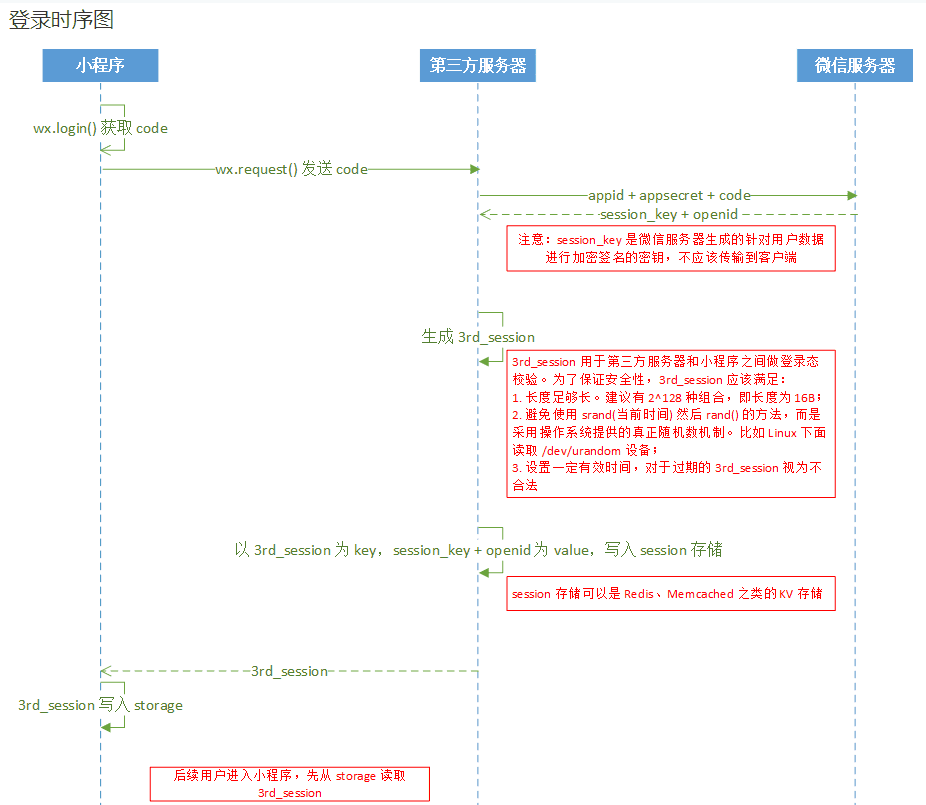
有两种获取用户信息的方案。
1、不包含敏感信息openId 的json对象(包含:nickname、avatarUrl等基本信息)
2、包含敏感信息openId的基本信息。
第一种获取方案
1、首先调用wx.login()接口 让用户授权验证,也就是我们肉眼观察到的,你是否对xxxxx授权这种信息。
2、用户成功授权后,调用wx.getUserInfo() 接口获取用户信息。
完整代码如下
wx.login({ success:function(){ wx.getUserInfo({ success:function(res){ var simpleUser = res.userInfo; console.log(simpleUser.nickName); } }); }

});
第二种比较复杂了,需要与后台进行交互才能获得userInfo,但是这种方案获得的数据是完整的(包含openId)。
1、调用wx.login()接口 授权 在success 成功函数的参数中包含code。
2、调用wx.getUserInfo()接口success 函数中包含encryptedData、iv
3、将上述参数传给后台解析,生成userInfo
代码如下
js
var request = require("../../utils/request.js");

wx.login({

    success:function(res_login){

         if(res_login.code)

         {

             wx.getUserInfo({

                 withCredentials:true,

                 success:function(res_user){

                     var requestUrl = "/getUserApi/xxx.php";

                     var jsonData = {

                             code:res_login.code,

                             encryptedData:res_user.encryptedData,

                             iv:res_user.iv

                         };

                     request.httpsPostRequest(requestUrl,jsonData,function(res){

                        console.log(res.openId);

                     });

                 }

             })

         }

     }

 })
后台解析
/** * 获取粉丝信息 * 其中的参数就是前端传递过来的 */

public function wxUserInfo($code,$encryptedData,$iv) {

    $apiUrl = "https://api.weixin.qq.com/sns/jscode2session?appid={$this->wxConfig['appid']}&secret={$this->wxConfig['appsecret']}&js_code={$code}&grant_type=authorization_code";

    $apiData = json_decode(curlHttp($apiUrl,true),true);

    if(!isset($apiData['session_key']))

    {

        echoJson(array(

            "code"  =>  102,

            "msg"   =>  "curl error"

        ),true);

    }

    $userInfo = getUserInfo($this->wxConfig['appid'],$apiData['session_key'],$encryptedData,$iv);

    if(!$userInfo)

    {

        echoJson(array(

            "code"      =>  105,

            "msg"       =>  "userInfo not"

        ));

    }

    //$userInfo = json_decode($userInfo,true);

    //载入用户服务

    //$userService = load_service("User");

    //$userService->checkUser($this->projectId,$userInfo);

    echo $userInfo;    //微信响应的就是一个json数据

}
getUserInfo function 其中wxBizDataCrypt.php 就是微信官方提供的素材包
//获取粉丝信息

function getUserInfo($appid,$sessionKey,$encryptedData,$iv){

    require_once ROOTPATH . "/extends/wxUser/wxBizDataCrypt.php";

    $data = array();

    $pc = new WXBizDataCrypt($appid, $sessionKey);

    $errCode = $pc->decryptData($encryptedData, $iv, $data );

    if ($errCode == 0) {

        return $data;

    } else {

        return false;

    }

}
自己写的小工具 request.js
var app = getApp();

//远程请求

var __httpsRequest = {

    //http 请求

    https_request : function(obj){

        wx.request(obj);

    },

    //文件上传

    upload_request : function(dataSource){

        wx.uploadFile(dataSource);

    }

};

module.exports = {

    //执行异步请求get

    httpsRequest:function(obj){

        var jsonUrl = {};

        jsonUrl.url = obj.url;

        if(obj.header)jsonUrl.header=obj.header;

        if(obj.type)

            jsonUrl.method = obj.type;

        else

            jsonUrl.method="GET";

        if(obj.data)jsonUrl.data = obj.data;

        obj.dataType?(jsonUrl.dataType=obj.dataType):(jsonUrl.dataType="json");

        jsonUrl.success = obj.success;

        jsonUrl.data.projectId = app.globalData.projectId;

        __httpsRequest.https_request(jsonUrl);

    },

    //get 请求

    httpsGetRequest:function(req_url,req_obj,res_func) {

        var jsonUrl = {

            url:app.globalData.host + req_url,

            header:{"Content-Type":"application/json"},

            dataType:"json",

            method:"get",

            success:function(res) {

                typeof res_func == "function" && res_func(res.data);

            }

        }

        if(req_obj)

        {

            jsonUrl.data = req_obj;

        }

        jsonUrl.data.projectId = app.globalData.projectId;

         __httpRequest.https_request(jsonUrl);

    },

    //post 请求

    httpsPostRequest:function(req_url,req_obj,res_func) {

        var jsonUrl = {

            url:app.globalData.host + req_url,

            header:{"Content-Type":"application/x-www-form-urlencoded"},

            dataType:"json",

            method:"post",

            success:function(res) {

                typeof res_func == "function" && res_func(res.data);

            }

        }

        if(req_obj)

        {

            jsonUrl.data = req_obj;

        }

        jsonUrl.data.projectId = app.globalData.projectId;

         __httpsRequest.https_request(jsonUrl);

    },

    //文件上传

    httpsUpload:function(uid,fileDataSource,res_func) {

        dataSource = {

            url:app.globalData.host + req_url,

            header:{

                "Content-Type":"multipart/form-data"

            },

            dataType:"json",

            formData    : {

                "uid"   :   uid

            },

            filePath    : fileDataSource,

            name        : "fileObj",

            success:function(res){

                typeof res_func == "function" && res_func(res);

            }

        }

        __httpsRequest.upload_request(dataSource);

    }

};
对于微信小程序登录的理解图的更多相关文章
- 微信小程序登录方案
微信小程序登录方案 登录程序 app.js 调用wx.login获取code 将code作为参数请求自己业务登录接口获取session_key 存储session_key 如果有回调执行回调 App( ...
- 微信小程序登录,获取code,获取openid,获取session_key
微信小程序登录 wx.login(Object object) 调用接口获取登录凭证(code).通过凭证进而换取用户登录态信息,包括用户的唯一标识(openid)及本次登录的会话密钥(session ...
- 基于Shiro,JWT实现微信小程序登录完整例子
小程序官方流程图如下,官方地址 : https://developers.weixin.qq.com/miniprogram/dev/framework/open-ability/login.html ...
- 微信小程序登录JAVA后台
代码地址如下:http://www.demodashi.com/demo/12736.html 登录流程时序登录流程时序 具体的登录说明查看 小程序官方API 项目的结构图: springboot项目 ...
- 微信小程序登录对接Django后端实现JWT方式验证登录
先上效果图 点击授权按钮后可以显示部分资料和头像,点击修改资料可以修改部分资料. 流程 1.使用微信小程序登录和获取用户信息Api接口 2.把Api获取的用户资料和code发送给django后端 3. ...
- 全栈项目|小书架|微信小程序-登录及token鉴权
小程序登录 之前也写过微信小程序登录的相关文章: 微信小程序~新版授权用户登录例子 微信小程序-携带Token无感知登录的网络请求方案 微信小程序开通云开发并利用云函数获取Openid 也可以通过官方 ...
- Flask与微信小程序登录(后端)
开发微信小程序时,接入小程序的授权登录可以快速实现用户注册登录的步骤,是快速建立用户体系的重要一步.这篇文章将介绍 python + flask + 微信小程序实现用户快速注册登录方案(本文主要进行后 ...
- Taro -- 微信小程序登录
Taro微信小程序登录 1.调用Taro.login()获取登录凭证code: 2.调用Taro.request()将code传到服务器: 3.服务器端调用微信登录校验接口(appid+appsecr ...
- Spring Security 整合 微信小程序登录的思路探讨
1. 前言 原本打算把Spring Security中OAuth 2.0的机制讲完后,用小程序登录来实战一下,发现小程序登录流程和Spring Security中OAuth 2.0登录的流程有点不一样 ...
随机推荐
- 对EJB的认识
对EJB的认识 接触EJB以来有一段时间了,走马观花一样把它所涉及到的东西看了一遍,随着深入了解越来越感觉到ejb的很强大,用了java后觉的java好用.学历SSH觉的比java好用.学了ejb觉的 ...
- (转)C++ 自由存储区是否等价于堆?
“free store” VS “heap” 当我问你C++的内存布局时,你大概会回答: “在C++中,内存区分为5个区,分别是堆.栈.自由存储区.全局/静态存储区.常量存储区”. 如果我接着问你 ...
- UVa 1151 - Buy or Build(最小生成树)
链接: https://uva.onlinejudge.org/index.php?option=com_onlinejudge&Itemid=8&page=show_problem& ...
- BZOJ2194:快速傅立叶之二(FFT)
Description 请计算C[k]=sigma(a[i]*b[i-k]) 其中 k < = i < n ,并且有 n < = 10 ^ 5. a,b中的元素均为小于等于100的非 ...
- PHP----练习-----三级联动
<!DOCTYPE html PUBLIC "-//W3C//DTD XHTML 1.0 Transitional//EN" "http://www.w3.org/ ...
- SQL 关联两个表的视图总结
视图就是一条select查询语句,是一张虚拟表. table a , table b 以表a基表(a LEFT JOIN b) 1.1 当update view时 更新view中表b字段并且表b ...
- Coursera 机器学习基石 第4讲 学习的可行性
这一节讲述的是机器学习的核心.根本性问题——学习的可行性.学过机器学习的我们都知道,要衡量一个机器学习算法是否具有学习能力,看的不是这个模型在已有的训练数据集上的表现如何,而是这个模型在训练数据外的数 ...
- 一. Selenium介绍
1. 什么是Selenium 是web自动化测试工具集,主要包括:IDE.Grid.RC(Selenium1.0).WebDriver(Selenium2.0) 与其他工具的不同: 一般的脚本测试工具 ...
- 配置git
https://blog.csdn.net/qq_34446663/article/details/81106018
- Redis 基本操作(一)
redis和普通的Key-Value结构不同,Redis的Key支持灵活的数据结构,除了strings,还有hashes.lists. sets 和sorted sets等结构.正是这些灵活的数据结构 ...