
【第三章】 springboot + jedisCluster
如果使用的是redis2.x,在项目中使用客户端分片(Shard)机制。(具体使用方式:第九章 企业项目开发--分布式缓存Redis(1) 第十章 企业项目开发--分布式缓存Redis(2))
如果使用的是redis3.x中的集群,在项目中使用jedisCluster。
redis3.2.5集群搭建:第十二章 redis-cluster搭建(redis-3.2.5)
1、项目结构
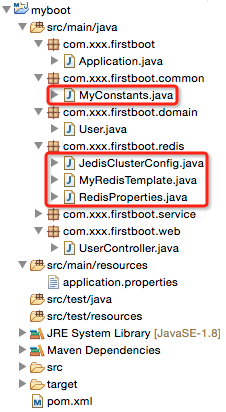
2、pom.xml
<?xml version="1.0" encoding="UTF-8"?>
<project xmlns="http://maven.apache.org/POM/4.0.0" xmlns:xsi="http://www.w3.org/2001/XMLSchema-instance"
    xsi:schemaLocation="http://maven.apache.org/POM/4.0.0 http://maven.apache.org/maven-v4_0_0.xsd">

    <modelVersion>4.0.0</modelVersion>

    <groupId>com.xxx</groupId>
    <artifactId>myboot</artifactId>
    <version>1.0-SNAPSHOT</version>

    <properties>
        <java.version>1.8</java.version><!-- 官方推荐 -->
    </properties>
    <!-- 引入spring-boot-starter-parent做parent是最好的方式,
         但是有时我们可能要引入我们自己的parent,此时解决方式有两种:
         1)我们自己的parent的pom.xml的parent设为spring-boot-starter-parent(没有做过验证,但是感觉可行)
         2)使用springboot文档中的方式:见spring-boot-1.2.5-reference.pdf的第13页
    -->
    <parent>
        <groupId>org.springframework.boot</groupId>
        <artifactId>spring-boot-starter-parent</artifactId>
        <version>1.2.5.RELEASE</version>
    </parent>

    <!-- <dependencyManagement>
        <dependencies>
            <dependency>
                Import dependency management from Spring Boot
                <groupId>org.springframework.boot</groupId>
                <artifactId>spring-boot-dependencies</artifactId>
                <version>1.2.5.RELEASE</version>
                <type>pom</type>
                <scope>import</scope>
            </dependency>
        </dependencies>
    </dependencyManagement> -->

    <!-- 引入实际依赖 -->
    <dependencies>
        <dependency>
            <groupId>org.springframework.boot</groupId>
            <artifactId>spring-boot-starter-web</artifactId>
        </dependency>
        <dependency>
            <groupId>redis.clients</groupId>
            <artifactId>jedis</artifactId>
        </dependency>
        <dependency>
            <groupId>com.alibaba</groupId>
            <artifactId>fastjson</artifactId>
            <version>1.1.15</version>
        </dependency>
        <dependency>
            <groupId>org.apache.commons</groupId>
            <artifactId>commons-lang3</artifactId>
            <version>3.3.2</version>
        </dependency>
    </dependencies>

    <build>
        <plugins>
            <!-- 用于将应用打成可直接运行的jar(该jar就是用于生产环境中的jar) 值得注意的是,如果没有引用spring-boot-starter-parent做parent,
                且采用了上述的第二种方式,这里也要做出相应的改动 -->
            <plugin>
                <groupId>org.springframework.boot</groupId>
                <artifactId>spring-boot-maven-plugin</artifactId>
            </plugin>
        </plugins>
    </build>
</project>
说明:相对于上一章的代码仅仅引入了jedis的依赖jar。
3、application.properties
#user info
user.id=1
user.username=zhaojigang
user.password=123

#redis cluster
redis.cache.clusterNodes=localhost:8080
redis.cache.commandTimeout=5
#unit:second
redis.cache.expireSeconds=120
说明:相对于上一章的代码仅仅引入了redis cluster的配置信息
4、Application.java(springboot启动类,与上一章一样)
5、RedisProperties.java(Redis属性装配)
package com.xxx.firstboot.redis;

import org.springframework.boot.context.properties.ConfigurationProperties;
import org.springframework.stereotype.Component;

@Component
@ConfigurationProperties(prefix = "redis.cache")
public class RedisProperties {

    private int    expireSeconds;
    private String clusterNodes;
    private int    commandTimeout;

    public int getExpireSeconds() {
        return expireSeconds;
    }

    public void setExpireSeconds(int expireSeconds) {
        this.expireSeconds = expireSeconds;
    }

    public String getClusterNodes() {
        return clusterNodes;
    }

    public void setClusterNodes(String clusterNodes) {
        this.clusterNodes = clusterNodes;
    }

    public int getCommandTimeout() {
        return commandTimeout;
    }

    public void setCommandTimeout(int commandTimeout) {
        this.commandTimeout = commandTimeout;
    }

}
说明:与上一章的User类似,采用@ConfigurationProperties注解自动读取application.properties文件的内容并装配到RedisProperties的每一个属性中去。
6、JedisClusterConfig.java(获取JedisCluster单例)
package com.xxx.firstboot.redis;

import java.util.HashSet;
import java.util.Set;

import org.springframework.beans.factory.annotation.Autowired;
import org.springframework.context.annotation.Bean;
import org.springframework.context.annotation.Configuration;

import redis.clients.jedis.HostAndPort;
import redis.clients.jedis.JedisCluster;

@Configuration
public class JedisClusterConfig {

    @Autowired
    private RedisProperties redisProperties;

    /**
     * 注意:
     * 这里返回的JedisCluster是单例的,并且可以直接注入到其他类中去使用
     * @return
     */
    @Bean
    public JedisCluster getJedisCluster() {
        String[] serverArray = redisProperties.getClusterNodes().split(",");//获取服务器数组(这里要相信自己的输入,所以没有考虑空指针问题)
        Set<HostAndPort> nodes = new HashSet<>();

        for (String ipPort : serverArray) {
            String[] ipPortPair = ipPort.split(":");
            nodes.add(new HostAndPort(ipPortPair[0].trim(), Integer.valueOf(ipPortPair[1].trim())));
        }

        return new JedisCluster(nodes, redisProperties.getCommandTimeout());
    }

}
说明:
- 该类注入了RedisProperties类,可以直接读取其属性
- 这里没有对jedis链接池提供更多的配置(jedis-2.5.x好像不支持,jedis-2.6.x支持),具体的配置属性可以查看文章开头第一篇博客
注意:
- 该类使用了Java注解,@Configuration与@Bean,
- 在方法上使用@Bean注解可以让方法的返回值为单例,
- 该方法的返回值可以直接注入到其他类中去使用
- @Bean注解是方法级别的
- 如果使用的是常用的spring注解@Component,
- 在方法上没有注解的话,方法的返回值就会是一个多例,
- 该方法的返回值不可以直接注入到其他类去使用
- 该方式的注解是类级别的
7、MyRedisTemplate.java(具体redis操作)
package com.xxx.firstboot.redis;

import org.slf4j.Logger;
import org.slf4j.LoggerFactory;
import org.springframework.beans.factory.annotation.Autowired;
import org.springframework.stereotype.Component;

import redis.clients.jedis.JedisCluster;

@Component
public class MyRedisTemplate {
    private static final Logger LOGGER    = LoggerFactory.getLogger(MyRedisTemplate.class);

    @Autowired
    private JedisCluster        jedisCluster;

    @Autowired
    private RedisProperties     redisProperties;

    private static final String KEY_SPLIT = ":"; //用于隔开缓存前缀与缓存键值

    /**
     * 设置缓存
     * @param prefix 缓存前缀(用于区分缓存,防止缓存键值重复)
     * @param key    缓存key
     * @param value  缓存value
     */
    public void set(String prefix, String key, String value) {
        jedisCluster.set(prefix + KEY_SPLIT + key, value);
        LOGGER.debug("RedisUtil:set cache key={},value={}", prefix + KEY_SPLIT + key, value);
    }

    /**
     * 设置缓存,并且自己指定过期时间
     * @param prefix
     * @param key
     * @param value
     * @param expireTime 过期时间
     */
    public void setWithExpireTime(String prefix, String key, String value, int expireTime) {
        jedisCluster.setex(prefix + KEY_SPLIT + key, expireTime, value);
        LOGGER.debug("RedisUtil:setWithExpireTime cache key={},value={},expireTime={}", prefix + KEY_SPLIT + key, value,
            expireTime);
    }

    /**
     * 设置缓存,并且由配置文件指定过期时间
     * @param prefix
     * @param key
     * @param value
     */
    public void setWithExpireTime(String prefix, String key, String value) {
        int EXPIRE_SECONDS = redisProperties.getExpireSeconds();
        jedisCluster.setex(prefix + KEY_SPLIT + key, EXPIRE_SECONDS, value);
        LOGGER.debug("RedisUtil:setWithExpireTime cache key={},value={},expireTime={}", prefix + KEY_SPLIT + key, value,
            EXPIRE_SECONDS);
    }

    /**
     * 获取指定key的缓存
     * @param prefix
     * @param key
     */
    public String get(String prefix, String key) {
        String value = jedisCluster.get(prefix + KEY_SPLIT + key);
        LOGGER.debug("RedisUtil:get cache key={},value={}", prefix + KEY_SPLIT + key, value);
        return value;
    }

    /**
     * 删除指定key的缓存
     * @param prefix
     * @param key
     */
    public void deleteWithPrefix(String prefix, String key) {
        jedisCluster.del(prefix + KEY_SPLIT + key);
        LOGGER.debug("RedisUtil:delete cache key={}", prefix + KEY_SPLIT + key);
    }

    public void delete(String key) {
        jedisCluster.del(key);
        LOGGER.debug("RedisUtil:delete cache key={}", key);
    }

}
注意:
这里只是使用了jedisCluster做了一些字符串的操作,对于list/set/sorted set/hash的操作,可以参考开头的两篇博客。
8、MyConstants.java(缓存前缀常量定义类)
package com.xxx.firstboot.common;

/**
 * 定义一些常量
 */
public class MyConstants {
    public static final String USER_FORWARD_CACHE_PREFIX = "myboot:user";// user缓存前缀
}
注意:
- 根据业务特点定义redis的缓存前缀,有助于防止缓存重复导致的缓存覆盖问题
- 缓存前缀使用":"做分隔符,这是推荐做法(这个做法可以在使用redis-desktop-manager的过程看出来)
9、UserController.java(测试)
package com.xxx.firstboot.web;

import org.apache.commons.lang3.StringUtils;
import org.springframework.beans.factory.annotation.Autowired;
import org.springframework.web.bind.annotation.RequestMapping;
import org.springframework.web.bind.annotation.RequestParam;
import org.springframework.web.bind.annotation.RestController;

import com.alibaba.fastjson.JSON;
import com.xxx.firstboot.common.MyConstants;
import com.xxx.firstboot.domain.User;
import com.xxx.firstboot.redis.MyRedisTemplate;
import com.xxx.firstboot.service.UserService;

/**
 * @RestController:spring mvc的注解,
 * 相当于@Controller与@ResponseBody的合体,可以直接返回json
 */
@RestController
@RequestMapping("/user")
public class UserController {

    @Autowired
    private UserService userService;

    @Autowired
    private MyRedisTemplate myRedisTemplate;

    @RequestMapping("/getUser")
    public User getUser() {
        return userService.getUser();
    }

    @RequestMapping("/testJedisCluster")
    public User testJedisCluster(@RequestParam("username") String username){
        String value =  myRedisTemplate.get(MyConstants.USER_FORWARD_CACHE_PREFIX, username);
        if(StringUtils.isBlank(value)){
            myRedisTemplate.set(MyConstants.USER_FORWARD_CACHE_PREFIX, username, JSON.toJSONString(getUser()));
            return null;
        }
        return JSON.parseObject(value, User.class);
    }

}
说明:相对于上一章,只是添加了测试缓存的方法testJedisCluster。
测试:
在Application.properties右击-->run as-->java application,在浏览器输入"localhost:8080/user/testJedisCluster?username=xxx"即可。
附:对于redis的测试,我们有时需要查看执行set后,缓存是否存入redis的db中了,有两种方式
- 执行set后,get数据,之后修改数据,在get数据,比较两次get的数据是否相同即可
- 有时,这些数据是无法修改的(假设该数据是我们从第三方接口得来的),这个时候可以使用redis-desktop-manager这个软件来查看缓存是否存入redis(该软件的使用比较简单,查看官网)
【第三章】 springboot + jedisCluster的更多相关文章
- 第三章 springboot + jedisCluster(转载)
本编博客转发自:http://www.cnblogs.com/java-zhao/p/5347703.html 如果使用的是redis2.x,在项目中使用客户端分片(Shard)机制. 如果使用的是r ...
- 第三章 springboot + jedisCluster
如果使用的是redis2.x,在项目中使用客户端分片(Shard)机制.(具体使用方式:第九章 企业项目开发--分布式缓存Redis(1) 第十章 企业项目开发--分布式缓存Redis(2)) 如果 ...
- 第二十五章 springboot + hystrixdashboard
注意: hystrix基本使用:第十九章 springboot + hystrix(1) hystrix计数原理:附6 hystrix metrics and monitor 一.hystrixdas ...
- spring boot 笔记--第三章
spring boot 笔记 第三章,使用Spring boot 构建系统: 强烈建议支持依赖管理的构建系统,Maven或Gradle 依赖管理: Spring Boot的每版本都会提供它支持的依赖列 ...
- 《精通Spring4.x企业应用开发实战》第三章
这一章节主要介绍SpringBoot的使用,也是学习的重点内容,之后就打算用SpringBoot来写后台,所以提前看一下还是很有必要的. 3.SpringBoot概况 3.1.1SpringBoot发 ...
- 《Django By Example》第三章 中文 翻译 (个人学习,渣翻)
书籍出处:https://www.packtpub.com/web-development/django-example 原作者:Antonio Melé (译者注:第三章滚烫出炉,大家请不要吐槽文中 ...
- 《Linux内核设计与实现》读书笔记 第三章 进程管理
第三章进程管理 进程是Unix操作系统抽象概念中最基本的一种.我们拥有操作系统就是为了运行用户程序,因此,进程管理就是所有操作系统的心脏所在. 3.1进程 概念: 进程:处于执行期的程序.但不仅局限于 ...
- Python黑帽编程3.0 第三章 网络接口层攻击基础知识
3.0 第三章 网络接口层攻击基础知识 首先还是要提醒各位同学,在学习本章之前,请认真的学习TCP/IP体系结构的相关知识,本系列教程在这方面只会浅尝辄止. 本节简单概述下OSI七层模型和TCP/IP ...
- 《Entity Framework 6 Recipes》中文翻译系列 (11) -----第三章 查询之异步查询
翻译的初衷以及为什么选择<Entity Framework 6 Recipes>来学习,请看本系列开篇 第三章 查询 前一章,我们展示了常见数据库场景的建模方式,本章将向你展示如何查询实体 ...
- 《Entity Framework 6 Recipes》中文翻译系列 (19) -----第三章 查询之使用位操作和多属性连接(join)
翻译的初衷以及为什么选择<Entity Framework 6 Recipes>来学习,请看本系列开篇 3-16 过滤中使用位操作 问题 你想在查询的过滤条件中使用位操作. 解决方案 假 ...
随机推荐
- 洛谷P2602 数字计数 [ZJOI2010] 数位dp
正解:数位dp 解题报告: 传送门! 打算在寒假把学长发过题解的题目都做辣然后把不会的知识点都落实辣! ⁄(⁄ ⁄•⁄ω⁄•⁄ ⁄)⁄ 然后这道题,开始想到的时候其实想到的是大模拟,就有点像之前考试贪 ...
- Elasticsearch 的坑爹事——记录一次mapping field修改过程(转)
原文:http://www.cnblogs.com/Creator/p/3722408.html 本文记录一次Elasticsearch mapping field修改过程 团队使用Elasticse ...
- (3.5)mysql基础深入——mysqld_safe脚本功能及流程
(3.5)mysql基础深入——mysqld_safe脚本功能及流程 目录 1.mysqld_safe过程总结 2.mysql_safe启动的好处 3.mysqld_safe 参数 4.mysqld_ ...
- linux命令之复制
版权声明:本文为博主原创文章.未经博主同意不得转载. https://blog.csdn.net/zkn_CS_DN_2013/article/details/24464547 语法:cp [选项] ...
- Spark Storage(二) 集群下的broadcast
Broadcast 简单来说就是将数据从一个节点复制到其他各个节点,常见用于数据复制到节点本地用于计算,在前面一章中讨论过Storage模块中BlockManager,Block既可以保存在内存中,也 ...
- [py]监控内存并出图
监控内存出图 先将内存数据搞到数据库 已使用内存算法 used = int(total) - int(free) - int(butffers) - int(cache) pymysql模块使用 db ...
- [py]面向对象图解assignment
python的chained assignment 在python中 a is b is c 等价于 a is b and b is c 所以,猜猜 False is False is False # ...
- 谷歌浏览器:audio如何隐藏下载按钮
当我们使用原生的audio标签时,可以看到如下的效果. 那么如何让下载按钮隐藏掉呢? 1. controlsList="nodownload" // 这个方法只支持 Chrome ...
- Hadoop集群安装-CDH5(5台服务器集群)
CDH5包下载:http://archive.cloudera.com/cdh5/ 架构设计: 主机规划: IP Host 部署模块 进程 192.168.254.151 Hadoop-NN-01 N ...
- Git 全局设置
Git 全局设置: git config --global user.name "ASxx" git config --global user.email "123456 ...